





Last updated on February 16th, 2021
Do you know how to fine-tune your Jscrambler application?
At Jscrambler, we go the extra mile to make sure our product is easy and intuitive to use. But when you’re developing software that needs to be highly performant, you may need additional configuration.
In this article, we will go in depth on features and strategies you can use to make your application as protected as possible while maintaining its original performance.
Be aware of the transformation’s potency and resilience!
Jscrambler offers different transformations with distinct levels of potency and resilience, two metrics associated with obfuscation.
Potency reflects how hard it is for a human to understand the code; resilience reflects how difficult it is for a machine to defeat the applied protection.
Our documentation estimates the potency, resilience, and cost of each transformation.
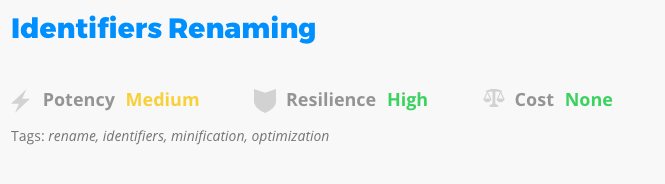
If you want to protect strings in your code, Jscrambler offers four distinct transformations: String Splitting, String Encoding, String Concealing, and Char To Ternary Operator. These transformations have distinct levels of potency, resilience, and cost, which means that, if you want to protect strings, choosing the most powerful one (String Concealing) should be enough to provide a high degree of protection and not impact the cost too much, whereas selecting all possible transformations could bloat the code, impacting performance.
If protecting strings isn’t a main concern, opt for a less powerful transformation; it will provide less protection but keep your code performant.
Step into Advanced Mode
Jscrambler offers two distinct ways of selecting the transformations that will be applied to the code: Targets and Advanced.
When you select a target in “Targets” mode, Jscrambler selects all available transformations for that target (you can step into Advanced mode to check the mapping) and applies the transformation’s default parameterization.
The “Targets” mode allows you to select which targets of your application you want to protect. By targets, we mean any of JavaScript’s building blocks (e.g., predicates, statements, booleans, and numbers).
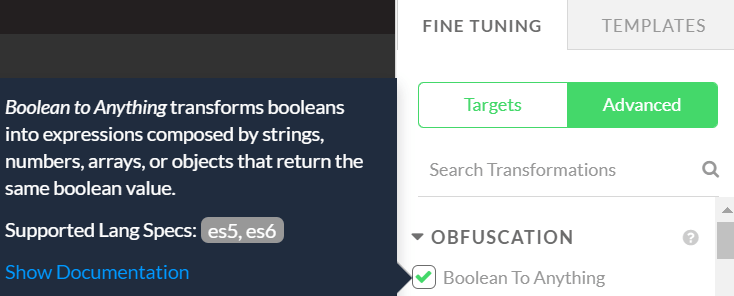
By going into the “Advanced” mode, you can select each individual transformation and its parameterization. You should mix and match transformations and arrive at a degree of protection you deem fit.
If you have questions about the transformation’s parameterization, hover over it. You’ll find a description of the transformation’s parameters and a link to our documentation.
Select a Specific Order of Transformations
Jscrambler’s protections are polymorphic. This means that no protection is exactly the same as in previous transformations. This is guaranteed not only by randomizing the order in which transformations are applied but also by randomizing behavior within each transformation.
Selecting a specific order of transformations may be useful, since some of Jscrambler’s transformations generate targets that other transformations will use. For example, the Number To String transformation will convert numbers to strings. Subsequent transformations then protect these newly created strings. This is intended, as it increases protection.
This polymorphic behavior can, however, significantly impact code performance when too many targets are created. For example, if all transformations that generate strings are applied before String Encoding, the resulting code size will be much larger than normal.
To address this, you can either enable Jscrambler’s Recommended Order (a specially crafted order that keeps the code performant while ensuring a high degree of protection) or craft your own order.
You can enable the Recommended Order in Jscrambler’s Web Application by clicking the lower cogwheel in the top-right corner of your app and checking the box.
The Recommended Order can also be activated through the API by adding the following parameter:
"useRecommendedOrder": true
To use a custom order, specify the areSubscribersOrdered option, which applies the selected transformations in the order they appear.
// the dotToBracketNotation transformation
// will be applied after identifiersRenaming
"params": [
  {
    "name": "identifiersRenaming"
  },
  {
    "name": "dotToBracketNotation"
  }
],
"areSubscribersOrdered": true
Use Code Annotations
Jscrambler’s Code Annotations allow you to strategically place annotations in parts of your code that need to be better protected.
For example, Jscrambler’s Control Flow Flattening transformation is powerful, but it comes with a cost.
If you want to apply the transformation but only need it on a specific part of your code, you can remove it from your configuration (or selected parameters) and use it via code annotations. This way, the transformation applies only to that block.
function iDontNeedThisProtected (a) {
  return a + 1;
}

function iDontNeedThisEither (b) {
  return b + 2;
}


// @jscrambler enable controlFlowFlattening
function thisWillBeProtected (c) {
  if (c > 0) {
    return c + 1;
  } else {
    return c + 2;
  }
}
Alternatively, you can use Code Annotations to disable globally applied transformations in specific parts of the code.
Sidenote: If performance is a critical aspect of your app, you may also want to check our Profiling feature, which helps effortlessly optimize performance.
Reuse a Randomization Seed
One of Jscrambler’s advanced features is the Randomization Seed. This is a specific string that you can supply to the protection process, which will allow you to deterministically reproduce all of Jscrambler’s polymorphic behavior.
This feature is useful in cases where you want to reproduce a previous protection that might have better performance and benchmark it against the current version of your protected code.
This feature should not be used as a replacement for selecting a custom/recommended order of transformations and tuning the transformation’s parameterization.
Keep in mind that the protection output will be identical only if you provide the same input and seed. If you change some files in your application and protect them, those files will be completely different. Only unchanged files will remain the same. Use this for benchmarking/debugging, not in production.
Conclusion
Fine-tuning your application’s protection can take time. However, by combining several of the features discussed in this article, we can balance application integrity and performance with a very high degree of protection. If you’d like personalized recommendations to address potential performance issues, contact our client-side protection experts.