



Jscrambler Solution for Healthcare



 Web applications are facing growing threats from client-side attacks that seek to steal sensitive data and disrupt user experiences. Jscrambler’s Webpage Integrity (WPI) defends against these increasingly targeted risks by safeguarding web assets and payment pages against supply chain attacks, data exfiltration, DOM tampering, and more, while maintaining a seamless user experience and supporting compliance with data privacy-related regulations.
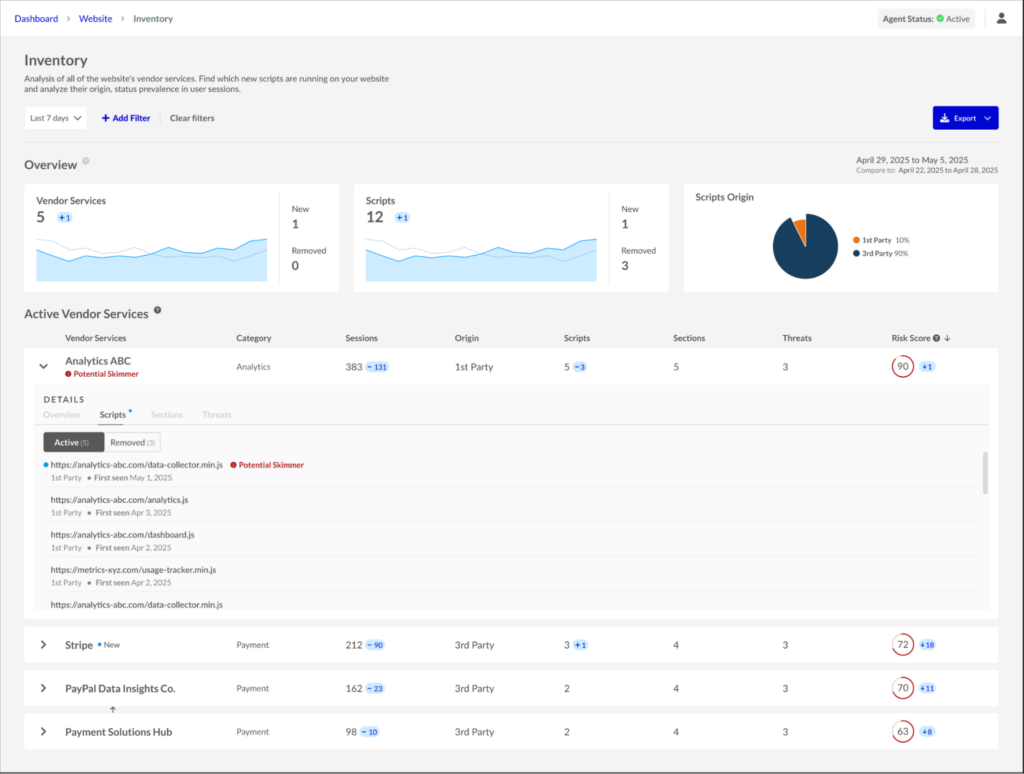 Inventory dashboard
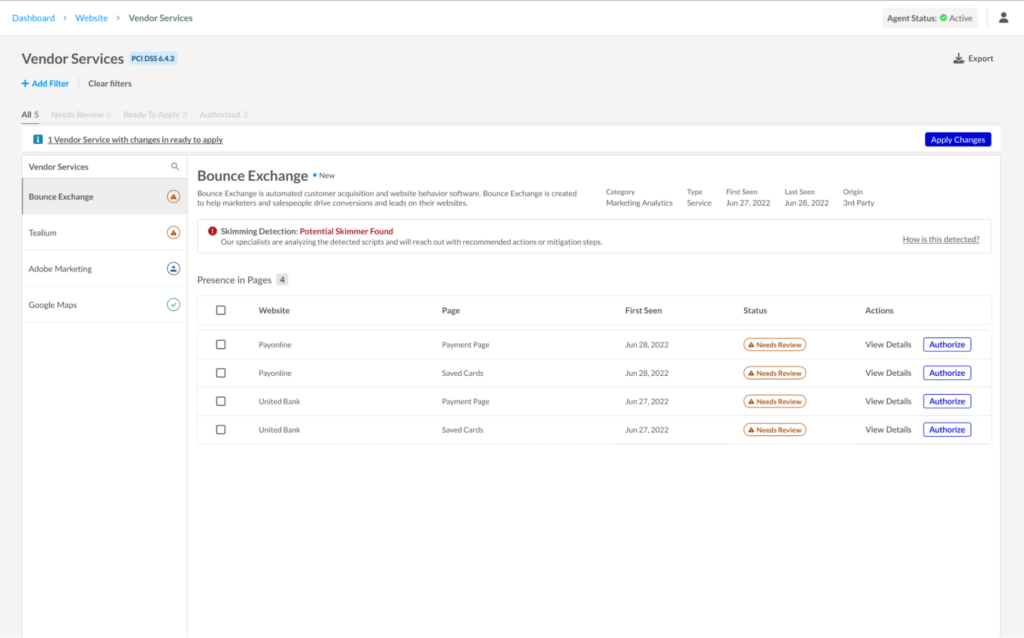 PCI DSS Vendor Services dashboard
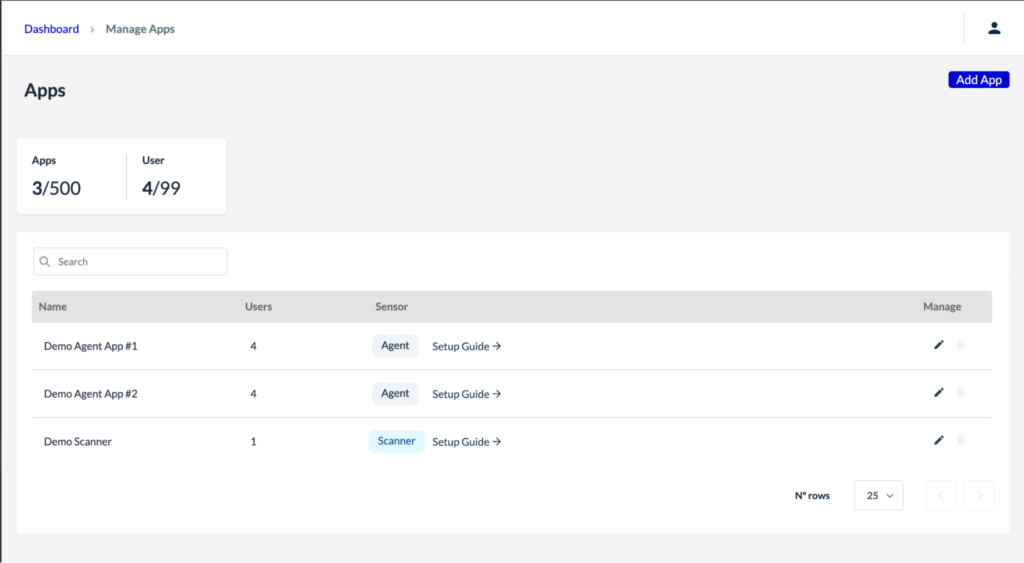 App Management dashboard
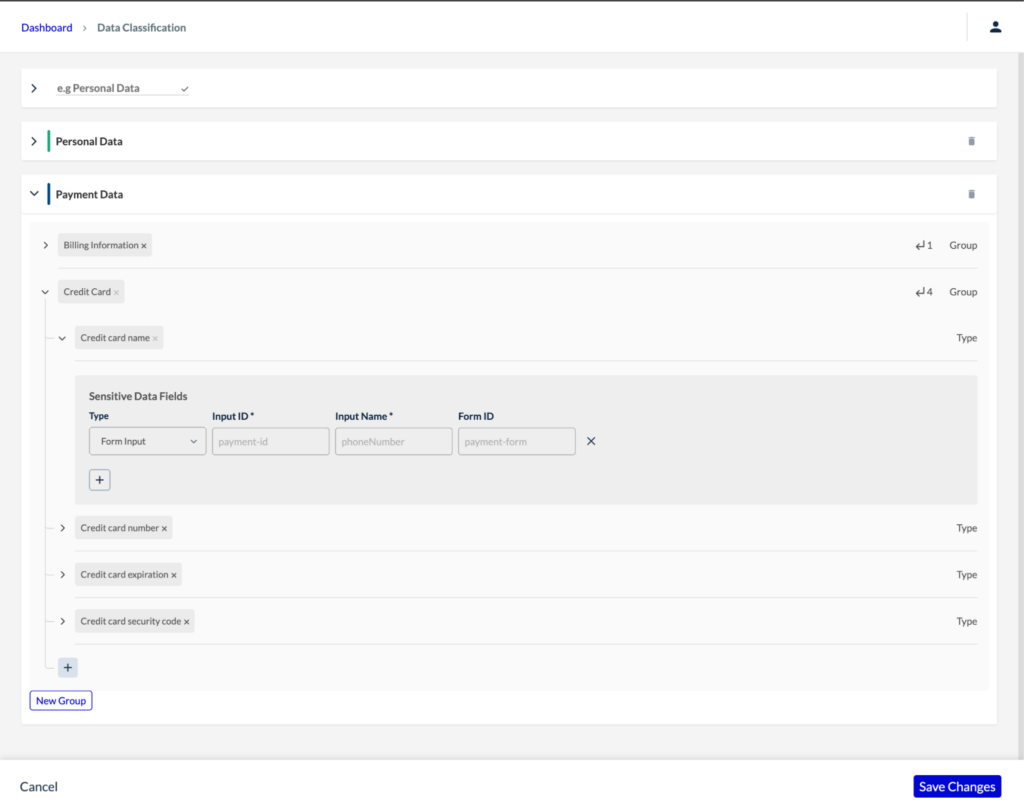 Sensitive Data configurations
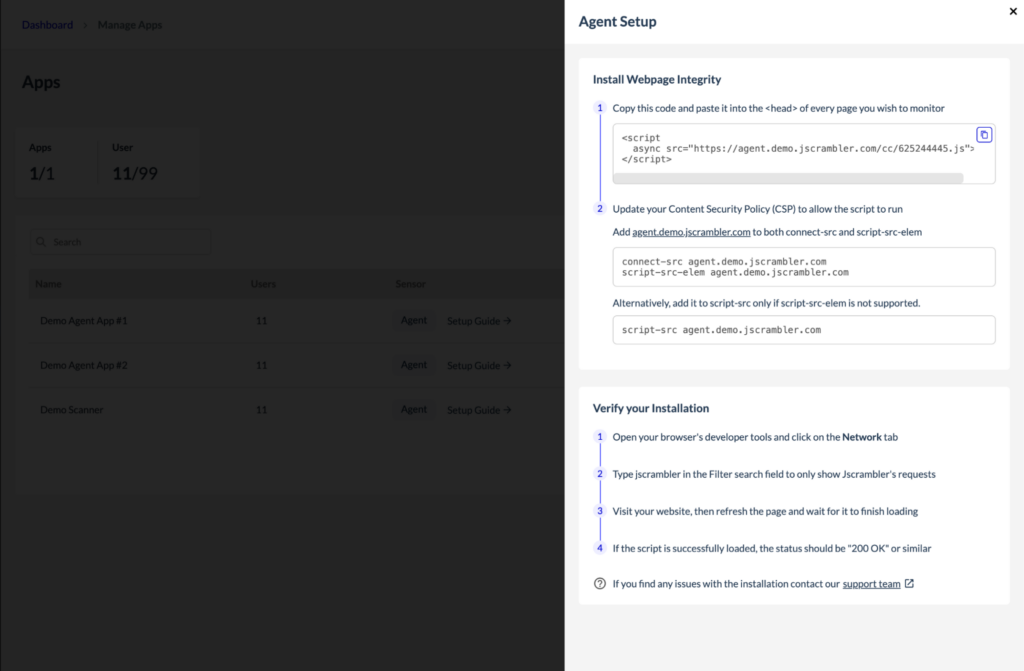 Agentless Monitoring allows WPI to run without any code changes or script deployments on the customer’s side. Instead of embedding an agent into live pages, Jscrambler uses a synthetic user that automatically visits the target pages and executes our data collection routines. This approach simulates real user behavior to detect and classify third-party scripts and potential skimming threats.
The agentless option allows customers to move forward even when they can’t easily insert the agent into a web property, such as when they don’t have direct control over the application. To enable agentless monitoring on the web property, provide the Jscrambler team with the URLs of the properties and their corresponding payment pages you wish to monitor.
Once the URLs are shared, the Jscrambler team will set up your account and provide the necessary login credentials for you and any additional users. Our team will also configure the websites and payment pages to be monitored by the Agentless Monitoring component.
Agentless Monitoring allows WPI to run without any code changes or script deployments on the customer’s side. Instead of embedding an agent into live pages, Jscrambler uses a synthetic user that automatically visits the target pages and executes our data collection routines. This approach simulates real user behavior to detect and classify third-party scripts and potential skimming threats.
The agentless option allows customers to move forward even when they can’t easily insert the agent into a web property, such as when they don’t have direct control over the application. To enable agentless monitoring on the web property, provide the Jscrambler team with the URLs of the properties and their corresponding payment pages you wish to monitor.
Once the URLs are shared, the Jscrambler team will set up your account and provide the necessary login credentials for you and any additional users. Our team will also configure the websites and payment pages to be monitored by the Agentless Monitoring component.

Welcome back to the WPI blog series! Jscrambler WPI 101 is a series of articles about Jscrambler’s product Webpage Integrity (WPI), its main use cases, innovative features, and tips on maximizing the product’s benefits.
This article focuses on the WPI use case for Skimming Detection and explains how Webpage Integrity enables you to protect your business against web skimming and data leakage.
As web skimming attacks become more sophisticated, businesses face increasing pressure to secure their client-side environments, especially on sensitive pages like payment pages and login portals. Skimmers often operate silently, injecting malicious scripts into third-party code or exploiting weak points in the browser to siphon off personal and financial data without ever being detected.
To combat this, Jscrambler’s WPI Skimming Detection provides a proactive line of defense. Leveraging advanced static code analysis, it inspects every script running on your website, evaluating not just the code itself but how and where it executes. The system is designed to identify behaviors commonly associated with skimming, such as obfuscation, data encryption, unauthorized form injections, and access to sensitive information.
When a potential skimmer is detected, the Jscrambler platform offers detailed visibility into the threat, including which third-party vendors are involved and where the skimmer was found. This visibility empowers security teams to act quickly and precisely, removing the threat before any damage is done.
The Jscrambler Skimming Detection engine aims to classify every individual third-party script present on a website and determine whether a potential skimmer is behind it.
The skimming detection capabilities within the Jscrambler dashboard are slightly different depending on whether you’re using the full Webpage Integrity (WPI) product or a PCI DSS Module of the WPI. However, they pursue the same goal—helping you eliminate skimming risks to zero.
A good way to get an instant overview of skimming threats is to check the Inventory in the WPI dashboard. The Inventory feature provides comprehensive visibility into all vendors and their scripts on the website, offering a better understanding of the various scripts in use. It allows users to identify the scripts’ purpose, location, and impact on sessions and assess the associated level of risk based on verified actions and the potential types of threats they pose.
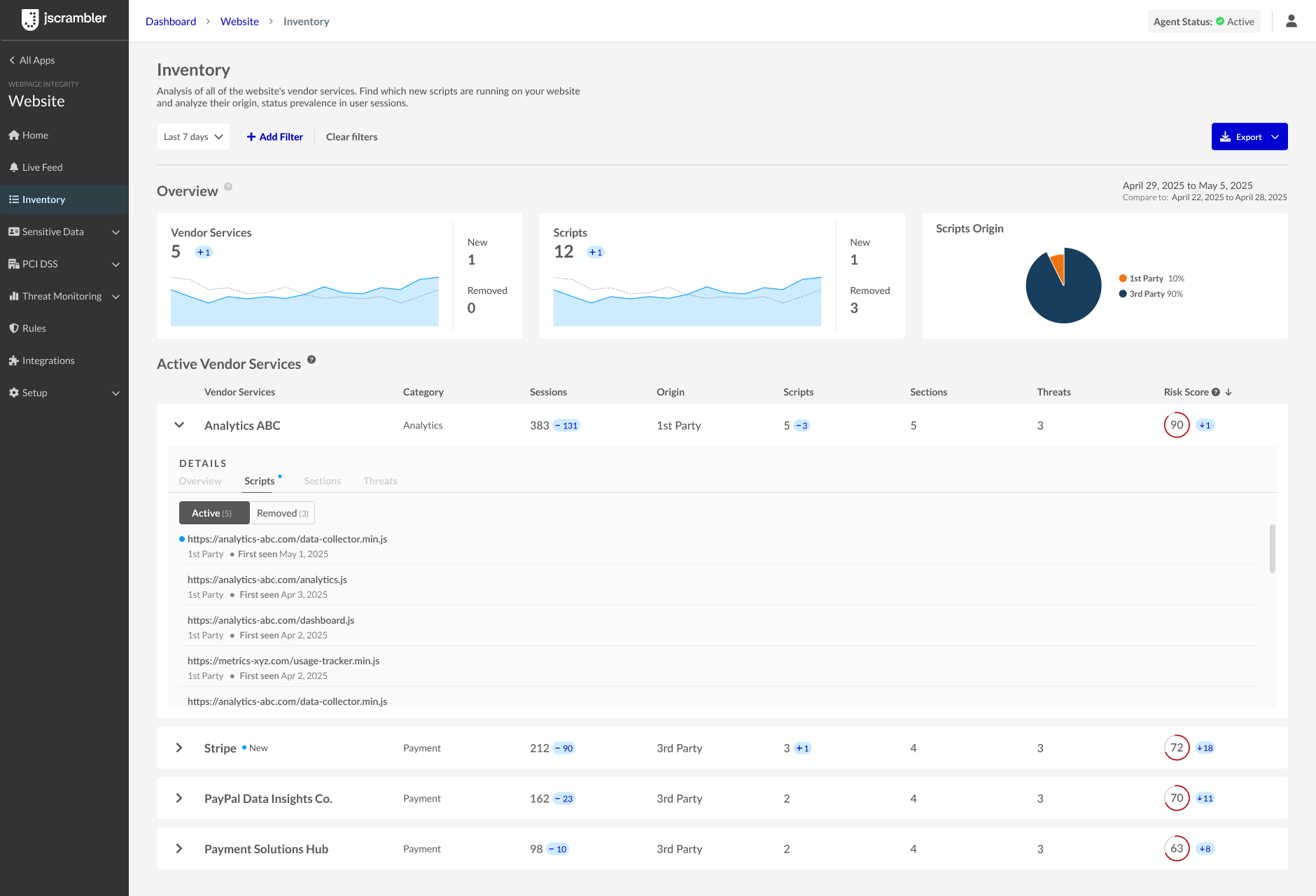 An example of an Inventory view with no skimming issues identified.
This goes beyond simply raising awareness of threats. The Inventory dashboard presents a qualitative measure that helps prioritize security actions and implement mitigation measures to address the impact of vendors present and active on the website.
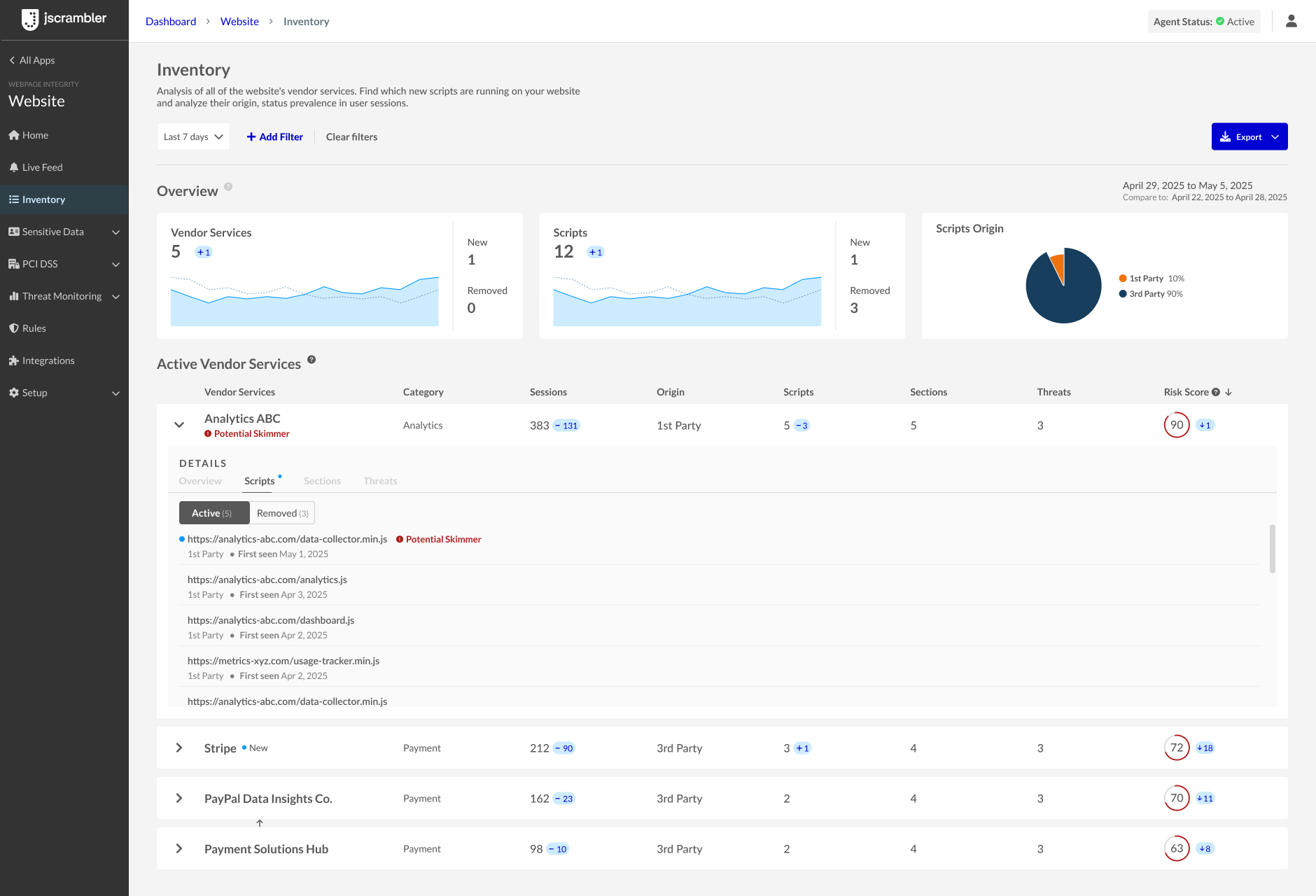 An example of an Inventory view with a potential skimmer identified.
In addition, the Inventory feature provides visibility into threats related to sensitive data present or entered on the website. It enables verification of which scripts have access to specific data and ensures compliance with the appropriate data access permissions.
Now that you’ve spotted a skimmer in your Inventory view, what is behind it? You can go deeper to discover what happened and get more insight into the skimming risks. This is possible thanks to the Skimming Detection feature that is responsible for identifying and classifying scripts based on their potential security threats, including those associated with Magecart and skimming attacks. Skimming attacks are notorious for extracting sensitive information from websites, posing significant risks to both website owners and their users.
At its core, Skimming Detection is all about analyzing the scripts running on your website and flagging those that could be dangerous. Every script is scanned and categorized based on its behavior and the aspects detected in its code. If it looks clean, it’s marked as safe. But if it shows signs of malicious intent—especially those linked to Magecart-style skimming—it’s flagged as a threat.
This classification helps you stay ahead of attacks by giving you visibility into which scripts (and which vendors) could be putting your customers at risk.
Sometimes, a script might get flagged even when you know it’s safe. That’s why we have built-in flexibility. If your technical team reviews a script and determines it’s not a threat, you can manually mark it as safe right from your dashboard. That change is reflected within minutes, ensuring your data stays current and actionable.
The Skimming Detection system doesn’t stop at individual scripts—it also looks at vendors. If a vendor has even one script flagged as Skimmer, the vendor itself gets tagged accordingly, and its risk score spikes to reflect that elevated threat level. Clean up the scripts, and the vendor’s risk profile improves. It’s that simple.
This system makes it easier to prioritize threats, monitor your third-party ecosystem, and protect your site from one of the web’s most dangerous types of attacks.
The Skimming Detection section of the dashboard alerts merchants when skimming activity is detected in their vendor services. If no skimming is found, you’ll see a reassuring message. If any skimming is detected, you’ll be able to access a link that shows you which specific vendors are compromised.
By analyzing the behavior of web scripts and the context in which they execute, the system detects various indicators commonly associated with skimming activity, such as:
Stealth techniques
Data encryption
Injection of forms, iframes, and other elements
Access to sensitive data
Suspicious networking behavior
By evaluating these and other factors within the script and page context, the result provides a comprehensive assessment of whether potential skimming activity is present on the website.
If our system detects a potential skimmer—a malicious script designed to steal sensitive data, especially payment information—you’ll see it in the dashboard right away. You’ll see which vendors are involved and where exactly the threat was found, whether on a specific website or payment page. This visibility empowers your team to act quickly and precisely, minimizing risk and exposure.
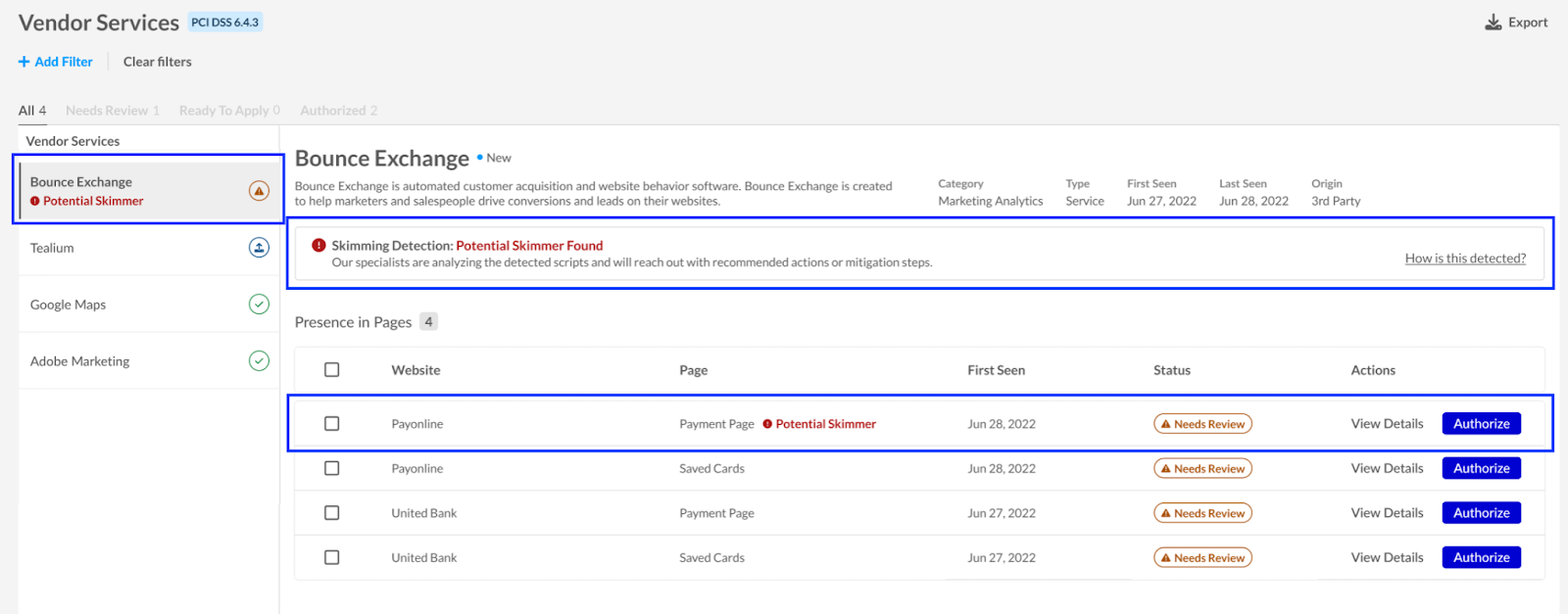
PCI DSS Module view with a “Potential skimmer found” notice.
No skimmers? No problem. When our system gives the all-clear, you’ll see a reassuring “No skimmer found” message. It’s peace of mind that your site is clean and your customers’ data is safe, for now.
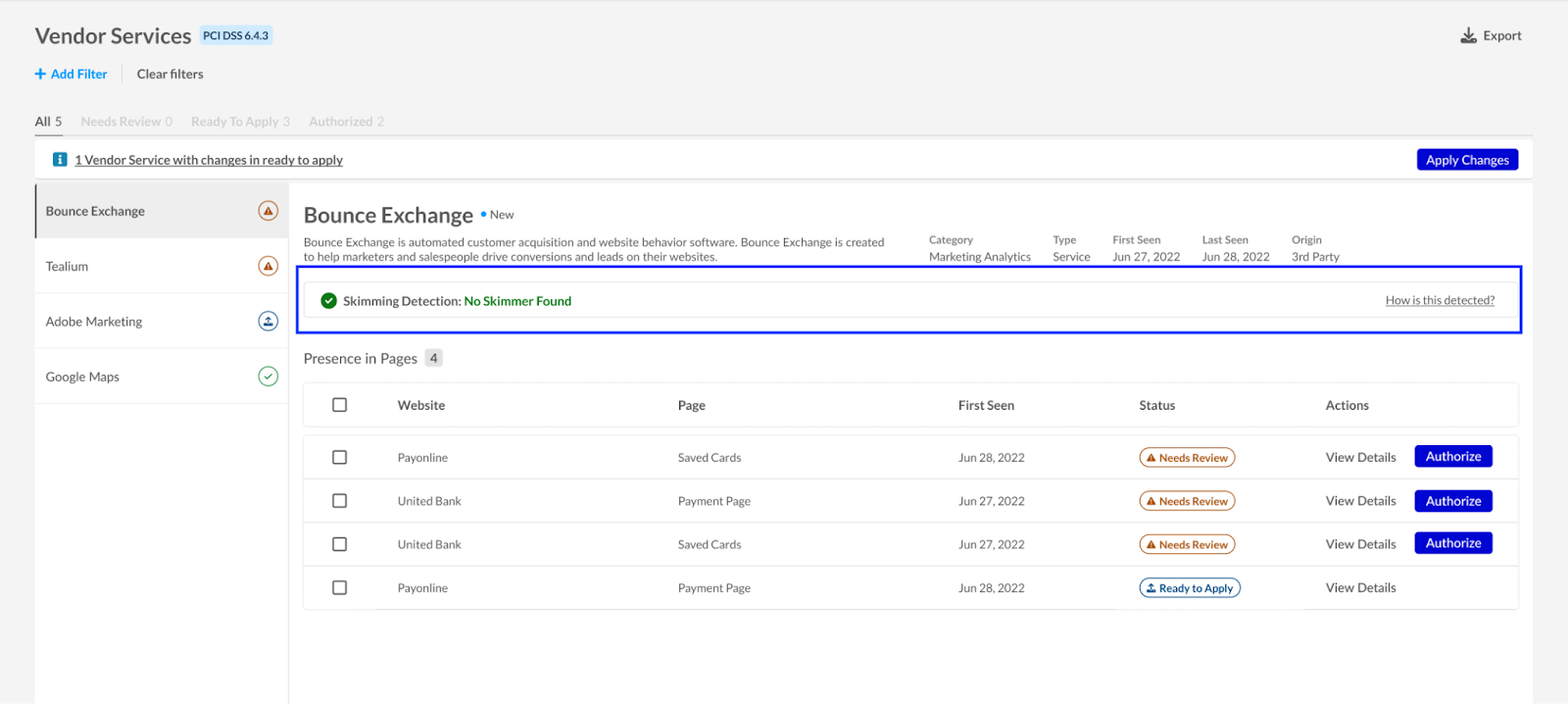 PCI DSS Module with a “No skimmer found” notice.
Jscrambler Webpage Integrity allows you to react to skimming alerts, review the malicious script or scripts in question, limit their access to data, and block them from performing malicious actions or data transfers.
In summary, the WPI product can block all unauthorized behaviors from third-party vendor scripts without preventing the script from loading on the page or performing authorized behaviors. This prevents actions such as skimming of payment, login, or other PII (Personally Identifiable Information) data, even if a vendor script contains both malicious code and useful code that is critical to the end-user experience.
As long as the script remains on the page, even if WPI is preventing all behaviors, it will still be included in the vendor inventory. The website administrator should remove a certain third-party vendor script to prevent its continued presence.
To learn more about the blocking capabilities of the Jscrambler WPI, check out the Form Fencing feature that specifically restricts third-party scripts from accessing form data. And stay tuned for the next WPI 101 series article that will cover PCI DSS compliance and how it helps meet the requirements 6.4.3 and 11.6.1, and goes beyond them with the blocking capability.

Welcome to our new blog series! Jscrambler WPI 101 is a series of articles about Jscrambler’s product Webpage Integrity (WPI), its main use cases, innovative features, and tips on how to maximize the benefits of using the product.
The focus of this article is the WPI use case for Form Fencing. Forms are integral to many online businesses that sell goods and services online. Forms gather important customer data and allow you to easily collect payment. Before we cover how WPI’s Form Fencing works, let’s see what kind of forms Webpage Integrity protects and the ways in which they are deployed on websites. In the section below, we’ll primarily review the payment forms as they collect the most sensitive data that criminals target – cardholder data.
Safeguarding user data is critical. Websites rely on third-party analytics libraries to track user behavior, but these integrations can sometimes become a security liability. Let’s imagine that there is a website that uses a third-party analytics library to store user session data. While this functionality is essential for business insights, it also opens the door for potential exploitation.
Imagine a scenario where the third-party library is compromised by malware. Let’s suppose the attackers manipulate a function to access all form inputs and exfiltrate sensitive information. Initially, the function only stores basic user details like email, user ID, first name, and last name.
However, with the malware in place, additional sensitive data—such as addresses and credit card details—could be stealthily collected and sent to an unauthorized external server, all without detection. This kind of data breach can be catastrophic, leading to identity theft, financial loss, and reputational damage.
To counteract such threats, businesses can leverage WPI’s Form Fencing, a proactive security measure that ensures that only authorized first-party scripts and third-party vendors collect and transmit data. With Form Fencing, organizations can create specific rules to monitor and prevent third-party scripts from accessing form fields.
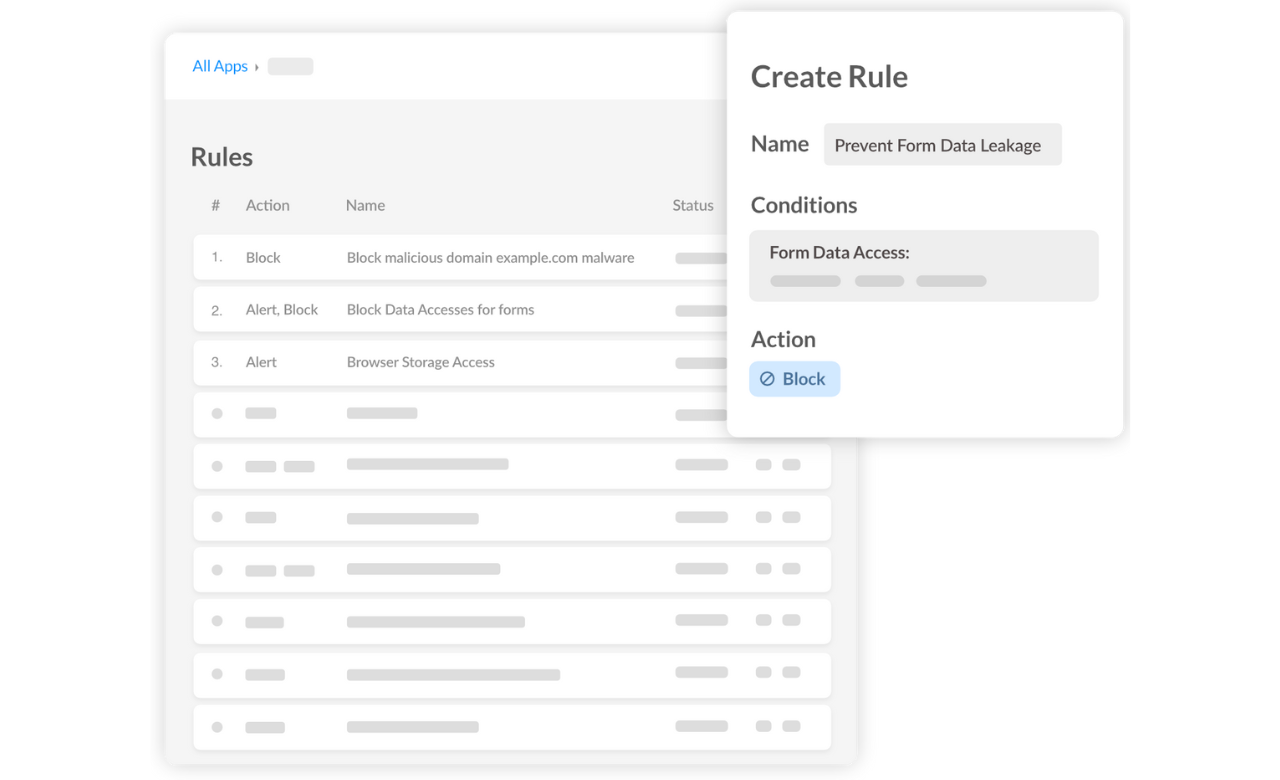
Setting up a Fencing rule is straightforward:
Navigate to the Rules page and create a new rule.
Define a clear name and description for easy identification.
Specify which website pages should be monitored.
Identify the values to configure the rule with the form ID/name or the input ID/name (for example, bookingCode for input booking code and lastName for the input last name).
Configure the targets.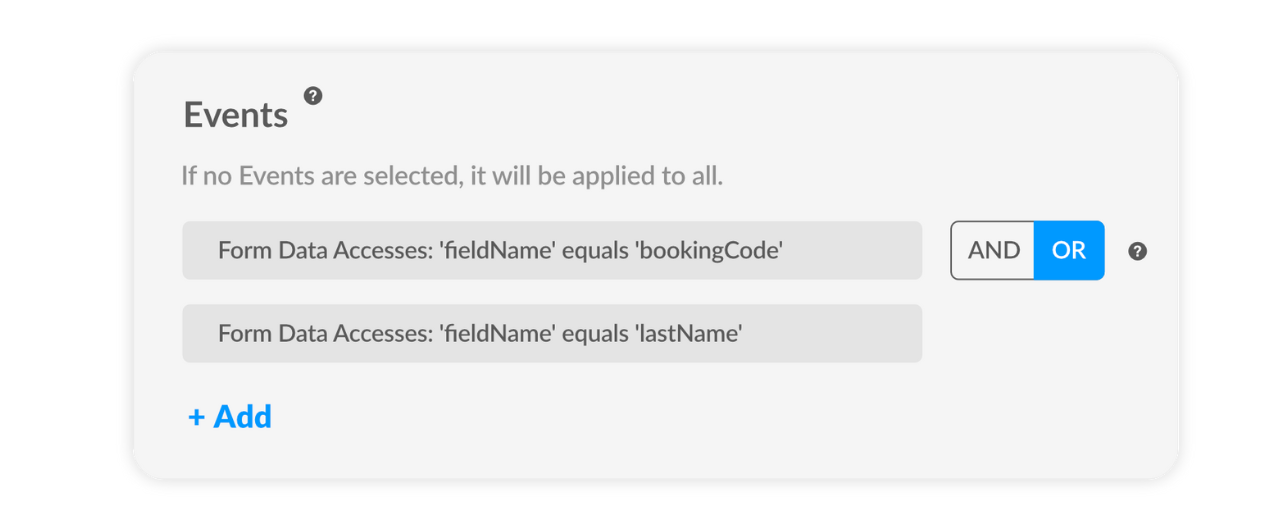
Configure the action to prevent form data from being accessed by unauthorized scripts.
Deploy the rule and activate the WPI protection agent.
Once in place, this rule ensures that any attempt to extract unauthorized information is immediately blocked and flagged in the dashboard.
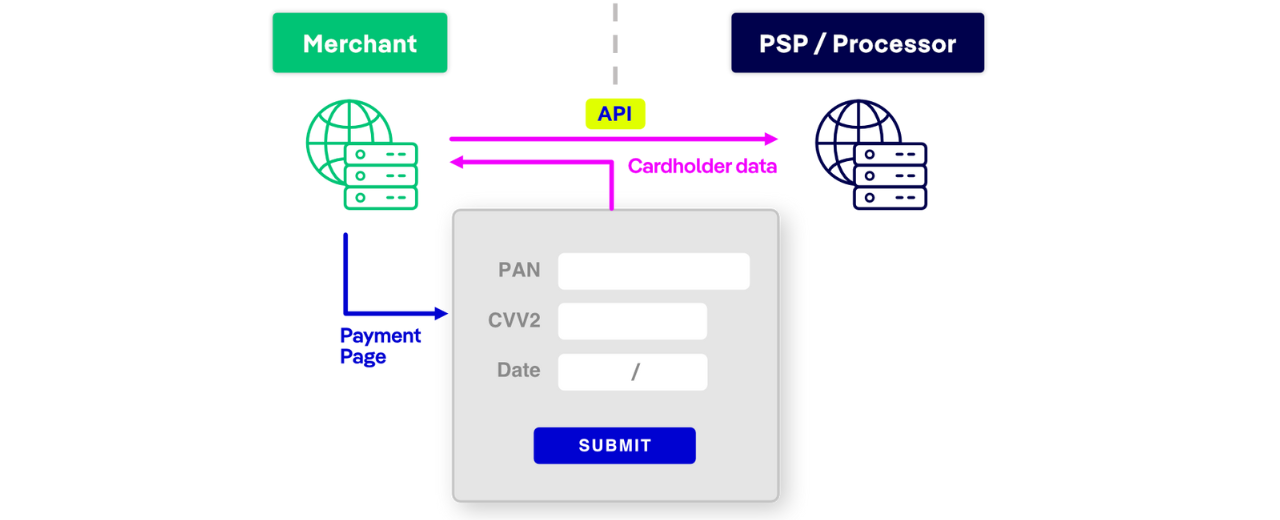
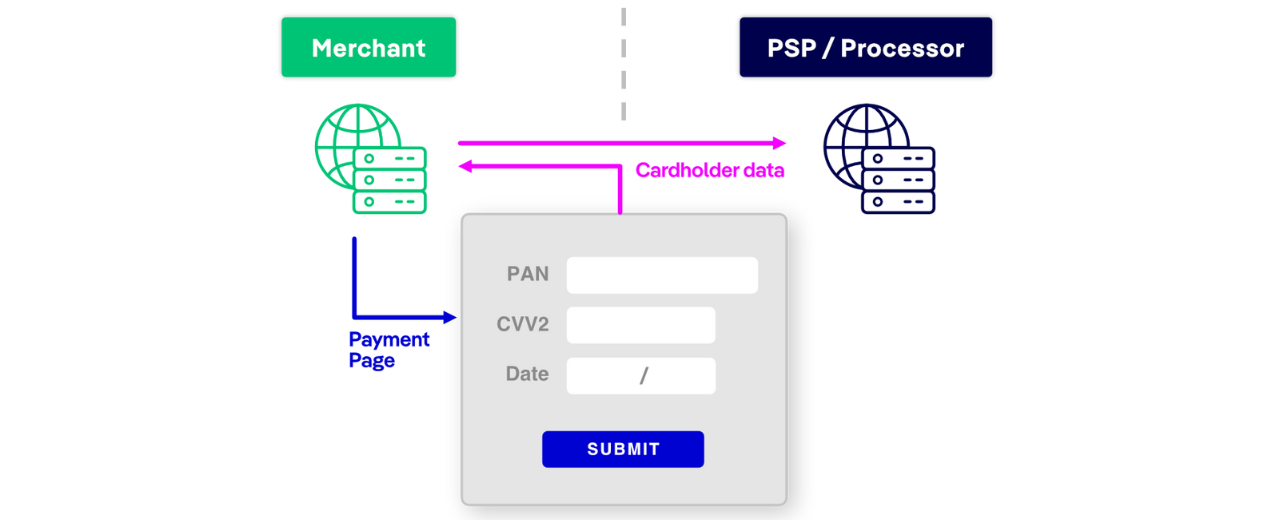
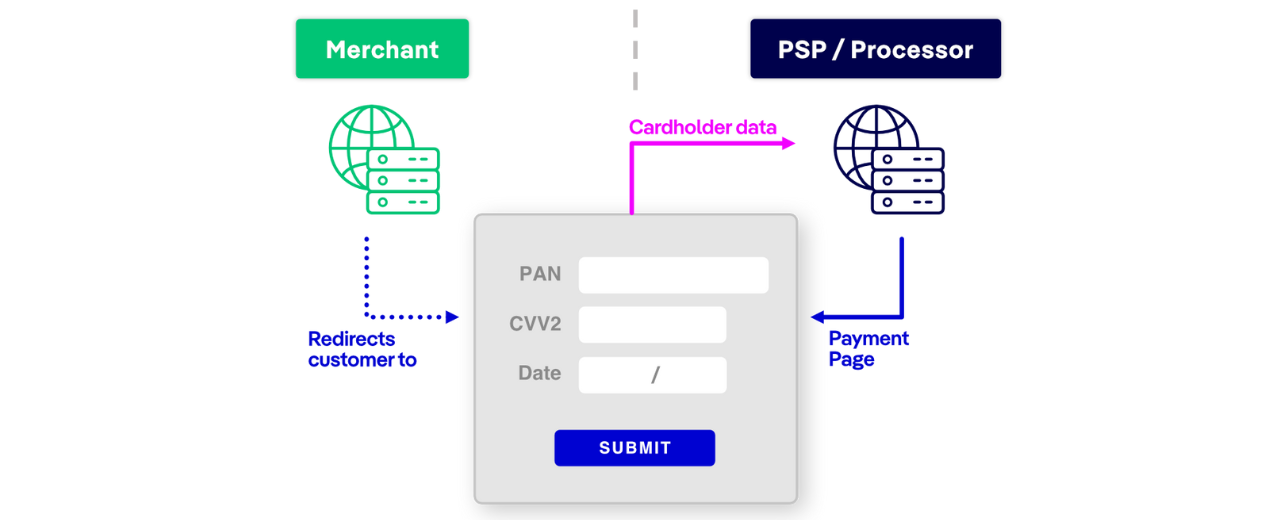
There are different ways in which you can deploy a form to be displayed on a website and collect payment data. The most vulnerable forms are usually forms that collect card payment data; they are the most common target of digital skimming attacks. Below are the most common types of payment forms.
Deployment: The merchant collects payment details and sends them securely via an API to the payment processor. In this case, the WPI agent should be injected by the merchant who is responsible for rendering the payment form.
Deployment: A secure JavaScript library (e.g., Stripe.js) collects payment data directly and sends it to the processor. In this case, the WPI agent should be injected by the merchant who is responsible for rendering the payment form.
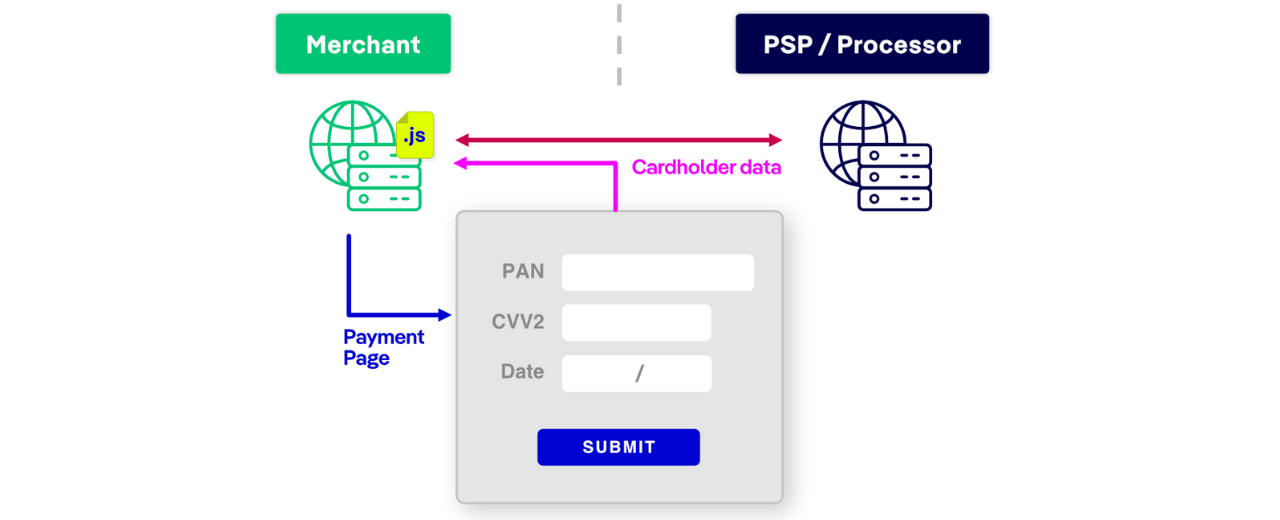
Example: Stripe.js, Braintree Hosted Fields
Deployment: A third-party payment processor hosts the form, so WPI should be deployed and provided by the Payment Service Provider (PSP).
PCI DSS requirements 6.4.3 and 11.6.1 will become effective on March 31st, 2025. Both requirements were developed to ensure that online merchants’ payment pages are sufficiently protected to detect and prevent skimming attacks.
If you are a Merchant who hosts a payment form yourself, then you can use a Form Fencing feature as a Compensating Control or follow a Customized Approach to become PCI DSS v4 compliant. Therefore, you don’t need to worry about authorizing scripts.
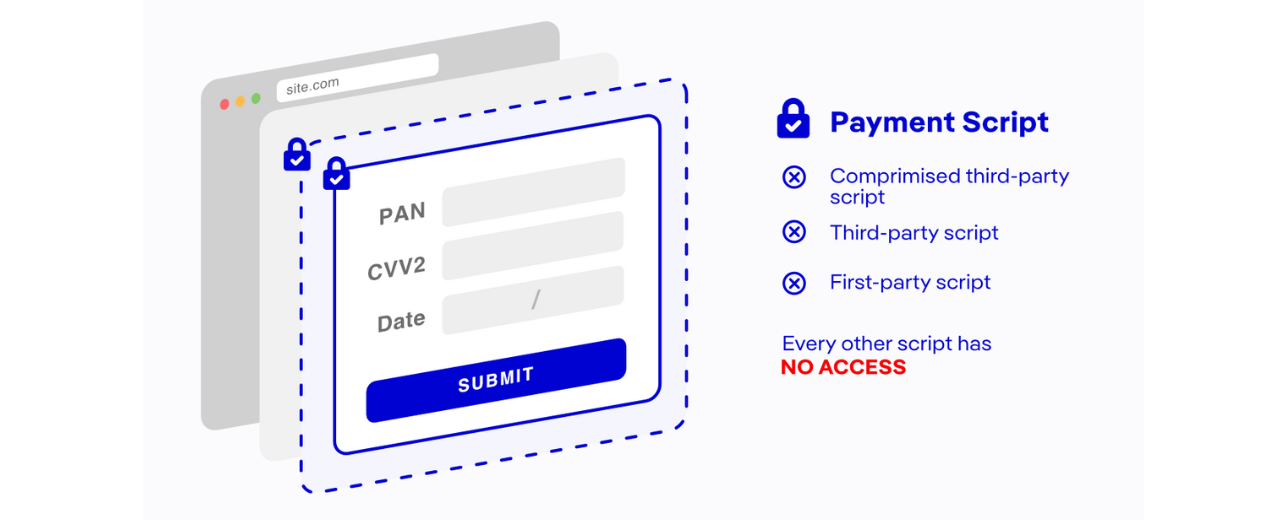
Additionally, Form Fencing works as an extra layer of defense that can shield your forms from skimmers even before you authorize scripts.
As cyber threats continue to evolve, proactive security solutions like Form Fencing are essential in protecting sensitive information. By implementing Form Fencing, businesses can safeguard user data, maintain compliance with data protection regulations, and enhance trust with their customers. Don’t wait for a breach to occur—instead, take control of your data security today.