Privacy compliance has come a long way. Most organizations today have data maps, consent management platforms, vendor assessments, and governance frameworks in place, which is genuinely good progress. But there’s a blind spot most of those programs share: the browser.
Data Starts in the Browser, Not Your Systems
Here’s the mental model that underpins most privacy programs: a user interacts with a service, data gets collected at a defined point, then it flows into your systems, where your governance controls kick in. Works great for server-side infrastructure: your CRM, payment processor, HR tools, etc.
The problem? The web doesn’t actually work this way.
Data starts being generated in the browser long before anyone hits “submit.” Every keystroke in a form field, every click, every scroll, every letter typed — that’s all happening client-side, before your backend ever sees a single byte. If your privacy program draws the line at form submission, it’s in the wrong place.
Third-Party Pixels Have More Access Than Most Teams Realize
Around 92% of websites load some form of third-party pixels. On e-commerce sites, over half the pixels and tracking tags executing in the browser come from outside your codebase — analytics tools, ad pixels, tag managers, session replay tools, chat widgets, and more.
Browsers fail to make one thing obvious: by default, these scripts aren’t isolated from each other. There’s no sandbox wall between your analytics vendor and your advertising pixel. Each has access to the same page, the same DOM, and the same form fields that users interact with.
That means including a third-party pixel isn’t just adding a feature — it’s giving that vendor’s code the technical ability to observe what users do on your page. That can include email addresses as they’re typed, phone numbers digit by digit, health information entered into a search bar, financial details in a mortgage calculator, or sensitive data filled into an employment form, even if none of it is ever submitted.
There’s a further complication that vendor reviews and data processing agreements often miss: third-party scripts can quietly update their own behavior after deployment. A pixel that was reviewed and scoped at integration may later expand what it collects — without triggering a new vendor assessment or contract amendment. Some vendors also inject fourth-party scripts, pulling in additional code from other domains entirely, without any direct contractual relationship with your organization. By the time that happens, your DPA is already describing a version of the tool that no longer exists.
The Consent Timing Gap
In web architecture, milliseconds matter—and so does the sequence in which scripts execute. While many privacy teams assume that installing a Consent Management Platform (CMP) automatically pauses all tracking until a user clicks “Accept,” the default behavior of web browsers tells a different story.
In reality, scripts start executing the moment a page loads. The consent banner appears, the user makes a choice, and only then does the Consent Management Platform act. But by that point, observation has already begun, creating a critical, often-overlooked consent timing gap.
Unless your web architecture is specifically configured to block third-party pixels from loading before consent is captured and confirmed, there’s a window of exposure your governance framework doesn’t account for.
Proof in Practice: What Popular Pixels Actually Collect
Jscrambler’s security research team analyzed what Meta and TikTok advertising pixels — two of the most widely deployed client-side technologies on the web — actually do at runtime on real websites across retail, hospitality, and healthcare.
The findings were eye-opening. These pixels collect detailed behavioral and transactional data: product names, prices, cart values, and the full customer journey. TikTok pixels were observed capturing physical addresses from store-locator fields at a major European retailer and sending them to TikTok servers. Meta’s pixel has a feature called automatic events — enabled by default — that scans page elements and captures data, including cardholder names and partial credit card numbers during checkout.
There’s also a timing dimension. In several cases, data was transmitted before the site’s consent management platform could intervene. In some cases, it continued even after a user clicked “reject all.”
The Compliance Risk
For privacy teams, the concern isn’t simply what data is collected, but whether collection aligns with user consent, regulatory obligations, and internal policy. If data is collected before consent is established — or continues after it’s withdrawn — organizations may be exposed to privacy compliance risks they don’t realize. And because third-party pixels can update their behavior post-deployment, the gap between what a vendor agreement says and what code actually does at runtime can widen over time without any visible trigger.
The Business Risk Nobody Talks About
Privacy isn’t the only concern. The same technologies that can observe customer interactions can also capture commercially sensitive behavioral data. Product interest, pricing comparisons, checkout behavior, feature evaluation, and conversion patterns are valuable intelligence. Many technology vendors operate across entire industries, meaning the data generated on your website may contribute to broader datasets that extend well beyond your organization. Your analytics vendor almost certainly serves your competitors, too.
Data observed in your users’ browsers doesn’t automatically stay with you.
Why Client-Side Governance Matters
Traditional privacy programs focus on governing data once it reaches enterprise systems. But modern web applications create and expose data before that point. Effective governance increasingly requires visibility into what third parties execute in the browser, what data they can access, and whether their behavior matches what was agreed to at procurement. Without that visibility, your program is governing a downstream slice of a much larger data flow.
Where to Start
Getting control of your client-side environment doesn’t require ripping everything up. This is where Jscrambler can help. A useful first step is to understand what’s actually running on your web properties—not based on documentation, but on what’s executing at runtime.
From there, you can assess which pixels have access to form inputs, identify any fourth-party scripts introduced without formal review, and test whether your consent implementation actually delays pixel execution or simply assumes it does.
Your website is the first place users interact with your service. If your privacy program can’t see what’s happening there, the gap between your commitments and your technical reality is likely bigger than you think.
Jscrambler recently joined thousands of privacy and legal professionals at the IAPP Global Summit 2026 in Washington, D.C. It was an invaluable opportunity to connect with experts and leaders dedicated to the evolving landscape of data protection. As we look back, a few themes dominated the stage: the relentless march of AI, the need to challenge current data collection practices, the growing gap between policy and enforcement, and a big realization that the client-side “blind spots” are far larger than previously assumed.
1. Privacy Starts in the Browser: Confronting the Client-Side Blind Spot
A recurring topic throughout our discussions at the summit was the insufficiency of focusing solely on the network perimeter. Most organizations have spent years maturing programs designed to protect data once it passes into their network and lands in databases and servers. While this “systems of record” approach is effective for the traditional perimeter, it fundamentally ignores where data governance actually begins: the web browser.
While the industry acknowledges that data collection starts in the browser, a dangerous governance assumption persists. Most privacy frameworks assume collection begins only after a user clicks “submit.” In reality, data collection begins the moment a user interacts with a page, typing into fields, submitting search queries, or simply navigating the website. If data cannot be governed at the precise moment it is formed, it cannot be fully protected.
The Loss of Control
Unlike servers and databases that operate on controlled infrastructure, code in the browser executes on the user’s device alongside dozens of third-party scripts. This environment is highly privileged but remains one of the least governed parts of the enterprise.
Our discussions with the privacy experts at the summit highlighted several critical risks:
Observation Before Submission: Analytics, advertising pixels, and AI assistants can observe and collect sensitive personal data as it is first typed. This means names, emails, and even health symptoms can be collected before a user officially submits the data.
Scope Creep and Piggybacking: Many professionals were surprised by the prevalence of scope creep and “piggybacking.” Third-party scripts can quietly update their own permission scopes or add “fourth-party” dependencies without oversight from the privacy team.
The DPA Enforcement Gap: This lack of visibility quickly renders data processing agreements (DPAs) and privacy notices obsolete. If a script deployed for simple analytics begins observing form fields for ad targeting without approval, it creates a purpose-limitation violation that exists entirely outside traditional server-side controls.
The Audit Record Deficit: Compliance is an evidence-based discipline. Most privacy programs rely on server-side logs, which only record what your servers received. They have no record of what a third-party script exfiltrated directly to an external server from the website, leaving legal teams without a complete audit trail for regulatory inquiries.
2. AI: The Dual-Edged Sword of Modern Privacy
AI was arguably the most ubiquitous topic at the summit, presenting both a transformative opportunity and a significant hurdle for privacy and legal teams. The conference featured a wealth of sessions focused on how to use AI tools to support privacy initiatives, ensuring sensitive data isn’t fed to or surfaced by AI on the backend, and establishing robust strategies for vetting and onboarding new AI vendors.
However, amidst these deep dives into server-side security, one critical area remained largely unaddressed: AI running directly in the browser. While backend governance is essential, AI-powered tools like chatbots, assistants, and copilots increasingly operate client-side. These tools observe live page content and user interaction signals as input to provide real-time assistance. By doing so, they assemble context within the browser and transmit it to the outside world instantly, often falling under the vendor’s privacy policy rather than your own.
Navigating evolving global mandates, such as the EU AI Act, requires a fundamental shift toward data traceability and a granular understanding of exactly where AI inputs originate. Because many AI systems are non-deterministic, data collection is no longer strictly bounded by static, predictable logic. This makes runtime governance an absolute necessity to prevent a strategic loss of control over the data being fed into these models at the point of origin.
3. The Reality of Ad Pixels and Personal Data Exposure
The backbone of many conversations Jscrambler had was our research intoTikTok and Meta ad pixels, which was eye-opening for many. It sparked deep concern regarding the sheer volume of personal data harvested without clear oversight. While privacy teams knew these tags were active, they were often unaware of the extent: these pixels quietly ingest granular personal identifiers and interaction data directly from the browser.
When a pixel observes a user’s behavior before they have even consented or submitted a form, it creates a massive “consent timing gap”. This unauthorized collection of sensitive information, from health queries to shipping addresses, represents a major compliance risk under GDPR and CCPA. For privacy leaders, the takeaway was clear: relying on a static vendor list is no longer enough when ad tags can unilaterally expand their data-collection reach at the browser layer.
4. Data Minimization: Challenging the Status Quo
One of the most impactful sessions, “Less is More: Why Data Minimization Matters to Privacy Laws,” emphasized that personal data should only be processed if it is reasonably necessary for a specific, lawful purpose.
It wasn’t just Jscrambler highlighting the issue of unchecked data collection by third parties on the web; speakers opened by challenging the status quo, noting that ad trackers like TikTok and Meta are collecting far too much data. They discussed the current “take it or leave it” reality where customers feel forced to either accept egregious over-collection or not use the service entirely.
Crucially, the session debunked the myth of the “check-the-box” privacy policy. Just because you disclose every data category you collect doesn’t give you carte blanche to ignore minimization principles—a point made evident in the Healthline Media CCPA case. As more states pass regulations, the foundation of collection is shifting toward the customer’s reasonable expectation. You must only collect what is expected and strictly necessary to deliver the specific product or service requested.
This shift represents a fundamental move away from “notice and choice” models that overwhelm consumers with endless pop-ups and fine print. Instead, we are entering an era of the “Burden Shift,” where the responsibility is placed back on companies to align their technical practices with user expectations.
Another key point covered by the panel was that keeping up with U.S. state regulations is becoming increasingly complicated, as seen in the diverging philosophies of different jurisdictions. Maryland, for instance, has adopted a “substantive” approach where collection is tied strictly to requested services. In contrast, California utilizes a “hybrid” model centered more on the context of the user interaction. This fragmented landscape underscores the importance of visibility into what data is being collected and why at the browser level, to simplify compliance with the varied requirements and philosophies across regional regulations.
5. The Governance Gap: Accountability Without Control
Another point of tension that Jscrambler discussed with attendees was the widening gap between written policy and actual enforcement. While privacy and legal professionals are not typically the ones deploying enforcement controls, they are ultimately the owners of their organization’s compliance posture.
In a traditional server-side environment, enforcement has become relatively straightforward – organizations have a litany of tools in place, including data security posture management (DSPM), data loss prevention (DLP), data governance tools, and endpoint protection, to enforce their governance and privacy policies.
However, the client-side is a low-visibility environment that makes it nearly impossible for legal teams to verify compliance before it reaches their servers. Without client-side visibility, they cannot see if a script is capturing search queries before a user clicks “submit.” Furthermore, most privacy programs rely on server-side logs, which have no record of what a third-party script observed and exfiltrated directly to an external server.
This leaves privacy and legal teams without the necessary audit trail to defend their practices during a regulatory inquiry. To close this gap, organizations must adopt technical controls that provide interaction-level awareness at the browser layer.
Is Your Technical Reality Aligned with Your Privacy Commitments?
To evaluate your current governance stack, we encourage you to ask these five critical questions:
Inventory: Do we have a complete inventory of all scripts executing in the browser—not just our server-side processors?
Data Access: Which of these scripts can observe and collect form field input before submission?
Contractual Review: Do our data processing agreements cover the data these scripts can technically access at all times, or only what we intend them to collect?
Consent Timing: Has our consent implementation been tested to confirm it captures user choice before other scripts begin observation?
AI Governance: Are browser-deployed AI tools included in our AI governance register?
Try Jscrambler
If you’re interested in learning more about how Jscrambler can help you extend data governance and privacy enforcement beyond the traditional perimeter into the browser, schedule a demo today!
A BBC investigation published in February 2026 showed TikTok using a tracking pixel to collect highly sensitive data from websites across the Internet, including disclosures about cancer diagnoses, fertility treatment, and mental health concerns. The BBC found pixel-intercepting data that websites were transmitting to Google, without those sites knowingly authorizing any sharing with TikTok. What was especially troubling was that the tracking included individuals who had never even created a TikTok account.
The Ubiquity of Third-Party Scripts
While the findings raise serious privacy concerns, they also underscore a broader risk: the lack of visibility and control organizations often have over third-party scripts embedded in their websites. Numerous studies have shown that modern websites can load more than two dozen third- and fourth-party scripts, including analytics tags, ad pixels, chat widgets, and A/B testing tools. Often, website owners deploy them to support business needs but rarely implement any controls or oversight.
What many may not realize is that once loaded, a third-party script operates with the same browser-level privileges as the site’s own code. They have access to the entire DOM, meaning a third-party script can read every element on that page in real time, including form fields as users type into them, drop-down and checkbox selections, and any data that a browser might auto-fill on behalf of the user.
Critically, third-party scripts don’t need to wait for the user to submit a form. They simply capture values as a user inputs them, and before the web app itself has had a chance to do anything with the data. Even if an application never transmits the data, a script can capture it independently and send it elsewhere anyway. That’s not all. Scripts can also read cookies, access data in the browser’s local storage, and fingerprint users by collecting browser and device characteristics that survive cookie deletion and account logout. This form of “cookieless” tracking is becoming an increasingly common way for sites to track users without requiring their consent and without any indication that it is happening.
BBC’s investigation of TikTok, for instance, showed website owners had no idea or indication that a user selecting a checkbox, such as “I am a cancer patient”, for instance, could trigger a background network request sending the user’s email address and disclosure to TikTok. The site owners didn’t approve it and, in many cases, likely didn’t even realize it was happening.
Broad Implications
The implications for website operators are enormous. Under privacy and security regulations such as GDPR, CCPA, HIPAA, and PCI DSS, the website owner is responsible for protecting user data, even if a third-party script collected it in violation of compliance requirements. If sensitive information is exposed through a third-party script, regulators will hold the site owner accountable. Even TikTok, in comments to the BBC, noted how it is up to the website owners themselves to ensure they comply with privacy requirements and to take advantage of the notifications and tools the company provides to help them do so.
For most website owners, removing all third-party scripts is clearly not an option, as they enable essential capabilities, from logging and analytics to customer engagement. What’s needed instead is the ability to continuously monitor script behavior and enforce clear boundaries on what they can do to prevent unauthorized data access or transmission. Monitoring needs to be done without disrupting legitimate functionality.
Governance and Oversight
Fine-grained script governance begins with visibility. Organizations must be able to identify every script running on their pages, understand what data each script accesses, and track where that data is sent. This visibility cannot be limited to development. It must also extend continuously into production, where scripts can change behavior after deployment without notice.
Access controls are equally essential. Scripts should interact with sensitive page elements only when explicitly authorized. A marketing pixel, like TikTok’s, for instance, has no legitimate reason to read responses in a medical form, and neither does a chat widget need access to payment fields. Organizations should implement isolation and behavioral policies to ensure that scripts operate within clearly defined boundaries and access only the data necessary for their intended function. Controlling outbound data flows is another critical requirement. Security teams must be able to monitor script communications, restrict connections to approved domains, detect unexpected destinations, and block unauthorized transmissions in real time.
The TikTok pixel investigation is a reminder that third-party scripts operate as trusted insiders within modern websites, often with far more access than organizations realize. Without continuous visibility and control, these scripts can quietly expose sensitive user data and create significant security, privacy, and regulatory risk.
Customers may trust you with their data, but regulators expect you to prove you deserve it. Legislation from the European Union’s General Data Protection Regulation (GDPR) to California’s Consumer Privacy Act (CCPA) and the US Health Insurance Portability and Accountability Act (HIPAA) is designed to facilitate the use and sharing of data. It also penalizes the misuse and breach of personal data.
Businesses are increasingly being seen as stewards or custodians of their customers’ data. Failure to meet their obligations could result in hefty fines – up to €20 million or 4% of annual turnover under the GDPR – reputational damage and loss of customer trust. Yet opportunities and risks exist in the same future.
Empowering customers to derive more value from their own data lies at the heart of the GDPR. This is similar to other EU legislation, such as the revised Payment Services Directive (PSD2), on access to bank data. Businesses can turn privacy and data protection into a basis for innovation, enhanced customer trust and loyalty, operational efficiency, competitive advantage, and more.
This guide summarizes the essentials of data privacy compliance, helping you stay informed and prepared to protect your customers, your business, and your bottom line.
What Is the General Data Protection Regulation (GDPR)?
The General Data Protection Regulation, or GDPR for short, is European data privacy legislation that came into effect on 25 May 2018. It gives individuals in the EU/EEA (European Economic Area) rights over how their personal information is used. It explains what businesses worldwide must do when processing personal data of EU/EEA citizens. The regulation applies across EU member states under the ‘one-stop-shop’ principle, with a single lead regulator providing guidance.
Where Did the GDPR Come From?
The GDPR updated and strengthened existing EU data protection legislation, namely the Data Protection Directive 1995 and the UK’s Data Protection Act 1998.
An EU ‘regulation’ is a binding legislative act that applies in its entirety across the EU. A regulation carries more weight and offers less flexibility in implementation than a ‘directive’, which sets out a goal to be achieved. Individual EU member states then devise their own laws to reach these goals.
The GDPR builds on existing principles, namely that privacy is a fundamental human right, enshrined in the Universal Declaration of Human Rights (Article 12), the European Convention of Human Rights (Article 8), and the European Charter of Fundamental Rights (Article 7).
There are parallels with other countries, such as the US, where privacy has often been regarded as an element of liberty and the right to be free from state intrusions.
What Are the Principles of the GDPR?
The principles of the GDPR are outlined at the beginning and explain the foundation or ‘spirit’ of the legislation. Compliance with both the letter and the spirit of the law is the cornerstone of good data protection practice. Article 5 outlines seven data protection principles:
Lawfulness, fairness, and transparency – Personal data must be processed lawfully, fairly, and in a transparent manner to the individual
Purpose limitation – Personal data must be processed in accordance with the explicit and legitimate purposes specified to the individual on collection
Data minimization – Personal data must be processed in an adequate, relevant, and limited to what is necessary in relation to the purposes for which the data is processed.
Accuracy – Personal data processed must be accurate and kept up to date, where necessary
Storage limitation – Personal data must only be stored for as long as necessary for the specified purpose
Integrity and confidentiality (security) – Personal data must be processed in a manner that ensures appropriate security of the personal data, including protection against unauthorized or unlawful processing and against accidental loss, destruction or damage
Accountability – Businesses processing personal data are responsible for and must be able to demonstrate compliance with the principles above
What Are the Key Rights for Individuals Contained in the GDPR?
The GDPR sets out various rights and responsibilities related to the processing and free movement of personal data. ‘Personal data’ is basically information relating to an individual who can be identified either directly or indirectly.
Names, addresses, and social security numbers are clearly personal data. But so too is data related to gender, biometrics, health, political beliefs, and even online browsing habits, if the individual can be uniquely identified.
Individuals have certain key rights under the GDPR as follows:
Right to be informed – Individuals must be informed of how their personal data is collected and used.
Right to object – Individuals may object to the processing of their personal data in certain circumstances.
Right of access – Individuals may request a copy of the personal data and any supplementary information that the business holds about them.
Right to rectification – Individuals may ask for inaccurate personal data to be corrected or for incomplete data to be completed.
Right to be forgotten – Individuals may request that businesses delete personal data, sometimes also known as the ‘right to erasure’.
Right to restrict processing – Individuals have the right to request that their personal data be restricted or suppressed.
Right to data portability – Individuals may request that a business transfer their personal data to a commonly used format so they can easily share it.
Rights related to automated processing – Decisions affecting individuals cannot be made solely on the basis of automated processing, unless required by law or contract.
To What Extent Does the GDPR Apply in Jurisdictions Outside the EU?
The GDPR applies to businesses established in the EU/EEA, regardless of where the data processing takes place. However, because it’s extraterritorial in scope, the GDPR also applies to businesses outside the EU/EEA that process personal data of individuals in the EU/EEA. That includes where the processing activities relate to:
Offering goods or services to data subjects in the EU/EEA, even if no payment takes place
Monitoring the (online) behavior of data subjects in the EU/EEA
How Does the GDPR Apply to Small Businesses vs. Large Businesses?
The core principles of the GDPR apply to all businesses irrespective of size. However, small businesses with fewer than 250 employees may be exempt from record-keeping requirements detailed in Article 30, under certain circumstances.
How small businesses administer compliance with the GDPR may also differ to large companies. For example, whether they appoint a dedicated data protection officer (DPO) and whether they draw on internal legal and compliance resources. But this is less about business size and more about the nature and amount of personal data they process.
What’s the Impact of the GDPR on Businesses?
The GDPR brings both obligations and opportunities. The main ones include:
Fines and sanctions
Serious breaches of the GDPR could result in businesses being fined up to €20 million or 4% of annual turnover, whichever is higher. Less serious violations may result in fines of up to €10 million or 2% of the company’s annual turnover, whichever is higher.
Accountability
Businesses are required to not only comply with the GDPR but also demonstrate their compliance, including:
Maintaining records of data processing activities (e.g., what personal data you collect, where it’s stored, how it’s used, and who has access to it)
Implementing data protection by design and by default
Conducting data protection/privacy impact assessments (DPIA) for high-risk data processing
Monitoring appropriateness of accountability measures over time
Data security
The ‘security principle’ of the GDPR stipulates that businesses must take “appropriate technical and organizational measures” to process personal data securely.
Businesses must consider risk analysis, organizational policies, and physical and technical measures to determine what is necessary and proportionate to the risks of processing data and their circumstances.
Data security measures should ensure the confidentiality, integrity, availability, and resilience of systems and services, as well as the personal data processed within them, for example, through pseudonymization and encryption.
Businesses must be able to restore access to and availability of personal data promptly in the event of a physical or technical incident. And have appropriate processes in place to test the effectiveness of their measures and improve them as necessary.
Consent
Consent must be freely given, specific, informed, and unambiguous. Requests for consent must be made in clear and plain language, unbundled from other matters, and require positive action to opt in.
Trust as the ‘killer app’
Trust is the guiding thought in privacy and data protection. Demonstrating strong data protection not only builds credibility with customers but also with partners, investors, regulators, and others.
Customers are more likely to share information with businesses they perceive as responsible and trustworthy. This, in turn, enables companies to unlock more value from data, benefiting both customers and themselves.
Mapping and streamlining data flows often reveals redundancies and inefficiencies. Meanwhile, effective data governance practices also enhance organizational information management, leading to greater operational efficiencies.
What’s the future of the GDPR?
Nearly seven years after it took effect, initiatives are underway to simplify GDPR rules. This aims to ease compliance burdens for small and medium-sized businesses, expedite cross-border investigations, and enhance cooperation between national data protection authorities (DPAs).
How Does Jscrambler Help Ensure Data Privacy Compliance?
The GDPR was designed to safeguard personal data, but there’s a blind spot that many businesses are missing. Specifically, the hidden risks of third-party scripts used to enhance customer experiences, such as chatbots and online checkout pages.
These scripts can access forms and data outside their intended business purpose, which was one of the areas designed to be prevented. Malicious actors can also view and manipulate third-party scripts to gain access to highly confidential information, including intellectual property (IP) and customers’ personally identifiable information (PII), credit card data, and more.
Businesses must protect their clients’ information from unlawful data collection by third-party pixels and tags. That’s all, while keeping their websites compliant with PCI DSS v4, GDPR, CCPA, NIST, OWASP, and HIPAA privacy regulations.
The Jscrambler platform provides fine-grained control over how third-party tags can behave and what data they can access, enhancing application resilience. Connect with our experts to try our solutions to ensure data privacy compliance.
Today, virtually all websites use JavaScript to seamlessly integrate third-party services. This is primarily to improve their online operations with analytics, user tracking, payments, social media, chatbots, and more. But this adoption comes at a price. Most businesses have no idea what information these tags are collecting.
Jscrambler research reveals that while 97% of organizations are aware that JavaScript tags collect private and sensitive data, only 13% of organizations are confident that they understand what information these tags collect. And only 26% are aware that these tags leak their private user data to other organizations.
In this article, we will examine how attackers are exploiting JavaScript to capture customer data and corporate intellectual property, using real-life case studies to assess the impact of such breaches in the e-commerce, healthcare, media, streaming, and travel sectors. Plus, offer advice on how businesses can protect themselves from data leakage risks.
E-Commerce: protect customer data and payment pages
The fully loaded costs of a data breach to a business could be potentially massive. These include the direct costs of lost revenue, incident response, fines, and breach notifications. Then, there are the indirect costs, namely the loss of brand value, reputation, and trust.
For example, Marks & Spencer suffered a devastating cyberattack in March/April 2025, where customers were unable to use contactless payment in-store, shop online, or use click and collect services. E-Commerce accounts for around £3.8 million in daily takings. The attack wiped more than £750 million off its market capitalization and is expected to cost up to £300 million in operating profits this year.
Luxury retailer Louis Vuitton experienced a data breach affecting customers in several countries in June/July 2025. This followed similar attacks on the E-Commerce sites of Adidas, Cartier, Dior, and Victoria’s Secret. The latter was forced to shut down its website for three days in May 2025, although corporate systems were disrupted for longer.
Prevention Strategies
While the alleged perpetrators behind recent E-Commerce attacks and their modus operandi differ, comprehensive client-side protection exists to prevent data leakage, customer hijacking, web skimming, and Magecart attacks. Safeguard your transactional website and ability to trade and continue trading by:
1. Detecting and Alerting on Suspicious Script Activity
Analyze the behavior of scripts to identify anomalies such as excessive network requests, or unusual data manipulation, which could indicate a malicious attack.
2. Verifying the Integrity of JavaScript Libraries
Compare JavaScript code with known and trusted scripts to spot tampering with a library or website domain, and to prevent the execution of compromised code.
3. Monitoring and Blocking Malicious Third-Party Scripts
Monitor the execution of scripts, identify suspicious behavior, block scripts exhibiting malicious characteristics, and prevent the exploitation of vulnerabilities.
Healthcare: protect online engagement with patients
Healthcare applications often handle sensitive data, making them prime targets for cyberattacks. Client-side breaches can result from misconfigurations or malicious script injections, potentially exposing user credentials, Social Security numbers, and Protected Health Information (PHI), and may remain unnoticed for prolonged periods.
This is what happened to two Swedish online pharmacies. They were fined a combined SEK 45 million ($4 million) in early July 2025 for improperly sharing sensitive personal data with Meta. Apoteket AB and Apohem AB installed the Meta Pixel to enhance their Facebook and Instagram marketing efforts. But exposed customer purchasing data, including over-the-counter medicines and sexually transmitted infection testing kits, is classified as sensitive personal data under the GDPR.
Prevention Strategies
Healthcare businesses can enhance the privacy and security of patient information, while also protecting web apps through:
1. Implementing Polymorphic Obfuscation
Ensure JavaScript code is continuously transformed, making it extremely difficult for attackers to reverse-engineer or tamper with it.
2. Deploying Client-Side Threat Mitigation
Automate control over third-party vendors to prevent web supply chain attacks, data leakage, and customer hijacking.
3. Monitoring in Real Time
Get instant alerts and benefit from real-time self-defense against tampering, debugging, or poisoning attempts.
4. Getting Compliance Assurance
Allows healthcare organizations to comply with HIPAA regulations by enforcing strict data protection policies and providing detailed audit trails.
Media and Streaming: prevent IP theft and enforce software licensing
Reverse engineering, zero-day exploits, code modification, and more: the hacker threat within the entertainment industry is real. Media and streaming businesses must safeguard their intellectual property and digital assets – and with it their revenue and competitive advantage.
For example, a hacker who stole unreleased music from artists, including Coldplay, Upsahl and Melanie Martinez, received a 24-month suspended prison sentence. The 22-year-old hacker from the UK obtained the music by illegally accessing several cloud storage accounts linked to the artists, and sold the tracks online for around £42,000.
Meanwhile back in 2018, cyber attackers inserted malicious code into a chatbot running on the Ticketmaster website to harvest data from users, including card numbers, expiry dates and security numbers. This resulted in a £1.25 million fine from the UK data protection regulator, a class action lawsuit from victims and ongoing legal repercussions in the US seven years after the breach.
Prevention Strategies
Media and streaming businesses can protect their intellectual property and enforce software licensing with minimal impact on web app performance to:
1. Prevent Piracy
Block any unauthorized access to apps. Harden your video player and protect it against fingerprinting or watermarking technologies.
2. Protect Content
Protect your IP, the player, and the ad revenue running inside it. Keep your unique content safe from competitors and bad actors.
3. Support Team
Save time and resources by delegating the monitoring and protection of JavaScript to a trusted third party.
Travel, Transport, and Logistics: Prevent Web Supply Chain Attacks
Third-party services, such as online booking engines, chatbots, customer review tools, and digital marketing solutions, are transforming the hospitality industry. After all, what business wouldn’t want to streamline operations, enhance customer experience, and provide valuable customer insights?
However, digital transformation also comes with risks, particularly around the use of third-party tags and supply chain attacks. For example, Australia’s largest airline, Qantas, is investigating a cybersecurity breach that exposed the personal data of up to 6 million customers. The airline confirmed in early July 2025 that cybercriminals had accessed a third-party customer servicing system linked to a Qantas call centre.
Guard against data breaches, web skimming, and more, by blocking unauthorized script behavior.
2. Obtaining Maximum Visibility
Get complete data granularity for real-time threat monitoring and alerts, so you can spot what’s what and what’s not quicker and easier.
3. Achieving PCI DSS v4 Compliance
Protect against and detect digital skimming attacks on payment pages by certifying against PCI DSS v4, which contains two new requirements effective April 1, 2025.
4. Reducing Data Leakage Risk
One size fits no one in security. Configure your client-side protection to match your organization’s unique data leakage protection needs.
How Jscrambler Helps Prevent Data Leakage Risk
There are no silver bullets in risk management. Rather, it’s best to develop a defense in depth, layered or matrix approach to managing risk. The protection afforded across the various layers or stages becomes greater than the sum of its parts. Consider the following ways to secure your E-Commerce website and web apps:
Get Advanced Protection Through Obfuscation
Obfuscation can deter attackers by making JavaScript code more difficult to analyze and reverse engineer. The best security platforms allow businesses to define their obfuscation policy and needs. Jscrambler allows businesses to integrate obfuscation into their continuous integration and continuous delivery seamlessly (CI/CD) tools. Plus, run obfuscated code without slowing down website performance.
Protect Your Web Apps with Run-Time Defenses and Code Locks
Most obfuscation solutions solely protect code from cyberattacks. Market-leading solutions, such as the one from Jscrambler, go a step further by offering extensive runtime defenses. These defenses empower applications to autonomously detect and react to any tampering, debugging, or poisoning attempts in real-time.
Know When Your Website Is Under Attack
Ongoing monitoring is a second, third, and ongoing chance to check that the risk was correctly assessed in the first place — and is still applicable. For dynamic, international businesses, continuous monitoring is a must.
Jscrambler’s platform allows you to know if your JavaScript code is being debugged, tampered with, or being used outside your desired environment, via alerts and an at-a-glance monitoring dashboard. This enables real-time threat mitigation.
Benefit From Expert Advice
A security solution is good. But a security solution with expert advice is even better. Jscrambler backs up its products with responsive customer service, high-quality documentation, and industry-specific expertise to address your specific vulnerabilities.
Jscrambler Client-Side Protection Platform
The Jscrambler Client-Side Protection Platform safeguards first-party JavaScript through state-of-the-art obfuscation and exclusive runtime protection.
Its fine-grained JavaScript behavioral analysis also mitigates threats and risks posed by third-party tags. It also complies with the new PCI DSS v4.0 standard for card data security. With Jscrambler, businesses adopt a unified, future-proof client-side security policy, all while achieving compliance with emerging security standards.
Trusted by digital leaders from several industries, including E-Commerce, healthcare, media and streaming, and travel, Jscrambler gives businesses the freedom to innovate securely.
We have all been there: stuck in an airport, waiting for a coffee order, or killing time in a hotel lobby when that familiar notification pops up: “Public Wi-Fi available”. It feels like a small win in a connected world, a free pass to check emails, scroll social media, or catch up on work without using data. For most people, it’s just another harmless convenience of modern life. But what if that convenience comes at a cost most users never see?
The truth is, many people have fallen for the misconception that public Wi-Fi is “safe enough,” especially when trusted places like airports, cafés, or hotels offer it. The reality? Open networks are among the easiest entry points for cybercriminals, and connecting without protection can expose your private data, banking details, or even work data to silent threats.
In this article, the hidden dangers of using public Wi-Fi are revealed, offering simple ways to stay safe without compromising your ability to connect on the go.
Why is Public Wi‑Fi so Convenient?
Public Wi-Fi is ubiquitous: it can be found in cafes, airports, hotels, libraries, and on public transportation, and people use it for a variety of reasons. Some use it as a backup when they don’t have mobile data, while others connect to browse social media or make calls through apps like WhatsApp and FaceTime.
This highlights how public Wi-Fi is commonly used for both personal and work-related tasks, underscoring people’s significant reliance on it to stay connected.
That reliance is apparent among travelers, remote workers, and students, for whom convenience often takes priority. According to a Forbes Advisor survey, 31% of American travelers use public Wi-Fi while traveling within the U.S, 10% while abroad, and 59% in both scenarios. This highlights how convenience often outweighs caution when it comes to online safety.
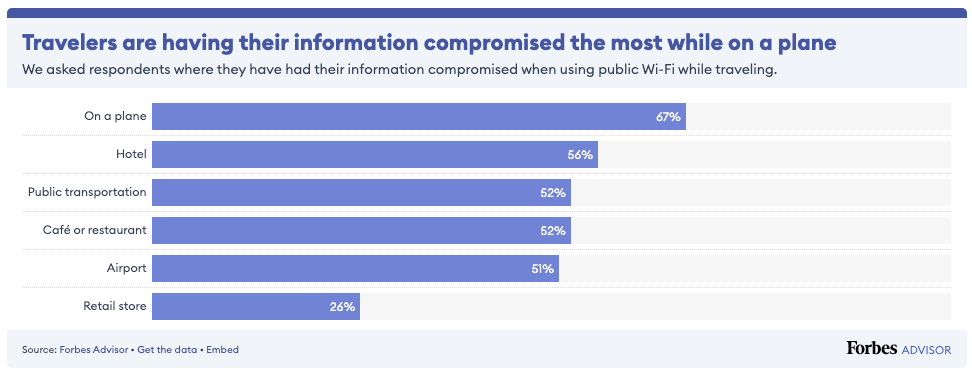
The numbers below reveal that data security risks on public Wi-Fi aren’t limited to just one type of location; they are present in many public spaces, making it a common issue for travelers, no matter where they connect.
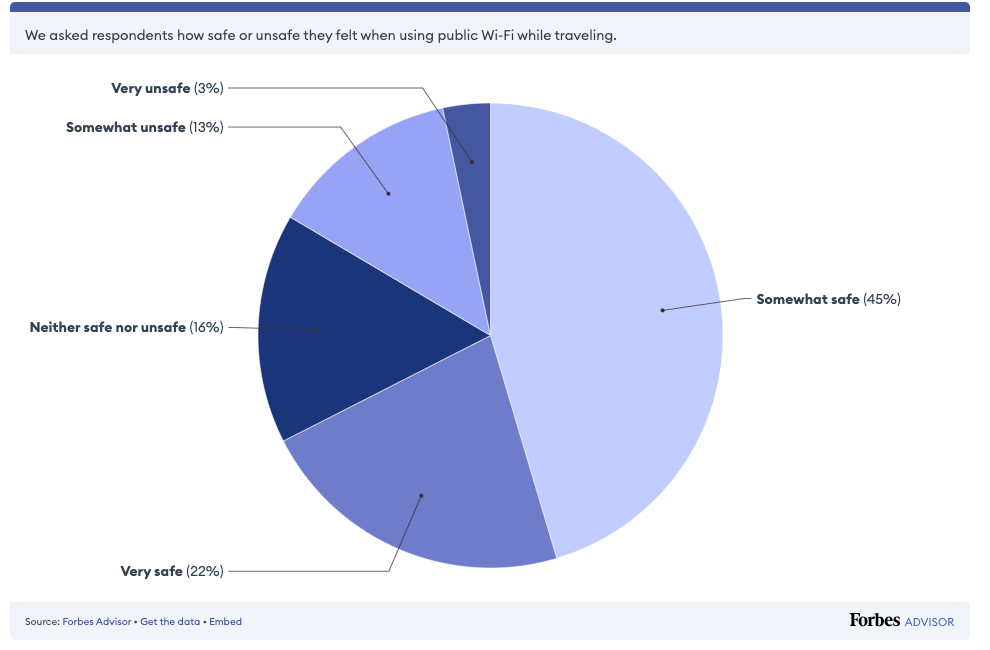
When Forbes Advisor took a closer look at user perceptions, it revealed a clear gap between the convenience of public Wi-Fi and how people assess its safety.
In response to the question, “How safe or unsafe do you feel when using public Wi-Fi while traveling?”, travelers expressed varying levels of comfort. Only 3% reported feeling very unsafe, while 13% felt somewhat unsafe. Another 16% were neutral. The majority, however, showed confidence; 45% felt somewhat safe, and 22% felt very safe.
Altogether, more than two-thirds of travelers believe public Wi-Fi presents little to no serious threat. This contrast between real cybersecurity risks and public perception highlights how easily the dangers of open networks can be overlooked.
The diagram illustrates a discrepancy between travelers’ confidence in the security of public Wi-Fi and the actual cybersecurity risks, highlighting a lack of awareness of these threats.
But beneath this widespread sense of safety lies a more troubling reality. Public Wi-Fi networks often hide threats that most users are completely unaware of. To understand what really happens behind the scenes, let’s take a closer look at the hidden dangers concealed in public Wi-Fi.
The Hidden Dangers Concealed in Public Wi‑Fi
1. Unencrypted networks
One of the serious risks of public Wi-Fi is the lack of encryption on many networks. According to Kaspersky Security Network, 24.7% of public hotspots worldwide do not use any form of encryption, meaning that the data you send, such as login details, emails, and form submissions, is vulnerable to exposure.
Anyone nearby with basic equipment can intercept and capture this data as it travels between your device and the access point. Without encryption in place, your personal information becomes an easy target for attackers.
2. Man‑in‑the‑Middle Attacks (MITM)
This lack of encryption leaves your data vulnerable to more than someone spying on your activity. It also opens the door to more active threats, such as Man-in-the-Middle (MITM) attacks.
In this type of attack, a hacker intercepts the connection between your device and the destination, allowing them to monitor activity, alter messages, or inject malware. Unsecured public Wi-Fi makes these attacks much easier to carry out.
3. Fake hotspots (Evil Twin Attacks)
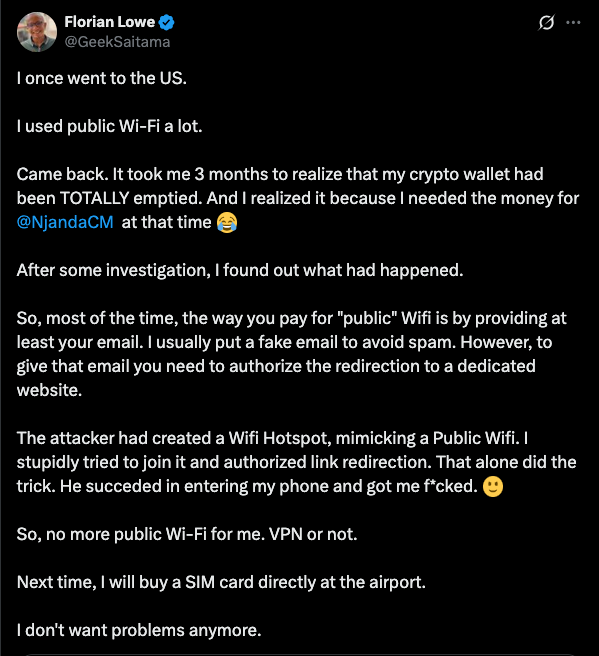
Another tactic cybercriminals use involves setting up fake Wi-Fi hotspots, commonly known as evil twin attacks. In these cases, hackers set up rogue Wi-Fi networks with names that closely resemble legitimate ones, like “Starbucks_Free_WiFi” or “Airport_Guest”, to trick users into connecting. Once connected, any information you send can be captured, including login credentials and personal details.
In one case, an Australian man created fake Wi-Fi networks at airports and even on flights in cities like Perth and Melbourne to steal travelers’ private information. He now faces multiple charges for intercepting sensitive information.
Unfortunately, this kind of attack isn’t rare; travelers have been compromised in various public spaces around the world. These tend to happen in specific areas where users often connect without a second thought.
4. Common Places Travelers Have Been Compromised on Public Wi-Fi
Public Wi-Fi may seem harmless, but real-world data shows that travelers have been compromised in many everyday locations. A significant number of security breaches occur in places where people trust the most; 67% of reported incidents took place on planes, 59% at airports, and 52% in cafés or on public transportation.
These are common spots where travelers quickly connect without thinking twice, often unaware of the risks associated with them. Making matters worse, approximately 34% of users still connect without using any protection, such as a VPN, leaving their personal information vulnerable to exposure.
Airports and hotels are particularly high-risk zones. Hackers often exploit these busy, high-traffic environments to set up fake Wi-Fi networks or tampered USB charging stations designed to steal sensitive data.
In 2024, U.S. transportation authorities issued warnings about these so-called “honeypots.” Similar attacks have been documented in other parts of the world, including arrests involving fake Wi-Fi setups at major airports.
What’s at Risk When You Connect to Public Wi‑Fi
1. Personal data
Every time you type a password, send an email, or fill out a form on an unsecured public Wi‑Fi network, sensitive information can be intercepted. This includes usernames, passwords, credit card numbers, medical data, tax IDs, private messages, and more. Public hotspots often use weak or no encryption, allowing attackers on the same network to capture your data using simple interception tools.
2. Corporate data
However, it’s not just personal data at risk; company data is also a target. Hackers can intercept sensitive emails or access corporate systems through an unsecured connection. Public Wi-Fi has been linked to corporate data breaches, with 12% of incidents traced back to employees using unsafe networks while traveling. IT teams continue to see public Wi-Fi as a serious security concern.
3. Malware infection & device compromise
Beyond data theft, public Wi-Fi also opens the door to malware infections. Cybercriminals exploit vulnerabilities to inject malicious software directly into your device; ransomware, spyware, and keyloggers are common threats. Once installed, malware can enable remote access, steal sensitive data, or completely take control of the device.
Best Practices to Protect Yourself on Public Wi‑Fi
While public Wi‑Fi is a widely used convenience, it’s also associated with risks that can compromise both personal and business information. Still, this doesn’t mean you have to avoid public Wi‑Fi entirely. There are straightforward steps you can take to stay protected. Whether you are grabbing a quick coffee or working from an airport lounge, here’s how to use public Wi‑Fi more safely.
1. Verify network names before connecting
There’s a little excitement when you find free Wi‑Fi with no password. However, before you click “Connect,” take a moment to confirm the network name with a staff member. Hackers create fake Wi-Fi hotspots that have convincing names designed to trick travelers. Do not sacrifice your security for convenience.
What to do instead: Before you connect, ask a staff member, “Hey, what’s the official Wi‑Fi here?” A two-second question could save you from weeks of damage control.
2. Disable auto‑connect to Wi‑Fi Networks
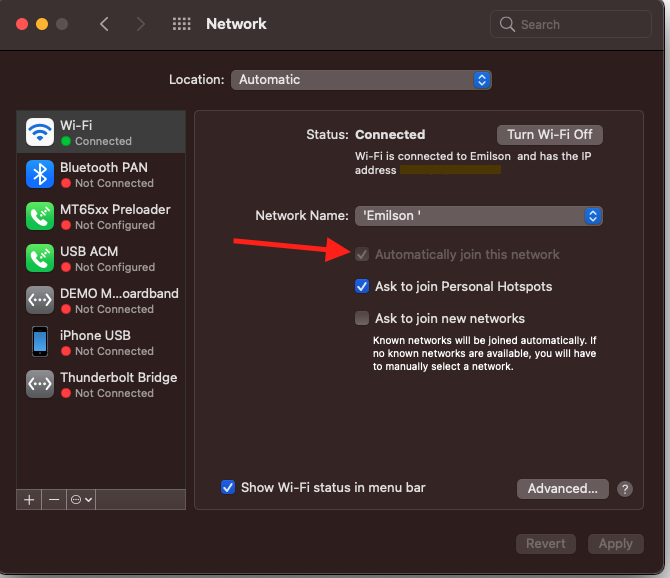
I know, typing the Wi‑Fi password every time can feel like a pain. That’s why you set your phone to auto-connect to networks you have used before; it just makes life easier. But this approach is risky.
Here’s the issue: Let’s say you connected to public Wi‑Fi at your local coffee shop a few weeks ago. When your device automatically reconnects, it doesn’t check whether that network is still secure. It’s just looking for the name, even if the actual network has been compromised or spoofed by a hacker. To stay safe, go into your Wi-Fi settings and ensure your device prompts you before connecting to any available network. You can do this by unchecking the option that says “Automatically join this network.” It may feel like an extra step, but it puts you back in control of when and how you connect.
3. Only use HTTPS websites
Not all websites are created equal. If you’re on public Wi‑Fi and visit a website without encryption (i.e., it starts with “http” instead of “https”), any information you enter could be visible to someone monitoring the network.
Always check for the padlock icon in the address bar and make sure the site starts with “https://”. Modern browsers often alert you if a site is not secure. These encrypted sites help protect your login details, personal info, and browsing activity, even on open Wi‑Fi.
4. Avoid public Wi‑Fi for sensitive activities
If you’re reading the news, checking public transit times, or scrolling social media, public Wi‑Fi might be fine, assuming the website is secure.
But when it comes to online banking, shopping, sending work emails, or accessing business accounts, it’s best to wait until you’re on a trusted, private connection. Doing all of these activities on public Wifi is like shouting your PIN in a crowded room. Sensitive transactions over unsecured networks are a common cause of identity theft and financial fraud. A general rule: If you wouldn’t want a stranger seeing it, don’t do it on public Wi‑Fi.
5. Turn off file sharing
One often overlooked risk is file sharing. On many devices, file and printer sharing are enabled by default when connected to trusted networks, such as your home network.
However, when you’re on public Wi‑Fi, this setting can be dangerous. If file sharing is enabled, others on the same network may be able to access your files or even send malicious ones directly to your device.
To protect yourself:
Go to your device’s network settings.
Disable file sharing and network discovery while on public networks.
Ensure your firewall is enabled.
These settings can prevent strangers from poking around your device while you’re connected.
6. Use a VPN whenever possible
If you frequently work from public spaces, investing in a reputable VPN service is one of the smartest moves you can make. A VPN creates a secure, encrypted tunnel for your data, protecting your connection even on the most insecure networks.
A VPN is just like wearing a mask while walking through a smoky room; nobody can see who you are or what you’re doing. With many VPNs offering one-click setup on both mobile and desktop devices, it’s never been easier to stay safe on the go.
Although a VPN may not be all that, because the websites you are visiting are not protected, you may still fall into risk. However, it still helps to encrypt your traffic and hide your online activity from prying eyes.
7. Use your private network for added security
If you are unsure about using free public Wi-Fi, it’s often safer to use your phone’s personal hotspot instead. It creates a private connection over your mobile data, so you’re not sharing the network with strangers.
Frequently Asked Questions (FAQs)
To help clarify some of the most common concerns about public Wi‑Fi usage, here are answers to questions people frequently ask:
Is it safe to use public Wi‑Fi for banking transactions?
No, it is not safe. Avoid logging into your bank account or performing any financial transactions while connected to public Wi‑Fi. Some of these networks are often unsecured, which makes it easier for attackers to intercept sensitive data. If necessary, use your mobile internet for this purpose.
What are Evil Twin Wi‑Fi networks?
Evil Twin networks are malicious Wi-Fi hotspots that masquerade as legitimate networks. Attackers set them up to trick users into connecting, allowing them to intercept data and steal sensitive information.
Can my personal data be stolen on public Wi‑Fi?
Yes, your personal data can be stolen if you are connected to public Wi‑Fi without any protection. These networks are typically unsecured, meaning anyone on the same network can intercept your data.
When you visit a website that uses HTTP instead of HTTPS, the information you enter, like usernames, passwords, emails, or credit card details, is sent in plain text.
This makes it easy for attackers to capture and read your data using basic tools. To stay safe, always use websites with HTTPS and consider using a VPN to protect your connection.
Should I use a VPN on public Wi‑Fi?
Yes. A VPN (Virtual Private Network) is one of the best tools for protecting your data on public networks. It encrypts your internet traffic, making it unreadable to hackers, even on unsecured connections. Make sure to use a trusted and reputable VPN provider; free versions may not offer sufficient security.
It’s easier than ever to get around a city, country, or anywhere on the planet, thanks to the current digital sophistication in booking flights, rides, and other modes of transportation online. However, to offer customers a complete experience that meets all their travel needs requires transportation companies to integrate third-party tags from partner companies that an organization’s development team may never even see, let alone secure.
Transportation companies use these third-party service tags to connect their websites to external sites, allowing them to upsell services to partner companies, such as car rental, hotel, or travel insurance companies. Website tags also collect data on user behavior, demographic information, and purchase history to personalize a customer’s experience, as well as link to third-party chatbots for customer support.
These tags have certainly enabled players in the transportation industry to transform their digital business, integrating new functionality into their websites quickly to make it easier than ever for customers to make purchases and receive customer or technical support, quite literally on the fly. However, they also leave digital transactions exposed to external risks that an organization may not even be aware of.
Risks of Third-Party Tags in the Transportation Industry: An Aviation Use Case
British Airways, for example, in 2019 was the victim of a Magecart attack in which attackers skimmed the information of about 500,000 customers from the company’s website. The UK-based airline not only lost customer data and confidence, but even incurred a fine of £183.39 million ($229.2 million at the time) for not reporting the incident according to the European Union’s General Data Protection Regulation (GDPR), which mandates the time frame in which a company must disclose a breach.
In fact, this incident spurred another airline serving international customers to approach Jscrambler and its client-side solution to secure their website, hoping to avoid a similar scenario. Company officials suddenly wondered whether their own website also had security gaps that cybercriminals could exploit, threatening the safety of customer data and dooming them to a similar fate.
When the company examined its practices, officials found a common problem among non-digital-native organizations rapidly upgrading their digital business: their approach to security was more manual than technical, relying on checklists and paperwork rather than a deeper understanding of how JavaScript and third-party tags on their websites work.
Although the organization had security staff who could do the heavy lifting to secure new scripts as they were added, they prioritized innovation over process, using workarounds to get things up and running quickly rather than doing due diligence to monitor new scripts in real-world conditions. This created security risks that could inadvertently open the door to compromise or be exploited by a threat actor.
Addressing the Security Risks
Enter Jscrambler’s comprehensive client-side monitoring solution, which helps organizations not only discover where third-party tags put data at risk, but also control those tags. Jscrambler provides policies and controls through which third-party tags must pass, ensuring that only approved tag behaviors and data captured during a third-party transaction or interaction leave their secure website.
In fact, during implementation, Jscrambler made a critical discovery that one of the third-party tags the client was using to connect to a partner website was leaking customer booking codes from the client’s website to the partner site during the transaction.
This is no minor data leak, as these codes are the key to a person’s reservation and hold a trove of personal and sensitive data about customers – including personally identifiable information (PII), travel plans, transaction data, passport information, and the like – that could be exploited if it falls into the wrong hands.
Jscrambler’s Client-Side Solution
While companies need to expand their partner ecosystem by connecting with third-party companies through tags, they also need to have controls like those provided by Jscrambler’s client-side solution because “people make mistakes,” says Rui Ribeiro, Jscrambler’s CEO.
“The overall picture is: we need to have controls and make sure that all the third parties that you need to build an effective and practical website only have access to the data that they need to do the work that they need to do,” he says.
Luckily, it was an easy fix to prevent the booking code from being shared with the partner company; however, this could happen with any transportation organization that uses tags to connect with partners for a modern website experience.
This type of inadvertent exchange of sensitive data, such as booking codes, is a security issue that many airlines and other transportation companies aren’t aware of, Ribeiro says. That’s why Jscrambler must give companies visibility into the data exchanged between third-party tags and their website, and control over what data is shared.
To put such controls in place, the client used Jscrambler’s Form Fencing feature, which offers behavioral control over third-party tag access to form data based on policies and user-defined rules. This puts the client in the captain’s chair, ensuring only necessary scripts can read and access form data and preventing malicious actors from siphoning sensitive information from web forms.
Jscrambler’s solution also provides clients with tag visibility by alerting them to significant modifications or non-compliant behavior in third-party tags, enabling continuous assessment of a company’s exposure to third-party vendor risk. This feature is a competitive advantage over the static policies that other modern client-side protection solutions use, which can’t keep up with third-party tag software updates.
Transportation companies want to focus on the digital experience they present to customers and not on worrying about how third-party tags might expose customer information. Jscrambler’s client-side protection can help them maintain digital agility while ensuring cybercriminals don’t use malicious scripts to fly away with booking codes – or any other sensitive data.
Whether your business is large or small, whether you trade in physical places, on the Internet, over the telephone, or via mail order, and whether you accept hundreds or hundreds of thousands of card payments monthly—can your business afford to be hacked?
Customers will not thank your business or continue to reward it with loyalty if you lose their data or handle it in a way that someone else can steal and misuse it. That’s the bottom line.
So, it stands to reason that all businesses must improve their data breach prevention, proactively defend themselves, and safeguard their ability to trade and continue trading online. That can be primarily achieved by protecting customer data, especially payment data, but also by protecting their own intellectual property (IP) and enforcing software licensing.
How to Stop Data Breaches: What Is The Strongest Way To Protect Sensitive Customer Data?
When it comes to protecting sensitive customer data online, prevention is better, cheaper, and less painful than the cure.
Businesses want to choose a platform that protects them against client-side attacks, script injections, and unauthorized access to sensitive data by potentially dangerous third-party tags, pixels, and trackers. Plus, one that helps them:
EnableIn-Depth Defense
Keep your business secure and compliant by layering your levels of protection with code obfuscation and maximum visibility over third-party scripts.
Navigate Changing Regulations
Stay ahead of the ever-changing regulatory landscape with a platform that helps your business comply with new requirements, like PCI DSS v4, before they become effective.
Deliver Short-Term ROI
Consider a platform that’s managed offsite and needs minimal maintenance once in place to demonstrate short-term ROI.
Manage Risk Effectively
Benefit from continuous, real-time monitoring of first- and third-party scripts on payment pages and forms and get instant alerts of anomalies and suspicious behavior.
Move Faster, Be Bolder
Become a fearless digital innovator, knowing that your IP and sensitive data are secure and your user experience is unaffected by page performance.
Strike The Right Balance
Seamlessly integrate compliance into business processes without trade-offs between security, compliance, and business goals.
Partner With A Client-Side Protection Leader
Choose a best-in-class client-side protection platform trusted by big-name brands.
Reverse engineering, zero-day exploits, code modification, and more. The hacker threat is real. Safeguard your customer data, intellectual property, and digital assets, as well as your revenue and competitive advantage.
Is Client-Side Validation Sufficient For Security?
Client-side validation is important in improving user experience by catching errors early. For example, it provides an immediate prompt when a user enters an invalid e-mail address. However, relying on client-side validation exclusively is risky for several reasons.
Client-side validation is executed in the user’s browser, which means it can be easily bypassed or manipulated by an attacker. The validation logic is part of the client-side code and is visible to anyone. Such transparency makes it easier for attackers to understand how to circumvent checks.
Different browsers or user settings may affect client-side code, potentially leading to inconsistent validation results. What’s more, security measures should always be implemented in layers. A successful security strategy should be less of a single line of defense and more of an in-depth defense.
For example, Jscrambler’s comprehensive JavaScript monitoring and protection solution ensures your web apps are protected from client-side threats without damaging user experience and simplifying data privacy and compliance.
Application Shielding
With polymorphic obfuscation, code locks, and runtime protection, attackers can’t reverse engineer, debug, or tamper with your web/mobile app code.
Webpage Threat Mitigation
Powerful and granular rules engine to control each script running on your website. Allows proactive or reactive blocking of scripts exhibiting malicious behavior.
Real-Time Threat Notifications
Get instant alerts and benefit from real-time self-defense against tampering, debugging, or poisoning attempts.
Compliance with Regulations
Manage data access and transfer on the client side to better comply with regulations, such as PSD2, PCI DSS, GDPR, and CCPA.
Third-Party Risk Management
To secure your supply chain, the Jscrambler engine scrutinizes every user session in real time, regardless of the user’s device or browser.
Jscrambler enables online businesses to prevent consumer data leakage with client-side protection and compliance solutions.
What Are The Repercussions Of Data Security Breaches?
The fully loaded costs of a data breach are far bigger than just the cost of regulatory fines, although these can be significant. For example, non-compliance with GDPR can be up to 4% of annual global turnover or €20 million. The business repercussions could be extensive. They include operational disruption, lost productivity, staff downtime, increased insurance premiums, the cost of recovering lost information, equipment, or data, and the lost revenue of being unable to trade.
Then there are the direct costs: incident response costs, technical and forensic support costs, breach notification costs, compliance and regulatory fines, and the indirect costs of loss of brand value, reputation, and trust.
How Do Security Breaches Impact Compliance?
Non-compliance with data security breaches can result in fines, enforcement notices, regulatory investigations, and significant costs (direct, indirect, and opportunity costs).
How To Handle Website Security And Data Protection
Digital skimming, sometimes also known as e-skimming, web skimming, data skimming, or formjacking, involves stealing sensitive data inputted by users into web forms.
Skimming is becoming more sophisticated and prevalent. In the first two months of 2025 alone, there have been several high-profile skimming attacks.
US food delivery platform Grubhub confirmed in February 2025 that hackers breached its internal systems to access the personal details of customers and drivers. More than 375,000 merchants and 200,000 delivery providers in over 4,000 US cities use the Grubhub platform.
UK telecommunications company Talk Talk initiated an investigation in January 2025 after a hacker claimed to sell information from current and former customers online.
Given JavaScript’s ubiquity and innate security vulnerabilities on payment pages, the PCI Security Standard Council (PCI SSC) published an updated version of the PCI Data Security Standard (PCI DSS) in March 2022.
Requirement 6.4.3—The first PCI requirement is designed to minimize the attack surface and manage all JavaScript present on the payment page.
Requirement 11.6.1 – The second PCI requirement aims to detect tampering or unauthorized changes to the payment page and generate an alert when changes are detected.
Jscrambler helps businesses that accept card payments achieve frictionless compliance with requirements 6.4.3 and 11.6.1 of PCD DSS v4. Fast-track your compliance by protecting your web pages within 24 hours of deployment. Our agentless monitoring solution flags potential follow-ups as they occur.
Don’t just take our word for it. Request a free, no-obligation demo today to see these features in action.
Data fencing security: Cybercriminals are opportunists. As the level of interaction between users and websites escalates, an increasing amount of private data is being exposed in the browser – and these criminals are ready to pounce.
The subsequent exacerbation of client-side cyberattacks is a symptom of businesses expanding their investment in the end-user digital experience without reinforcing their cybersecurity controls. In 2023, the global average cost of a data breach — the biggest risk of a client-side attack — reached $4.45 million, a 15% increase over the last three years.
Amid this relentless barrage of threats, the fragility of web security perimeters is being exposed. Whether they have been the victims of client-side attacks or feel they could be next, businesses are becoming acutely aware of the need to implement proactive measures to safeguard sensitive data by controlling and restricting access to it—known as data fencing.
Recognizing you must do something to fence off your data is not enough. Businesses must understand how to prevent unauthorized users or processes from accessing, modifying, or stealing valuable information – and take necessary action.
Unfortunately, data fencing blind spots lead to gaps in the web security perimeter that cybercriminals are primed to exploit, perpetuating the proliferation of client-side attacks. So, what are the benefits of data fencing, and how do you go about solving this data security dilemma?
Data fencing: Why?
Data fencing supports a fundamental element of data security that has its roots in regulatory compliance: data integrity. This assurance that digital information is uncorrupted and can only be accessed or modified by authorized users fosters complete, accurate, consistent, and safe data throughout its lifecycle.
With integrity at its core, robust data fencing offers compelling benefits that combine to build a strong web security perimeter:
Data protection
By setting up access controls—we’ll get into that later—you can ensure that only authorized users or systems can access specific data, reducing the risk of costly data breaches. Protecting sensitive data from unauthorized access and manipulation is crucial to maintaining its confidentiality, integrity, and availability—and your business’s reputation.
Regulatory compliance
A slew of new and existing data privacy laws, regulations, and standards, such as the General Data Protection Regulation (GDPR), have been introduced to reinforce defense against escalating client-side attacks, both in terms of frequency and sophistication.
By maintaining data confidentiality, integrity, and availability, fencing can align your business with regulatory requirements and industry standards – shielding it from the legal and financial consequences of non-compliance.
Data availability
If data is compromised, inaccessible, missing, or incomplete, your business’s performance and continuity will suffer. By restricting unauthorized access to sensitive data, data fencing can also ensure that the right people have timely access to the data they need and that it remains useful—promoting data availability while maintaining security.
Customizable policies
Data fencing empowers you to establish specific access control policies that align with your business’s unique data security and management requirements. These policies can be tailored to different data types and user roles and can adapt to the dynamic cyber landscape as data evolves and new threats emerge – maintaining your resilience.
Trust and reputation
Data breaches can harm your business’s reputation and erode the trust of customers, partners, investors, and stakeholders. Implementing strong data fencing measures and communicating them clearly will help you build and maintain trust and reputation by reassuring customers that their data is secure amid the prevalent threat of cyberattacks.
Data fencing: How?
There’s no silver bullet for safeguarding your business’s data. The process of creating a protective virtual boundary around sensitive data to control access and usage is multifaceted.
Let’s explore the arsenal of methods that you can leverage to build a strong web security perimeter:
Data classification
This process of ranking data sensitivity within a system using pre-defined categories – typically Public, Private, Internal, Confidential, and Restricted – provides the foundations for fencing. Once the data has been categorized, you can achieve a ‘need to know’ approach to data security by tailoring measures for each category and determining what data is public versus private – making it easier to access and secure.
A robust classification system safeguards highly sensitive data, such as customers’ personal information, and helps you focus on confidentiality and security policy requirements, such as user permissions and encryption.
Data encryption
Data encryption is a web security measure that defends your sensitive data against cyber-attacks, including malware and ransomware. Encryption algorithms disarrange the data transmitted between the user’s browser and the web server, making it exceptionally difficult for cybercriminals to intercept and decipher.
This technique for translating data from plaintext (unencrypted) to ciphertext (encrypted) permits users to access encrypted data with an encryption key and decrypted data with a decryption key – securing transmitted data on the cloud and computer systems.
For example, secure communication protocols like HTTPS and SSL/TLS are used to perform web form fencing through encryption. By encrypting sensitive form data, you can ensure its integrity, authenticate the server, and create a trust framework through certificate authorities.
Data masking
Like encryption, data masking is an obfuscation method that transforms data to make it unintelligible for security purposes. Unlike encrypted data, which will always have an encryption key to view the initial data set, masking permanently replaces the original data with fictional data that looks similar. With all the authentic data masked, it becomes useless if intercepted by an attacker.
To be effective, the masked data must preserve the distinguishing characteristics of the original unmasked data to ensure that requests and analysis still produce the desired results. This requires the new masked data set to sustain referential integrity across systems and databases.
Tokenization
Tokenization is the process of replacing sensitive data with non-sensitive identification symbols—referred to as tokens—that cannot be exploited but retain the essential elements of the data.
De-tokenization retrieves the original data element associated with a given token. Applications often necessitate access to the original data or a specific component of it to make informed decisions, conduct analysis, or facilitate personalized messaging. To reduce de-tokenization and mitigate security risks, tokens can preserve certain attributes of the original data. This enables the utilization of token values for processing and analysis rather than exposing the original data in full.
This technique is typically used to reinforce the security of e-commerce transactions by tokenizing the data so that organizations can use and process credit cards without storing them in the application database. Moreover, it reduces the cost and complexity of compliance with industry standards and government regulations.
Multi-factor authentication (MFA) is a multi-step account login process that requires users to provide more than one method of authentication from independent categories of credentials.
MFA secures data by augmenting the traditional username and password authentication (something you know) with something you have, like a one-time code or response to a push notification and/or something you are, such as a fingerprint or facial recognition.
This layered approach to web security places more than one barrier in the defence of a network or database for an attacker to breach.
According to Microsoft, 99.9% of the compromised accounts they track every month don’t use MFA – a powerful testament to its effectiveness in protecting data and systems from cybercriminals.
Reinforce network security
Network security is a catch-all term for the security solutions available to better protect sensitive data from being accessed and compromised. Tools like antivirus software, virtual private networks (VPN), and firewalls help create a secure IT environment for users by protecting the integrity of your computer network and the data within it.
For example, each day, the AV-TEST Institute registers over 450,000 new malicious programs (malware) and potentially unwanted applications (PUA) – amplifying the value of these tools for your business in guarding against malicious attacks.
Conclusion
With an understanding of data fencing’s benefits and its methods, you can establish a web security perimeter that keeps your data in and cybercriminals out.
By fortifying sensitive data against cyberattacks, your business will achieve data integrity and reap the rewards: enhanced reputation, regulatory compliance, informed decision-making, business continuity, and competitive advantage.
Watch the Jscrambler on-demand webinar with Sikich experts to explore why CSP/SRI fall short, the risks of incomplete web protection, and best practices for robust, cost-effective PCI DSS v4 compliance. Learn how automated, client-side solutions deliver real-time threat monitoring, tamper detection, and scalable security.
Healthcare organizations ushered in the new year with the stark realization that healthcare data breaches were rampant in 2024. New Year’s resolution or not, the time to strengthen client-side protection against data loss, security vulnerabilities, and malicious threats is now.
The data doesn’t lie; 2024 marked a record-breaking year for healthcare-related data breaches in the U.S. and globally. According to information shared by the U.S. Department of Health and Human Services’ Office for Civil Rights, by December 20, 2024, there had been 677 major healthcare data breaches affecting more than 182.4 million people in that year alone. Hacking and IT incidents represented the most significant type of attack, and client-side threats can allow attackers to steal sensitive medical data, leading to potentially larger attacks, privacy violations, and financial losses.
Recent data shows that third-party tracking technology is present on nearly 99% of “hospital websites, which includes transfers to large tech companies, social media companies, advertising firms, and data brokers.”
The omnipresence of these technologies demands the healthcare industry proactively protect patient data, mitigate data leakage, and prevent bad actors from executing malicious code by injecting scripts or manipulating application functionality on the client side.
Identifying Client-Side Vulnerabilities for Healthcare Data
When discussing threats to data integrity, it is often assumed that a bad actor is actively working to compromise systems to gain access to valuable data. It is a fair assumption. However, with the way third-party vendor services operate, sensitive user data can be unwittingly exposed to unauthorized access due to third-party tags (or scripts) being present on the website pages where they should be restricted. And in many scenarios, that is the case. However, some third-party tagging technologies can unwittingly expose sensitive user data to unauthorized third parties.
Take data leakage, for instance. Data leakage via third-party tags happens when an organization inadvertently gives access to sensitive user information by allowing third-party tags to “roam” the website freely, including login and payment data forms. Vulnerabilities in third-party vendor software or misconfigurations can lead to unauthorized access to customer, patient, or user data.
When a website integrates code from a third-party ad network, analytics platform, or other service, the code may unintentionally collect and transmit user data, like browsing history, demographics, or even personal details such as date of birth or social security numbers, with unauthorized third parties. Even when small, these data leaks could lead to significant consequences such as legal issues, identity theft, financial loss, and disruption to operations. With multiple tags from various sources running on websites, the risk of data leakage grows exponentially.
Another more intentional threat is digital skimming. Digital skimming is a fraudulent process of capturing and transferring payment card data. It involves bad actors injecting malicious code into third-party scripts on a website. The code then skims the credit card data when entered into payment forms.
Because hackers continuously look for vulnerabilities to exploit, client-side vulnerabilities can be especially appealing. By exploiting weaknesses in the applications the end user is actively using, attackers cannot only steal data on a client device but also install malware and gain unauthorized access to systems.
Hackers target client-side vulnerabilities because they are less secure and give them direct access to user data such as login credentials or credit card details. The client-side also represents a much wider attack surface to hackers because of the number of applications and browser extensions running on an end-user device. Hackers also depend on users not being current with software updates, leaving known vulnerabilities open to attacks.
For healthcare organizations, all of this will negatively impact patient care and a slew of other potential risks. The adverse outcomes of client-side data breaches run the gamut of:
Disruption of patient care: When healthcare data are compromised, it can lead to delays in treatment, difficulty accessing records, and disruption of essential medical procedures.
Data breaches: Hackers exploit vulnerabilities in web applications to steal sensitive data such as diagnoses, prescriptions, and insurance details—which can lead to privacy violations, identity theft, and potential lawsuits and settlements.
Digital skimming attacks: Bad actors use the lack of visibility into third-party scripts on websites to introduce malicious code into the patient’s browser, primarily to steal cardholder data.
Phishing attacks: Attackers create a fake or mirrored website hosted on a fraudulent URL to trick end users into divulging personal and sensitive information.
Reputation damage: A data breach can significantly damage a healthcare organization’s reputation, which could ultimately lead to lost patient trust and business.
Tracking Codes and Compliance
While common across websites, third-party tracking codes must follow different rules on healthcare provider sites.
Healthcare websites utilize third-party trackers to improve provider services, but the same technology becomes a risk vector when unauthorized data is shared with technology providers. Examples of third-party tags include Meta pixel, Google Analytics, LinkedIn Insights, Snapchat pixel, TikTok pixel, Twitter conversion tracking, and other custom tracking pixel tags implemented by a third-party ad network or marketing platform.
These code snippets utilize cookies, web beacons or pixel tags, and other tracking technologies to identify users across different websites. The data collected can help healthcare providers gain insights into patient behavior, identify trends in health needs, optimize website usability, and deliver more personalized and proactive care. Problems arise with third-party tracking technologies when patient privacy is put at risk, and those collecting the data potentially misuse sensitive health information. A lack of transparency regarding how data is collected and utilized could also put healthcare providers in a precarious compliance situation.
Guidance from the U.S. HHS’ Office for Civil Rights details how HIPAA-regulated organizations must have a business associate agreement (BAA) in place with the provider of the code or authorization from patients—or be found in violation of the Health Insurance Portability and Accountability Act. And while the guidance is clear, a recent analysis of healthcare websites found that one-third of those websites analyzed still use Meta Pixel tracking code—even with the risk of repercussions such as “lawsuits, data breaches, and fines for non-compliance with the HIPAA Rules.”
For instance, Novant Health settled a $6.6 million pixel privacy breach lawsuit in January 2024. The Lawsuit involved pixel code that collected personally identifiable information on their patient portal, intending to improve care with virtual visits. In this case, the tracking pixels also transferred the data of more than 1.3 million individuals to third-party technology companies that were not authorized to receive the data.
Closing the Loop on Client-side Threats
Fortunately, healthcare organizations can follow key security steps to keep this year’s resolution and protect their end users on the client side.
To safeguard against client-side attacks, healthcare organizations can implement strict access controls, deploy robust endpoint protections, conduct regular security audits, protect mobile devices, limit network access, educate employees on cybersecurity best practices, and more. Client-side protection platforms offer healthcare providers an additional required layer of security against hackers and data leakage by protecting end users when interacting with websites and applications in a few critical ways.
Managing Script Inventory
By automatically identifying all third-party vendors and scripts present on each web page, script inventory management allows users to maintain a real-time list of all scripts running on their website—including third-party tags. This provides visibility into potential security risks and helps ensure organizations stay compliant with regulations such as PCI DSS. Client-side protection platforms act as a comprehensive script tracking system by identifying and managing potentially unauthorized scripts on payment pages.
Blocking Access to Data
By identifying and limiting third-party vendors’ access to forms and data input into those forms, client-side protections such as form fencing allow clients to control which scripts can read and access form data. These platforms offer powerful and granular rules engines that give healthcare organizations full control of each script running on their website.
Controlling Data Exfiltration
By setting specific rules for how third-party tags interact with data, protection platforms can restrict access to sensitive information and prevent unauthorized data transfer.
Stopping Formjacking and Magecart Attacks
By monitoring and security forms on healthcare websites, client-side protection can stop attackers from capturing sensitive data such as healthcare interests searched by patients. Client-side protection can also prevent Magecart attacks, which target e-commerce sites by injecting malicious code into checkout pages and allowing threat actors to skim user card details in the HTML form.
Detecting Threats and Data Leakage in Real Time
By continuously monitoring end-user sessions, client-side platforms can identify suspicious activity, quickly intervene, and mitigate threats. For instance, client-side protection platforms can identify potential data leaks by analyzing how third-party tags interact with sensitive data on a website.
Complying with Standards & Regulations
By providing additional protections on the client side, healthcare organizations can adhere to data privacy regulations like HIPAA and PCI DSS v4 when accepting payments on their websites.
Jscrambler provides even more protection against client-side data leakage and attacks, from which healthcare providers can benefit.
Comprehensive: Jscrambler is the only client-side security and compliance platform to natively combine first-party JavaScript obfuscation with third-party tag protection. Jscrambler’s Code Integrity obscures JavaScript code used in healthcare, making it difficult for hackers to understand and exploit vulnerabilities to steal patient data. Jcrambler’s Webpage Integrity blocks unauthorized behavior and offers protection against data breaches, form jacking, web skimming attacks, and data exfiltration.
Fine-Grained Control: Employ fine-grained rules for managing forms and sensitive data. Our solution provides real-time detection and response capabilities, issuing alerts for suspected fraudulent or risky activities.
Top-Notch Performance: Jscrambler is designed to effortlessly scale to support the largest and most demanding websites without causing any slowdown or disruption to the online user experience.
Sweeping Client-Side Security & Compliance Policy: Jscrambler is unique in its ability to support the formulation by all involved teams (product management, software development, security, digital, marketing, as well as governance, risk, and compliance) of a centralized security policy encompassing all client-side related risks and regulatory compliance requirements. The policy is sweeping, comprehensive, fine-grained, company-wide, and future-proof. Out of the box, businesses can comply with one or several security standards, including HIPAA, PCI DSS v4, PSD3, and others.
Trusted Expertise: Jscrambler helps its clients succeed in using its industry-leading platform at every step. For third-party tags, skilled consultants are available to guide them in setting up the best risk mitigation strategies, including suitable data fencing tactics. Jscrambler also offers Managed Services for PCI DSS v4 Compliance (requirements 6.4.3 and 11.6.1) so that security teams don’t have to orchestrate script authorizations or have compliance concerns.