
Product: Code Integrity

Jscrambler 101 – Anti-Debugging

Welcome back to Jscrambler 101! A collection of tutorials on how to use Jscrambler to protect your JavaScript. This tutorial is about the Anti-Debugging transformation and covers Jscrambler version 8.3.

Introduction

We will explore Anti-Debugging, a new Jscrambler feature released in version 8.3. The Anti-Debugging feature protects your application by making it harder for attackers to debug an app by activating defenses that stop any reverse engineering attempts.

About Anti-Debugging

Before Anti-Debugging, Jscrambler offered an anti-debugging capability within the Self-Defending transformation. However, some concerns about more advanced reverse engineering and piracy ran deeper than this defense. Debugging with malicious intent, through, for example, bypassing the debugger with event listeners’ breakpoints, and then removing/disabling the fingerprinting or tampering with a license verification mechanism, was becoming a great concern. The Anti-Debugging feature was developed to make it increasingly harder for attackers to debug the code and commit fraud.

How does Anti-Debugging work?

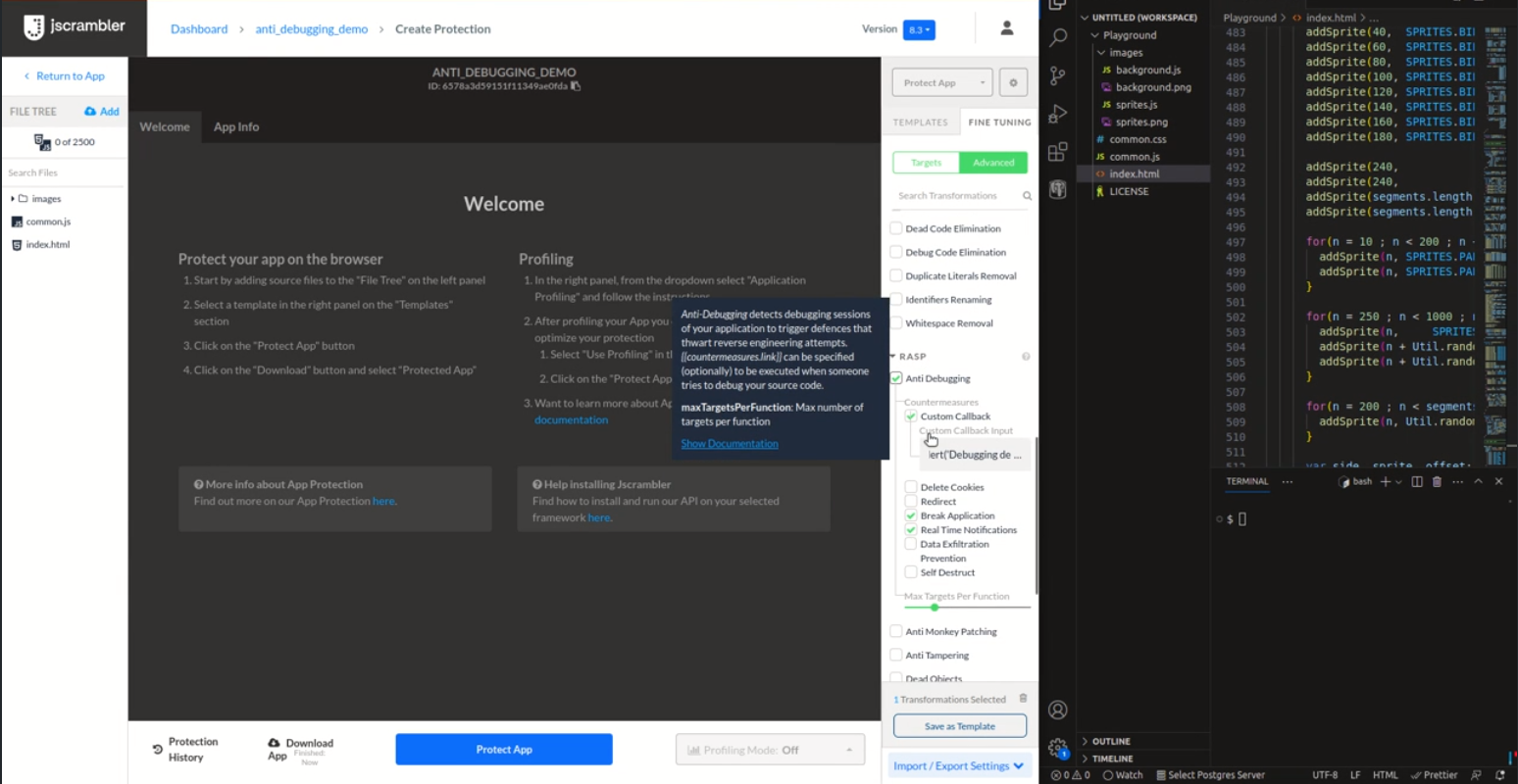
This transformation uses several techniques to detect debugging activity. The user can define the countermeasures to be triggered if, during runtime, debugging activity is detected. When the code is protected with this transformation, checks are injected at the start of the program. Each check then runs three random techniques during runtime to detect debugging activity. Additionally, a different subset of techniques is used in each runtime to maximize the detection efficiency. Once detected, the countermeasures selected will be triggered.
Benefits of Anti-Debugging

With Anti-Debugging, there’s an opportunity to trust your environment more, making it easier to balance security and flexibility. It becomes increasingly more difficult for attackers to exploit dev tools designed to help your team debug to reverse engineer the code without being noticed. Key feature benefits include:
  • Enhanced detection – combining nine techniques heightens the ability to identify debugging activity. Each runtime uses a distinct subset of techniques, increasing the overall detection capabilities.
  • Stronger resilience – the injection of random checks in the source code reduces single points of failure, resulting in a more resilient defense against debugging activities.
  • Broader attack surface coverage – the diverse and independent nature of the techniques addresses various debugging approach strategies.
  • Extended defense protection – safeguarding against different types of breakpoints (conditional, exception, event, and XHR/fetch), offline debugging, and offering swift reactions upon detecting debugger activity.
  • Smooth and quick reaction – a wide array of countermeasures, such as custom callback, delete cookies, redirect, real-time notifications, data exfiltration prevention, self-destruct, and break application, provide an extensive defense toolkit. The option to stop or break application execution is discretionary.

Popular use cases

What are you protecting yourself against with Anti-Debugging? This is a great feature to shield from reverse engineering attempts that may have various forms of malicious intent:
  • Piracy
  • Licence abuse
  • Cheating and bypassing restrictions
 

Anti-Debugging

Self-Defending

FEATURES

Multiple Anti-Debugging Techniques YES NO
Detect Built-in Method Poisoning NO Limited
Stops the Event Loop NO YES
Anti-Debugging YES YES
Forces the Use of Anti-Debugging N/A YES
Allows breakpoint detection YES, if selected YES, always
Anti-Tampering NO YES
CSP: Requires unsafe-eval NO YES
Tolerate Minification YES Optional
Countermeasures: Disable Break Application YES NO
Countermeasures in General YES YES
Control with Annotations YES Limited

COMPATIBILITY

No Internet Needed YES YES
Modern Browsers YES YES
Internet Explorer NO/NOT TESTED YES
Node YES YES
React Native with Hermes YES NO
React Native YES YES
Other Mobile Frameworks YES YES

Conclusion

Anti-debugging is fully compatible with all major browsers and the browser’s Content-Security Policy (CSP), Node.js, and specific hybrid mobile frameworks, including Ionic, NativeScript, React Native, and React Native Hermes. Contrary to Anti-Tampering, it is possible to use both Self-Defending and Anti-Debugging, as the existing Self-Defending protection (against tampering and debugging) will remain available.  

LLM-Resilient Obfuscation

The latest Code Integrity release builds on Jscrambler’s LLM-resilience foundation with code-hardening improvements that broaden protection coverage, ensuring stronger defense against AI-driven reverse engineering.

Key highlights:

– Research-Backed Anti-AI Defense: Countermeasures engineered after benchmarking leading AI models against real-world deobfuscation strategies.
– Seamless Protection Upgrades: Our core protections and standard templates have been directly enhanced with LLM-resilient techniques. You get stronger security across your existing protections, with no additional settings to reconfigure.
– Dynamic & Runtime Protections: Continuous runtime integrity checks, dynamic execution, and deceptive mechanisms designed to break static AI parsing and deplete attacker resources.
– Dashboard Transparency: Look for the new AI-resistance notice in your Code Integrity dashboard after applying the obfuscation transformations.

What’s included in the Code Integrity 8.6 version:
– Integration of Code Integrity into Jscrambler’s unified authentication platform (Dec 2025)
– Anti-Monkey Patching 2.0 (April 2026)
– Notifications: Dashboard views (live faults and reports) now include protection ID and custom labels, with filters on reports. The same fields are available in payloads sent to webhooks, SIEM, and other integrations. (April 2026)
– Hardening against LLM de-obfuscation (August 2026)

Code Integrity 8.6: Enhanced Authentication

Code Integrity 8.6 strengthens the security and stability of authentication by integrating Code Integrity into Jscrambler’s unified authentication platform.

With this release:
– Unified authentication platform: Code Integrity now runs on Jscrambler’s unified authentication infrastructure, consolidating how identity and access are managed across the platform.
– Stronger data security: Ensures Code Integrity meets and maintains the highest data security standards.
– Modernized infrastructure: Reduces technical debt and improves service stability across authentication flows.

You’ll benefit from enhanced security and stability immediately — no configuration or action required on your side. Your protection remains fully operational throughout and after the update.

Jscrambler 101 – Code Watermarking

Updated on July 15, 2025

Welcome back to Jscrambler 101! A collection of tutorials on how to use Jscrambler to protect your JavaScript. This tutorial covers the Code Watermarking feature, included in the Jscrambler version 8.5.


Introduction

In this article, we’ll explore Code Watermarking, a new Jscrambler feature released in version 8.5. Code Watermarking is a self-service feature that empowers customers to verify ownership of JavaScript code using robust, nearly unremovable watermarks, akin to a digital signature. This feature addresses intellectual property (IP) theft and supports forensic tracing for enterprises. 


About the Code Watermarking Protection Feature


How was the feature inspired?

The feature was created to address Jscrambler’s customers’ need for a self-service verification method. Many users are unaware of embedded watermarks, limiting their ability to address IP theft or investigate leaks in web applications. The feature focuses on self-service verification for JavaScript.


How does the Code Watermarking feature work?

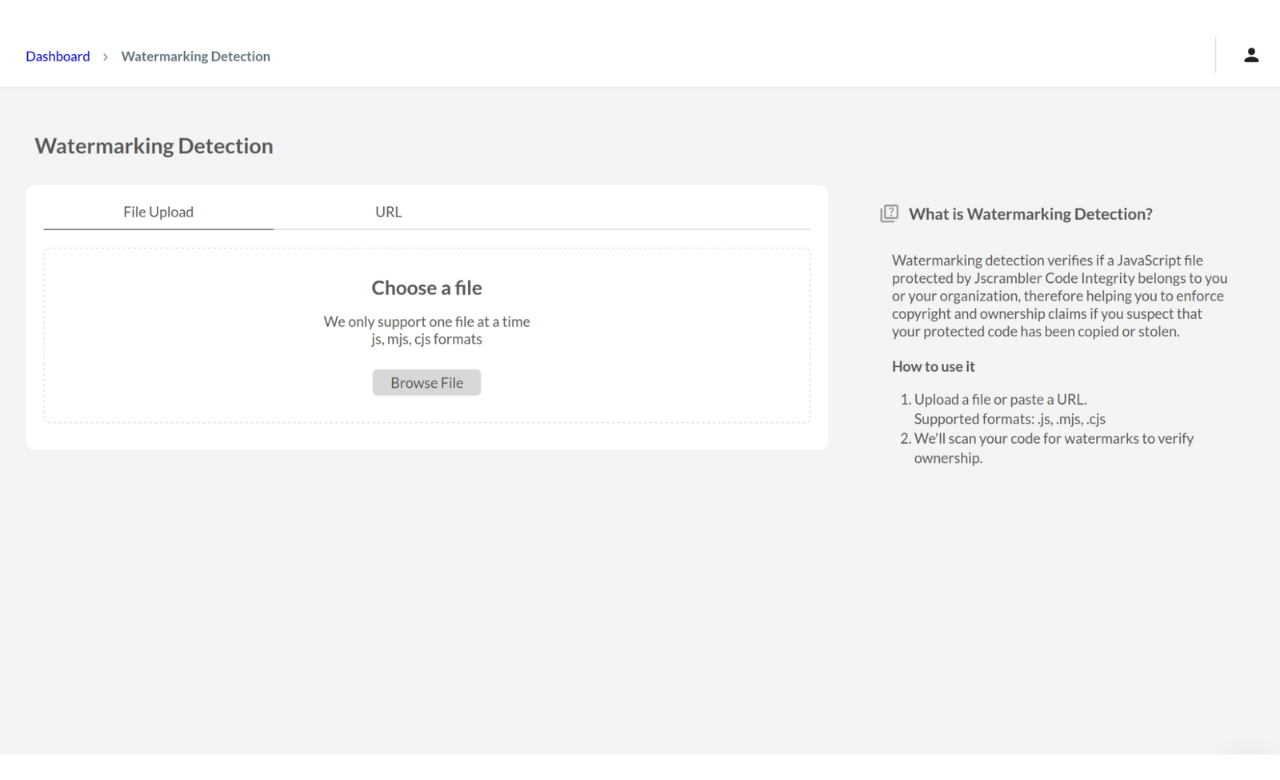
The feature enables users to confirm JavaScript code ownership independently, leveraging watermarks’ signature-like persistence to protect frontend logic and trace code origins without manual support. The “Watermark” UI, as shown in the screenshot, provides an intuitive interface for watermark detection:


code-watermarketing-code-integrity-feature-explanation


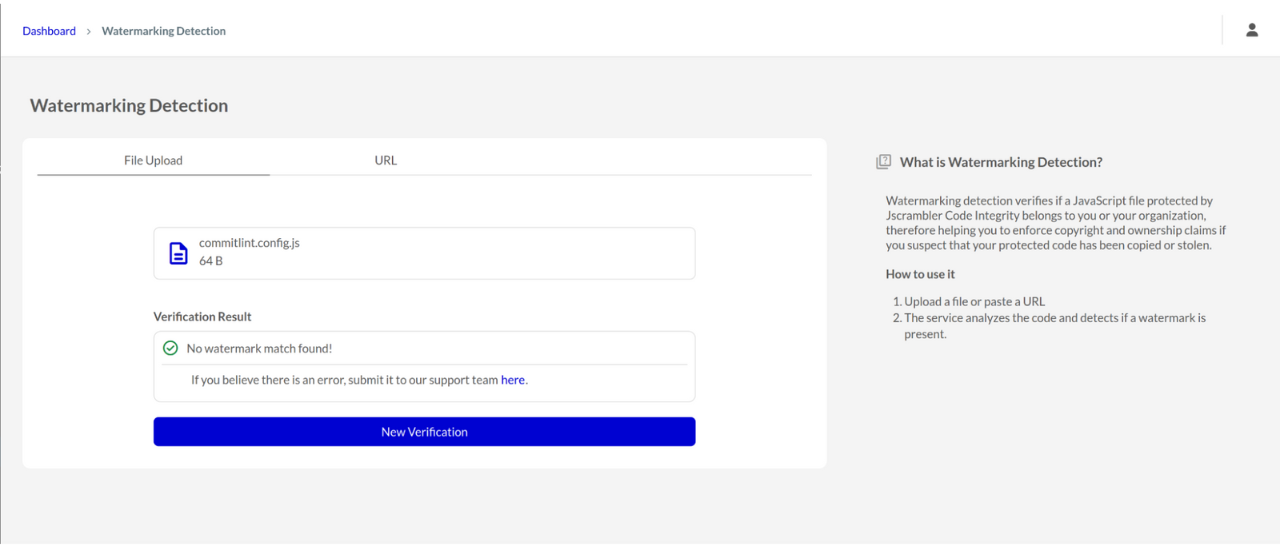
It allows users to upload JavaScript files (.js, .mjs, .cjs formats) or input a URL. The system checks for robust, embedded watermarks (already included in protected code) and displays results: “Code belongs to [Organization], protected on [Date]” or “No watermark match found.” If the user disagrees with Jscrambler’s assessment that a piece of code is theirs, even if no watermark was found, they can submit the file for analysis by clicking a link that appears after our response. 


watermarking-detection-example

Code Watermarking Benefits 


  • Ownership Verification: confirms if suspect JavaScript is yours, akin to verifying a signature, streamlining IP dispute resolution.

  • IP Theft Deterrence: near-unremovable watermarks discourage copying by ensuring traceability, mirroring a signature’s trust signal.

  • Legal Evidence: provides signature-like proof of ownership for legal disputes.

  • Forensic Tracing: traces leaked JavaScript to its source, supporting breach investigations, similar to signatures that identify origins.

  • Increased Awareness: educate customers about watermarking’s signature-like capabilities.


Conclusion

Code Watermarking offers a robust, signature-like solution to verify JavaScript ownership. By enabling self-service verification within the organization, it delivers immediate value while laying the groundwork for future capabilities, such as automated code scanning, ownership certificates, and AI code attribution. This feature not only strengthens JavaScript security where traditional code signing falls short but also sets Jscrambler apart in a crowded market.

With ongoing customer feedback and planned integrations, Code Watermarking showcases the signature-like robustness of watermarks, emphasizing ownership verification, deterrence, and forensic tracing.


Code Watermarking

Code Watermarking is a feature that empowers enterprises to take ownership of their JavaScript by embedding persistent, tamper-resistant watermarks into protected code, helping teams verify code ownership, deter IP theft, and trace leaks without relying on support tickets. Think of it as adding a digital signature to your code, making it instantly identifiable and defensible. With a user-friendly UI, you can upload a suspect JavaScript file or paste a URL to quickly check for embedded watermarks. The tool confirms ownership with a clear result:
– “Code belongs to [Organization], protected on [Date]”, or
– “No watermark match found.”

The benefits of Code Watermarking:
– Ownership Verification: Instantly confirm if questionable JavaScript originated from your team.
– IP Theft Deterrence: Persistent watermarks signal ownership, discouraging code misuse.
– Legal Evidence: Gain signature-like proof for IP or legal disputes.
– Forensic Tracing: Pinpoint the origin of leaked code during investigations.
– Enhanced Protection: Ensure your code isn’t reused without permission.
– Increased Awareness: Help your team recognize watermarking as a best practice for secure development.

Code Integrity 8.4: One-Click Code Protection

One-Click Code Protection is a feature that allows users to apply code protection in under 3 minutes without manual configuration. At the App Creation stage, users will be prompted to choose either Manual Configuration or Automatic Configuration.

It’s a convenient plug-and-play solution for code protection where you can apply a protection recipe that works on the first try, without having to delve into technical details or worry about fine-tuning or configuring transformations.

The benefits of One-Click Code Protection:
1. Simple to Use: The One-Click Code Protection feature is designed with user simplicity in mind, ensuring that anyone on the team can use it effortlessly. It enables users to safeguard their code with just a single click.
No Fine-Tuning Needed: One-Click Code Protection removes the need to select a template and/or manually fine-tune protection settings. Users do not need to worry about choosing the right protection strategy or adjusting parameters—everything is handled automatically.

2. High Level of Code Protection Resilience: The feature employs advanced algorithms and security mechanisms to offer a high level of resilience against reverse engineering and malicious JavaScript attacks. This guarantees that sensitive logic, intellectual property, and proprietary algorithms within the code remain well-protected, providing peace of mind for developers and stakeholders alike.

3. Time Efficiency: The entire process takes less than 3 minutes. There’s no need for manual configuration or tweaking, which allows developers to integrate security measures into their workflow without interrupting the pace of development. This quick protection process is especially valuable in fast-moving projects, where deadlines are tight and security is paramount.

4. Framework Compatibility: All the most popular hybrid mobile frameworks can be protected without manual configuration (React Native, Vue, React, Cordova, Ionic, NativeScript, etc.).

Jscrambler 101 — Self-Healing

Last updated on July 16th, 2024.

Welcome back to Jscrambler 101! A collection of tutorials on how to use Jscrambler to protect your JavaScript. This tutorial covers Jscrambler version 8.3.

Introduction

Last time, on Jscrambler 101 — Countermeasures, we covered one of Jscrambler’s more powerful features: automated anti-debugging and anti-tampering reactions.

This time, we’re going to dive into a new Jscrambler layer: Self-Healing. We’ll explain how Self-Healing works, why it’s a valuable layer, how you can set it up, and in which cases you should use it.

Self-Healing

As you may be aware, one of our main protective layers is Self-Defending, which does an integrity check on the app during runtime, breaking it whenever a debugging or tampering attempt is detected. With the need for more anti-tampering features in mind, in Jscrambler 6.1 we released a new anti-tampering layer: Self-Healing.

Self-healing can regenerate the original code after a tampering attempt by using checksum techniques to verify its integrity. As so, an application protected with self-healing does not break if someone tampers with its code; instead, it guarantees that only the correct code is executed. The app breaks into extreme tampering scenarios.

With Jscrambler’s Self-Healing JavaScript, you can thwart code tampering while keeping the application’s user experience undisturbed.

As an added benefit, Self-Healing’s behavior is likely to frustrate attackers even more when they’re trying to debug or tamper with the app. The application will only break in extreme tampering scenarios.

Self-Healing is also completely integrated with Jscrambler’s JavaScript Threat Monitoring, so you’ll be able to see (in real-time) every occurrence of Self-Healing coming into action to protect your code.

Setting Up Self-Healing

Jscrambler Web App

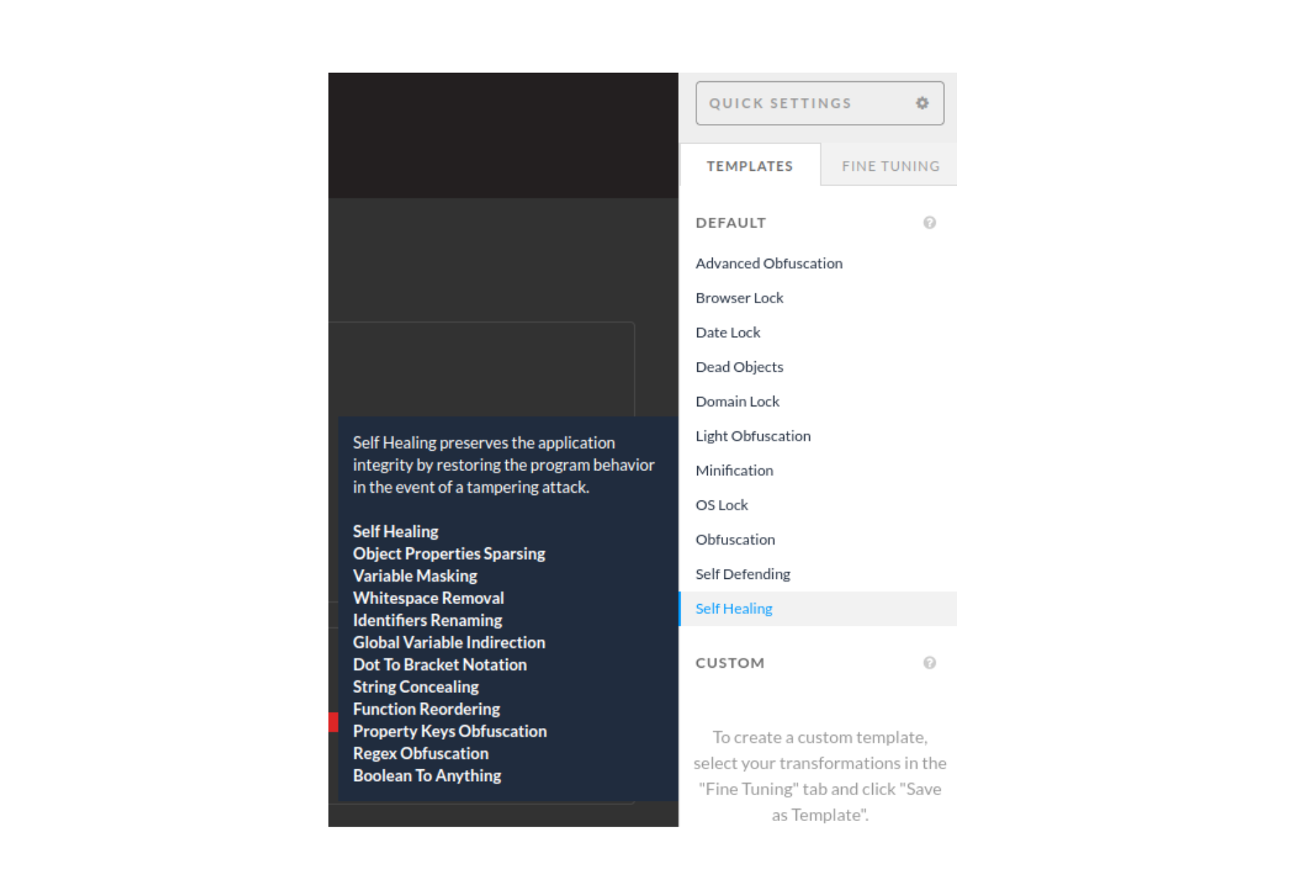
The most straightforward way of getting Self-Healing up and running is through the Jscrambler Web App. Once you’re on your app’s Protection page, you can either select the Self-Healing template, as shown below:


self healing template-jscrambler-tutorial

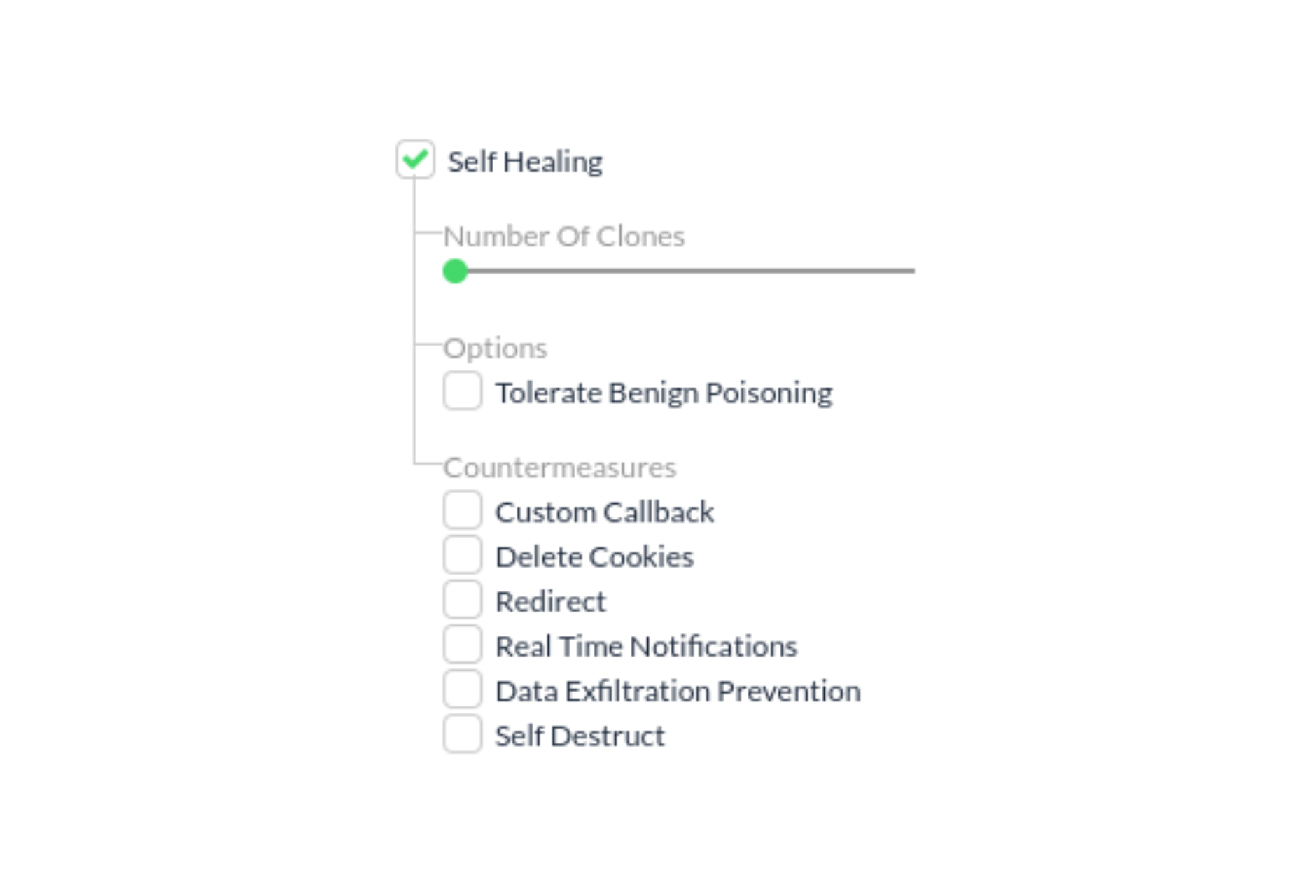
Or you can individually select Self-Healing in the Fine-Tuning tab, which will display several Self-Healing parameters that you can configure:


Self-Healing-Fine-Tuning-tab-explanation


Jscrambler API Parameters

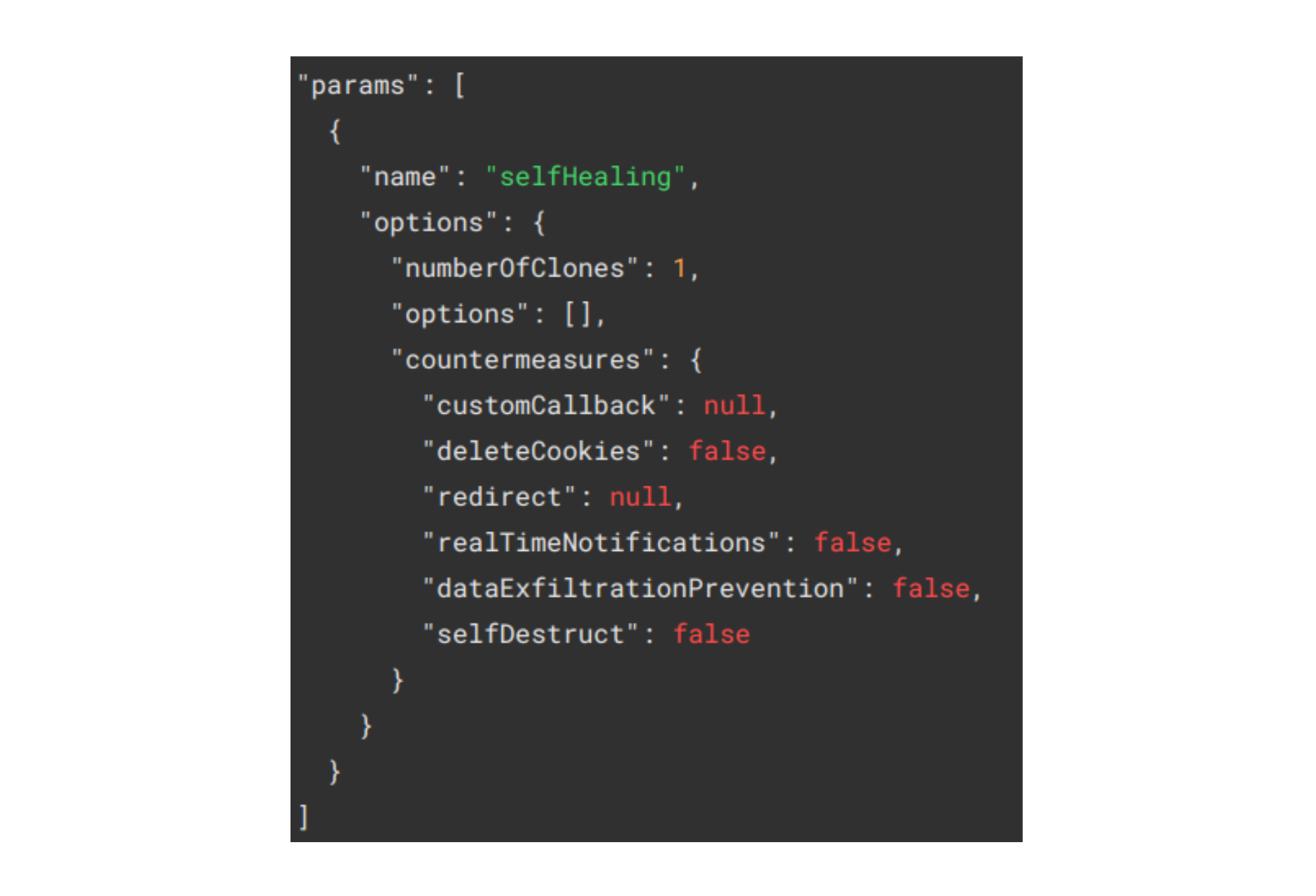
If you’re using the Jscrambler CLI, you simply have to set Self-Healing in the params section of the Jscrambler config file, as below:

jscrambler-api-parameters-jscrambler


Self-Healing vs. Self-Defending

Both Self-Healing and Self-Defending have anti-tampering features. However, they work differently.

First, it’s useful to keep in mind that Self-Defending provides both anti-tampering and anti-debugging features (Self-Healing only tackles the former). Second, they tackle tampering attacks with different approaches and objectives; both check the code integrity during runtime, but:

  • Self-defending breaks the app immediately if the integrity check fails.

  • Self-healing actively seeks to replace the compromised code with the original code. The application will only break if no replacement is found, avoiding the execution of unsafe code.


Because they both tackle tampering attempts, generally speaking, it doesn’t make sense to apply both Self-Defending and Self-Healing globally to the app. However, it does make sense to apply Self-Defending to some parts of the code and Self-Healing to others using code annotations.

Knowing where to apply each of these techniques will vary according to your app, as we’ll discuss below.

Self-Healing Use Cases

Knowing how Self-Healing tackles tampering attempts, a general use case would be to apply Self-Healing to portions of the code for which you want to ensure that the app doesn’t break (code that’s vital to the user experience) and Self-Defending to the most sensitive portions of the code, for which you want the app to break in response to tampering or debugging attempts.

This behavior can be especially important in industries that rely on critical apps, such as Healthcare, Manufacturing, or IoT. In these cases, downtime for the affected website or app can lead to huge costs.

With Self-Healing’s approach, tampering attacks can be successfully mitigated while keeping systems operational.

Conclusion

This sums up Jscrambler’s Self-Healing. Remember that you can test the Self-Healing template using our Playground app, or even in your app if you have an active Jscrambler license.

Feel free to proceed to one of our other 101 Tutorials:


Enjoy your testing and start protecting your Applications ASAP! If you have any additional questions, feel free to contact us.

Jscrambler 101 – Collaborative Workspace

Welcome back to Jscrambler 101! A collection of tutorials on how to use Jscrambler to protect your JavaScript. This tutorial is about the Collaborative Workspace feature and covers Jscrambler version 8.4.


Introduction


This article will explore the Collaborative Workspace, a new Jscrambler feature released in version 8.4. This feature allows multiple users to work on the same app seamlessly.


About the Collaborative Workspace feature


How was the feature inspired?

It’s a normal scenario for many of our customers to have one developer assigned to log into the Jscrambler dashboard to work on protecting the application. However, with more and more of our clients adhering to strict security measures and involving their whole security teams, it was apparent that a feature for collaborative work was much needed.
  

Now Jscrambler’s Code Integrity supports assigning more than one user to access the same app and apply protections. This means that when one person from a team logs in to Code Integrity using their individual account credentials and uploads a given code/app to Code Integrity, other team members can see, access, and protect that same app, as well as check the history log.


The Collaborative Workspace feature facilitates teamwork and removes the limitation that might lead users to share their login credentials, reinforcing a bad security practice. It also prevents users from manually looking for the latest protection recipe applied to an app every time there is a need to revise the protection. 


How does the Collaborative Workspace feature work?

With this “multiple users” reality, a new concept of “organization” is introduced to Code Integrity.

An “organization” represents a customer and each “organization” can have several apps and several “users” under its umbrella. Each user has their individual account for logging in to Code Integrity. Each user can be assigned to one or several apps and each app can have one or more users assigned. There are different degrees of permissions granted to each user.


It is important to note that the “organization” must have an administrator. The user with this responsibility has access to an “administration screen”, through which it is possible to manage the users, roles, and permissions, as well as add new users to the organization and remove existing users from the organization.


code-integrity-new-feature-collaborative-workspace

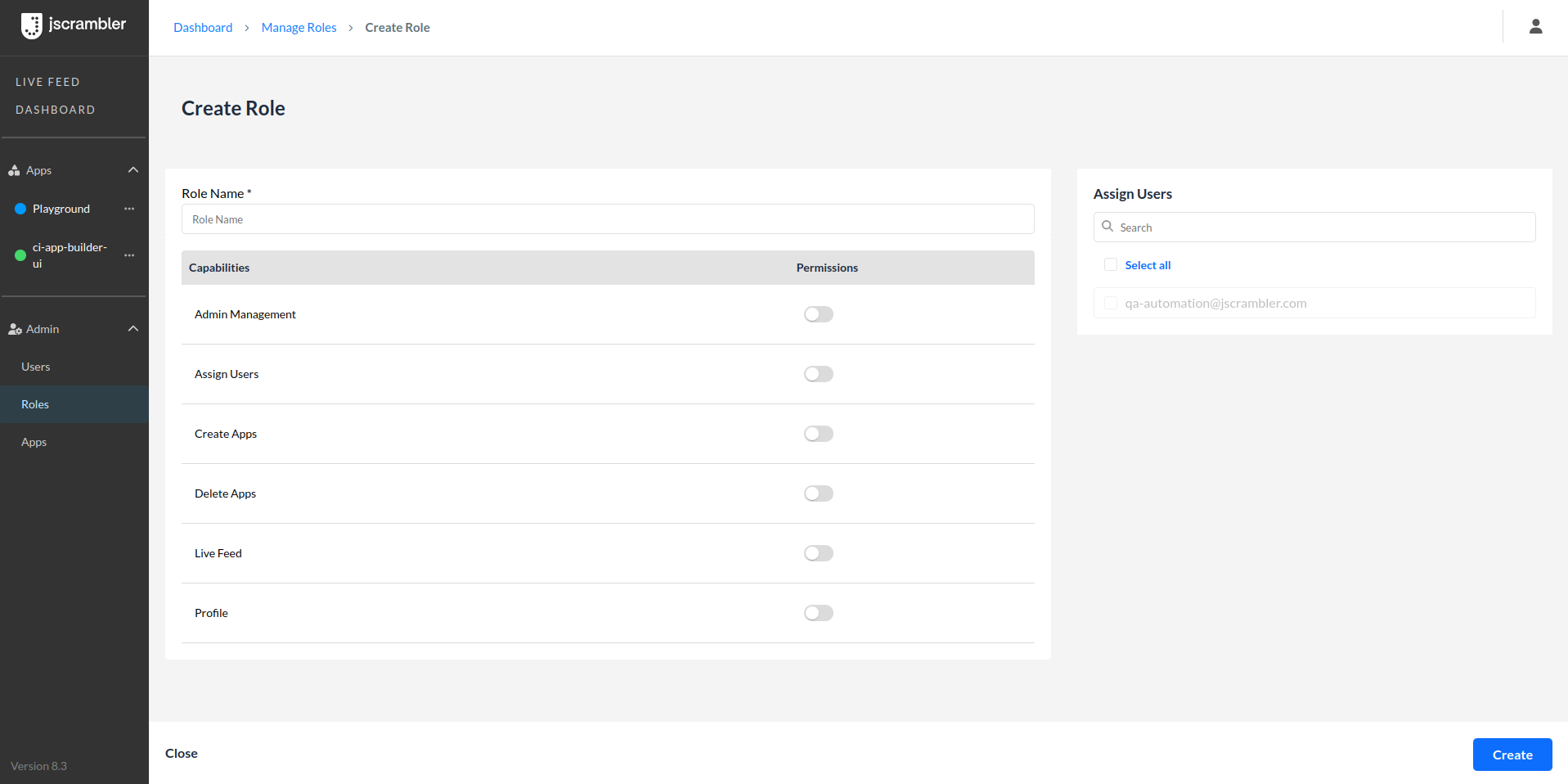
An Admin user can create a new role for a user and apply all the relevant permissions.
  

admin-user-create-new-role-for-users

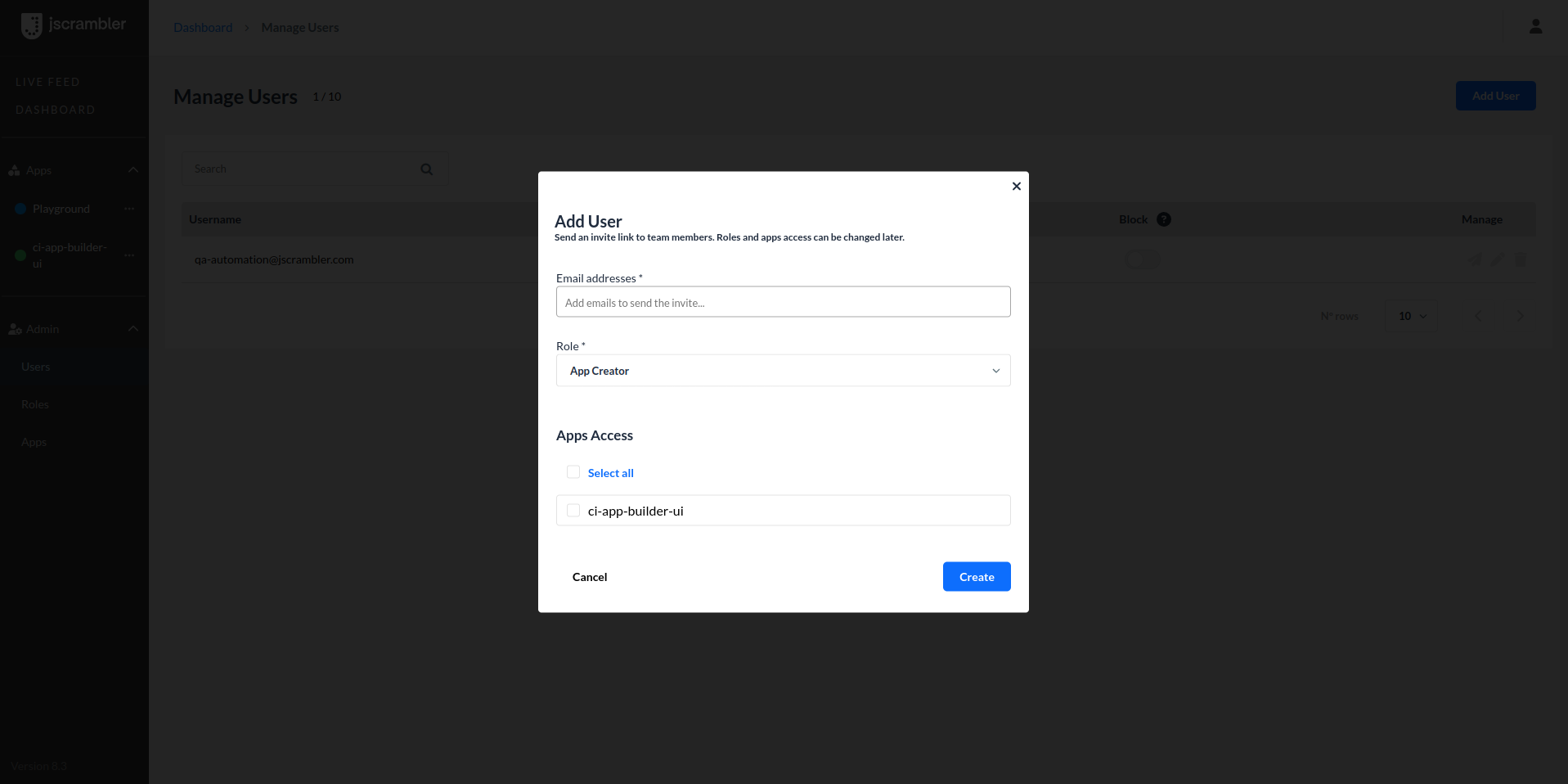
Adding users and assigning them to specific app/s is quick and easy.


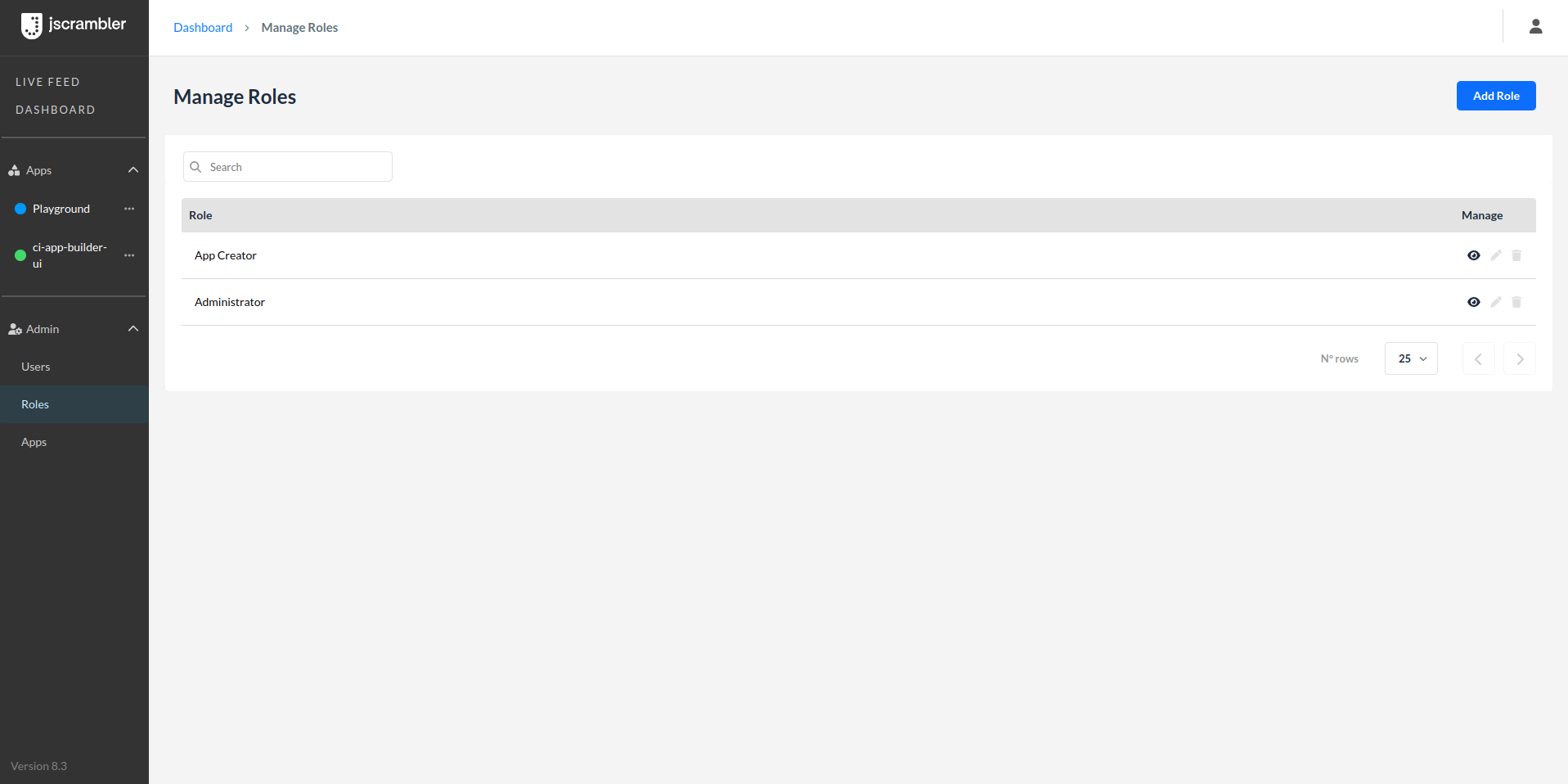
manage-roles-tutorial
An Admin user can manage roles and change permissions.


All users assigned to the same “organization” see the same information, however, one user cannot be assigned to more than one “organization” at the same time.


Benefits of Collaborative Workspace


  • Enhanced Collaboration

    • Shared Access: Multiple developers can seamlessly work on the same app, eliminating the need for sharing login credentials or manual reassignments.

    • Unified View: All users assigned to an app can see the same information, including uploaded files, transformation parameters, and protection history.


  • Improved Security Practices

    • Individual Accounts: Each user has their login, reducing the security risks associated with sharing credentials.

    • Detailed Activity Logs: Enhanced protection history tracks who made specific changes, ensuring accountability and traceability.


  • Scalability for Large Security Teams

    • Scalable for Large Teams: Supports complex organizational structures by allowing multiple users and roles within an organization, making it ideal for large enterprises.

    • Role-Based Access Control: Flexible permissions allow precise control over what each user can do, ensuring that security and operational needs are met.


Conclusion


This new feature empowers teams with a shared vision to safeguard their applications collaboratively. Whether it’s creating or deleting apps, assigning or removing users, or inviting new team members, our platform ensures efficient and secure app management for your organization.

Jscrambler 8.4: Multi-User Access (Collaborative Workspace)

Collaborative Workspace is a feature that allows multiple users to seamlessly work on the same app by inviting them to the Code Integrity dashboard under the same organization, providing a single, unified view across the whole team. One app project can now be accessed and protected by several users, with a full protection history and the ability to reuse a recipe from previous versions.

Key features include:
– Unified Interface: Several users can log into the Code Integrity dashboard and work collaboratively on protecting the same app.
– Real-Time Updates: Any changes made by a user are instantly reflected for all users, ensuring everyone is always working with the most current information.
– Version Tracking: A detailed history of changes lets users see who made each change and reuse a recipe from previous protections.
– Efficient User Management: Assign app projects to specific users and give them a specific role and permission.

Collaborative Workspace transforms how teams work together by providing a seamless, integrated environment for real-time collaboration on JavaScript protection, helping every team member contribute effectively and efficiently, boosting productivity and improving teamwork.