






JavaScript obfuscation and minification are two essential techniques in modern web development – both address performance and security concerns, but in fundamentally different ways.
Minification reduces file sizes to speed up web applications. Obfuscation makes source code unreadable to protect it from reverse engineering, theft, and tampering. Together, they help deliver fast and secure web applications. This guide covers everything you need to know: what each technique does, how they differ, examples, and how to choose the right one for your project.
What is JavaScript Obfuscation?
JavaScript obfuscation is the process of deliberately making readable source code unclear and unreadable to humans, while remaining functionally identical. This adds a layer of security to source code, especially online, where everyone can see it. The goal is not to break the code – it must still execute correctly – but to strip away any meaningful structure that would make it easy to read, copy, or reverse engineer.
Obfuscation is crucial when securing client-side JavaScript, because unlike server-side code, it runs directly in the browser. That means anyone who opens DevTools can inspect it. Without protection, proprietary algorithms, business logic, and sensitive configurations are exposed.
How JavaScript Obfuscation Works
JavaScript obfuscation typically involves executing one or more of these transformations:
- Identifier renaming – Replacing descriptive variable and function names with meaningless strings.
- String encoding – Converting plain strings into encoded or hex-escaped equivalents.
- Control flow flattening – Restructuring the code’s logical flow to make its execution path harder to trace.
- Dead code injection – Adding misleading code to confuse anyone analyzing the program.
- Self-defending code – Inserting logic that detects and responds to tampering or debugging.
JavaScript Obfuscation Example
Here is a simple function before obfuscation (and minification, for example purposes):
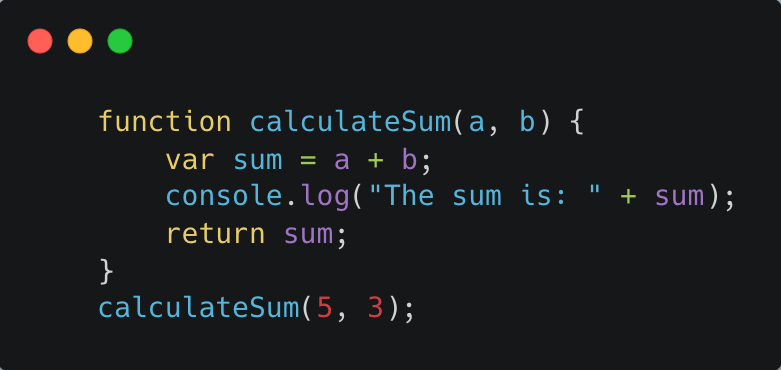
Once JavaScript obfuscation has been implemented, the same function might look like this:

The function names, variable names, and numeric values have been replaced with expressions, and strings have been altered intentionally to make the code confusing and difficult to understand. The function still runs and produces the correct output, but understanding or extracting the logic is extremely difficult.
Why JavaScript Obfuscation Matters
- Protects proprietary logic – Shields your code, business logic, and algorithms from malicious activity and reverse engineering.
- Prevents code theft – Makes it extremely difficult to copy and reuse code in another product.
- Reduces attack surface – Attackers can’t read the code, preventing them from finding exploitable vulnerabilities or injecting malicious modifications.
- Supports licensing enforcement – Used to enforce licensing terms for commercial software by making it harder to modify or remove license checks.
- Protects sensitive data – API keys, configuration values, and other data that may be embedded in client-side code are reinforced.
What Is JavaScript Minification?
JavaScript minification is the process of compressing source code by removing all characters that are not necessary for execution – whitespace, comments, line breaks, and long variable names – without changing its functionality. The output is functionally identical to the original; it just takes up less space.
The result: vastly improved performance. With the code size reduced, smaller files download faster, parse faster, and possibly run faster. This elevates page load times, user experience, and search engine rankings – Google uses page speed as a ranking gauge.
How JavaScript Minification Works
Minification typically applies these transformations:
- Removing whitespace (spaces, tabs, newlines)
- Removing comments
- Shortening variable and function names to single characters where possible
- Collapsing redundant code patterns
JavaScript Minification Example
After minification:
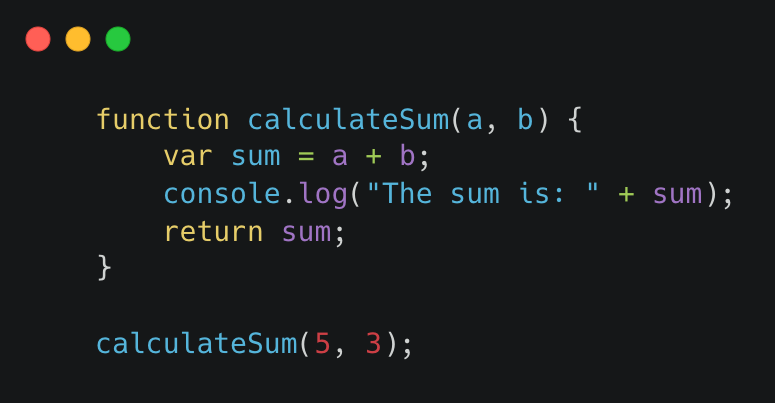
Unnecessary whitespace and newline characters have been removed, so the whole thing fits on one line. This produces a smaller file size while retaining the original functionality. How minification helps:
- Faster load times – Removes unnecessary characters and spaces from JavaScript files, reducing page load times and improving user experience.
- Improved SEO – Faster scores are recognized by Google, which uses page speed to rank websites
- Improved Core Web Vitals – Core metrics like LCP (Largest Contentful Paint) and FID (First Input Delay) are enhanced by leaner JavaScript bundles
- Removes dead code – Removes variables and code that are not used
- Broader accessibility – Lighter pages make websites easier to access on low-bandwidth networks.
Differences between JavaScript Obfuscation and Minification
JavaScript obfuscation and minification have distinct goals and operate in very different ways.
| JavaScript Obfuscation | JavaScript Minification | |
| Primary goal | Security – by making code unreadable | Performance – by reducing file size |
| Output readability | Intentionally cryptic | Remains readable |
| File size impact | Typically increases file size | Always reduces file size |
| Reversibility | Difficult to reverse | Easily reversed with a formatter |
| Effect on execution | Code runs identically | Code runs identically |
| Typical use | Protecting IP, preventing tampering | Faster page loads, better SEO |
Choosing Between JavaScript Obfuscation and Minification
Use obfuscation when:
- Your code contains private algorithms, unique logic, or sensitive data that you don’t want easily understood or copied by others.
- Your applications handle sensitive user data or perform critical operations.
- You distribute commercial JavaScript and need to protect against license bypass or tampering.
- You’re worried about Magecart-style attacks or client-side skimming, where perpetrators inject code or analyze your scripts to surface vulnerabilities.
- You need self-defending code that can detect and respond to debuggers, code modification, or execution in unauthorized environments.
Use minification when:
- You want to reduce a large file to improve page load times.
- You are optimizing for Core Web Vitals and SEO rankings.
- You want to improve user experience.
- You need your application to load reliably on low-bandwidth or mobile networks.
- You want to remove dead code and reduce the amount of JavaScript the browser has to parse.
JavaScript Obfuscation Tools
Not all obfuscation is equal. Basic obfuscators rename variables and encode strings, but sophisticated attackers can often reverse these transforms with automated tools. Enterprise-grade JavaScript obfuscation goes further.
Reverse engineering unprotected JavaScript for vulnerability discovery and application intelligence has become dramatically more accessible with AI. If you care about application security, source code protection with AI-resistant deobfuscation is no longer optional.
Jscrambler’s Code Integrity makes your JavaScript code resilient, so it can’t be read, copied, tampered with, or reused. Every version of code you deploy is automatically protected on every screen. Try all of Jscrambler’s features with a free trial, or book a demo with our client-side security experts.
Make sure to attend our upcoming webinar, Resilient Code in the Age of AI | Understanding the New LLM Threat Landscape for Application Security, on Jun 16, 2026, on LLM resilience and obfuscation.
Conclusion
JavaScript obfuscation and minification are both valuable tools in web development, but they address distinct issues. Minification enhances performance by making your files smaller and your pages faster. Obfuscation enhances security by protecting your code from being read, stolen, or tampered with.
For any web application, especially one with proprietary logic or sensitive client-side operations, using both tools together is recommended. Minify for speed. Obfuscate for security.