


Category: Client-Side Security

Security and Development: How to Manage Disparate Goals

Security and development teams have traditionally been separate organizational units of an IT firm, with their tasks well defined.

Development teams primarily focused on the design, implementation, and maintenance of applications, whereas the purpose of a security team was to monitor their network security (primarily on the server side) and solve security incidents.

Decades ago, this structure of keeping the development and security teams as separate units worked fairly well because their jobs did not overlap much.

In recent years, due to the advancement of technology and the emergence of innovative security threats, the boundary between the development and security teams has grown thinner.

Their tasks have become interlinked as security is an integral part of the applications that are developed. However, as development and security teams are still separate entities within the organization, there is friction between these teams if their goals are not aligned in the same direction.

The cause of this friction is a phenomenon known as subunit orientation, which is a tendency to view a role within an organization strictly from the perspective of its subunit.

This simply means that a developer would give priority to their development goals over security goals, and vice versa for a security professional. Therefore, the need of the hour is to align development and security objectives towards a common goal and increase collaboration to meet the challenges of this changing scenario.

The philosophy of DevOps, which has gained popularity over the last few years, has interlinked these tasks to increase the efficiency of the firm by reducing rework and fixing issues as they develop.

Let us now look at a few DevOps paradigms, specific to our cto increasesing collaboration between your development and security teams to enhance productivity.

1. Change in Mindset

The first step to bringing in collaboration is to change the traditional mindset of separate development and security teams with completely different goals.

To do so, an organization needs to promote a culture where these departments consider themselves a part of a common, larger team with one ultimate goal. By aligning the goals, each team would know the bigger picture and avoid diverting from that view. Further, each team needs to understand and respect the roles and goals of the other team and give them due consideration when undertaking their day-to-day activities.

Such a mindset may be achieved by focusing on delivering a superior product for the customer. Brainstorming may be done at the initial stages of a project to better understand the how goals of various teams fit into the overall value proposition of the product, thus resolving possible conflicts at later stages.

2. Report to a Common Leader

A step in the right direction could be to bring both departments under the same roof and make them (or the unit heads) report to the same person. This way, the top-down goare of both departments are aligned, and possible conflicts in their tasks are avoided. This step also removes the problem of subunit orientation, as the larger objective of each of these teams is to achieve the same goal.

3. Integrate Security Team Members in Development Projects

As security is embedded in the software development process, members of the security team may be put into projects of software development as consultants. This ensures that security goals are aligned and security policies of the firm are followed right from the design phase, which minimizes the possibility of rework later. This also helps the security team to be aware of the goals of the development teams, which reduces the possibility of conflicts.

An example where this might be helpful is to combat client-side security threats.

Traditionally, security teams have focused on server-side threats, but client-side threats like the Man in the Browser attack, which are undetectable on the server side, may cause huge financial losses to a business. By working with the development team, the security team can provide solutions to work on client-side threats too.

4. Enhance Your Product Offering

Traditionally, a security team worked in the background, tirelessly working to make your product safe from cyber attacks. However, with an active role in the development process, security may be bundled with a product offering to improve the value proposition to a customer. Enhanced security in a product might also help a firm provide a differentiated offering as compared to its competitors, gaining an edge in a competitive industry.

5. Collaborate in Response to Security Incidents

Yet another way for collaboration of security and development teams is to work together on security incidents.

One step could be to merge the issue trackers of development and security teams, thereby developing an ability to clearly define and track activities for various incidents. This process would improve efficiency and responsiveness by making use of the synergy of working together.

Conclusion

In the modern competitive environment, it is necessary to use resources efficiently to survive and grow.

Getting the development and security teams to work together through modern-day DevOps paradigms will go a long way in achieving the objective of creating a lean organization.
Man in The Browser Attacks: A Comprehensive Guide

Man in the Browser attacks have gained widespread notoriety in recent times. With a rapidly growing user base on the Internet, potential attackers are finding new, innovative, and complex ways to serve their malicious purposes.

Conceptually, the MitB involves an attacker secretly tapping into a browser to gather data, modify websites, and manipulate requests without the user’s knowledge.

Man in the Browser attacks: How does it work?

A MitB attack starts with a trojan infecting the OS or software. It may just be invisible to an antivirus software, and silently logs the activities of the user, with the potential of manipulating it. The most frequent modus operandi is email phishing.

When a user downloads and executes an infected file (say, from an email attachment), it typically hooks itself to a system library called wininet.dll, which is used by major browsers to connect to the internet – effectively taking over all information flow to and from a browser.

The malware can take full control over the user’s actions — it can detect anything a user types, read information that is displayed on the screen, and modify any response originating from the browser.

You may wonder if technology such as encryption keeps you safe from MiTB attacks.

Encryption is designed to protect you if someone intercepts your information. In a MitB attack, the malware has access to data that has already been decrypted in your browser, thereby making encryption ineffective against such attacks. Since the attack takes place locally, other security measures like firewalls are equally ineffective in detecting such attacks.

From the point of view of a server, a MitB attack cannot be detected, as all the activities as a part of this attack originate at the user’s end and it is very difficult, if not impossible, for the server to differentiate any such activity.

What makes MitB so dangerous is that the process is automated without minimal and sometimes no human intervention.

There is no upper limit on the devices that can be affected by such malware at a time since each infection uses local resources, and the infection spreads exponentially.

What can a MitB attack potentially affect?

With the control of detecting inputs, reading the screen, and manipulating requests, there are no limits to the consequences of MitB, although two specific use cases are discussed here.

The easiest target of a MitB attack is social engineering. It can gather a user’s data (including login data) by analyzing their actions for some time, and use that data to impersonate the user.

With user information, an attacker can obtain credit, a practice commonly known as identity theft. MitB attacks may also be orchestrated for the data leakage of sensitive, classified data.

Yet another malicious task that a MitB attack may be used for is to steal funds.

The malware remains inactive when a user logs into an account using two or three-factor authentication. Thereafter, the malware redirects funds by manipulating the details of the transaction and modifying any message to fool the user into believing that the transaction was successful, thereby leading to significant financial losses.

As MitB attacks are so difficult to detect, businesses must be aware of the potential losses these attacks can cause to their systems. Financial institutions, specifically, are at high risk as they form some of the biggest bounties for potential attackers.

How can you detect MiTB attacks?

Although this post has continuously mentioned that detecting MitB attacks is very difficult, it must be reiterated that it is not quite impossible.

There are a few emerging methods and tools to detect potential attacks and take steps to avoid transactions initiated on compromised end-user devices. The techniques that battle MitB attacks may be divided into two — client side and server side.

Server side measures

As a business, one may employ many server-side measures to prevent MitB attacks. A few popular methods are discussed in this post.

Out of Band (OOB) Verification

This process involves an extra step in the verification process by involving a separate device that is owned by the user. However, this step can also be bypassed by malware, if it has access to your phone as well, or the contact details are stored online in a platform that is accessible by the malware.

The malware can also wait for the user to authenticate the transaction on the infected device, but it can be avoided by clearly mentioning the details of the transaction in the secondary device to alert the user of suspicious activity, although there are difficulties in getting the transaction information on a small message and users may ignore such information to read only the verification code.

Using biometrics (fingerprint or a retina scan) to verify a transaction may also be used. Although theoretically, it is possible to avoid MitB attacks through this mode, it is generally accepted that MitB bypasses this.

Behavior Analysis

Behavior analysis is a process where unusual account activity is detected based on the past activity of the users. Financial institutions may use this technique to determine if a transaction under consideration fits a user profile, and accordingly validate the transaction.

Client Side Measures

On the client side, users can take extra precautions by only using browsers with stringent security measures.

Browsers may come with denied listed extensions and add-ons, which are blocked in routine security checks by the browser on startup.

A good browser also performs integrity checks on any extensions that are installed to make sure malicious code is not running on the browser.

Using anti-malware software may prevent attacks, but only if they are present in the database of this software. A developer may also include as a part of its code checks to detect client-side behavior of known infections.

Web Integrity Module

All the measures described so far require continuous monitoring and can be bypassed by attackers with relative ease.

Jscrambler now offers an agentless and cross-platform solution that tackles fraud in your website, which can make your application secure by preventing tampering with the DOM and removal of known threats on the client side.

Further security to your application is provided by easy and effective monitoring through real-time updates, which enables you to tackle an issue as soon as it develops. If something suspicious is spotted, the application backend is immediately notified, allowing near real-time reaction from the application to the possible fraud attempt.

Web Integrity Module emerged as a solution that is completely plug-and-play, and does not require installing anything locally.

The end-user doesn’t have to cooperate with anything. It’s completely transparent to the client device and supports all browsers and platforms. Also, contrary to anti-virus solutions, it does not look for malware signatures but for changes made to the untampered page, and by doing so, it can detect 0-day threats.

Conclusion

Attackers are working round the clock on improving existing threats to find new ways of gaining access to malicious data, and traditional ways of tackling them are turning out to be insufficient, although still necessary.

It is, therefore, the duty of companies to keep up with the latest threats that they may face by adopting the technology and securing their systems.

How CAPTCHA Works

CAPTCHA stands for Completely Automated Public Turing Test to Tell Computers and Humans Apart. Its goal is to check if a user (of an app or a website) is a human or a bot. It relies on specific traits that people have and machines don’t. It’s widely used in the web industry as a proactive defense against spam, bots, and DOS attacks.

You are familiar with this technology, even if you don’t know its name.

Curious note: Although CAPTCHAs are developed to block automated bots, CAPTCHAs themselves are automated. As gatekeepers, they pop up in specific places on a website and pass or fail users after a quick and simple test.

How does CAPTCHA work?


CAPTCHA’s roots date back to the beginning of the twentieth century when Alan Turing wanted to answer one question:

Are computers able to think like humans?


He set up a game of imitation, where an interrogator was obligated to ask two participants a series of questions. The participants were humans and machines.

The interrogator’s challenge was to figure out which one was a human being. The interrogator was unable to see or hear them and needed to rely only on their responses. If the interrogator was unable to decide or decided wrongly, the machine passed the Turing test.

The goal of the CAPTCHA is to ask such a question or make such a challenge that computers are unable to deal with it. At the same time, it should be easy to answer for humans.

The scheme is simple.

You type some data or perform any other action, and then confirm it by passing a CAPTCHA test.

Text-based Captachas versus Image-based Captachas

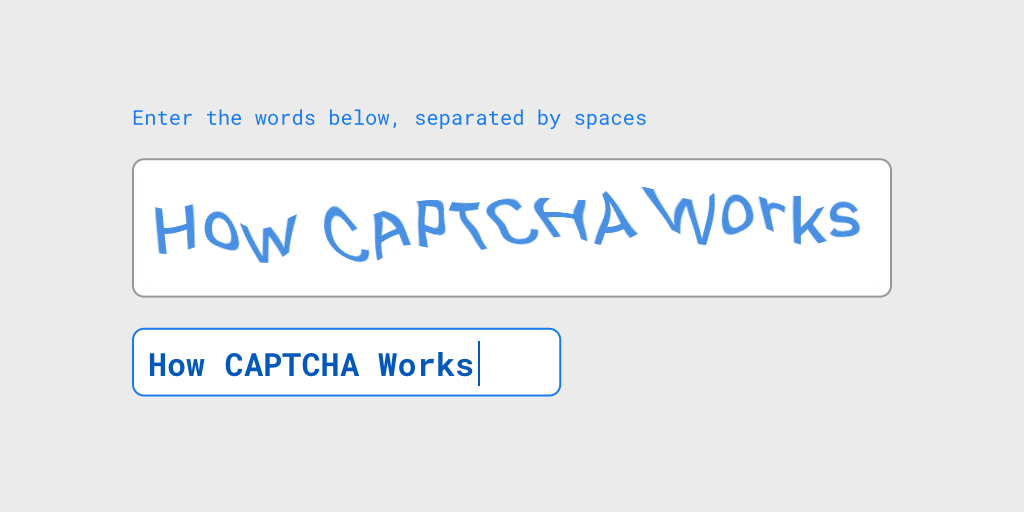
The most common type of test is an image of a bunch of distorted letters. It uses the issue of computers not being able to think abstractly and “see” the world the way people do.

While humans are really sophisticated at processing visual data, computers lack those skills. When you look at the image, you can quickly read the pattern.

The brain of humans is constructed in such a way that it’s always searching for a known pattern or shape. You know the paradox of seeing faces and shapes in trees and clouds, even if it’s just an illusion. It’s called pareidolia.

captcha request with a bunch of distorted letters
While you are easily able to read the above words and write them down, for computers, it’s just a mass of zeros and ones.

Nevertheless, we have to remember how machines work.

CAPTCHA’s challenges shouldn’t be limited to a fixed number. If they would, it would be easy to teach a computer which text corresponds to a given image. Therefore, many creators use sophisticated algorithms in order to generate their distorted texts randomly.

The creators of reCAPTCHA figured out another idea. They used the process of digitalizing books and asked users to decrypt the short pieces.

Due to evolving bot algorithms, text-distorted CAPTCHAs have become a lot harder to solve.

text-distorted-CAPTCHAsWhile the first one (above) is quite readable, the second one could already cause some problems for someone without sharp eyesight (below).

text-distorted-captcha
Therefore, a lot of developers tried to think of a new type of CAPTCHA. The result of their work was the select-images CAPTCHA.

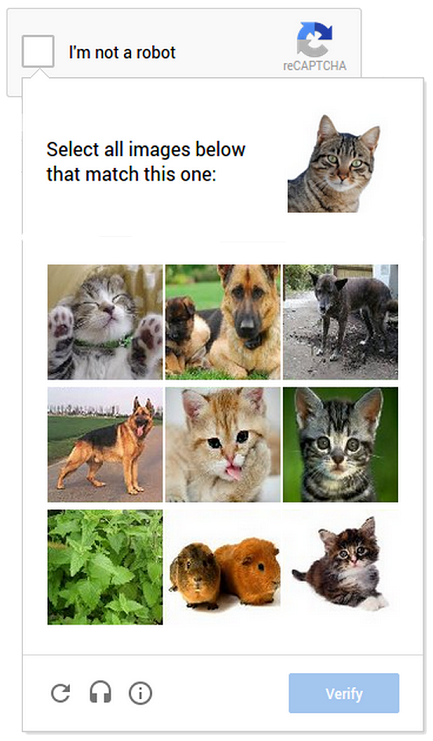
select images captach to verify if you are a robot
It relies on the same foundation, but it’s just harder to solve for machines. And what’s more important, it’s easier to solve for humans.

The scheme is easy.

You have a collection of images and have to pick the ones that match the requirements. It’s easy for you to pick the right ones. Computers, however, don’t think like humans, and it’s not so easy for them.

It relies on the classic computer vision problem of image labeling. Also, it’s really mobile-friendly. It’s easier to tap images corresponding to a clue than type a line of distorted text.

These approaches have their cons.

For machines, they’re hard to solve, but text-reading systems are also just algorithms. Thus, they encourage problems with reading CAPTCHAs and are treated like bots.

For blind people and people with different eye dysfunctions, it causes a technological barrier.

Sound-based Captchas

With barriers for blind people and people with different eye dysfunctions in mind, developers often add a sound CAPTCHA to their text-distorting solutions.

sound-based captchas exampleIt works in a similar manner. The script adds background noise to the audio in order to make it harder for bots to solve. It has a small impact on humans, but it adds a lot of problems for voice-recognition programs.


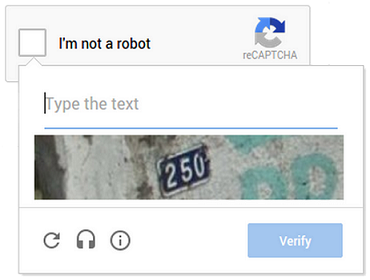
While all these solutions are perfect on paper, they can still be annoying and confusing. Therefore, Google introduced a new CAPTCHA (No CAPTCHA reCAPTCHA) that asks you only to check a box.

No-CAPTCHA-reCAPTCHA-addition

Why do we need a CAPTCHA?


Do we need a CAPTCHA because we no longer know if we are humans or robots? We hope not. The correct answer is that there are a lot of people out there who want to harm your website for different reasons:

  • Unfair competition

  • Malicious advertising

  • Malicious behavior

  • Just fun.

You can imply that it’s not the majority of web users that are trying to exploit your system’s weaknesses, but the problem remains.

Denial of Service attack (DoS)

The simplest example is DOS (Denial of Service), which is a type of attack that is focused on making a resource unavailable.

The attacker sends a large number of requests to the server to make it incapable of returning results. It simply blocks your website.

Doing this attack individually, by a person, would be a horror. It would be exhausting, and simply impossible. You can’t manually make an efficient number of requests, but computers don’t get exhausted or bored. It’s not a problem for them to make hundreds of requests every second.

CAPTCHA helps you identify such behaviors and block them.

Malicious advertising tactics

Another example is malicious advertising tactics. Every internet user is familiar with spam.

You receive tons of unwanted emails every day. It’s easy to block one particular email, but it’s hard to protect against unknown ones.

How do spammers get past the CAPTCHA?

If a spammer uses only one email account, we can easily block it. But imagine now that he or she hires a bot to use one of the free email providers (the one that doesn’t use CAPTCHA). That way, it can set up a new account every several minutes and send spam content from different addresses.

Comments

A third example, more trivial, is comments.

Many websites, even small blogs, are fighting unwanted ads. Of course, we can turn a blind eye to one or two spam messages. Unfortunately, we often see hundreds of them.

It’s usual to find well-written content with a spam comments section. If you see a post with hundreds of the same messages (not related to the text), the owner probably does not use CAPTCHA.

Even for real people with evil intentions (so-called trolls), it is discouraging.

Captcha Example: noCAPTCHA reCAPTCHA


You already have some general knowledge about different types of CAPTCHA.

Now I want to tell you more about the newest and most popular solution: noCAPTCHA reCAPTCHA.

It was created as a result of this quite obvious realization: Bots got so advanced that it’s now impossible to generate images that are easy to solve for humans but unsolvable for them.

As spammers got more sophisticated, images became harder and harder to read. But Google’s research showed that it’s a dead end. Today’s AI technology can solve even the most difficult distorted texts (with almost 99.8% accuracy).

So instead of making it harder for humans, they’ve decided to find a way to make a more advanced algorithm. Its goal is to make the checking process easy for you while still being effective in protecting against bots.

We can’t say how it really works in detail because, as is understandable, it’s not available to the public. What we know is that Google created sophisticated analytics technology. It somehow tries to guess if you’re a human or not. If it thinks you are, you just have to check a box to prove it.

No-CAPTCHA-reCAPTCHA2-example
It’s simple, accessible, and not annoying. If the analysis isn’t enough to decide, the system asks you to solve the select-image CAPTCHA. If it’s still not enough, it asks you to solve a more classic CAPTCHA, which is a lot harder than the old ones.

No-CAPTCHA-reCAPTCHA3-example-asking-to-type-the-text
Now let’s get back to analyzing the engine behind it. We don’t know the details, but let’s try to imagine how it could work. 

On GitHub, you can find a great analysis of the steps reCAPTCHA takes to make it all work. Combining it with the paper “I’m not a human: Breaking the Google reCAPTCHA” (by Suphannee Sivakorn, Jason Polakis, and Angelos D. Keromytis), we know that the script gathers at least some information about:

  • Plug-ins

  • User-agent (it tests if it’s real.)

  • Execution time, timezone

  • Number of click, keyboard, or touch actions in the <iframe> of the CAPTCHA

  • Likely cookies server-side

and it…

  • compares the environment with the behavior of many browser-specific functions and CSS rules

  • checks the rendering of canvas elements.


Also, screen resolution and mouse events don’t really matter. We use different devices; we use tablets (there is almost no mouse behavior), so it seems wise. In the paper, you can also read that keeping a cookie active for +9 days allows you to pass reCAPTCHA by only clicking the checkbox.

Is the CAPTCHA a secure solution?

In order to break a CAPTCHA completely, you would have to try to manipulate your computer to think in a human manner. It’s not really possible, but there are some workarounds.

Computers try to detect the text at least partly and “guess” what the result is, or use sophisticated algorithms. It’s really helpful for them to have a database of already broken CAPTCHA strings. There are websites that even pay their users for solving the image CAPTCHAs. It seems that it can be really helpful for bots in the fight with CAPTCHA.

As long as people know about computers’ weaknesses, they will try different approaches. They will try to tackle CAPTCHA by reducing its complexity. A clever hacker would look at the generated CAPTCHAs and analyze what makes them so hard to solve. Is there something in the background?

Let’s play with contrast and get rid of middle values. If you make your image black and white, your challenge will be much simpler. If you take enough factors into account, you’ll be able to build a really working algorithm.

Nobody thought that the image of the CAPTCHA would always be safe, and it was only a matter of time before it would be cracked, and it already was.

Google Image reCAPTCHA: For a long time, the Google Image reCAPTCHA system seemed like a safe choice. Unfortunately, researchers have already taught the machine to guess the correct answer. At 70.78 percent accuracy, as they recorded. It’s a great result, with an average time of less than 20 seconds.

Facebook CAPTCHA: The Facebook CAPTCHA system failed even worse, with an 83.5% success rate.

A lot of images CAPTCHA systems failed against advanced algorithms.

Jennifer Tam, Jiri Simsa, Sean Hyde, and Luis von Ahn (all working for Carnegie Mellon University, Pittsburgh) wanted to figure out if it was easy to fool the sound CAPTCHA as well. They succeeded with some of them.

In the spring of 2012, there were reports that Google’s audio CAPTCHA system had been broken with a 99% success rate. The engineers made a little oversight. The noise background (the main protection) didn’t use high-frequency sounds. It made it easy for the hackers to isolate each word by locating the regions with higher frequencies.

And what about the newest solution: noCAPTCHA reCAPTCHA?

This technique may seem harder to crack but is not unbreakable. This year, security experts from Columbia University deployed an attack technique against Facebook and Google’s noCAPTCHA reCAPTCHA.

They succeed with a 41.57 percent success rate (at about 20 seconds per challenge). It’s less than 50%, but it’s enough for bots to spam your website. After all, they can bombard you with hundreds of requests per minute.

How did they crack it?
They created their own sophisticated reCAPTCHA-breaking algorithm and compared it with other available CAPTCHA-breakers. Thanks to that, they’ve deployed a balanced solution. They’ve achieved such success while in offline mode. So, we can presume that a lot of noCAPTCHA reCAPTCHA power comes from analyzing user history, which is inaccessible without an internet connection.

Cons of CAPTCHA


CAPTCHA is widely used, and it can be really annoying. Let’s be honest: typing some strangely shaped letters or solving any other type of challenge over and over is simply irritating.

We know why developers use it. Nevertheless, it looks like they’re trying to shake off their responsibilities and make them yours. By saying that, you would be partly right. There is some truth in it, but it’s really hard to find another way to do that. You can try some sophisticated algorithms, but in most cases, it’s easy to fool them.

Another problem is accessibility. Even if you have great eyes, you can face problems sometimes. Identifying a valid text or image (select-image CAPTCHAS) isn’t always a simple thing. And what if your vision is a little blurry or you have some kind of eye dysfunction? The audio version seems like a perfect solution, but it often has poor quality. And what if you use text-only browsers or don’t have a sound card installed?

CAPTCHA also consumes your time. You could say it only takes 2.3 seconds, but now imagine that every website uses it. How many of them do you visit a day? How many actions could a site ask you to perform in order to verify your humanity?

A CAPTCHA can harm your website’s usability and accessibility. Even if the new reCAPTCHA made by Google deals well with it, not every system is so good at it.

Conclusion


It seems there is no perfect solution.

With every new generation of CAPTCHA, there are new generations of bots. The more sophisticated algorithms you use to protect against them, the wiser they become. But does it mean CAPTCHA is completely useless and just annoys users?

No, the idea is still good. Even simple CAPTCHAs represent a significant barrier for most primitive bots. We shouldn’t deprive you of it, but please note that CAPTCHA does not protect you and/or your users from credentials and data leakage, which can be triggered by any third-party scripts included in the page, browser extensions, or a MitB trojan.

Do you want to know more? Here are some helpful links:

CAPTCHA’s goal


Breaking CAPTCHA


CAPTCHA accessibility

The Portuguese Entrepreneurs Who Are Protecting Your JavaScript

“Tech firms have an obligation to guarantee the integrity of their applications, but it seems that many are failing to do so, and risk compromising their users as they fall prey to client-side or browser hacks. An example is the GozNymin malware, a hybrid of two strains of known malware that targeted the business banking and credit unions sector and stole around $4 million from 24 US and Canadian banks in April 2016.

Portuguese tech entrepreneurs Rui Ribeiro and Pedro Fortuna, founders of Porto-based web security startup Jscrambler, believe they have developed a solution that tackles the hidden dangers of this client-side hacking, a threat that many businesses are surprisingly still unaware of. The idea for Jscrambler emerged in 2009 when the pair were busy developing a solution to fight click-fraud in advertising campaigns. This was a web traffic audit mechanism that was JavaScript dependent.

Ribeiro says: “We searched the market and found there was no tool capable of protecting our JavaScript, so we created one. We launched the first beta version in 2010, and it was an immediate success. Since then, it has evolved in terms of resilience, potency and efficiency, thanks to a lot of investment in R&D. In its 4.0 version, Jscrambler is a full client-side protection and monitoring solution that ensures that users can run apps safely, even in hostile environments.”

Surprisingly, many businesses are still unaware of this threat to their security, as Fortuna explains. “Traditionally, code protection meant storing as much code on the server as possible,” he says. “This kept your code safe from prying eyes and allowed the server to do the heavy lifting, performance-wise. Even today, storing your code on the server certainly offers the best protection, although with some disadvantages.

“One challenge involves forcing an Internet connection; if you’re developing an application you want to work offline, it is not feasible. Performance is another. Server calls take time. That’s not an issue for simple apps, but for high-performance apps like games, excessive latency can ruin the user experience. This raises concerns as more and more logic is being executed on the client-side where, due to the nature of the language, is very exposed to code tampering and code injections.”

Companies still focused on deploying server-side security mechanisms, like web application firewalls, are starting to realize that the threat model for web applications is changing.

“It’s not enough to find security vulnerabilities and fix them,” says Ribeiro. “You need to ensure that your web application is as resilient as it can be against user-experience tampering, malware injection, data leakage, and IP and code theft.”

Until now, organizations have relied heavily on endpoint security solutions to protect the client side, paying little attention to the hidden dangers of hacks through the client side, yet solutions such as antivirus have a low success rate, believed to be around 40%.

“If you consider that an application encompasses both server and client side and that the client side solution doesn’t necessarily have to be endpoint security, then you understand the thinking behind Jscrambler,” says Fortuna.

Jscrambler growth

In 2014, Jscrambler raised $800,000 in seed funding from Portugal Ventures, a public VC and PE firm, and the traction to date has been strong; Jscrambler has over 28,000 customers globally, including Fortune 500 companies, and a number of global brands.

The Jscrambler team is also growing, currently 20 strong, and the company, which has offices in Porto, Lisbon, and San Francisco, is expanding its operations to the US, its primary market.

It is one of a growing number of startups thriving in Portugal’s tech ecosystem, which was recently bolstered by the presence of its capital, Lisbon, at the Web Summit. However, Ribeiro insists that Porto is the real scale-up city of Portugal, and also a leading European hub for innovation, startups, and investments.

He says: “Jscrambler will continue to be a disruptive player, revolutionizing the application security scene, and delivering a resilient solution for client-side security that companies and individuals can rely on. There are no excuses for ignoring the risks that are being taken when unprotected code is deployed or underestimating the importance of monitoring what is happening on the client side, as we are witnessing on the expanding cyber-battlefield every day.”

Contributed by Allison Coleman, Forbes contributor

Originally published on Forbes on February 13, 2017.

Jscrambler Themed Sliding Puzzle Tutorial Built with Phaser.js

Every day, we encounter puzzles in various forms. Most of the JavaScript code is ultimately a technical puzzle waiting to be solved.

Developers must find creative solutions for these puzzles, from probing for weaknesses in real-world systems to creating scalable web apps.

Countless JavaScript frameworks are created with the express intent of solving a specific puzzle. One such framework is Phaser.js. If you’re a developer with a penchant for game development, you may have heard of it.

Game Development

Phaser is a well-designed and thoroughly documented JavaScript game development library created by the good folks at Photonstorm.

Building games is totally different than typical application development. It can be an especially daunting task for those new to game development. Fortunately, Phaser was built with the sole purpose of making game development easier.

Those lucky enough to have used a vintage Macintosh may have played the memorable sliding puzzle game that came included as part of Mac OS 7-9.

Because we now live in the Golden Age, we’ll create our own Jscrambler-themed sliding-puzzle game using Phaser.js. The basic game logic for our sliding puzzle game will be as follows:

  • Separating and shuffling the image into tiles

  • Event-handling of mouse-clicks

  • Moving tiles with animation

  • Re-calculating the tiles based on the position of the black tile

  • Define win conditions (puzzle-solved criteria) based on the position of indexed tiles


To begin, we encapsulate and load our entire game states using the Phaser.Game method. The game method falls within the scope of a single object, Phaser.Game. Put simply, the phaser game object represents the entire game state window:

Create a game.js

    create: create
});

var PIECE_WIDTH = 200,
    PIECE_HEIGHT = 200,
    BOARD_COLS, BOARD_ROWS;


Our first few variables define the size of each piece of the puzzle so that the background image is sliced correctly:

var piecesGroup,
    piecesAmount,
    shuffledIndexArray = [];


We then create variables for our group of pieces, amount of pieces, and the Array for our shuffled puzzle, shuffledIndexArray.

function preload() {
    game.load.spritesheet("background", "15puzzlebg.png", PIECE_WIDTH, PIECE_HEIGHT);
}


Next, we preload our background image, while we define the parameters for the width and height of each sliding piece.

function create() {
    prepareBoard();
}


Here is where all the fun begins, by creating a function that prepares our board with the individual pieces shuffled we can give each tile a variable to track index positions down the line.

function prepareBoard() {

        var piecesIndex = 0,
            i, j,
            piece;


The first portion of the function has to set the Index to 0 while defining our variables for the board rows and columns.

    BOARD_COLS = Math.floor(game.world.width / PIECE_WIDTH);
    BOARD_ROWS = Math.floor(game.world.height / PIECE_HEIGHT);


In this next portion of our code, we pass in the width and height we selected earlier and set the state of the board. We create a variable for the shuffled Index as shuffledIndexArray.

    piecesAmount = BOARD_COLS * BOARD_ROWS;
    shuffledIndexArray = createShuffledIndexArray();


The piecesGroup variable houses our algorithm. The purpose of our algorithm is to check for a black space within the group of shuffled pieces while placing the tile piece positions and allowing for user input:

    piecesGroup = game.add.group();


    for (i = 0; i < BOARD_ROWS; i++) {
        for (j = 0; j < BOARD_COLS; j++) {
            if (shuffledIndexArray[piecesIndex]) {
                piece = piecesGroup.create(j * PIECE_WIDTH, i * PIECE_HEIGHT, "background", shuffledIndexArray[piecesIndex]);
            } else { //initial position of black piece

                piece = piecesGroup.create(j * PIECE_WIDTH, i * PIECE_HEIGHT);
                piece.black = true;
            }
            piece.name = 'piece' + i.toString() + 'x' + j.toString();
            piece.currentIndex = piecesIndex;
            piece.destIndex = shuffledIndexArray[piecesIndex];
            piece.inputEnabled = true;
            piece.events.onInputDown.add(selectPiece, this);
            piece.posX = j;
            piece.posY = i;
            piecesIndex++;
        }
    }

    }

    function selectPiece(piece) {


        var blackPiece = canMove(piece);


        if (blackPiece) {
            movePiece(piece, blackPiece);
        }

    }


We use the above code to check for our black tile nearby. The canMove function is for ensuring that the tile piece that is interacted with is allowed to move to a new position.

function canMove(piece) {

    var foundBlackElem = false;

    piecesGroup.children.forEach(function(element) {
        if (element.posX === (piece.posX - 1) && element.posY === piece.posY && element.black ||
            element.posX === (piece.posX + 1) && element.posY === piece.posY && element.black ||
            element.posY === (piece.posY - 1) && element.posX === piece.posX && element.black ||
            element.posY === (piece.posY + 1) && element.posX === piece.posX && element.black) {
            foundBlackElem = element;
            return;
        }
    });

    return foundBlackElem;
}


Next, we add the movePiece function to create a temporary piece variable that is based on the current index of the piece.

function movePiece(piece, blackPiece) {


        var tmpPiece = {
            posX: piece.posX,
            posY: piece.posY,
            currentIndex: piece.currentIndex
        };


Our code should switch the places of the chosen piece with our black tile aka blackPiece. Then after every move we initiate a check to see if the puzzle is completed with checkIfFinished();

    game.add.tween(piece).to({
        x: blackPiece.posX * PIECE_WIDTH,
        y: blackPiece.posY * PIECE_HEIGHT
    }, 300, Phaser.Easing.Linear.None, true);

    piece.posX = blackPiece.posX;
    piece.posY = blackPiece.posY;
    piece.currentIndex = blackPiece.currentIndex;
    piece.name = 'piece' + piece.posX.toString() + 'x' + piece.posY.toString();

    // previously clicked piece is the new black tile
    blackPiece.posX = tmpPiece.posX;
    blackPiece.posY = tmpPiece.posY;
    blackPiece.currentIndex = tmpPiece.currentIndex;
    blackPiece.name = 'piece' + blackPiece.posX.toString() + 'x' + blackPiece.posY.toString();
    checkIfFinished();
    }

    function checkIfFinished() {

        var isFinished = true;

        piecesGroup.children.forEach(function(element) {
            if (element.currentIndex !== element.destIndex) {
                isFinished = false;
                return;
            }
        });

        if (isFinished) {
            showFinishedText();
        }
    }


Lastly, we have to announce when the user completes the puzzle correctly by creating a showFinished Text function:

function showFinishedText() {
    var style = {
        font: "40px Arial",
        fill: "#000",
        align: "center"
    };
    var text = game.add.text(game.world.centerX, game.world.centerY, "Congratulations! nYou made it!", style);
    text.anchor.set(0.5);
}


The createShuffledIndexArray creates a brand new array based on the shuffled puzzle piece index.

function createShuffledIndexArray() {

    var indexArray = [];

    for (var i = 0; i < piecesAmount; i++) {
        indexArray.push(i);
    }

    return shuffle(indexArray);

}


The following is likely the second most important function within our game. Within this function, we use Math.floor to create a randomized index which we iterate over every time we check to see if our puzzle is shuffled.

function shuffle(array) {

    var counter = array.length,
        temp,
        index;

    while (counter > 0) {
        index = Math.floor(Math.random() * counter);

        counter--;

        temp = array[counter];
        array[counter] = array[index];
        array[index] = temp;
    }

    return array;
}


Our completed Jscrambler sliding puzzle code is somewhat lengthy but we’ve created an entire game using only one library.

Adding Jscrambler Security

The final piece of the puzzle is protecting our app.

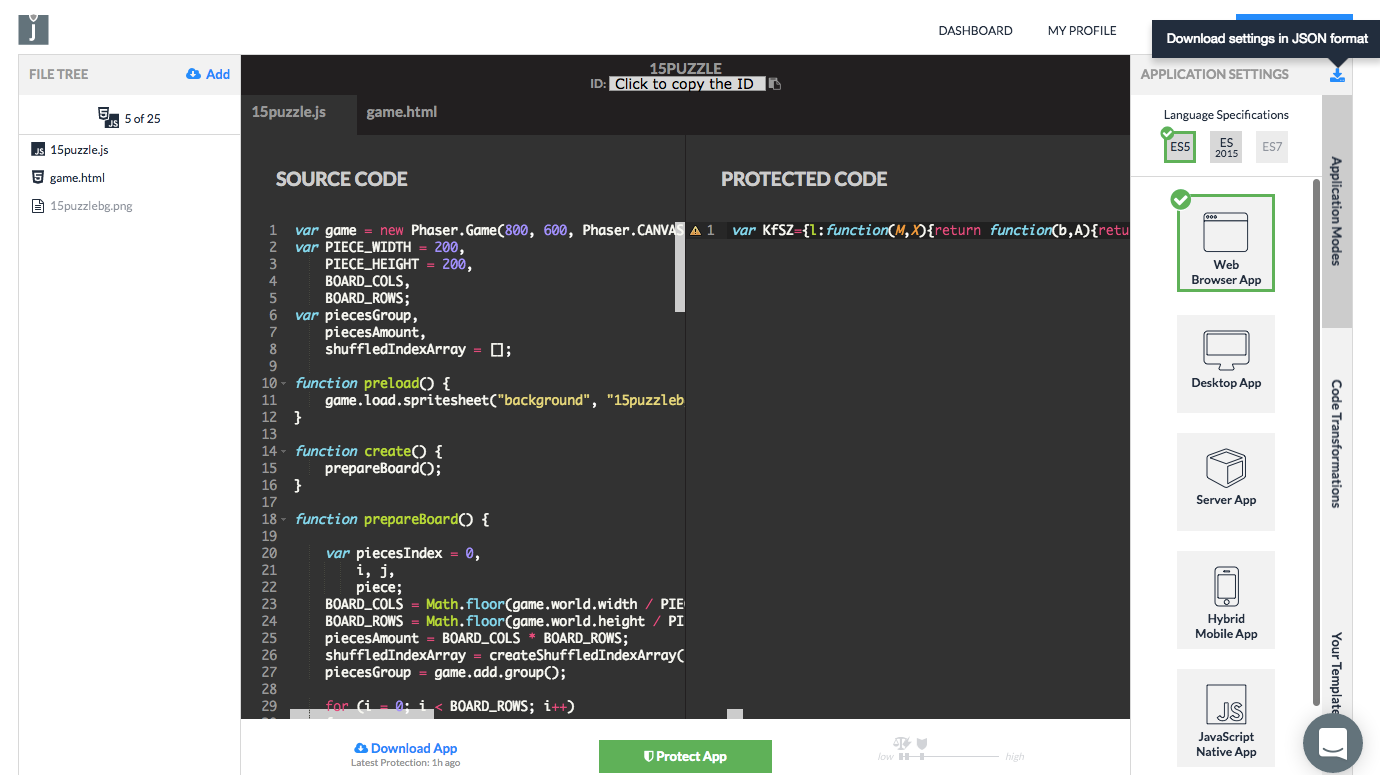
The next part is as easy as copying the code directly as new files within the dashboard:

jscrambler-dashboardAs a priority, we’ll need to download a JSON file with the corresponding API Credentials. These can also be found on the Profile Page once you’ve logged into the Jscrambler Account Panel.

Here we’re applying transformations that include Self Defending and Date Locks. Self Defending will protect the App from being tampered with and debugged, while the Date Lock will only allow the App to run in a certain time interval, useful for delivering expirable demos.

In addition, Date Locks, and all other Locks, allow you to have a warning function that will be triggered if someone tries to run the App outside the parameters you set.

With this function, you can be warned whenever someone tries to use your App incorrectly.

jscrambler.json
{
  "keys": {
    "accessKey": “XXXXXXXXXXXXXXXXXXXXXXXXXXXXXXXXXXXXXXX”,
    "secretKey": "XXXXXXXXXXXXXXXXXXXXXXXXXXXXXXXXXXXXXXX"
  },
  "applicationId": “YYYYYYYYYYYYYYYYYY”,
  "params": [{
        "name": "whitespaceRemoval"
    }, {
        "options": {
            "mode": "SAFEST"
        },
        "name": "identifiersRenaming"
    }, {
        "name": "duplicateLiteralsRemoval"
    }, {
        "name": "functionReordering"
    }, {
        "name": "dotToBracketNotation"
    }, {
        "name": "functionOutlining"
    }, {
        "name": "selfDefending"
    }, {
        "name": "booleanToAnything"
    }, {
        "name": "propertyKeysReordering"
    }, {
        "name": "propertyKeysObfuscation"
    }, {
      "name": "dateLock",
      "options": {
        "endDate": "2017/02/01",
        "startDate": "2017/01/18"
      }
    }],
  "areSubscribersOrdered": false,
  "applicationTypes": {
    "webBrowserApp": true,
    "desktopApp": false,
    "serverApp": false,
    "hybridMobileApp": false,
    "javascriptNativeApp": false,
    "html5GameApp": true
  },
  "languageSpecifications": {
    "es5": true,
    "es6": false,
    "es7": false
  }
}


That’s it! Simply running Webpack after the configuration of our webpack.config.js will bundle our entire Puzzle.

Conclusion

Anyone willing to dip their feet in the waters of game development should know Phaser.js is shallow enough to keep you from drowning in complexity.

There are a few other options out there for game development with JavaScript. Pixi.js (which Phaser wisely incorporates) is great for lightning-fast 2D rendering and Bablyon.js is used for 3D/WebGL games.

Where Phaser stands out is that it provides support for both Canvas and WebGL rendering. It garners wide support and has a very active community, making it one of the best-performing JS game engines available today.

How Secure is your Web Browser?

“JavaScript is ubiquitous. Everywhere you look, something has been created, at least in part, using JavaScript. JavaScript is so easy to learn and use, as there is a wide availability of easy-to-incorporate, open-source libraries like jQuery, React.js, and Frameworks such as Backbone.js, Angular.js, and Ember.js.

But the most important fact is that JavaScript is very dynamic and versatile.

Companies have acknowledged the power of this language and are using it to develop almost anything that is important to them. This raises concerns as more and more sensitive logic is being developed in JavaScript and more and more data and Intellectual Property is being put on the client-side. If companies focus only on protecting the server, as they have been doing until now, they will leave their front door open to attacks such as user-experience tampering, malware injection, data leakage, MiTB, Intellectual Property, and code theft.

According to Statista, over three billion people access the internet globally, giving cyber thieves a very big pond to fish in. Last year alone, it was discovered that nearly one billion Android handsets could be hacked by just one SMS. Also, so-called rogue app stores are becoming a serious concern for banks. Subtly altered versions of popular apps, often available for free, are appearing more often on smartphones. In some cases, these apps allow the theft of mobile banking passwords or redirect text messages containing passcodes.

Traditionally, code protection meant storing as much code on the server as possible. This kept your code safe from prying eyes and it also allowed the server to do the heavy lifting, performance-wise. Even today, storing your code on the server certainly offers the best protection, although with some disadvantages.

Web Security: the Challenges

One challenge involves forcing an internet connection; if you’re developing an application you want to work offline then it’s not feasible. Another consideration is performance. Server calls take time. Not an issue for simple apps but for high-performance apps like games, excessive latency can ruin the user experience.

A question that often crops up is, “Why can’t I just encrypt my JavaScript code?” Seems like a great solution at first, but it doesn’t quite work that way. You can encrypt the files but then they won’t be of any use to the browser. You’ll need to decrypt them to make them readable to the browser, which takes you back to square one.

Let us bear in mind that to date, organizations have relied heavily on endpoint security solutions to protect the client-side – yet solutions such as antivirus have a low success rate of around 40 percent. If we consider that an application encompasses both the server and client side and that the client side solution doesn’t necessarily have to be endpoint security, then we understand that every client app has its own cloaking system and defense.

To date, companies have been focused on the threats via servers and have paid little attention to the hidden dangers of hacks through the client-side. Often, when we get in front of IT teams they are unaware of the risks they face if the client-side isn’t protected sufficiently. Our technology is designed to detect tampering with the application on the client. This means that the development and security teams are made aware and can execute a plan to ensure the attack isn’t successful. We make the assumption that execution takes place in an unsafe environment so we take every measure possible to allow the app to execute safely.

Due to the increasing ubiquity of HTML5 and JavaScript, more and more of an app’s logic is transferred from the server-side to the client-side. This requires developers to focus much more on security. Applications need to be protected in a comprehensive manner.

An additional layer of security allows an application to become self-defensive ensuring that it is able to detect any kind of tampering and make the code derail the execution of the program. Also, if you require real-time notifications then you can use settings to warn you if your application is being tampered with or used in a different environment or date other than the one you have defined.

Conclusion

JavaScript is the de facto language of the web. As we see more and more important information, logic, and assets being incorporated on the client-side, we see an expansion of the battlefield. Attacks are happening now in the absence of effective countermeasures.

We need to recognize and understand the very real dangers posed by not protecting the client side instead of relying solely on antivirus-type solutions and other security on the server side. It’s time to make a stand on security to better protect your precious web assets.”

Originally published in SC Magazine UK on January 20, 2017.

Why You Don’t Know The Client Browsers

Do you know the client browsers?

Client-server architecture comes from the early days of computing. Computers solve problems by talking to other machines on a network.

UNIX, for example, came from a family of multitasking and multiuser computer operating systems. The design was a client terminal from which you log into the computer server. This architecture enables time-sharing, a way to interact with computers over a network. Through time-sharing, you begin to see the birth of the web and cloud computing.

This client-server architecture has many benefits, like decoupling underlying implementation details on clients that share the same resource.

A resource-driven architecture provides more flexibility and scalability in the solution. It is no accident the web is the de facto standard for modern computing.

Modern web solutions take advantage of asynchronous multitasking across many nodes in a network.

What is the Internet?

I know what you may be thinking, isn’t the Internet too nebulous? The modern architecture of the web sits on top of a set of clear and well-defined standards.

Once engineers figured out client-server solutions had great potential, the next step was to rally behind a common protocol, known as HTTP.

HTTP stands for Hypertext Transfer Protocol, and it is the backbone of the Internet. The protocol is a text message that talks to a computer over a network. The client initiates a message as a request to the server. The server then responds to the message with a resource.

A simple hypertext response can do, for example:

HTTP/1.1 200 OK
Content-Type: application/json; charset=utf-8
Date: Mon, 26 Dec 2016 16:40:44 GMT
Connection: keep-alive
Content-Length: 27

{"message":"Hello, World!"}


Note the protocol has a resource content type. In this example, it is responding with JSON. The server is not concerned with how clients handle this resource. JavaScript on the client, for example, can do whatever it needs with this content type.

HTTP is hypertext messages over a network. It is both intelligible and fascinating.

A Stateless Protocol

What follows from a system of decoupled hypertext messages is a stateless protocol. This means HTTP is not concerned with persistence on the client or the server.

The state itself is an implementation detail. It can go on the client or the server. Persistence is a responsibility that gets delegated to each layer.

Imagine an app where you begin a user session on a desktop browser. Then, continue where you left off on a mobile device. In this instance, the server uses a persistence mechanism decoupled from the client. The server can choose to store user sessions in memory or a database. The client is not concerned at all about how this is happening.

On the client, applications with offline support are common for mobile. This enables the client app to store its state. The client keeps the state and syncs up with the server once the network becomes available. In this example, the state gets handled by the client. The client app must decide whether the network is or is not available.

The implication of a stateless protocol leads to a fascinating conclusion. It means applications over the web are client-server agnostic. Any computer program with the correct hypertext message can interact with your web solution.

This stateless nature has security implications.

Browser Usage

This story becomes more interesting when you see the plethora of browsers out there. Each is capable of sending hypertext messages over the web.

According to Stat Counter, Chrome is the most popular browser as of the time of this writing. On mobile, Safari is the second most popular.

The web is a place full of diverse browser clients. Because of this, it is both scary and fascinating. There is little chance to know in advance which browser end-users use on the client.

This means you have little to no control over the web solution. End-users are free to use whatever browser can interact with your solution. This level of freedom comes at a price.

For security, this means there are many attack vectors because attackers have many choices. Each layer is vulnerable, an attack on the server can come from an agnostic client. An attack on the client can target a specific vulnerability in code that runs on the client.

Conclusion

In the end, you can’t trust the client. In the open web, the client is the layer you can’t control. Once your server receives a request, it can come from anywhere since it’s a hypertext message. The open web is both scary and fascinating.

With the proliferation of JavaScript on the client, many modern solutions put more and more business logic on the client. Single-page applications, for example, are ubiquitous on the web. Many solutions depend on the functionality provided by the browser.

Modern browsers have become the best programming platform on the web. The APIs available add richness and ease of use to any solution.

So, where does this lead? What can you do to secure modern solutions?

With Runtime Application Self-Protection (RASP), you can trust the client.

Jscrambler, for example, offers the most effective level of protection for client-driven applications.

A RASP solution protects against tampering and adds self-protection. This solution is ideal for JavaScript applications that run on the client.

5 Awesome Free Books for JavaScript Developers

Our top 5 books for JavaScript developers are well worth reading. Today, we will show you some ebooks to learn JavaScript and Node.js. The coolest thing is that you don’t need to spend your money to buy it because all books are open-source and free to read!

1. Eloquent JavaScript Second Edition

This is a book about JavaScript, programming, and the wonders of the digital.
Eloquent-JavaScript-Second-Edition-book
The book contains roughly three parts. The first eleven chapters discuss the JavaScript language itself. The next eight chapters are about web browsers and how JavaScript is used to program them.

Finally, two chapters are devoted to Node.js and another environment to program JavaScript. Throughout the book, there are five project chapters, which describe example programs to give you a taste of real programming.

In order of appearance, we will work through building an artificial life simulation, a programming language, a platform game, a paint program, and a dynamic website.

What you’ll learn?

  • Introduction to JavaScript

  • Values, Types, and Operators

  • Program Structure

  • Basic Data Structures: Objects and Arrays

  • Functions and Higher-order Functions

  • The Secret Life of Objects

  • Bugs and Error Handling

  • Using Regular Expressions in JavaScript

  • Modules

  • JavaScript and the Browser

  • The Document Object Model

  • Handling Events

  • Drawing on Canvas

  • HTTP protocols

  • Forms and Form Fields

  • Basics of JavaScript into Node.js


Conclusion: It’s a book for beginners who know the basics of programming. In this book, you will learn deeply about the JavaScript language, how to manipulate the HTML DOM (Document Object Model) using JavaScript, about drawing graphical objects using Canvas, how to handle errors, bugs, and events, how the HTTP protocols work using Ajax and how to play with JavaScript under the Node.js environment.

Author: Marijn Haverbeke

2. Understanding ECMAScript 6

This book is a guide for the transition between ECMAScript 5 and 6. It is not specific to any JavaScript environment, so it is equally useful to web developers in general it is for Node.js developers.
understanding-ecmascript-6-book
What you’ll learn:

  • What are the changes in the language between ECMAScript 5 and ECMAScript 6?

  • How to work with the new class syntax

  • Iterators and Generators

  • How and when to use arrow functions instead of regular functions

  • How to store data using Sets, Maps, and more

  • Inheriting from native types

  • Work using Promises for asynchronous programming

  • How to organize code in modules


Conclusion: This is a book for programmers who wanna upgrade their JavaScript knowledge. The basics of JavaScript are required to understand this book. All content is related to the new JavaScript implementation, the ECMAScript 6 (aka ES6 or ES2015). This book will guide you to migrate to this new implementation, showing the differences between the old ES5 and the new ES6 features.

Author: Nicholas C. Zakas

3. Learning JavaScript Design Patterns

In this book, we will explore how to apply both classical and modern design patterns to the JavaScript programming language. It’s targeted at professional developers wishing to improve their knowledge of design patterns and how they can be applied to JavaScript.
learning-javascript-design-patterns-book
Some of the concepts covered (closures, prototypal inheritance) will assume a level of basic prior knowledge and understanding. If you are interested in reading further about these topics, a list of suggested titles is provided for convenience. If you would like to learn how to write beautiful, structured, and organized code, we believe this is the book for you.

What you’ll learn?

  • Introduction to Design Patterns

  • JavaScript Anti-Patterns

  • JavaScript Design Patterns

  • JavaScript MV* Patterns

  • Modular JS Design Patterns

  • jQuery Design Patterns


Conclusion: This is a must-have book for all JavaScript developers! This book is one of the best free books for JavaScript, the author – Addy Osmani – explains deeply about anti-patterns and design patterns.

All content will teach you how to code better and how to code using the right pattern for the problem you want to solve. The basics of JavaScript are required for well understanding of this book.

Author: Addy Osmani

4. Node.js Succinctly

Node.js is a wildly popular platform for writing web applications that have revolutionized web development in many ways, enjoying support across the open-source community as well as industry.
nodejs-succinctly-book
With Node.js Succinctly, you will learn the basics of non-blocking I/O, the event loop, modules, and the Node.js runtime environment. From there, you will dive into building practical solutions that interact with filesystems and streams, access databases, handle web server message queuing, and more.

What you’ll learn?

  • The Node.js Ecosystem

  • How to use Filesystem and Streams

  • Building Web Applications

  • Real-Time Apps with WebSocket

  • How to integrate a database

  • Messaging with RabbitMQ

  • Build and Testing tools


Conclusion: If you wanna improve your JavaScript skills working on a backend platform, Node.js will be a good choice this book will teach you how to work under a Node.js runtime environment, how to build web applications with real-time interactions via HTTP & WebSocket protocols, how to send messages using RabbitMQ and how to work with useful tools for build and testing your server-side code.

Author: Emanuele DelBono

5. Module Patterns

The first short book of this series is a brief introduction that sets the foundation for the next books to come. It shows what you can do with JavaScript and the Node module system to create and consume different types of modules: Singletons, Closure-based and prototype-based pseudo-classes, facades, and others.
Module-Patterns-book
What you’ll learn?

  • Introduction to Modules

  • How to return the exported value

  • Working with modules in the browser

  • Module registry

  • Transitive module loading

  • Node.js module system

  • Types of Modules


Conclusion: This book requires, at least, intermediate knowledge of JavaScript and Design Patterns. You will learn deeply, the concepts about the Module Patterns and how to work with the main module’s systems for the backend via Node.js and frontend environments.

Author: Pedro Teixeira

Conclusion

If you wanna find more free books, just take a look at this site DevFreeBooks. Please note that not all books are free for download, in this case, you can read them online for free.

Do you know another cool and free book for JavaScript? Let us know!

How to Store Passwords Safely

The one million dollar question is: How to Store Passwords Safely?

The security of users’ passwords is one of the most significant aspects of developing your web application. However, making a good authentication script is not a piece of cake. It’s so easy to get it wrong.

The best way is not to store passwords, but this is not linear. Let’s think about how to make it as safe as possible.

How does it work?

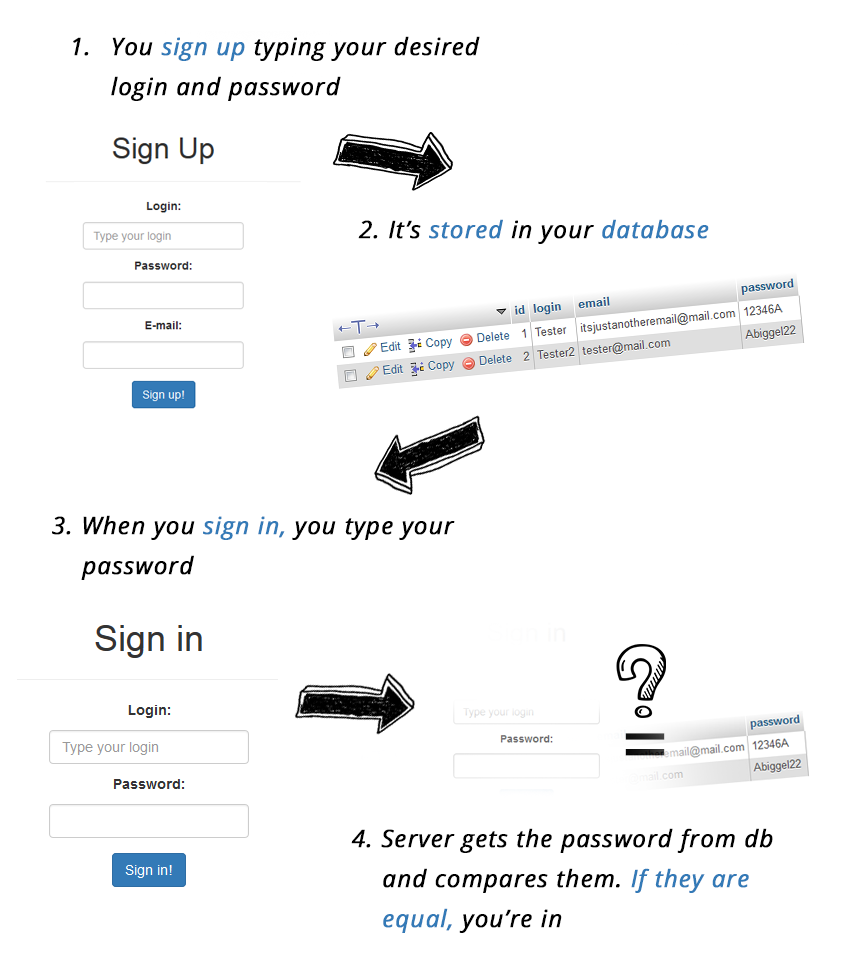
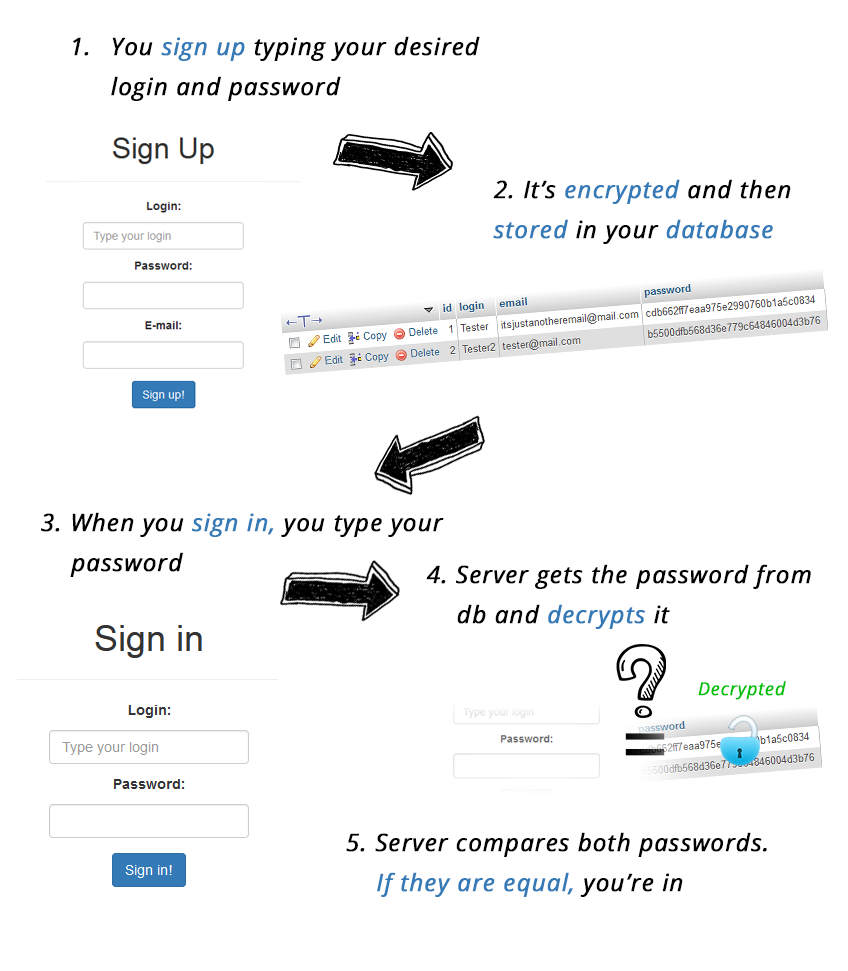
How does it work in theory? It seems really simple. When you register, you choose your login and password. They are saved to the database.

Then when you log in, the server compares what you typed in the login box with the data from the database and if it’s equal, it lets you in.

Step1-saving-password-and-user-name-in-databaseIt’s pretty simple, isn’t it?

If you ever learned any server-client-related programming language (like PHP, for instance), you know that a simple authentication script is one of the basic lessons and it sometimes looks like that, but I’ve got something to tell you – it’s wrong! Why?

It may seem like a safe solution, but this approach has its cons.

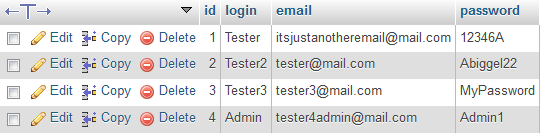
Think about this – What if you get hacked? What if your database gets hacked? I’ll help you. We’ll see something like this:

DB1-database-dashaboard
They hacked one password, the one to your DB, and they have access to all accounts created in your service. “So what?”, you could say if your website has nothing to do with money or any other important data, but… take into account that it’s common for people to use the same password for different services. So the password used on your website could be valid (often with the same login and email!) also emphasized text for Facebook, Youtube… you name it!

When I was starting my adventure with PHP, tutorials about the authentication process with this approach were something very popular.

If you think it has changed, you can take a quick shot at Google and search for examples. I can guarantee you that at least some of them will still teach you to store passwords like that. Don’t get fooled. If you want to make good scripts, always do wide research.

This approach seems naive now, but if you think there aren’t any websites with such an authentication method, you’re wrong. How to identify such services? By their ability to send you your password by email if you forget it.

That means it has to be stored as plain text or it would be an impossible thing to do. That’s why the only way to restore your password is often to set a new one. And don’t think that we are talking only about small personal websites.

We mean also websites managed by big corporations, shops, and so on. There is a nice service out there – Plain Text Offenders, which collects such websites.

But let’s get back to business. What can we do to strengthen our defense?

Encrypting

The first thought, that comes to mind, when you think about how to hide passwords in plain text is to encrypt them. It’s a good idea, but it’s still not so perfect. But before we start analyzing what’s wrong with this approach, let’s think about how to bring it to life.

So? How does it work?

Step2-encryptingNow user passwords get encrypted before they are stored in the database. When your user signs in, the script gets an encrypted password from the database, decrypts it, and then compares it with the password you typed. If they’re the same, the script lets you in.



It seems more secure, because now when somebody just reads out your database, he sees something like this:

DB2-database-dashboard-after-encrypting-technique
Of course, if somebody has access to your database, they can set up a new account with his password, and then by searching their record in the database, just copy their encrypted passwords and paste it into every account they want.

Then, with their password, they can sign in to every account, even yours – the one with admin permissions! It’s bad, but at least they don’t have passwords of users, so they can’t use them on other websites.

It has got other cons though. You see, encrypting is a two-way function. It’s reversible so you can always decrypt the string and get the original one if you have the key.

So it means that the attacker who gets access to your database can still get the original passwords. He only needs the key to encrypt them.

The other flaw is caused by the incompetence of users. In theory, everybody knows the passwords should be long, safe, original, and hard to crack, but there are still individuals who love “123456″, “admin1″ and so on. If your website is small, it’s not so scary, but the more users you have the more users could probably pick “123456″. I wonder If you already know what this means.

Encryption of the same password will be always the same so you could end with a database where encrypted passwords are repeated:

DB3
When the attacker sees something like this, it’s easy to come to the conclusion that repeated passwords must be something popular. And it would be the truth!

Just another digression.
If you don’t use salt (it’s just a random sequence of bytes that is added to the password before being digested, I’ll tell you more about this in the next chapter) and the same passwords look the same after encryption, another thing which can reveal them is password hints. What do I mean?

DB4
Let’s analyze the previous table.
If we have the same password, every hint must fit. So if we store hints alongside the user password, the attacker gets as much help as many passwords there are.

If we could see only one, as in the standard procedure of restoring a password, it would be hard to guess what it could be. It’s a movie about the mafia? There are tons of them… But if we also know, that Marlon Brando played there and Michael Corleone is one of the characters, then the difficulty is decreasing to zero.

We already know that we’d like a safer system for our website. Could you believe that such a weak authentication system was used by, for instance, Adobe?

In 2013, Adobe databases got hacked. Reports revealed that more than 130 million user accounts got leaked.

The whole database was quickly published online and became the target for a great number of hackers and… marketing companies. They received a great list of emails and they knew a lot about this group of people just by the fact they were Adobe clients. In the article, we can read:

“The file holds Adobe IDs, email addresses, (encrypted) passwords, credit/debit card numbers, expiration dates, other PII (Personally Identifiable Information) and more.”

The worst thing here is encrypted passwords. We already know what the flaws are:
“The use of a symmetric cipher here, assuming we’re right, is an astonishing blunder, not least because it is both unnecessary and dangerous.

Anyone who computes, guesses, or acquires the decryption key immediately gets access to all the passwords in the database.” Paul Ducklin at Sophos [Naked Security]

So, is this a better approach? Yes. But it’s still not what we’re looking for.

Hashing

So encrypting seems quite a good idea, but the encryption key makes it really unsafe. How can we get rid of an encryption key? By making our encryption one-way only. If we encrypt and never decrypt, we don’t need an encryption key.

You can wonder – “What if one of my users loses a password? Can I send it to her/him?” – No, you can’t, but there are other solutions, like setting new passwords. But let’s get back to the topic.

Again, how does it work?

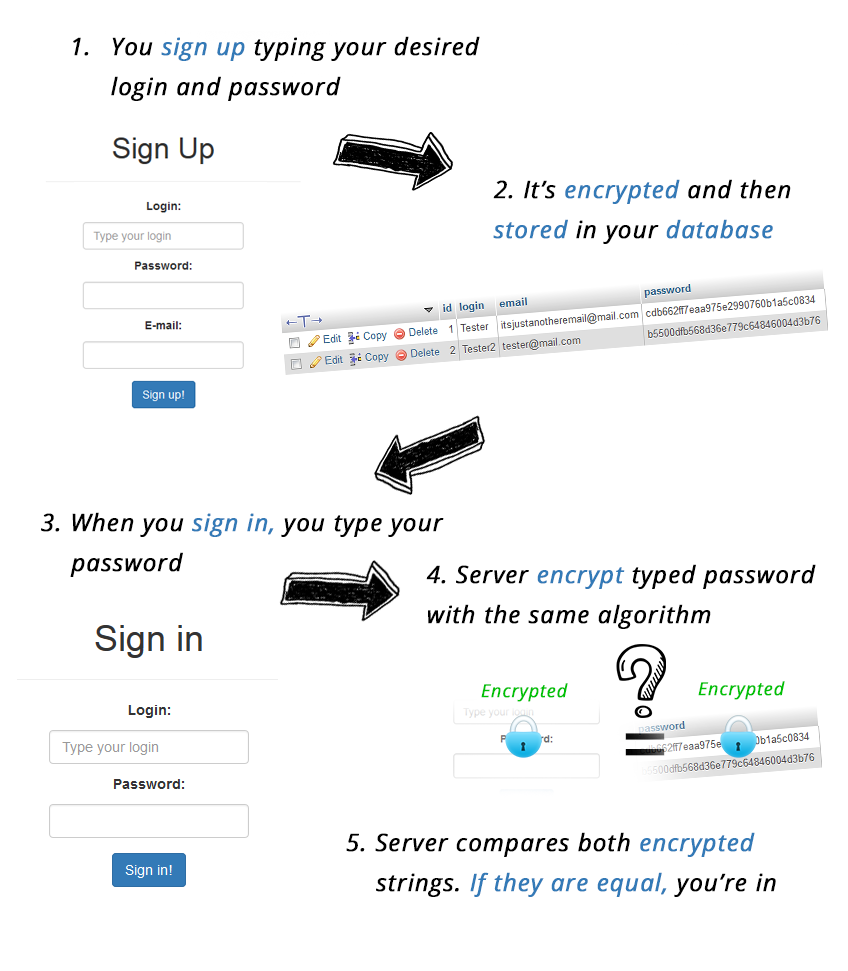
step3-hashingSo what has changed? We NEVER decrypt, so we forget about our encryption key. The same as before we encrypt the password before storing it in the database.

The thing that has changed is the part when we sign in. This time, we don’t decrypt our password from the database (we don’t have any key, so we can’t do it anyway), instead, we encrypt the typed password in the same way, with the same algorithm as we had done it while registering. If both encrypted strings (typed password and password from DB) are the same, you’re in.

It’s not really complicated. But now we have a question, what password-digesting algorithm should we choose? The most popular ones are MD5 and SHA1, SHA2 (from SHA family). They are really easy to use. But now the question arises. If they are popular, are they really safe? Well…

If you type the hashed code to Google and you use a public popular algorithm you’ll probably get a tone of results telling you what would be an encrypted value of such digest. Just try

“e00cf25ad42683b3df678c61f42c6bda” for example. The first result will already give you a decoded value “admin1″.

There are also the things called rainbow tables, which really speed up the cracking of password hashes.

Rainbow tables are precomputed tables for reversing cryptographic hash functions. They’re used mainly for cracking password hashes and recovering plaintext passwords. Shortly, it’s a space/time trade-off.

You use less computer processing time and more storage. It’s faster than a brute-force attack calculating a hash on every attempt. It’s like a database of already calculated millions of hashes for specified passwords. Scary enough?

And the other flaw is again – common passwords. “123456″ and “123456″ still will give the same results to the database.

What do we have to do? We need to salt them.

Salting

Hashing and salting.

They have never invented annoying better than this and it seems a really good approach for now. The salt is a random sequence of bytes that is added to the password before being digested. This causes the digest to be different than the normal encryption. It protects us really well against rainbow tables/dictionary attacks.

There are two types of salting:

fixed salt, a sequence of bytes used for every password. However, even if we keep our salt hidden, our system is still vulnerable to birthday attacks and doesn’t use the whole idea of salting. A birthday attack is an attack that exploits the Birthday paradox theory. Shortly, it says that if you have a large amount of user password digests, the probability of generating a password colliding with another one of the digests in the table is higher than you could expect. And the more users, the more the probability and the easier it becomes for an attacker to find a way to crack your passwords.

Variable salt is generated separately for each password. This causes the digest to be different for the same password with every encryption. It’s safer and we get rid of common password flaws, which I mentioned before.

Step4The first option weakens when the attacker gets the fixed salt. He’s getting the key for all passwords then. There are a few ways for an attacker to know the salt. Brute force on his/her or somebody’s password is enough to get it.

The second option is much safer, but if it’s random, we have to store it unencrypted along with the hashed password in the database. Why? Because we will need it to regenerate the same algorithm we used for signing up while logging in. However every password is different, so they have to be attacked separately.

The best option is to mix both of them. Then we generate a random string and compute it with fixed salt. This way we’re much safer. The minimum recommended size of salt is 8 bytes. At least 8 bytes should be random.

This way every user password is completely random. It means you are not able to pull the password back from it. Do you remember Rainbow Tables flow? It won’t work now! Salt added to the password ruins it. It’s now a really long random string.

The common password flaw? It won’t work as well! The only thing the attacker can do is to try every password he can find out. A brute force attack against a complicated hashing algorithm and very long salt will need a lifetime to get your password.

Oh! And one other thing – password guessing attempts limit. It’s a simple mechanism to implement and it’s very important against brute-force attacks.

The iteration count

We have now a really safe algorithm, but there is another thing we can also do.

The iteration count refers to the number of times the hashing function works on its own results. What do I mean? When you generate your salt and compute it with a password, you apply the hash function (SHA-1, MD5, or something else).

To make it safer you can again apply the hash function on an already hashed result and then do it again and again… and again. It makes the final string even more complicated.

The minimum recommended number of iterations is 1,000 and it really should make you feel safer. It’s not really demanding work for the server to do it, but for the attacker increasing such complexity would make brute-force attacking even longer process than it would be already anyway.

We’ve found possibly the best way to protect our users’ privacy. Not perfect, but at this moment – the best. Remember, however, that in the security area, in IT at all, everything is changing really fast. While designing your authentication system, search for the newest tricks, and follow reputable people from the industry. And never let your authentication system get old!

External authentication

The best way to not worry about password security is to not store them at all. If you can, use Facebook login, and Google sign-in in your websites to allow users to log in using their other accounts.

You don’t have to worry about it yourself then.

Passwords

We already know that weak passwords can provide harm not only to individual users but even to the whole database. If we’re skillful enough, we can take into account user incompetence and defend against it.

However, users themselves… they’re still easy targets with easy passwords. What the perfect password should be? I based my advice on the research of Matteo Dell’Amico, a researcher at Symantec Research, and Maurizio Filippone from the French research institute Eurecom.

The password must include upper and lowercase letters and at least one numeric character
The latest research shows that it doesn’t make them really stronger… but if it does even a little, don’t hesitate to use it.

Make the password as long as you can
It’s more effective. Try to make your password as long as possible. The longer it is, the harder it is to recover it.

Use symbols
The latest research shows that it’s more effective than using upper and lowercase letters.

Try to be the least predictable
Think of weird passwords, don’t use dictionary words.

Conclusion

The best way to not store passwords in a bad way is to not store them at all.

Unfortunately, it’s not always possible. So if you really have to do this, pay attention to every detail. The password is the key to your service and sometimes to other people’s lives.

Remember that you have a duty to protect your users’ privacy. We found out probably the best way to protect it at the moment. But remember that the world is changing really fast. Don’t let user data be exposed by your incompetence.

You owe them privacy.
If you’re interested in learning how Jscrambler can protect your Web applications, request a demo or get in touch with us.