Jscrambler WPI 101 - Getting Started
January 21st, 2026 | By Jscrambler | 7 min read

Web applications are facing growing threats from client-side attacks that seek to steal sensitive data and disrupt user experiences. Jscrambler’s Webpage Integrity (WPI) defends against these increasingly targeted risks by safeguarding web assets and payment pages against supply chain attacks, data exfiltration, DOM tampering, and more, while maintaining a seamless user experience and supporting compliance with data privacy-related regulations.
Understanding the Need for Webpage Integrity
With more websites relying on third-party scripts, the client-side attack surface has expanded significantly. Attackers exploit vulnerabilities in these scripts and forms to skim payment data, inject malicious code, or manipulate webpage behavior. Such attacks not only lead to financial losses but also cause critical damage to brand trust and compliance risks. Ensuring the integrity of every script running on the website is crucial for preventing data breaches and complying with regulations and standards, such as PCI DSS v4.
Key Features of Jscrambler Webpage Integrity
Jscrambler’s Webpage Integrity solution provides comprehensive capabilities designed to secure client-side environments:
Webpage Inventory: Automatically discover and monitor all third-party scripts (and all other scripts) present on the website, analyzing their origin, behavior, and prevalence to identify risk factors.
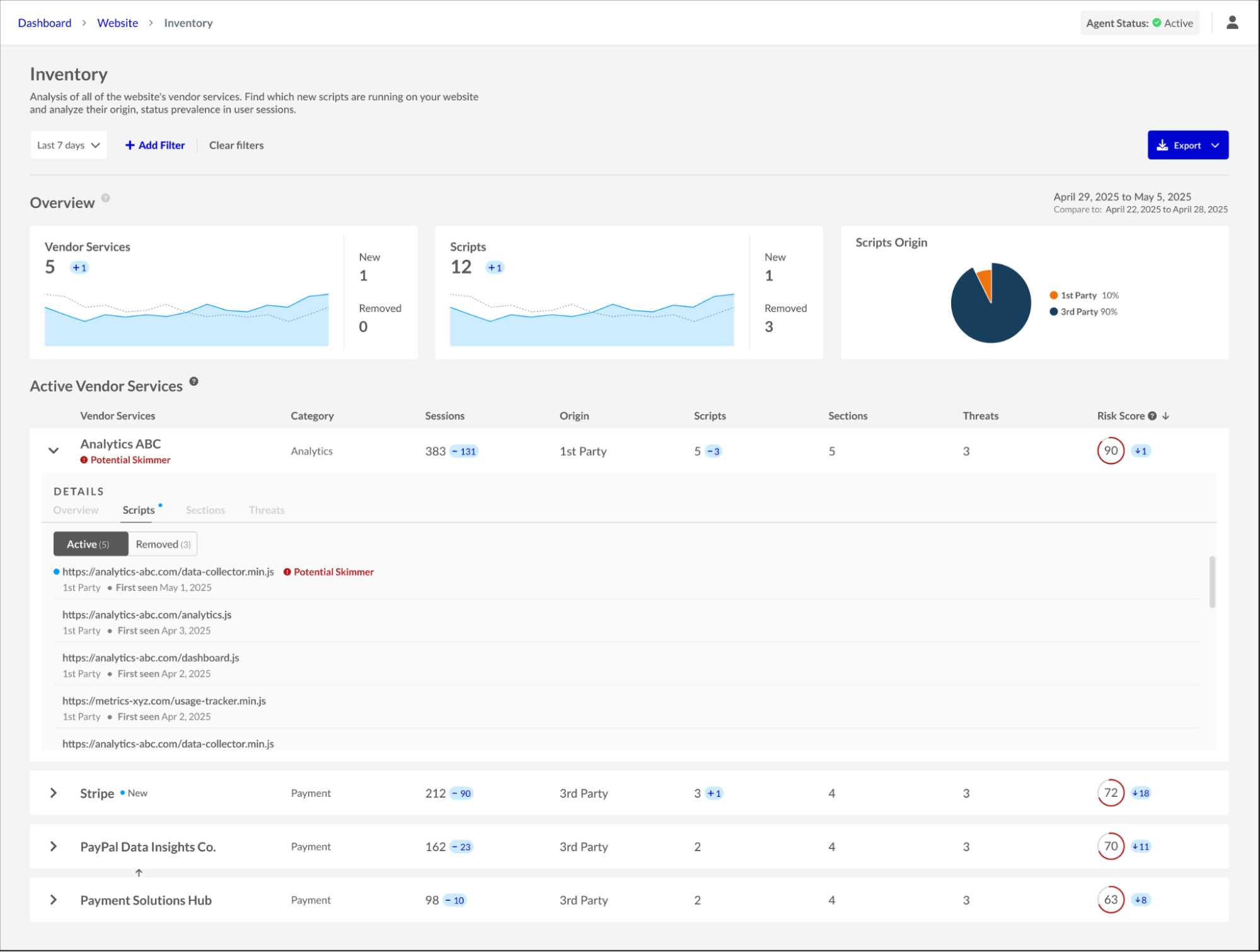
Inventory dashboard
Sensitive Data Overview: Get detailed reporting on events involving access to sensitive data on webpages (forms, cookies, browser storage, text elements), with filters to isolate alerts by vendor, page, or event type.
Form Fencing: Actively block unauthorized scripts from accessing form fields to prevent data skimming and leakage.
PCI DSS Compliance Module: Gain tools and reports to help meet PCI DSS version 4 requirements, particularly regarding script integrity on payment pages (6.4.3 and 11.6.1).
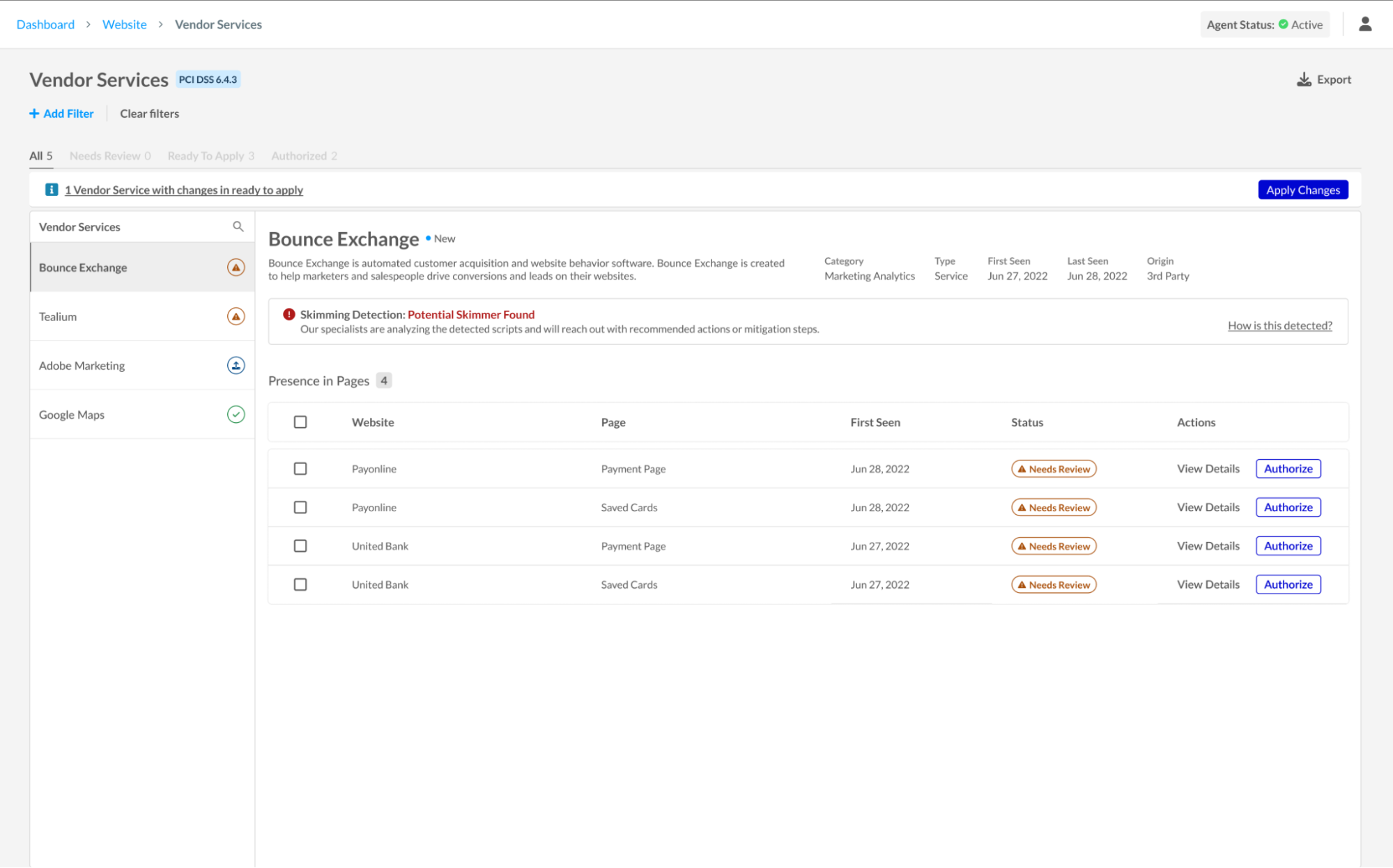
PCI DSS Vendor Services dashboardCustom Policies: Define precise security rules without disrupting your user experience. Jscrambler’s customizable policies let you block, alert, or ignore specific script behaviors, such as unauthorized data access, directly on the client side. Instead of stopping scripts from running, WPI silently intercepts and neutralizes risky actions, preserving both page functionality and the integrity of sensitive data.
The Webpage Integrity product uses a hybrid architecture that combines Agent-Based Protection and Agentless Monitoring. This flexibility lets organizations deploy rapid, lightweight monitoring on less critical pages while applying active, real-time blocking to high-risk areas such as login, payment, and other sensitive data entry forms. Data from both deployment types is integrated into a single unified dashboard, providing a seamless view of client-side risks and compliance status.
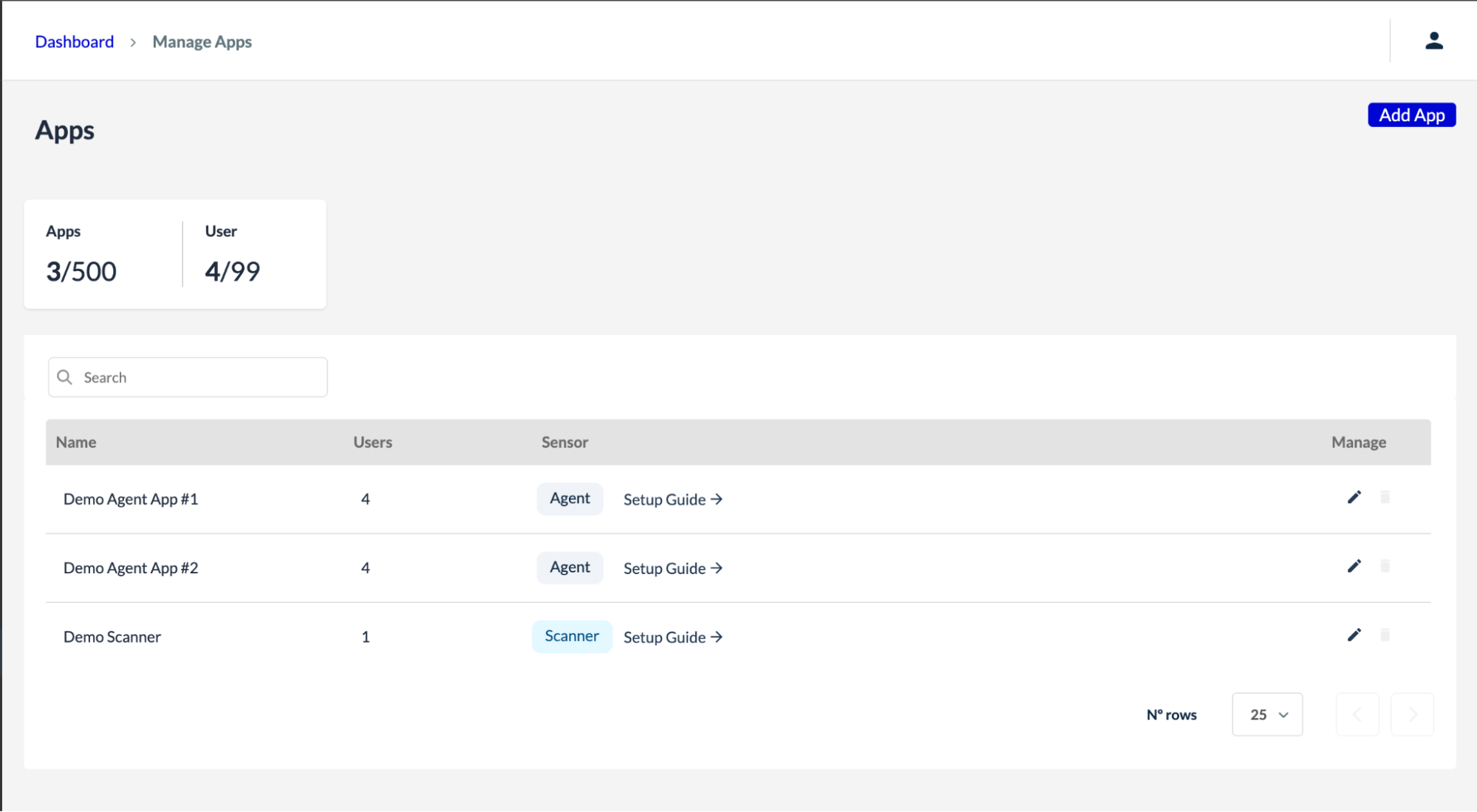
App Management dashboard
Step-by-Step Implementation Process
Integrating Jscrambler WPI follows a structured approach to ensure effective deployment and tuning:
Kickoff & Team Alignment
To help things run as smoothly as possible, the Jscrambler team asks that you form a small cross-functional group on your side. Start by assigning the champion (e.g., someone with the title AppSec Lead, Architect, Security Manager, or Risk Manager) from your team for the duration of the integration process. That person will have regular meetings with the team and be the main point of contact. It is also essential to allocate some developer resources (DevOps) for the agent injection on the pages to be monitored in the beginning stage of the deployment. For PCI DSS compliance, it is recommended to loop in your Compliance/Fraud manager for alert triage.
Planning and Scoping
After defining the WPI plan for the client, collaboration is key to identifying the websites and respective pages where the agent should be injected. During this phase, the sensitive forms to be monitored are also mapped, the customer’s first-party vendors are configured, and access permissions are set up for the group of users who will operate the dashboard.
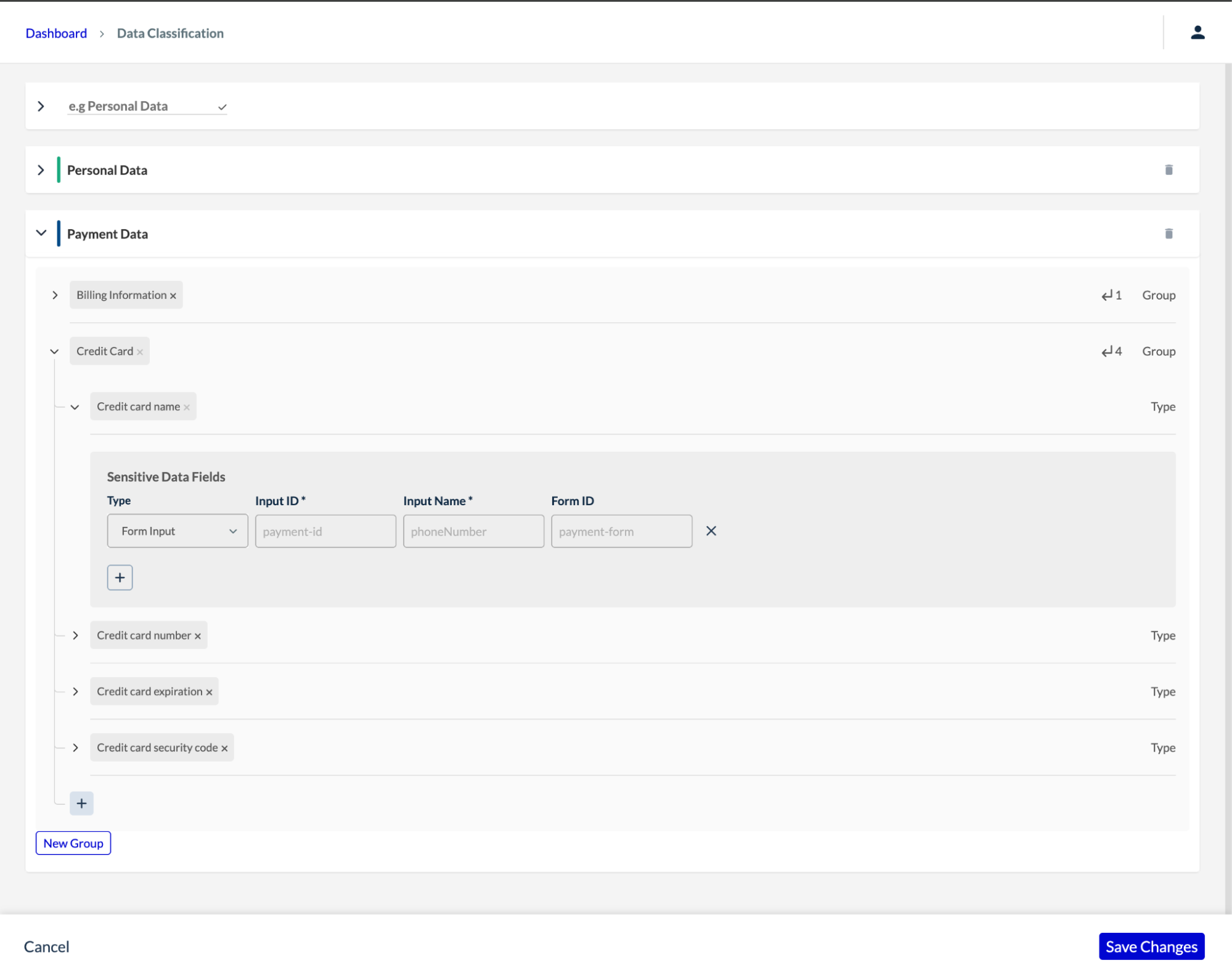
Sensitive Data configurations
Deployment
The successful deployment starts with injecting the Jscrambler agent into the web pages to be monitored, or with the Agentless monitoring component for those aiming to bring payment pages into compliance.
Embedded Agent Injection
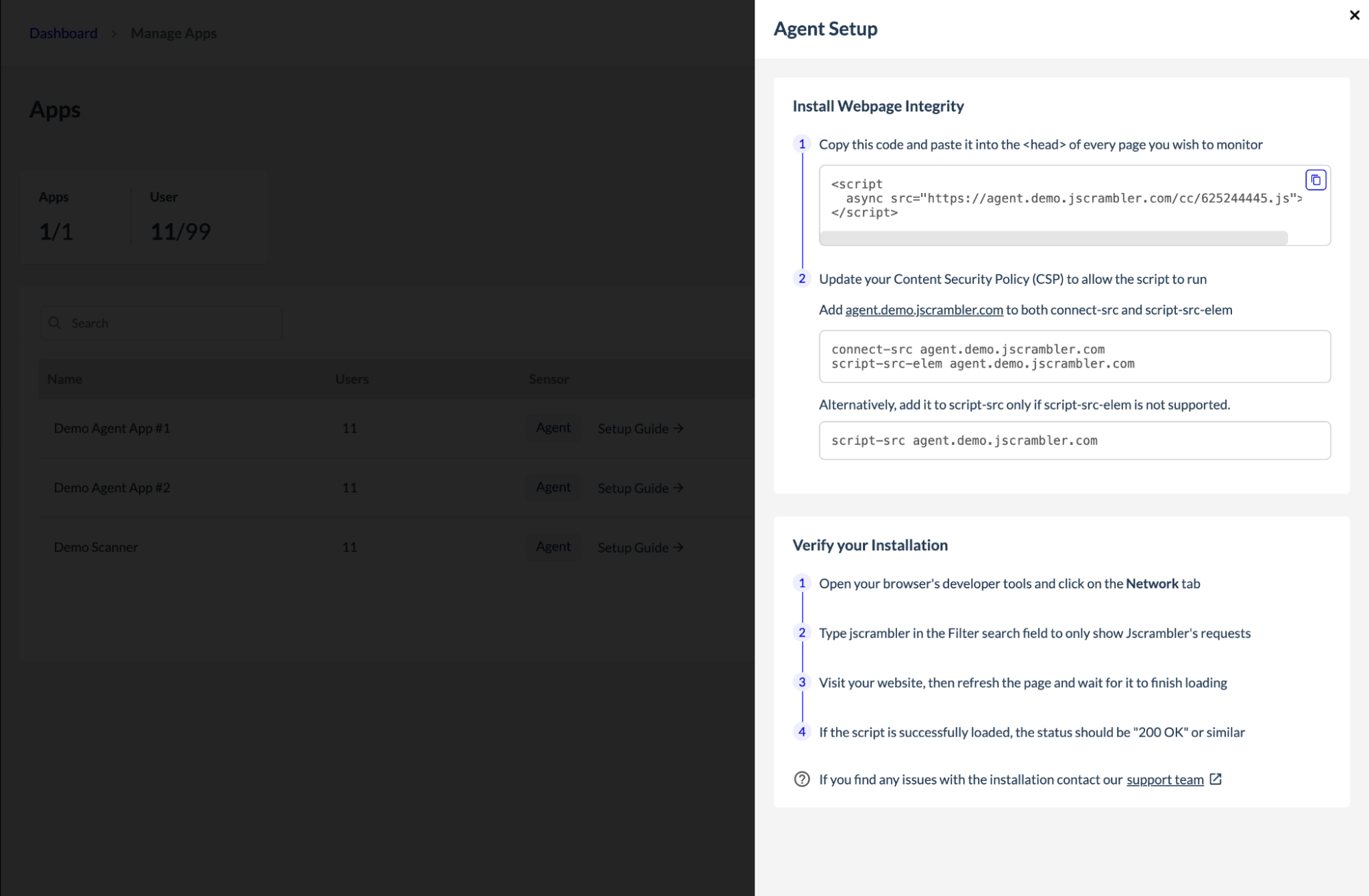
The Jscrambler team shares the snippet instructions for injecting the Jscrambler agent. Usually, the DevOps from the customer side completes this action. The agent injection can be carried out in one of two ways: via code injection or via Tag Manager, in which case no development resources are needed.
In an Agent-Based approach, the agent should be injected into previously configured websites and pages. It is recommended that the Jscrambler agent be one of the first scripts loaded on each page to ensure maximum visibility and control. This early injection provides stronger security coverage and ensures that monitoring and blocking can occur before any malicious scripts have a chance to execute.
How the Jscrambler Agent Works
The agent operates invisibly within end-users' browsers to monitor script behavior, network requests, and DOM interactions. Importantly, all data transmitted to Jscrambler’s backend is anonymized to protect user privacy, with no personally identifiable information collected. This approach ensures near real-time visibility into any unauthorized or suspicious activity without compromising compliance.
Best Practices for a Successful Implementation
Inject the agent as early as possible in the page load process to block threats before they can cause harm.
Appoint a dedicated project champion, such as a Security or Risk Manager, to coordinate communication and facilitate decision-making with Jscrambler’s team.
Use the initial configuration phase as an opportunity to continuously identify benign versus malicious actions in the environment, refining rules and alerts accordingly.
Agentless Monitoring allows WPI to run without any code changes or script deployments on the customer’s side. Instead of embedding an agent into live pages, Jscrambler uses a synthetic user that automatically visits the target pages and executes our data collection routines. This approach simulates real user behavior to detect and classify third-party scripts and potential skimming threats.
The agentless option allows customers to move forward even when they can't easily insert the agent into a web property, such as when they don’t have direct control over the application. To enable agentless monitoring on the web property, provide the Jscrambler team with the URLs of the properties and their corresponding payment pages you wish to monitor.
Once the URLs are shared, the Jscrambler team will set up your account and provide the necessary login credentials for you and any additional users. Our team will also configure the websites and payment pages to be monitored by the Agentless Monitoring component.
Configuration & Training
During the training period, insights gathered from the dashboard help confirm that the configured websites, pages, and other settings are correct or identify where small adjustments are needed.
For use cases such as Form Fencing, control rules over sensitive forms should be validated to ensure they are properly defined and effective. Jscrambler’s team will be available throughout this process to assist with configuration review and verification.
To ensure smooth configuration, weekly meetings can be held, and the topics discussed can include, but are not limited to:
Volume: Exact pages where the Jscrambler agent should work
Rules to alert about specific actions
New configuration requests
Custom events tracking
Production
In the final stage, live threat monitoring and alerting begin, with ongoing adjustments to maximize security without impacting the user experience.
Ongoing Operations, Support & Response
As a final step, an ongoing operating rhythm should be established to deliver long-term value from the platform. With the WPI dashboard, it is easy to do reviews, stay on top of the threats, automate compliance reporting, and stay audit-ready. Quarterly performance reviews with the Jscrambler Customer Success Manager can help optimize policies: analyzing blocked activity, updating allow-lists for new vendors, and refining rules as threats evolve. For incidents, rely on predefined rules to act quickly on alerts, including restricting access for suspicious scripts and escalating to Jscrambler support when needed.
Deployment Approaches: Agent-Based vs Agentless
Agent-Based Deployment: Embeds a hardened JavaScript agent directly within the website, enabling real-time detection and active blocking of malicious scripts. This method is preferred for high-risk pages needing comprehensive protection.
Agentless Monitoring: Not only applicable to this use case, but it also offers a faster path to PCI DSS compliance by passively scanning specified payment pages and tracking third-party services without impacting performance. It is ideal for initial rollouts or pages where direct agent insertion is not feasible.
Compliance and Security Confidence
Jscrambler’s infrastructure is PCI DSS-compliant, ISO 27001-certified, and GDPR-aligned. Regular internal and external penetration testing underpins the product’s security posture, providing customers with assessment-ready reports and increased assurance when protecting critical web applications.
Getting Started Tips
Get a full overview of all third-party vendors present on your website, and find out which teams, people, or processes can add JavaScript to the site. Is there a change management or approval process for this?
If you need to quickly gain visibility into web pages and third-party risks, start with Agentless Monitoring.
Share as many insights as possible during the configuration phase so that Jscrambler team can build tailored protections.
Leverage Jscrambler’s intuitive dashboards and real-time alerts to quickly respond to evolving threats.
Conclusion
Jscrambler’s WPI delivers essential, real-time protection against client-side threats that traditional security solutions often miss. Deploying WPI is a decisive step toward securing the client-side and future-proofing web applications against evolving attacks.
Jscrambler
The leader in client-side Web security. With Jscrambler, JavaScript applications become self-defensive and capable of detecting and blocking client-side attacks like Magecart.
View All ArticlesMust read next
Jscrambler WPI 101 — Skimming Detection
Jscrambler WPI 101 is a series of articles about Jscrambler’s product Webpage Integrity (WPI), its main use cases, innovative features, and tips on how to maximize the product's benefits. This...
May 27, 2025 | By Jscrambler | 9 min read
Jscrambler WPI 101 - Form Fencing
Jscrambler WPI 101 is a series of articles about Jscrambler’s product Webpage Integrity (WPI), its main use cases, innovative features, and tips on how to maximize the product's benefits. This...
March 25, 2025 | By Jscrambler | 6 min read
