


Category: Client-Side Security

[Case Study] How a Major Airline is Mitigating Magecart Attacks with Jscrambler

A major airline is mitigating Magecart attacks with Jscrambler’s Code Integrity solution, which provides fine-grained behavior.

If you are a cybersecurity aficionado, you have likely heard of the Magecart cybercriminal groups. They have been very active since 2018 and are known for injecting web credit card skimmers on e-commerce and payment websites, which pose a serious threat to businesses.

Note: As per the request of our clients, we have anonymized all company and personal names.

Magecart: Evolved Web Skimming


In a Magecart attack, attackers inject a skimmer that can hijack the submission of a form containing credit card details. These details are then sent to attacker-controlled drop servers. During this whole process, neither the end-user nor the company had any awareness that the attack had taken place.

While we’ve seen Magecart attacks originating from compromises of first-party and third-party code, attacks targeting third parties are especially critical because they don’t require a first-party server breach or direct access to the company’s website.

Attackers can exploit a third-party integration, such as a live chat widget, to inject the skimmer’s code without being detected.

The Key Business Threats of Magecart


Because many Magecart attacks occur without any awareness from the users or the affected company, they remain active for months before being detected and taken down.

From our analysis of a sample of known attacks, skimmers remain active for 104 days on average before being detected and taken down.

These attacks pose a significant threat to businesses. Looking back at known Magecart attacks, we see that they have likely caused over $1 billion in direct business losses, notably the $26 million GDPR fine on British Airways.

Then, we still have to consider the potential deep impact of indirect business losses. Because of negative PR and a loss of customer trust following a Magecart data breach, losses in revenue can have a long-lasting impact on the business.

Behavior-Based Magecart Mitigation


New Magecart attacks are still emerging every week and getting more sophisticated. Companies are gradually understanding the need to think outside the firewall and looking to protect the client-side. But several security approaches commonly associated with Magecart prevention often fail to cut this new wave of sophisticated Magecart skimmers.

Some, like CSP, are often bypassable; others introduce unsustainable performance drops and cause malfunctions.

While these skimmers keep evolving their tactics, they always display specific types of malicious behavior. As such, a behavior-based approach to Magecart mitigation provides the best chances of detecting and blocking this malicious behavior in real time.

This is what Jscrambler Webpage Integrity has been delivering to E-Commerce enterprises.

Jscrambler and Major Airline: Magecart Mitigation


The Challenges

The 2018 Magecart attack on British Airways made headlines around the world because it managed to silently exfiltrate over 380,000 credit cards and remain active for 15 days before being detected and taken down.

After it was disclosed that BA initially faced a $230 million GDPR fine, the threat of Magecart attacks became much more noteworthy.

Companies started to look for solutions able to mitigate this type of sophisticated client-side attack, and Jscrambler was contacted by a major airline with this challenge: to prevent Magecart web skimmers from running undetected on their pages and exfiltrating data.

This company had web apps running scripts from third parties. One key priority was being able to know when one of these scripts changed behavior.

Such a change could potentially be linked to attackers exploiting the vulnerabilities of these third-party providers and injecting malicious code that could lead to a Magecart attack.

“After learning about the Magecart attack on British Airways, it became our priority to detect and prevent these attacks from happening to us.” Jscrambler client, from the Airline industry.

Fast implementation was one of the biggest requirements of this project. Each unmonitored user session could potentially hide a web skimmer, and the risk of a breach was tangible.

And with the company having such a complex web environment, several other requirements had to be met. For one, the company required a solution that could be easily integrated into the SIEM that it was currently using. Then, it had to guarantee minimal performance overhead, ensuring that the end user’s experience wouldn’t be negatively affected.

“We had to be alerted immediately when a third-party script started doing things that it shouldn’t do.” Jscrambler client, from the Airline industry

The company also wanted to make sure that the solution would work correctly even in scenarios where file names change frequently.

The Solution

Due to the urgency of implementing a solution that was capable of stopping potential Magecart attacks, the company tested several different vendors.

“Jscrambler has merit in passing every test we threw at it and being able to thwart the web skimming scenarios that we tested.” Jscrambler client, from the Airline industry.

As such, the company put Jscrambler Webpage Integrity to the test in multiple different attack scenarios. These dozens of tests included being able to detect the illegitimate addition, modification, or removal of content from the page (DOM tampering), the poisoning of form events, and the exfiltration of data to a drop server.

Beyond testing the raw detection and mitigation capabilities of Jscrambler, the company also highlighted the exceptional level of control that the tool provides.

Unlike most solutions out there, Jscrambler Webpage Integrity provides fine-grained behavior control both based on high-level assumptions and user-defined rules.

“The level of control and the ease of taking out the solution with no impact are added benefits.” Jscrambler client, from the Airline industry.

Performance was also tested to understand the potential impact that Jscrambler could have when added to the company’s web pages. During these tests, our client found that Jscrambler could easily be taken out with zero impact, and this flexibility was very valuable in their case.

After pondering all the factors, from the raw capabilities to the ease of integrating and maintaining the solution, the company concluded that Jscrambler outperformed all other vendors. As a result, they took the step of migrating from a PoC environment to a live production one.

The Results

Throughout every stage of the demanding testing process, Jscrambler Webpage Integrity consistently received approval from several different teams and committees within the company, from software development to architecture and legal.

By providing support from a dedicated engineering team, we were able to deliver within this very challenging timeframe. We were successful in ensuring a very smooth transition from POC to a live environment. During the 2-week learning process after the official kick-off, we were able to fine-tune Jscrambler and ensure it would be ready for the battlefield.

“This solution has met our requirements, and we’re confident to deploy it in our live environment to help us prevent a Magecart breach.” Jscrambler client, from the Airline industry.

More than being able to deliver a timely, robust, and flexible solution to a major airline (and receiving additional confirmation that our solution is the best choice to mitigate Magecart attacks), we’re thrilled to know that millions of travelers benefit from protection against credit card skimmers and enjoy a safer online experience.

Conclusion


Magecart attacks can have devastating impacts on companies, which are further aggravated when they don’t have adequate visibility over what is happening.

In this case study, we saw how Jscrambler was able to help a major airline mitigate this threat, but our mission doesn’t stop here.

As such, we are offering a free inventory report to help start preventing Magecart attacks.
[Case Study] Jscrambler Helps Neobanks Protect JavaScript

Jscrambler helps Neobanks protect JavaScript to overcome security challenges in the banking and financial services industries.

Leading Neobanks like Revolut, Nubank, and Starling Bank keep challenging the banking industry and setting new standards. However, these Neobanks have challenges to address, specifically application security.

Today, we explore a case study on how Jscrambler has helped Neobanks protect their JavaScript and overcome some common challenges in their industry.

Note: We have anonymized all company and personal names.

Neobanking Model: From Innovation to Satisfaction


Neobanks defy traditional banking by betting everything on digital and delivering customer-centric services for payments and money management.

73% of consumer interactions with banks are done digitally.

While traditional banks have invested in Web and mobile platforms, Neobanks release twice as many new features and three times more app updates per year.

They also run 42% faster than incumbents. As a result, user satisfaction ratings for Neobanks in the US (90%) are much higher than those of traditional banks (66%).

Neobanks’ technological flexibility comes from investing in cloud-based infrastructure and advanced Web and mobile applications using modern JavaScript frameworks such as React Native.

This allows for cutting product development costs and time, paving the way for rapid iteration and innovation, aided by relying on third-party integrations instead of developing all pieces of code in-house. However, this approach raises additional concerns about application security.

Faster Development, Larger Attack Surface


In software development, pursuing agility and speed often means widening security gaps.

Neobanks must be aware that client-side JavaScript can be targeted by attackers, despite JavaScript’s advantages. This may lead to intellectual property theft, code tampering, application abuse, and data exfiltration.

Unless protected with an enterprise-grade solution, this exposed JavaScript poses a business threat.

Jscrambler and Neobanks: Managing Application Security

The Challenges

Over the last few years, Neobanks, mainly from North and South America, have come to Jscrambler with significant security challenges.

With web and mobile apps built using JavaScript and an incidence of the React Native and Ionic frameworks for cross-platform mobile development, security teams understood early on that client-side logic would be a security liability.

“Protecting our JavaScript was a requirement from day one. Investors and management made sure that it was a priority. Today, not a single product ships without secure client-side logic.”.

There was a high likelihood of having to run sensitive logic on the client-side. Therefore, it became paramount to guarantee that this logic would be concealed with the most potent and resilient technology available today.

Therefore, it was mandatory to ensure that automated reverse-engineering tools would always fail to reverse the concealed code, as it would be unfeasible for attackers to achieve it manually. This goes hand in hand with the security recommendations from the OWASP Mobile Application Security Verification Standard (MASVS).

As these Neobanks’ apps handle valuable services, another key challenge was guaranteeing that malicious actors wouldn’t be able to tamper with the code. JavaScript had to react at runtime to mitigate these attacks.

And since both the Web and mobile apps handle sensitive data, credentials, personally identifiable information, and financial details, an additional pre-eminent requirement was guaranteeing that JavaScript couldn’t serve as a gateway for attackers to plan attacks that would steal user data.

“We’re called “challenger banks” for a reason; one of our toughest challenges is still gaining customer trust. When handling their data, we can’t just meet the minimum requirements; we must excel at it and keep data safe at all costs.”

With each Neobank possessing more than one application, it was also essential to guarantee that JavaScript protection would fit seamlessly into their CI/CD and integration tests.

The Solution

Given the challenges these Neobanks were facing, they had to meet the highest standards for JavaScript protection with an on-premise solution.

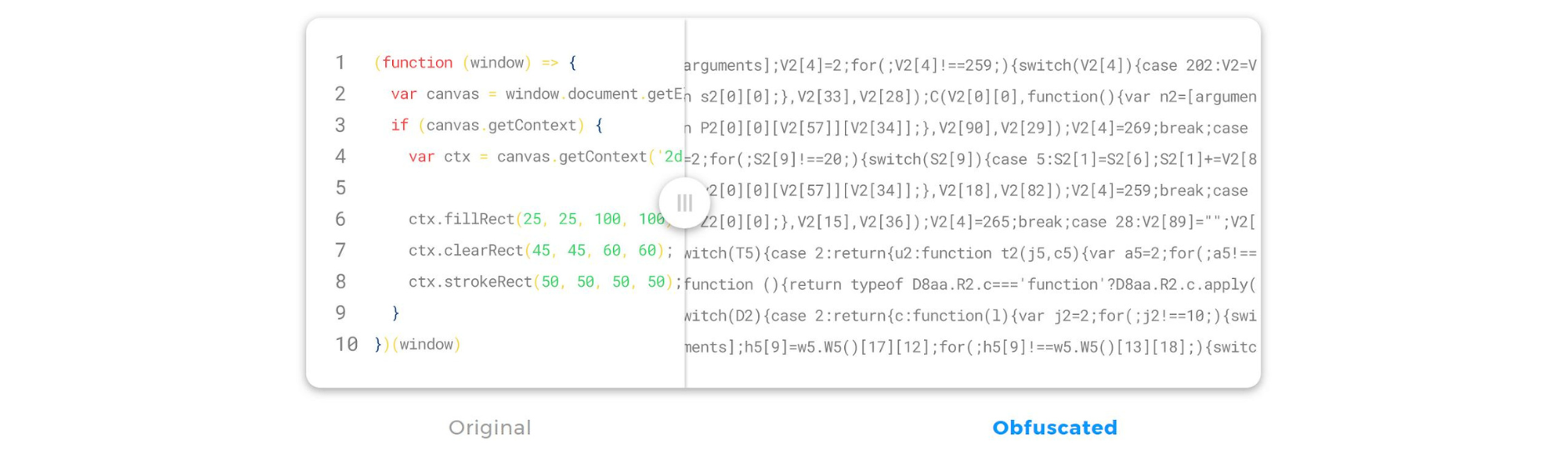
Polymorphic obfuscation

The first step towards securing JavaScript was Jscrambler’s polymorphic obfuscation.

With this security layer, all of the source code of the Neobanks’ apps was concealed beyond possible recognition.

Jscrambler’s set of the most potent and resilient transformations guaranteed cutting-edge obfuscation.

Its inherent polymorphism ensured that each new code deployment would be completely different, making it an extra line of defense against reverse engineering attempts.
polymorphism-obfuscation-example

“The concealed code looks like absolute nonsense and passed all of our tests. Being able to pick from dozens of well-documented transformations and fine-tune each one was very important.”

Following obfuscation, these Neobanks leveraged an additional Jscrambler security layer to meet the challenges of preventing application tampering and client-side data exfiltration: self-defending.

With this runtime protection, their apps gained a series of integrity checks that detect every debugging attempt and break the app whenever tampering occurs.

Taking advantage of other client-side countermeasures, such as calling a custom function, has enabled these Neobanks to stop malicious users.

Neobanks’ Security Engineers were well aware of the problem and the required steps for solving it.

After the initial setup of their Jscrambler instance, it took on average 1 week and 2 meetings with Jscrambler’s Engineers to integrate Jscrambler seamlessly into their CI/CD pipeline. From there, Jscrambler became an automated part of their application build process.

“The Jscrambler team has extensive knowledge of JavaScript. Communication with our engineering teams was excellent, and all issues were solved very quickly.”

The Results


5 Web and Mobile applications were secured in one week

Securing JavaScript code, first and foremost, requires awareness of the threats caused by having logic exposed on the client-side. Neobanks felt this pain from the very onset of the business, as their assets depended upon it.

By opting for Jscrambler’s JavaScript protection technology, product teams met their main requirement of integrating a code protection solution into their CI/CD. Now, these Neobanks deploy secure code to production, knowing each build has a fresh set of the most potent and resilient JavaScript protection available today.

“Today, not a single product ships without secure client-side logic, and this has been extremely effective.”

In parallel, security teams were able to fulfill several security recommendations by OWASP, namely the OWASP Mobile Top 10, which states that “To prevent effective reverse engineering, you must use an obfuscation tool” and “The app must be able to react appropriately at runtime to a code integrity violation.”.

To management, ensuring that their applications’ source code was protected against reverse engineering and tampering meant a new competitive advantage.

With Jscrambler, Neobanks gained the upper hand in future funding rounds.

In an industry where numbers are everything, for these Neobanks, Jscrambler’s outcome couldn’t be rounder: 0 integration issues and 0 successful attacks on JavaScript code.

Conclusion

To maintain their edge in the banking race, Neobanks need to maintain the integrity and security of their applications.

To do it, they need enterprise-grade solutions that offer them the flexibility and ease of implementation they need to continue innovating.

If you also want to secure your JavaScript source code against theft, reverse engineering, and more, you can try our solution for neobanks for free.

Validations in Angular Reactive Forms

Implementing validations in Angular Reactive Forms is easy. First, you must import the Validators class in the Angular app.

Before submitting data to the server, it’s important to validate if it’s in the expected format. In this Angular tutorial, you’ll learn how to add validations to Angular Reactive forms.

Setting up the app


In one of our previous tutorials, you learned how to create a user registration form using reactive forms. Let’s clone the source code we used there and use it for this tutorial.

git clone https://github.com/jay3dec/reactive-form-demo


Navigate to the project directory. You have two different options inside it, namely: form-app and form-server.

Form-app is the Angular project directory. Navigate to the form-app directory and install the project dependencies using npm.

cd reactive-form-demo
cd form-app
npm install


Once you have the dependencies installed, you can run the app.

npm start


You will have the app running at localhost:4200.

Using Built-In Validators


Let’s first try some built-in validators like required, min length, and max length.

this.userForm = this.formBuilder.group({
      firstName: ['', [Validators.required, Validators.pattern('^[a-zA-Z]+$')]],
      lastName: ['',[Validators.required, Validators.pattern('^[a-zA-Z]+$')]],
      email: ['', [Validators.required, Validators.email]]
    });

The form already uses required and pattern field validators. As the name implies, the field is required, and the text entered must satisfy the pattern.

Let’s add a couple of more built-in validators to the first and last name fields.

this.userForm = this.formBuilder.group({
      firstName: ['', [Validators.required, Validators.pattern('^[a-zA-Z]+$'), Validators.maxLength(10)]],
      lastName: ['',[Validators.required, Validators.pattern('^[a-zA-Z]+$'), Validators.maxLength(10)]],
      email: ['', [Validators.required, Validators.email]]
    });


As you can see, we just added the maxlength validator to the firstName and lastName.

Now let’s display a message under the fields based on the validations to make it more meaningful.

Add the following CSS code to root.component.css:

.custom-col{
    display: flex;
    flex-direction: column;
    align-items: flex-start;
}

.custom-col span{ 
    color: red;
    font-size: small;
    margin-top: 0.25rem;
 }


Modify the root.component.html file to include a span inside the first name divand change the class name of the div.

<div class="col custom-col">
            <input type="text" formControlName="firstName" id="defaultRegisterFormFirstName" class="form-control"
                placeholder="First name">
            <span>* First Name is required</span>
        </div>


Now you need to make the validation message conditional based on the validation. You must show it when the user clicks the sign-in button but has not entered the first name.

Let’s define a variable to check when the form is submitted inside the root.component.ts file. You can add it before the constructor method.

formSubmitted : boolean = false; 


Currently, a message is shown when the form is not valid. Let’s remove the alert message and set the formSubmitted variable to true.

onSubmit(){
    if(this.userForm.valid){
      alert('good')
      this.http.post('/api/userCreate', this.userForm.value)
      .subscribe((response)=>{
        console.log('repsonsei ',response);
      })
    } else {
      this.formSubmitted = true;
    }
  }


Inside the root.component.htmlfile, add the ngIf directive to show the message when the form is submitted. For this, the required validator must be “true.”.

<span *ngIf="formSubmitted && userForm.get('firstName').hasError('required')">
   * First Name is required
</span>


Save the changes and run the app. Click the sign-in button without entering the first name. You will see the required validation message.
validations-angular-reactive-forms-tutorial-example

Similarly, you can add validation messages for other validations like pattern and max length.

Writing Custom Validations


You saw how to use built-in validators in Angular reactive forms. You can also create your own custom validations and use them in reactive forms. Try to create one.

You have an email ID field in the sign-up form. Create a custom validation to check for duplicate or existing email IDs and display a message.

Assuming you already have a list of email addresses already signed up, add the following array list to the root.component.ts file.

emailIds = ["[email protected]","[email protected]","[email protected]"];


Import FormControl into the root.component.ts file.

import { FormControl } from '@angular/forms';


Create a method called duplicateEmailValidator inside the root.component.ts file.

  duplicateEmailValidator(control: FormControl){
    let email = control.value;
    if (email && this.emailIds.includes(email)) {
      return {
        duplicateEmailId: {
          email: email
        }
      }
    }
    return null;
  }


The above method takes a FormControl type as a parameter. It considers whether the email entered exists in the email ID list. If it exists, it returns an object, which indicates an error. If all is well, it returns null.

You need to add the validator to the validation array of the email control.

  ngOnInit() {
    this.userForm = this.formBuilder.group({
      firstName: ['', [Validators.required, Validators.pattern('^[a-zA-Z]+$'), Validators.maxLength(10)]],
      lastName: ['',[Validators.required, Validators.pattern('^[a-zA-Z]+$'), Validators.maxLength(10)]],
      email: ['', [Validators.required, Validators.email, this.duplicateEmailValidator.bind(this)]]
    });
  }


You have used bind to bind the current scope to give access to the email array inside the duplicateEmailValidator method.

Add an error message to the HTML in the root.component.html file. Add a div container to the email input and add a span as shown:

 <div class="custom-col">
        <input type="email" formControlName="email" id="defaultRegisterFormEmail" class="form-control mb-4"
        placeholder="E-mail">
        <span *ngIf="formSubmitted && userForm.get('email').hasError('duplicateEmailId')">
            * Email Id already exists !!
        </span>
    </div>


Save the above changes. From the application, try entering an existing email ID. The email field will be validated for duplicate emails, and an error will be shown.
entering-an-existing-email-ID-blocker

Dynamically Adding Validations


Sometimes it’s required to add validations dynamically. Add a new field called employed. It will be a check box.

Add another one called Company Name. This will be required only if the Employed checkbox is checked.

   <div class="custom-col emp-check">
        <input class="form-check-input" formControlName="employed" type="checkbox" value="" id="flexCheckDefault">
        <label class="form-check-label" for="flexCheckDefault">
          Employed
        </label>
    </div>

    <div class="custom-col">
        <input type="text" formControlName="companyName" class="form-control mb-4"
        placeholder="Company Name">
    </div>


Let’s add the form control names for employed and companyName in the root.component.ts.

  ngOnInit() {
    this.userForm = this.formBuilder.group({
      firstName: ['', [Validators.required, Validators.pattern('^[a-zA-Z]+$'), Validators.maxLength(10)]],
      lastName: ['',[Validators.required, Validators.pattern('^[a-zA-Z]+$'), Validators.maxLength(10)]],
      email: ['', [Validators.required, Validators.email, this.duplicateEmailValidator.bind(this)]],
      employed : [''],
      companyName: ['']
    });
  }


When the employed checkbox is checked, make the company name required. Create a value change event handler for employed.

  handleValueChange(){
    this.userForm.get('employed').valueChanges.subscribe(response => {
      console.log('check response is ', response);
    })
  }


You need to call the handleValueChange method in the ngOnInit method after you have defined the userForm.

ngOnInit() {
    this.userForm = this.formBuilder.group({
      firstName: ['', [Validators.required, Validators.pattern('^[a-zA-Z]+$'), Validators.maxLength(10)]],
      lastName: ['',[Validators.required, Validators.pattern('^[a-zA-Z]+$'), Validators.maxLength(10)]],
      email: ['', [Validators.required, Validators.email, this.duplicateEmailValidator.bind(this)]],
      employed : [''],
      companyName: ['']
    });
    this.handleValueChange();
  }


If the checkbox is checked, add the required field validator to the companyName field. If the checkbox is unchecked, remove the validators from companyName.

  handleValueChange(){
    this.userForm.get('employed').valueChanges.subscribe(response => {
      console.log('check response is ', response);
      if(response == true){
        this.userForm.get('companyName').setValidators(Validators.required);
      } else {
        this.userForm.get('companyName').clearValidators();
      }
      this.userForm.get('companyName').updateValueAndValidity();
    })
  }


As seen in the above code, setValidators and clearValidators have been used to set and clear the control validations. In the end, the updateValueAndValidity method is used to reset the validation status of the control.

Add the HTML code to show a validation status message for the company name field.

   <div class="custom-col">
        <input type="text" formControlName="companyName" class="form-control mb-4"
        placeholder="Company Name">
        <span *ngIf="formSubmitted && userForm.get('companyName').hasError('required')">
            * Company Name is required
        </span>
    </div>


Save the above changes and restart the app. While filling out the form, click the employed checkbox to see if the company name has required field validation. Uncheck the checkbox, and the validation is removed.

Next, look at what cross-validation is and how to use it.

Cross-Validations


Cross-validation means validating two fields across a form group. For example, your email address should be your company’s email address.

If your email is [email protected], then your company name should be Gmail. Let’s try adding this cross-validation to our user form.

We will place the validation not on any particular form group control but on the whole form group.

Add the form group validation as shown:

this.userForm = this.formBuilder.group({
      firstName: ['', [Validators.required, Validators.pattern('^[a-zA-Z]+$'), Validators.maxLength(10)]],
      lastName: ['',[Validators.required, Validators.pattern('^[a-zA-Z]+$'), Validators.maxLength(10)]],
      email: ['', [Validators.required, Validators.email, this.duplicateEmailValidator.bind(this)]],
      employed : [''],
      companyName: ['']
    }, {validator : this.companyEmailValidation});


Now let’s define the companyEmailValidation validation in our root.component.ts.

The validation method will take formGroup as a parameter. Let’s first parse the required form control from the form group.

Once you have the form controls, you’ll split the email string to get the @ name and compare it with the company name. Here is how the method looks:

  companyEmailValidation(formGroup : FormGroup){
    const email = formGroup.get('email').value;
    const company = formGroup.get('companyName').value;
    if(email && email.length > 0){
      let comName = email.split("@")[1].split(".")[0];
      if(company == comName) return null;
    }
    return {
      companyEmailError : true
    }
  }


If the validation fails, it will return an error object, as shown in the above code. If all is well, null will be returned.

Now let’s add some HTML to check for the error and show the error message.

Before the sign-in button HTML, add the following code to show the validation message:

    <div class="custom-col">
        <span *ngIf="formSubmitted && userForm.errors && userForm.errors.companyEmailError">
            * Enter your company email address
        </span>
    </div>


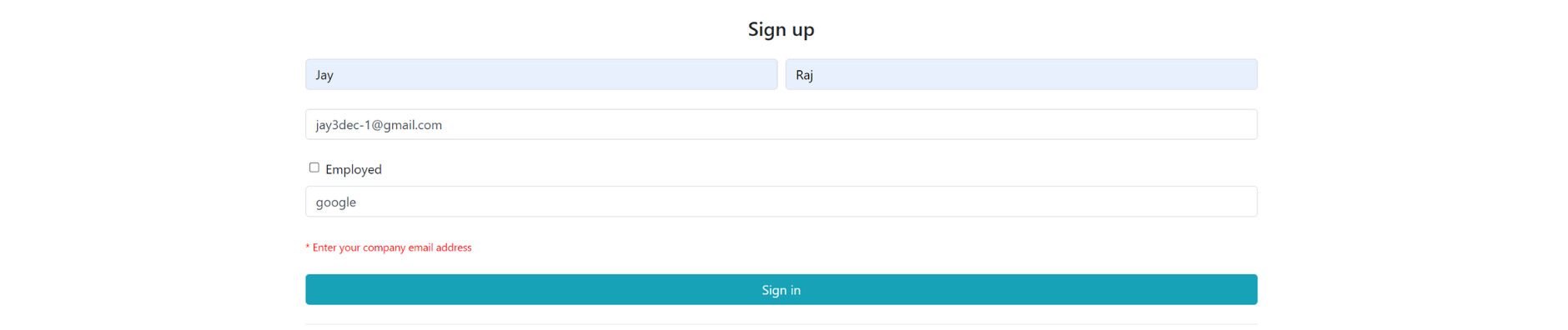
Save the changes and refresh the app. Enter the email address and another company name other than the one in the email.

For example, enter the email address as [email protected] and the company name as Google.

You’ll be able to see the validation message.
cross-validations-forms

Summary


You’ve learned how to validate Angular reactive forms. You also learned about built-in validators, dynamic validation, custom validation, and cross-validation across form groups.

We hope you find it helpful. Lastly, learn how to secure your Angular source code against theft and reverse engineering.

The source code for this tutorial is available on GitHub.

Why Script Vetting Isn’t Enough to Prevent Client-Side Attacks

Prevent client-side attacks and avoid customer data leakages, compliance nightmares, or revenue losses. How can companies implement stricter third-party control? What does this rigorous control mean?

Considering the context of web supply chain attacks, for instance, is Scrip vetting the best answer?

In the wake of recent supply chain attacks, such as the one from SolarWinds or even the one that led to the Celsius Networks phishing attack, there is an urgent need for stricter third-party control.

Find out if script vetting is enough to prevent client-side attacks.

What is Third-party Script Vetting?


To grasp the concept of third-party vetting, we must look at the average website.

With the growing demand for faster product development, developers rely on externally sourced code, especially JavaScript frameworks and libraries.

This results in the average web app having more than 1000 modules, also known as code dependencies. Because each one of the modules can also have dependencies, each application ends up with thousands of pieces of third-party code.

Then there are the additional scripts that websites use at runtime. Almost every website today uses externally sourced services like chatbots, analytics, or ads.

With such heavy usage of third parties, the attack surface increases, specifically, supply chain attacks. Because these attacks rely on the lack of visibility companies have over their code dependencies in the supply chain, they can often go unnoticed for weeks.

We have seen this happen in the case of the Magecart web skimming group attack on British Airways in 2018, which went unnoticed for over two months.

The concept behind third-party script vetting is that companies vet each third-party script and the company that provides it to guarantee they are legitimate and secure. Vetted scripts are allowed, and those that fail the vetting process are abandoned (at least while they remain insecure).

The process of vetting the script provider is typically done by looking for certifications (ISO or SOC) that attest to the company’s commitment to security. On the other hand, script vetting involves scanning the code for any vulnerabilities or security weaknesses that could make it easier for attackers to compromise the script.

This may seem like a definitive answer to the problem.

However, while this method of third-party vetting helps companies address web supply chain attacks, it must be coupled with additional security measures.

Why is Script Vetting Not Enough to Prevent Web Supply Chain Attacks?

If we were to closely observe the pieces of any given website over a few days, we would witness hundreds of code dependencies constantly changing. Each of these frameworks and libraries receives updates, as do their respective third parties.

When we contrast this dynamic scenario with the concept of script vetting, we can see why script vetting alone is not enough to guarantee the security of third-party scripts.

Script Vetting problems

The biggest problem with script vetting is that it provides a picture of a moment at a particular time. That said, a script successfully vetted and deemed secure today can become a security liability.

If we were to trust vetting alone, we would trust this script without reservations, disregarding its behavior on our website.

The perfect example to illustrate this is the Copay incident. An attacker took over a legitimate script, updating it with malicious code. Thus, it made its way into production releases of a crypto wallet and stole some of its users’ crypto.

Another issue is that the average website contains 35 different third-party components. Seeing how the web supply chain is as secure as its weakest link, a robust vetting strategy would entail going through every single one of these scripts, which is a complex task.

The script vetting process is not without flaws. While scanning for vulnerabilities is a good security practice, it does not analyze every line of code for potentially malicious behaviors. A script with no known vulnerabilities can still be dangerous if it tries to access sensitive user data.

Gaining Full Visibility and Control


Script vetting is not the definitive answer to web supply chain security. So, what is the answer?

The short answer is security in depth.

Script vetting doesn’t address how a legitimate script can suddenly change its behavior. The next step for an in-depth approach is real-time visibility of how each one behaves on the website.

This visibility allows companies to detect suspicious behaviors, such as a known script suddenly starting to tamper with a payment form (Magecart attack) or attempting to send data out to an unknown domain (data leakage).

Magecart web skimming attacks remain active for 22 days on average before being detected. Therefore, this real-time visibility can improve incident response and contain data leaks.

Security-in-depth Approach

Visibility is only half of the response needed for a security-in-depth approach.

The other half comes from having complete control over the behavior of each script.

Effective control means being able to restrict specific allowed or disallowed behaviors in real-time so that any attempt at malicious activity is blocked, thwarting the attack.

To achieve this level of control, companies must look for solutions to establish flexible rules that block all malicious activity on the client side. Plus, these solutions must not compromise the regular functionality of each script.

There is still a long way to go before companies can fully control their web supply chain.

The first step might be to request a Free Website Inventory Report. This allows you to gain visibility into the scripts and their behaviors running on your website.

How To Vet and Manage The Behavior of Third-Party Scripts in Your Website

Vetting and managing the behavior of third-party scripts on your website allows you to avoid websites sinking with third-party scripts. Also, the third-party JavaScript management Cheat Sheet is especially relevant when we are talking about the development of software products, namely web applications.

The use of third-party code has become the norm, contributing to an overall acceleration of the development lifecycle.

What are the impacts of this third-party code on application security?

We explore the current state of web application development, the associated security risks, and how to vet and manage third-party scripts on your website.

The Current State of Web App Development


The current demanding and dynamic market puts added pressure on development teams to deliver products faster.

To keep up with this pace, teams have to shorten the development lifecycle of web apps, which ends up raising concerns on the topic of application security.

To understand the core of the security concerns, we first need to understand that to fasten the development lifecycle, teams rely on various third-party scripts, frameworks, and libraries.

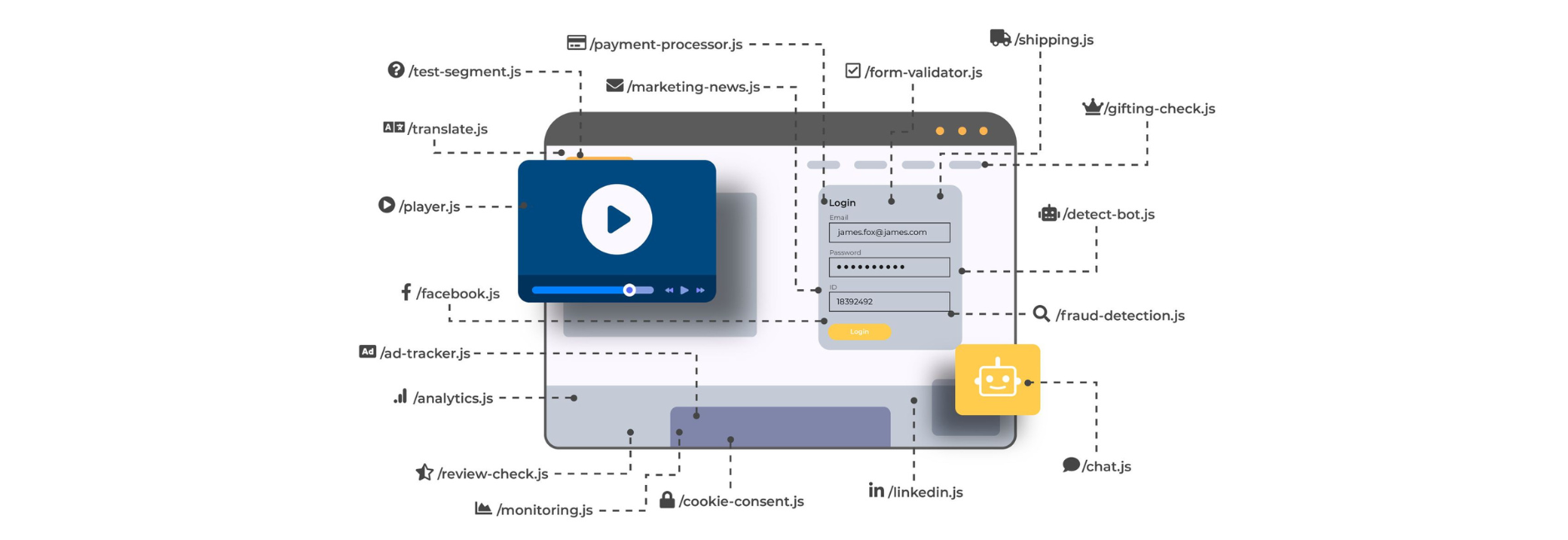
70% of the code in the average web app is sourced from third parties. And with 35 third-party components and 31 fourth-party components on average, it’s no wonder that the typical web application contains a huge mashup of client-side code (as illustrated below).

But why does this result in a larger attack surface?
mashup-of-client-side-codeWhen development teams use externally sourced pieces of code, they are inherently trusting this third-party code, along with any fourth-party code that it uses, and so on.



Companies end up having a long chain of code dependencies without really having good visibility over what they are effectively running and what each piece of code is actually doing.

The risks of the lack of visibility over third-party code


The main problem with lacking visibility and control over third-party code is that third-party scripts have the same privileges as all the code that is developed internally. This means a third-party chat plugin can start interfering with a payment form (which is precisely what happened in the Ticketmaster/Inbenta Magecart attack of 2018).

Because the typical modern web app today has a lot of sensitive data passing through on the client side, all that sensitive data is at risk of being leaked by a rogue third-party script.

When an attacker manages to breach the provider of a third-party script, companies that are using that script have no visibility that the attack is even happening.

Web application firewalls and other network defenses consistently fail to detect the attack because it originates from a source that’s trusted by default.

Attackers have a window to exfiltrate any data collected and send it to a drop server under their control. In the case of Magecart web skimming attacks, research shows that they have risen by 20% during the pandemic and remain active for 22 days on average before being detected and removed.

Consequences of a Third-party Script-based Attack


With the development of strict regulations like GDPR and CCPA, the leakage of sensitive user data into the hands of attackers is a clear violation of users’ privacy rights. When it comes to payment data, this can also mean a breach of compliance with PCI DSS.

Breaching compliance with any of these regulations results in financial costs due to the payment of hefty fines.

Magecart attacks are well-known third-party-based attacks since they have resulted in some of the highest fines seen in the scope of compliance with security and privacy regulations.

Apart from the direct breach of compliance, it is important to be aware of the damage to the company’s reputation, which can result in business losses and leave a permanent dent in its relationship with customers.

Vetting and Managing the Behavior of Third-party Scripts


First, you must gain visibility into which third-party scripts are running on the website and what types of actions they are performing (i.e., their behavior).

We provide a free website inventory report that gives a snapshot of these scripts and their behavior, broken down into actionable insights.

The report starts by detailing the number of domains that are receiving data from the website and how many of these are third-party.
website-inventory-report-third-party-scripts-behavior

It also analyzes the assets that are loaded on the website, including the number of assets coming from third parties and how many different domains are loading these assets.
Get-visibility-into-third-Party-scripts

Another key detail is the number of poisoning events detected on forms and on network events, as these may indicate that third-party scripts are collecting data from forms or intercepting network data (data leakage).
poisoning-events-Manage-behavior-of-Third-Party-scripts

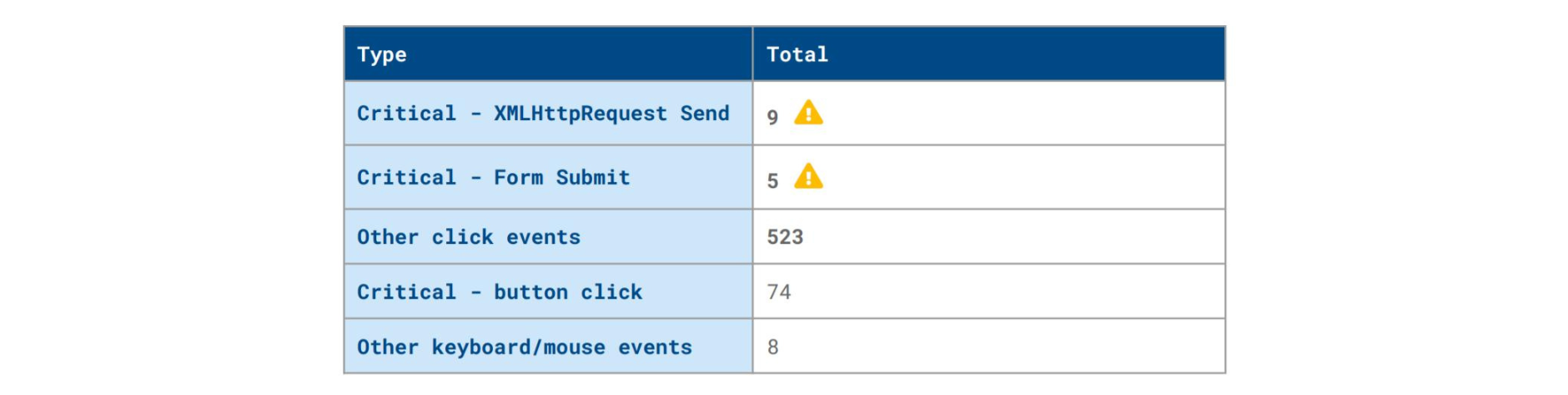
The report also presents high-level tables displaying critical client-side security threats, such as the one below.
inventory-table-example-with-warnings-and-events

The report includes other tables and graphs with detailed information on specific detections, such as:

  • Code or native API poisoning

  • Source domains

  • Destination domains

  • Resources and scripts

  • Breakdown of scripts into first- and third-party

  • A digested overview of the critical issues.


All this information allows for vetting the behavior of third-party scripts and is an important step toward reducing the website’s attack surface.

Insights From a Crypto Wallet Phishing Attack

Today, we give you insights from a Crypto Wallet Phishing Attack.

How did scammers use the source code to perpetrate a phishing attack against the cryptocurrency wallet Celsius?

Celsius Email System Breach

In the early hours of April 14, users of the rewards-earning cryptocurrency platform Celsius Networks started reporting a suspicious email that they received.

The email appeared to be a legitimate one coming from Celsius. It announced the launch of the anticipated “Celsius Web Wallet”, along with an offer of $500 in CEL to users who followed a promo link.

The email (you can see it below) presented no indication of being fake and was indistinguishable from a plausible launch campaign by the company.
Celsius-email-system-breachHowever, as some attentive users soon realized, the link led them to celsiuswallet.network instead of the official company domain, celsius.network.
This was a clear indication that something was not right, as Celsius has long made it clear that the company does not use any other official domain.

Unfortunately, since the destination page looked like a legitimate company page, several users went ahead in their attempt to claim the offer, submitting sensitive information.

Soon after, reports started appearing of users who claimed to have lost their crypto balance, and many more said they received the phishing email and even SMS messages all linking to the same fraudulent page.Celsius diligently kept on top of the incident, warning users about the scam email and advising them on what they should do to remain secure.

The company disclosed that its security team identified a data leak on a third-party service containing some of its users’ data, which is likely how the scammers gained access to valid emails and phone numbers.

This attack posed several important questions:

  • What does the code of the fraudulent page look like, and what does it do?

  • What type of preventive measures can companies put in place to avoid these scam copycat pages?

  • What does this incident say about third-party management?


Because our research team is actively engaged in uncovering details about these types of attacks, they were able to analyze the complete source code of the scam page.

We will go over some key insights as to who may be behind the attack, how the attack worked, and how similar companies are at risk of losing user data to web supply chain attacks.

Dissecting a Pristine Copycat


We have been seeing a trend where phishing attacks are getting more sophisticated. Scammers are doing a thorough job of writing seemingly official company emails and enticing users to submit valuable information on a scam page.

This incident with Celsius is especially interesting because the scammers leveraged users’ latent expectations of a web wallet launch.

Not only that, but they managed to create a scam page that looks like a perfectly believable company page. It uses design elements that are identical to those of the official page and follows a similar structure, with no discernible suspicious elements on the page itself, at least at first glance (in other words, a pristine copycat).

To analyze how this copycat was built and what it does, our research team went through its source code. We found a complete visual replica of the Celsius website assets and a testjs.js file which the attackers used to load fancybox (a library that enables additional page customization) features.

Although the scammers copied the assets perfectly, they kept themselves from using the same CMS used by Celsius and instead copied the main page from the official website, adapting it to their needs.

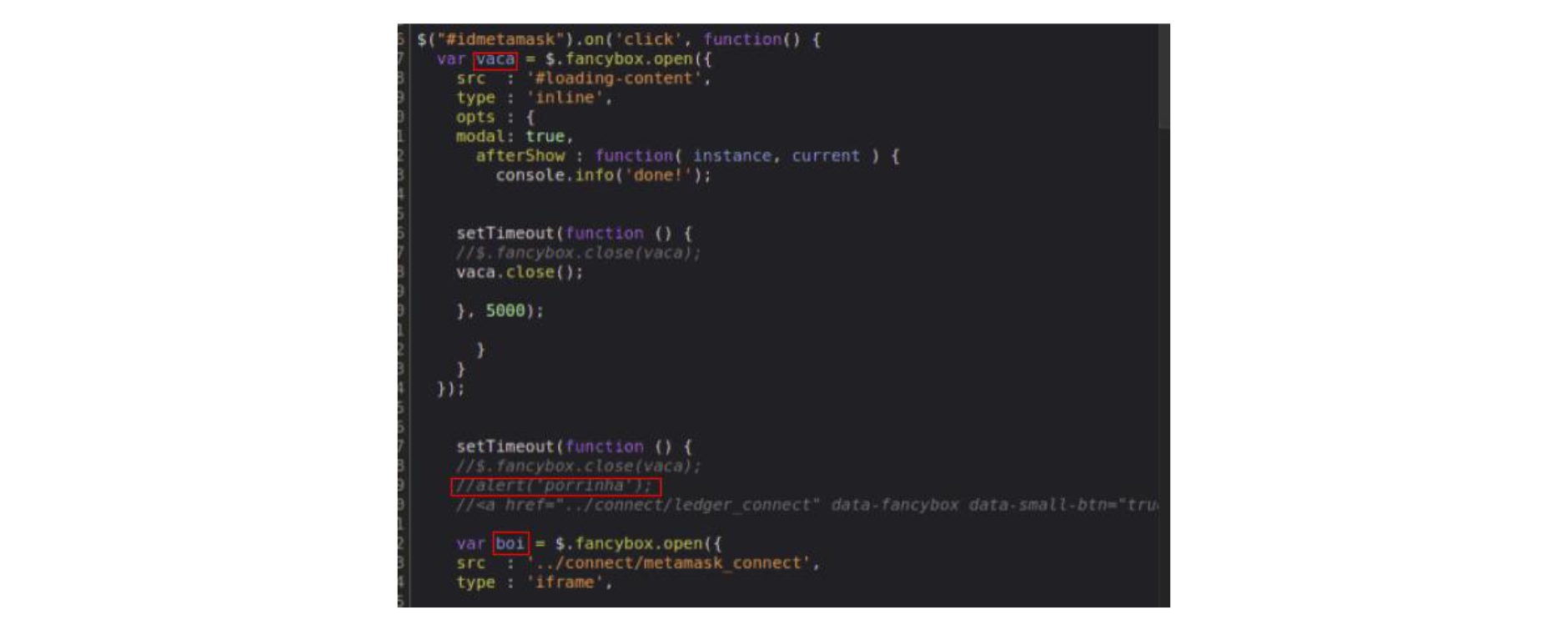
Inside this testjs.js file, we found some interesting comments written in Portuguese, which hints that the attackers may be from a Portuguese-speaking country (Portugal, Brazil, Angola, etc.).
insights-phishing-attack-celsiusLooking at the HTML files, we also found evidence that the code was copied without much care. Namely, we found comments that are specific to Celsius CMS. Since the attackers did not use the same CMS, it would not make sense to have this in the HTML body, so they probably forgot or didn’t care to remove it.


jscrambler-blog-insights-phishing-attack-celsiusinsights-phishing-attack-against-cryptocurrency-wallet-CelsiusRegarding what happens on the scam page when a user clicks the Web Wallet button to claim the (alleged) offer, we see a fancybox pop-up appear asking the user which wallet they want to connect to.

The behavior afterward is always the same: the user inserts the details of their wallet and, after clicking on “Import Wallet”, the page says it had a problem connecting to the wallet of choice.

It is important to note that, during our research, this behavior occurred when we provided fake wallet information, so it’s possible it could be different when a user-provided a real wallet.

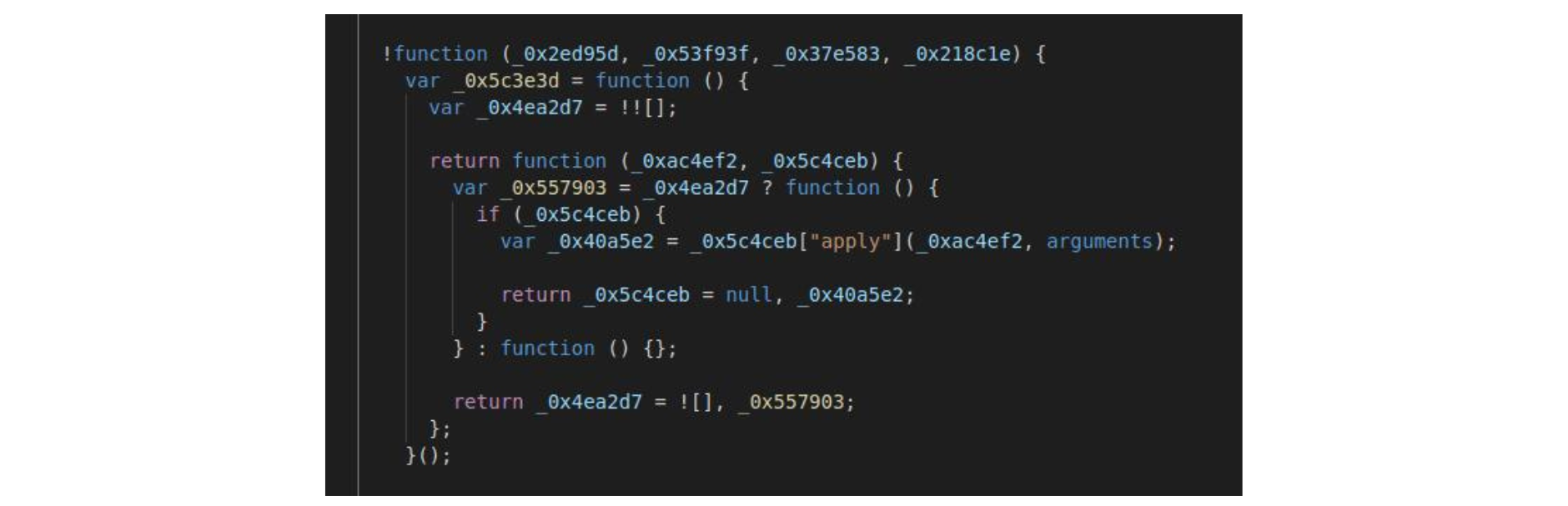
Upon pressing the Import Wallet button, the wallet details the customer introduced are parsed by the space.js script. We found that space.JS was the only file that had been obfuscated by attackers, which led us to believe that the file could contain some more useful information on the attack.

Deobfuscating the script

We deobfuscated the script, and the resulting code shows us that the attackers used at least 3 domains in their skimming campaign: celsiuswebwallet.network, celsiuswallet.network, and walletweb.xyz (the corresponding websites are already offline at the time of writing).

The.xyz domain was registered on November 25th, 2020, and the other domains on March 31st, 2021. These dates may hint that the attacker was already working on the MO website in November last year but only very recently adapted the website to the Celsius look and feel. The attacker will probably try to reuse the same codebase in other similar phishing attacks in the future.

We also noticed the usage of several anti-debugging and anti-tampering techniques (shown below) and the EmulateTab API to focus victims’ cursor and attention on the form.
usage-anti-debugging-and-anti-tampering-techniques
anti-debugging-in-the-deobfuscated-codeThe anti-debugging technique is found in the deobfuscated code.
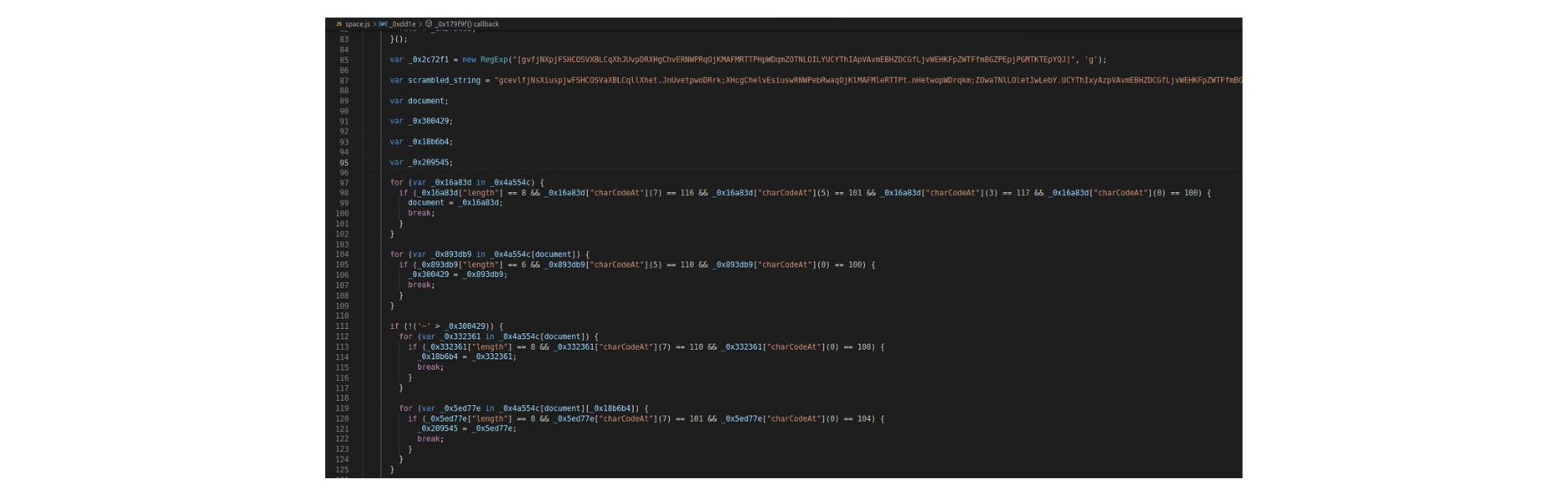
Deobfuscated-code-detailsThe anti-tampering technique found in the deobfuscated code is:
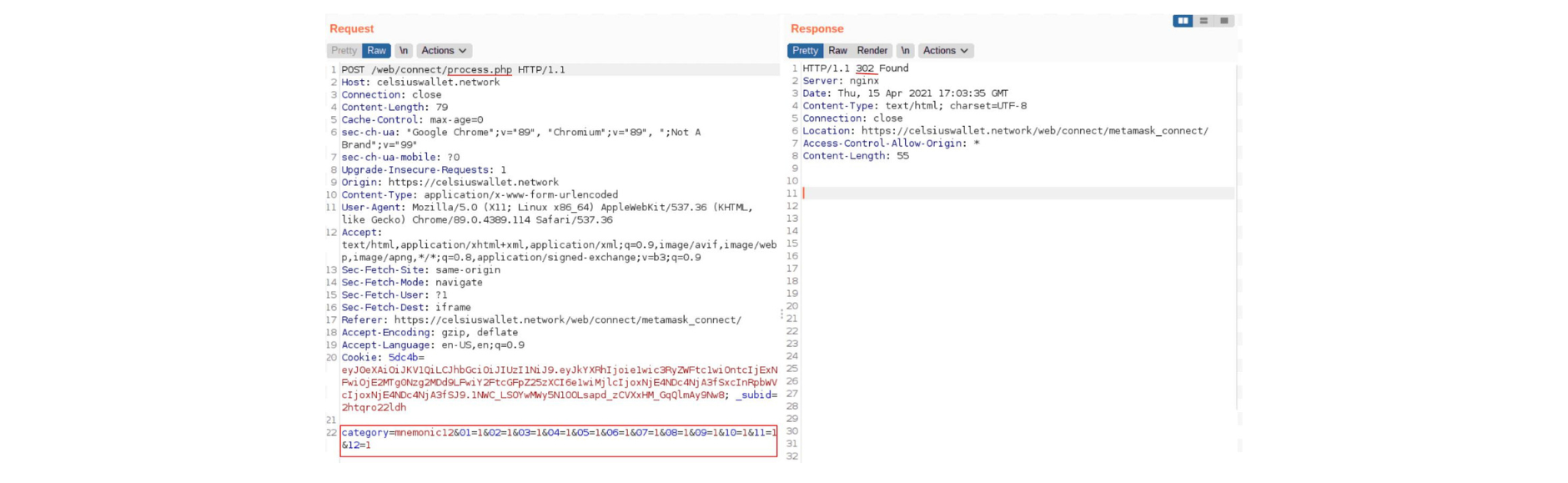
lessons-learned-phishing-attack-celsiusAfter being parsed by space.js, the data was sent to the process.php file (request shown below) to be processed by the attackers.



At this point, the attackers can do whatever they want with the collected data.

After analyzing the flow of the whole scam, several signs point out that this was performed by attackers with experience in this type of attack.

They meticulously chose a domain that was similar to Celsius’ and were able to create a credible email and copycat page.

Plus, since there’s some degree of sophistication required to use leaked customer emails as part of the campaign, and because we found a reference to an advertising domain called adsymptotic.com, this might indicate that the attack was a result of collaboration between groups and/or individual attackers, perhaps part of a larger ongoing phishing campaign.

Preventing Scam Copycat Pages


Considering all the files of the scam page that we analyzed, we conclude that the JavaScript source code of the scam page is distinct from the source code of the official Celsius page. It appears that they did indeed copy or mimic the HTML and CSS source code but did not copy any of the JavaScript logic of Celsius’ platform.

However, this is not always the case. If attackers, for some reason, choose to copy the entire source code, some preventive measures can raise the cost of creating the copycat page.

Protecting the website source code with runtime defenses will make it much more difficult for attackers to retrieve the source code. These runtime defenses not only prevent the use of debuggers but also derail execution if the protected code is changed (which would be the case when attackers want to create a new scam landing page).

Additionally, it’s possible to protect this same source code with domain locks that, when coupled with real-time notifications, trigger a critical security warning when someone attempts to run the code outside of the official company domain.

These are not foolproof measures, as it’s technically impossible to ensure that a website’s source code can’t be retrieved or reused by attackers. But the key takeaway is that these security controls can increase the cost of the attack to the point where scammers are more likely to move on to other targets.

Gaining Access to User Data


As disclosed by Celsius, “an unauthorized party managed to gain access to a third-party email distribution system to send a phishing communication through email and SMS to some Celsius customers and others”. This pinpoints the origin of the leaked data to a compromised third party—in other words, a supply chain attack.

Our discovery of a reference to the adsymptotic.com domain appears to indicate that this might be part of a bigger phishing campaign. As such, this attack may be replicated on similar crypto wallets (Nexo, BlockFi, Compound, and Crypto.com), especially if the payoff from the Celsius incident keeps growing.

To be successful, the attack would require gaining access to the legitimate emails and phone numbers of those platforms’ users. Similar to how attackers achieved this in the Celsius incident, by leaking data from a third-party email service, they could next turn to web supply chain attacks, a typical weak link in companies’ websites.

By infiltrating one of these websites’ third-party script providers (such as a chatbot or an analytics service), attackers would be able to run malicious code on the website itself, covertly collecting fresh batches of user emails and phone numbers. Rinse and repeat.

Third-Party Management in the Web Supply Chain


The issue of (in)security in the web supply chain derives from the fact that, within the context of a web page, all scripts have the same privilege, regardless of whether they are first- or third-party.

As a result, any third-party script can:

  • Harvest any user input;

  • Add extra code;

  • Hijack events;

  • Fully modify the behavior of the web page, tricking users into doing actions against their interests;

  • Tamper with other code in the same scope.

  • Contact any external domain and exfiltrate data.


All of these events can happen without any awareness from the user or the website owner. As a result, when a third-party script gets compromised, the attack typically remains undetected for weeks or even months, giving attackers plenty of time to exfiltrate valuable user data.

Celsius already made it clear that the company will take action to ensure strict third-party management, stating that they “will raise the bar on what we require from third parties in terms of ISO and SOC certifications.”

Companies must go the extra mile here, meticulously vetting third-party scripts and implementing security measures that give them visibility and control over these third-party scripts.

Final Thoughts


The Celsius attack might seem like any other phishing scam. However, as our research found, this is a prime example of a pristine copycat page being leveraged to trick users and eventually steal their crypto balance.

The evidence points out that this could be part of an ongoing phishing campaign with additional targets.

Jscrambler researchers have been investigating these types of attacks and working closely with companies to help them gain visibility and control over their third parties.

With cryptocurrencies displaying such momentum, all crypto platforms must step up their security, employing a defense-in-depth approach with effective client-side security controls.

Seeing how phone numbers were also compromised, we advise Celsius users to be aware of scams like SIM swapping, which can compromise SMS-based 2FA.

As for users of similar crypto wallets, we advise reviewing their account security measures (enforce 2FA, use strong passwords, and update them regularly), being extra cautious when clicking links only from official domains, and closely following the official company channels.

With the cryptocurrency market fully bullish, the upside of successful attacks is far too appealing for attackers.

They already have the code developed and can rapidly pivot to new sites. We should expect more of these pristine phishing scams in the future.

Memory Protection: An Extra Line of Defense Against Spectre Attacks

Memory protection is an extra line of defense against Spectre attacks. In this blog article, we explore why development teams need to deploy application-level mitigation measures.

Even five years after the Spectre vulnerability was discovered, it continues to pose a concern as it can still be exploited by attackers.

Google recently published a proof-of-concept exploit written in JavaScript on their Google Security blog that still works against multiple browsers, operating systems, and processors.

What are Spectre attacks?


Spectre attacks break the isolation between different applications and allow an attacker to trick error-free programs into leaking their secrets.

By taking advantage of flaws in the optimization features of CPUs (speculative execution), Spectre attacks force programs to access arbitrary portions of their memory, which are then read by a side channel.

Due to its nature, the Spectre vulnerability allows for attacks against different types of applications, including web apps. Attackers can potentially exploit them to extract sensitive information across different websites in a browser by exploiting how they interact with processors and on-chip memory.

In applications that handle critically sensitive data, such as government, healthcare, and financial apps, such an attack can have devastating results.

Attackers’ motivations to exploit the app’s memory may vary, but typically they intend to:

  • Reverse-engineer the code and understand its mechanics;

  • Modify the app’s behavior and, for example, access new features;

  • Access and retrieve sensitive data.


However, the bottom line when it comes to Spectre attacks is that there is still no ultimate solution to mitigate them, despite browser vendors’ efforts (such as Site Isolation, out-of-process iframes, Cross-Origin Read Blocking, and others).

To fully mitigate these attacks, the changes required are at the processor architecture level (hardware), which can take years.

Application owners must take action to protect sensitive data and prevent it from being present in parts of the memory that can be read by attackers.

In their proof-of-concept exploit, Google also recommends that web developers consider isolating their sites more robustly by using new security mechanisms that actively deny access to cross-origin resources.

To facilitate their process, they have published Post-Spectre Web Development and Mitigating Side-Channel Attacks with concrete advice for developers.

Memory protection as an extra line of defense


Since the potential outcome of a successful Spectre attack on web apps may mean the leakage of millions of sensitive data records, application owners must look for additional lines of defense.

Seeing how Spectre attacks can retrieve sensitive data from the app’s memory, one such line of defense is memory protection.

In the context of web apps, Memory Protection is a defensive technique developed by Jscrambler that encrypts sensitive data in memory and only decrypts it when the application needs to access it.

Thanks to this JIT (just-in-time) memory access, the attack window is narrower. As a result, there’s a high likelihood that, if the attacker retrieves some data, it will be encrypted and therefore useless.

This defensive technique uses state-of-the-art cryptographic algorithms and can be applied to strings and numbers in complex structures like objects and arrays.

To avoid impacts on performance, do not apply memory protection to data structures accessed constantly but rather to those not accessed as often. These can include keys, authorization tokens, and others.

Note that this does not stop attackers from scraping sensitive data from memory. However, when used alongside browser defenses and other application-level mitigation measures, it significantly reduces the potential impact of a successful attack.

Conclusion


While Spectre attacks require hardware changes for complete mitigation, the risk they pose for web apps is too heavy for application owners to wait for a definite fix.

A combination of recent browser defenses and in-app protection such as Jscrambler’s Memory Protection contributes to reducing the effects of these attacks. It provides a much-needed line of defense when used on top of all other recommended defensive strategies.

You can get started with Jscrambler for free now!

How to maintain security when employees work remotely

Although remote work is not a new concept, it has substantially increased its traction since the COVID-19 pandemic started, and maintaining security when employees work remotely is the new challenge.

Many companies were forced to operate remotely and had to adjust to the new circumstances. But what does this abrupt change represent in terms of security?

We explore those impacts and how companies can maintain security when employees work remotely.

Adjusting to any change can be complicated, even more so when it is so abrupt, as was the case with the remote shift for various companies in 2020 and 2021. Most didn’t have previous experience in a remote work environment, so there was a steeper learning curve.

Before the coronavirus pandemic, only 17 percent of U.S. employees worked from home five days or more. During the pandemic, this figure grew to 44 percent.

Throughout the past 12 months, there have been new opportunities for attackers to explore. In the first half of the pandemic, 4 out of 10 COVID-related emails were spam, and there was a 46 percent increase in the number of suspicious incident reports for home IoT devices.

As the social engineering techniques used by attackers continue to evolve, many organizations have fortified their cybersecurity to secure their digital operations and avoid falling victim to attackers.

Let’s get into some practices you can implement to maintain security in these trying times.

What are companies doing to maintain security in remote work?

security-issues-remote-work-jscrambler

1. Define a remote work security policy


If you have not yet done so, one of the first steps to increasing and maintaining security is to define remote-work security policies. Also, communicate adequately with your workforce.

If you do not have a document with these policies defined, it can be challenging to identify what it means to maintain security within your company.

Draft a policy document that outlines the different security protocols and identifies how the company intends to support compliance with those protocols among employees.

2. Provide training on cybersecurity best practices for employees


Focus on educating your employees on cybersecurity best practices to reduce the threat surface.

Having an informed workforce is one way of preventing attacks and maintaining security.

Companies should provide a thorough explanation about security policies instead of just stating them, as it will promote a better adoption rate.

3. Guarantee Network security


If your employees used to access a secure office network to do their jobs, you’ll want to transfer that security to a remote setting.

To do this, you will need a remote access VPN. That should give you more power in terms of access control and privacy.

However, trusting that a VPN will resolve all your cybersecurity concerns is not a good option. It is not about one perfect solution but rather a combination of various practices and tools.

Try not to overload it, as it will cause an undesired slowdown. You may need to prioritize a VPN for specific services, choose a provider with a large server network, and manage its usage adequately.

4. Personal device usage regulation and maintaining systems updated


Using personal devices to work increase the vulnerability to attacks because their devices could have outdated antivirus software or use weak passwords.

Therefore, regulate the usage of personal devices. Maybe it’s time to consider providing employees with a suitable antivirus license to diminish these risks.

Encourage regular security scans and implement a secure password manager to help employees manage multiple strong passwords.

Using a password manager encourages employees to implement and store strong passwords without the hassle of remembering everything.

Always keep tools like firewalls, antivirus, and others updated.

5. Continuous verification (Zero Trust) approach


Based on the continuous verification process, access is granted based on identities and respective permissions.

Good practices to implement in line with this concept:

  • Multi-Factor Authentication (MFA)

  • Use strong passwords.

6. Provide adequate IT support to employees


Guide employee insecurities with IT support.

Only with adequate support will they reap the full benefits of the training process and ensure that new security measures won’t impact productivity.

7. Ensuring Security beyond employee activity


Maintaining security is not just about guaranteeing your workforce follows your remote work security policies. The pandemic also shifted how companies should address the security of their websites.

In E-Commerce, there was an increase of 49% in online shopping, which also resulted in a growth of 20% in web skimming attacks. In these attacks, attackers infiltrate malicious code into websites without ever having to breach companies’ servers, and this code can silently steal credit card details of all shoppers.

Using the same strategy, attackers can exfiltrate data from any website, including sensitive information such as personally identifiable information (PII), protected health information (PHI), and credentials.

Because these attacks are more sophisticated, it’s critical to follow secure coding practices and implement threat monitoring technologies that can readily detect and block client-side attacks like web skimming and data exfiltration.

Conclusion


The pandemic has created opportunities for attackers not only to target remote-working employees but also to target websites that handle sensitive data.

The traditional security approach doesn’t cut it anymore.

Nowadays, it is not just about discovering the one secret ingredient but also combining various practices and building a robust strategy.

One step is keeping up with entities like the NCSC, NCSA, OWASP that will provide guidelines for cybersecurity best practices and evolving threats.

It is the companies’ responsibility to ensure the protection of their employees and their end-users.

Announcing Partnership with PCI Security Standards Council

Today is an exciting day for us as we announce we are joining the PCI Security Standards Council as a new Participating Organization. This means we will work together with PCI SSC to help guarantee the security of payment data worldwide.

The PCI Security Standards Council is responsible for the global development of industry-driven security standards and programs. Namely, the PCI Data Security Standard (PCI DSS) provides actionable information for companies to develop a robust security process and prevent, detect, and mitigate attacks or breaches.

Nowadays, with attackers developing increasingly sophisticated strategies to target systems, security plays an even bigger role when it comes to organizations protecting themselves (and their users) from those advancements.

We at Jscrambler endorse the PCI Security Standards Council’s mission of enhancing global payment account data security and want to be an ally when it comes to protecting organizations from emerging attacks.

“At Jscrambler, we aim to help companies protect themselves from client-side attacks like Magecart. Our solutions allow them to prevent data breaches, increase payment security, and mitigate attacks. Joining the PCI Security Standards Council as a Participating Organization is another step forward in our commitment to helping businesses understand and mitigate the growing threat of web skimming and keep millions of users safe,” said Rui Ribeiro, CEO at Jscrambler.

Jscrambler’s Purposes as a Participating Organization

  • Contribute to the standards development process to improve payment security worldwide

  • Recommend new initiatives to increase cross-industry security

  • Share cross-sector experiences and best practices at the annual PCI Community Meetings


For more information about the topic of PCI DSS compliance and web skimming attacks, watch our on-demand webinar.

Read the full press release of Jscrambler’s partnership with PCI Security Standards Council to Help Secure Payment Data Worldwide.

Jscrambler’s NEW free tool helps Merchants achieve compliance with requirements 6.4.3 and 11.6.1 of PCD DSS v4.0 and QSAs to validate compliance. Try this free PCI DSS Payment Page Analysis!

Announcing Partnership and Integration with GitLab

Today, we announce the Jscrambler partnership and integration with GitLab, which also marks an improved integration between both technologies.

GitLab is a name that most developers know very well, as it provides one of the most complete and developer-friendly DevOps platforms available today (built on open source).

With companies accelerating the rate at which they develop software, application security becomes a concern. Hence the emergence of DevSecOps, a push to implement and automate security controls earlier in the development lifecycle.

By combining Jscrambler’s leading application security technology with GitLab’s cutting-edge DevOps platform, we’ll address a missing piece of DevSecOps: seamless source code protection.

“Client-side attacks are on the rise, with attackers blindsiding companies by targeting their source code and other client-side weak links. Jscrambler’s integration with GitLab will allow development teams to seamlessly protect their source code and reduce their exposure to reverse-engineering, tampering, and data exfiltration attacks”, said Rui Ribeiro, CEO of Jscrambler.

Jscrambler integration with GitLab: The Advantages


This integration between both technologies will allow users to:

  • Protect source code seamlessly at build time;

  • Add runtime protection capabilities to the source code;

  • Instill threat detection mechanisms in the source code for improved monitoring capabilities in DevSecOps;

  • Reduce the attack surface to code theft, piracy, cheating, automated abuse, and data exfiltration.

Further details about the integration are available in our Docs at the Help Center. Also, you can read the full press release of the partnership.

To start exploring this integration, you can also follow the tutorial about how to protect your source code with GitLab and Jscrambler.

Start with Jscrambler JavaScript protection technology through a free trial. No credit card is needed.